Paragon Alignment Tool

michaelst

New member
Power User
VIP
Local time
3:15 PM
Messages
175
Location
Wisconsin
Just a little information about this tool.
My C: drive was not correctly aligned. It wasn't a big deal. Everything worked fine.
But, being a geek like the rest of you, I decided to try PAT and see if it really works.

First off, it's like $30. Not that much, but it's a one time tool.
It comes with a .exe file to create it's own rescue disk. Basically, it puts everything back to the way it was before it started. Thankfully, I didn't need it.

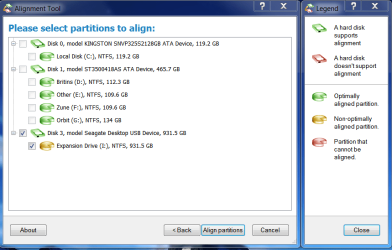
The application installed with no problem at all, and it does allow you to do an analysis on all connected drives, including external USB drives. It graphically shows your drives, and by color, shows which, if any need alignment. Green-good, Yellow-bad.

When you select to align, it reboots to a Pre-windows full (low res)screen showing the progress of the alignment.

My 120gb SSD took approximately 20 minutes to process.
It rebooted the PC, and opened the application and reported it as successful.
I had no other partitions on this drive, hidded or otherwise.

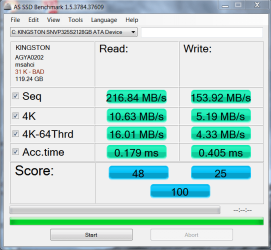
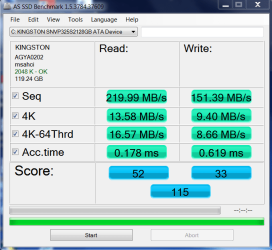
I ran Crystal Disk Mark before and after the alignment.

After reports nearly a doubling of the 4k and 4k-64thrd writes, and an almost 33% increase in the 4k reads.


Overall, I'd give it a thumbs up :)
 

Attachments

  • PAT After.PNG
    PAT After.PNG
    30.6 KB · Views: 160
  • AS SSD Benchmark 050711.PNG
    AS SSD Benchmark 050711.PNG
    28.1 KB · Views: 54
  • AS SSD Benchmark after alignment 050711.PNG
    AS SSD Benchmark after alignment 050711.PNG
    25.7 KB · Views: 43
Last edited:

My Computer

Computer type
PC/Desktop
Computer Manufacturer/Model Number
Homebuilt
OS
windows 7 32
CPU
Intel i7 4770K
Motherboard
Asus Z97-A
Memory
Corsair Vengeance 8gb DDR3 2133(PC3 17000)
Graphics Card(s)
nVidia GTX 660 2gb
Sound Card
Asus Xonar D1
Monitor(s) Displays
Dell Ultrasharp UM2913WM
Screen Resolution
2560x1080 32
Hard Drives
PNY 240gb SSD
Seagate 500gb SSD
PSU
Corsair CXM 600
Case
Fractal Design Define R4
Cooling
Arctic Freezer Xtreme rev 2
Keyboard
Logitech K800 Wireless Illuminated
Mouse
MicroSoft 5000
Internet Speed
Cable
Antivirus
MSE
Browser
IE 11 and Chrome
Other Info
Samsung DVD-RW
Cambridge 4.1 speakers
Hauppauge HVR-950 USB Tuner
Asus Optimized Overclock to 4.4ghz
Thanks for the report Michael.

Seems to have worked well for you.:D
 

My Computers

System One System Two

  • Computer type
    PC/Desktop
    OS
    7 X64
    CPU
    i5 8400
    Motherboard
    gigabyte b365m ds3h
    Memory
    2x8gb 3200mhz
    Hard Drives
    various
    PSU
    pure power 11 400w cm
    Case
    Coolermaster
    Cooling
    cryorig m9i
  • Computer type
    PC/Desktop
    OS
    7x64
    CPU
    g5400
    Motherboard
    ga b365m ds3h
    Memory
    8gb ddr4 2400
    PSU
    xfx pro 450w

My Computer

Computer Manufacturer/Model Number
HP, Dell, Gateway, Toshiba - 4 laptops and 2 desktops
OS
Vista, Windows7, Mint Mate, Zorin, Windows 8
CPU
from 1.6GHz Duo to i7
Monitor(s) Displays
2x HP w2207
Hard Drives
5x HDD, 7x SSD, 12x Externals
Keyboard
with trackball - no mices
Mouse
Trackball mice
Internet Speed
DSL 6000
Just a little information about this tool.
My C: drive was not correctly aligned. It wasn't a big deal. Everything worked fine.
But, being a geek like the rest of you, I decided to try PAT and see if it really works.
Yeah I bought it a while back, nice tool to have. In case you (anyone else) didn't know, It'll also align spinner (mechanical) drives as well.

Thanks for sharing.
 

My Computer

Computer type
PC/Desktop
Computer Manufacturer/Model Number
Custom built by me.
OS
Windows 10 Pro
CPU
Intel Core i7-4770K (3.5Ghz)
Motherboard
Gigabyte G1 Sniper 5 (F10 Bios)
Memory
32 gig Corsair Dominator Platinum (4x8Gig)
Graphics Card(s)
Sapphire Tri-X R9 Fury
Sound Card
Soundblaster ZXR
Monitor(s) Displays
NEC PA242W 24" LCD Monitor
Screen Resolution
1920 x 1200
Hard Drives
Primary - Samsung 850 Pro (512gig), Samsung 840 Pro (256gig), 2TB WD Caviar Black.
PSU
EVGA Supernova 1000 G2
Case
Cooler Master HAF X
Cooling
Corsair H100i with Corsair Air Series SP120 Quiet Fans
Keyboard
Logitech Wireless Wave
Mouse
Logitech Performance MX
Internet Speed
High Speed Cable
Antivirus
Norton Security
Browser
IE11
Other Info
Memory Timings - 1866MHz @ 9-9-9-27-1T @ 1.5 volts
Is there a freeware that can do the same job for my Samsung/Seagate Spinpoint M8 1TB?

The Samsung Advanced Format Utility seems only available for HDDs up to 750GB.

Samsung Advanced Format Utility | Seagate

Is your Spinpoint known to be misaligned?

Drives are typically aligned correctly during Windows installation, but you can do a manual alignment if you want using Diskpart. See WHS's tutorial that he links in post # 3.
 

My Computer

Computer type
PC/Desktop
Computer Manufacturer/Model Number
Ignatz Special; 4 speed manual gearbox; factory air conditioning; one of one
OS
Windows 7 Home Premium SP1, 64-bit
CPU
Intel Skylake i5-6600K, not overclocked
Motherboard
AsRock Z170M Extreme 4, micro ATX
Memory
8 GB HyperX DDR4-2666 (2 x 4 GB)
Graphics Card(s)
none; graphics are integrated on CPU
Sound Card
onboard: Realtek ALC1150; external: USB Behringer UF0-202
Monitor(s) Displays
Dell S2340M 23 inch IPS
Screen Resolution
1600 x 900
Hard Drives
System: Crucial MX100 series SSD, 128 GB;
Data: Samsung Spinpoint 103SJ, 1 TB;
Backup: WD Caviar Green WD30EZRX-00D8PB0, 3 TB
PSU
Rosewill SilentNight 500 watt fanless, semi-modular
Case
Antec Solo II
Cooling
Noctua NH-U12S; Noctua F12 intake, Noctua S12A exhaust
Keyboard
Microsoft 200 6JH-00001 USB
Mouse
Dell or Microsoft optical wired; USB
Antivirus
Microsoft Security Essentials and Malwarebytes Premium
Browser
Pale Moon
Other Info
All fans PWM; speeds at idle: CPU circa 500 rpm; intake circa 600 rpm; exhaust circa 600 rpm; CPU temps 27 idle and 47 C load in a warm room (27 C/81 F) when running Intel Extreme Tuning Utility stress test.
I'm not sure you can do a re-alignment with Diskpart on an existing installation. It may be possible with Partition Wizard. I'm just guessing as I have never faced the problem.

You may have to use the Paragon tool referred to in this thread.
 

My Computer

Computer type
PC/Desktop
Computer Manufacturer/Model Number
Ignatz Special; 4 speed manual gearbox; factory air conditioning; one of one
OS
Windows 7 Home Premium SP1, 64-bit
CPU
Intel Skylake i5-6600K, not overclocked
Motherboard
AsRock Z170M Extreme 4, micro ATX
Memory
8 GB HyperX DDR4-2666 (2 x 4 GB)
Graphics Card(s)
none; graphics are integrated on CPU
Sound Card
onboard: Realtek ALC1150; external: USB Behringer UF0-202
Monitor(s) Displays
Dell S2340M 23 inch IPS
Screen Resolution
1600 x 900
Hard Drives
System: Crucial MX100 series SSD, 128 GB;
Data: Samsung Spinpoint 103SJ, 1 TB;
Backup: WD Caviar Green WD30EZRX-00D8PB0, 3 TB
PSU
Rosewill SilentNight 500 watt fanless, semi-modular
Case
Antec Solo II
Cooling
Noctua NH-U12S; Noctua F12 intake, Noctua S12A exhaust
Keyboard
Microsoft 200 6JH-00001 USB
Mouse
Dell or Microsoft optical wired; USB
Antivirus
Microsoft Security Essentials and Malwarebytes Premium
Browser
Pale Moon
Other Info
All fans PWM; speeds at idle: CPU circa 500 rpm; intake circa 600 rpm; exhaust circa 600 rpm; CPU temps 27 idle and 47 C load in a warm room (27 C/81 F) when running Intel Extreme Tuning Utility stress test.
I think I'd rather do a clean install than shell out any money for a one-time tool. However, it's nice to know something exists, and works.

That beind said, I thought I saw an option to align partitions in Partition Wizard, but I would strongly recommend backing up anything important off that disk before trying it.

EDIT: Yes, looks like it should handle alignments.
http://partitionwizard.com/free-partition-manager.html
 

My Computer

OS
Windows 7 Ultimate x64 SP1
CPU
Intel Core i7-2600
Motherboard
Gigabyte GA-P67A-UD3P-B3
Memory
12 GB Patriot Extreme DDR3-1333
Graphics Card(s)
Nvidia GTX 470
Monitor(s) Displays
Dell UltraSharp 2209WA
Hard Drives
OCZ Agility3 240 GB, WD5001AALS, WD7501AALS
PSU
OCZ ModStream 700W
Case
CoolerMaster HAF 912 Advanced
Cooling
CoolerMaster Hyper 212 Plus
I tried re-aligning with Partition Wizard. It did not work for me. I could not start Windows and repair disc also didn't help this time. Whoever wants to give Partition Wizard a go, I urge you to be very careful.
 

My Computer

OS
Windows 7 Professional x64
Back
Top