
Paragon Backup and Recovery Question

ignatzatsonic

Aspiring Gnome
Guru
Gold Member
VIP
Local time
7:10 AM
Messages
12,011
I am experimenting with the 10 Free version of this application and have a question about the proper configuration choices when making an image.

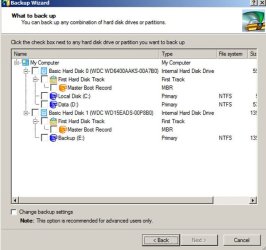
Here is a pic of the “what to back up” screen in the wizard.

If one wants to back up only the C drive, what are the correct choices?

Local Disk C only?

Or should MBR and/or First Hard Disk Track also be selected?

I made an image and checked Local Disk C, MBR, and First Hard Disk Track, but have not attempted to restore it.

If MBR and/or First Hard Disk Track should be included, I find it curious that those choices are optional in this screen.

Would the proper choices change if it were known that the image would be restored to a different hard drive?
 

Attachments
  • paragon.JPG
    paragon.JPG
    44.5 KB · Views: 92

My Computer My Computer

At a glance

Windows 7 Home Premium SP1, 64-bitIntel Skylake i5-6600K, not overclocked8 GB HyperX DDR4-2666 (2 x 4 GB)none; graphics are integrated on CPU
Computer type
PC/Desktop
Computer Manufacturer/Model Number
Ignatz Special; 4 speed manual gearbox; factory air conditioning; one of one
OS
Windows 7 Home Premium SP1, 64-bit
CPU
Intel Skylake i5-6600K, not overclocked
Motherboard
AsRock Z170M Extreme 4, micro ATX
Memory
8 GB HyperX DDR4-2666 (2 x 4 GB)
Graphics Card(s)
none; graphics are integrated on CPU
Sound Card
onboard: Realtek ALC1150; external: USB Behringer UF0-202
Monitor(s) Displays
Dell S2340M 23 inch IPS
Screen Resolution
1600 x 900
Hard Drives
System: Crucial MX100 series SSD, 128 GB;
Data: Samsung Spinpoint 103SJ, 1 TB;
Backup: WD Caviar Green WD30EZRX-00D8PB0, 3 TB
PSU
Rosewill SilentNight 500 watt fanless, semi-modular
Case
Antec Solo II
Cooling
Noctua NH-U12S; Noctua F12 intake, Noctua S12A exhaust
Keyboard
Microsoft 200 6JH-00001 USB
Mouse
Dell or Microsoft optical wired; USB
Antivirus
Microsoft Security Essentials and Malwarebytes Premium
Browser
Pale Moon
Other Info
All fans PWM; speeds at idle: CPU circa 500 rpm; intake circa 600 rpm; exhaust circa 600 rpm; CPU temps 27 idle and 47 C load in a warm room (27 C/81 F) when running Intel Extreme Tuning Utility stress test.
If the setup on the different HD is different, as for example you only will have one OS on it and you have 2 OS multibooting on the current drive, you should only save C:

You can save MBR and first track separately.

I would advise against making the Boot Capsule hidden restore partition unless you are prepared to fix your partition table. I had 2 different versions of Paragon Drive Backup hose 2 different versions of Vista when I tried to make the backup capsule.

Also if you have a Raid controller you might want to try the restore. You don't have to put the image back on to test it. Just boot the Rescue CD and enter the restore program. If it doesn't support your Raid controller your video will go crazy and you will have to cycle the power. Regular Sata controller should work ok restoring from a USB external drive.

I used PDBU 8.5 and 9.0 and the free 64 bit edition. I went to Macrium Reflect because the Linux Rescue CD supported my Raid controller directly. Thing is you won't know until you boot the Rescue CD and try it.
 

My Computer My Computer

At a glance

Windows 7 32 bitAMD 5200+ dual core2 GBNVidia GeForce 6150SE 128 MB
Computer Manufacturer/Model Number
HP Media Center
OS
Windows 7 32 bit
CPU
AMD 5200+ dual core
Memory
2 GB
Graphics Card(s)
NVidia GeForce 6150SE 128 MB
Monitor(s) Displays
CRT
Screen Resolution
1280x1024
Hard Drives
500 GB Sata internal :

SIIG USB 3.0 docking stations w/WD Caviar Black 6 Gb/s drives
Keyboard
PS/2
Mouse
PS/2 Wheel Mouse
Other Info
SIIG USB 3.0 PCIexpress card.
Miles:

Raid is not involved. Win 7 is the only OS.

I need to understand the best choices for either of the following possilities:

1: I have to restore to my current 640 gig drive

2: The current 640 gig drive fails, and I have to restore to a new drive yet to be purchased, which could be larger (if traditional) or smaller (if SSD).

I don't know what you mean by "Boot capsule hidden partition". If you are referring to that 100 MB partition that Win 7 often installs, I bypassed it. It is not and has never been on my PC.

I also have Macrium Reflect Free and have made images with it, but never restored. I am just examining Paragon and don't know if I will keep it.

The research I have done since my original post (at Wilder) leads me to believe that MBR and first track should normally NOT be included unless you have multiple OS. The MBR and first track are recreated during a restore anyway.

I also read that if you backup the entire disk, including MBR and first track, you can later restore WITHOUT restoring those 2 pieces if you want.
 

My Computer My Computer

At a glance

Windows 7 Home Premium SP1, 64-bitIntel Skylake i5-6600K, not overclocked8 GB HyperX DDR4-2666 (2 x 4 GB)none; graphics are integrated on CPU
Computer type
PC/Desktop
Computer Manufacturer/Model Number
Ignatz Special; 4 speed manual gearbox; factory air conditioning; one of one
OS
Windows 7 Home Premium SP1, 64-bit
CPU
Intel Skylake i5-6600K, not overclocked
Motherboard
AsRock Z170M Extreme 4, micro ATX
Memory
8 GB HyperX DDR4-2666 (2 x 4 GB)
Graphics Card(s)
none; graphics are integrated on CPU
Sound Card
onboard: Realtek ALC1150; external: USB Behringer UF0-202
Monitor(s) Displays
Dell S2340M 23 inch IPS
Screen Resolution
1600 x 900
Hard Drives
System: Crucial MX100 series SSD, 128 GB;
Data: Samsung Spinpoint 103SJ, 1 TB;
Backup: WD Caviar Green WD30EZRX-00D8PB0, 3 TB
PSU
Rosewill SilentNight 500 watt fanless, semi-modular
Case
Antec Solo II
Cooling
Noctua NH-U12S; Noctua F12 intake, Noctua S12A exhaust
Keyboard
Microsoft 200 6JH-00001 USB
Mouse
Dell or Microsoft optical wired; USB
Antivirus
Microsoft Security Essentials and Malwarebytes Premium
Browser
Pale Moon
Other Info
All fans PWM; speeds at idle: CPU circa 500 rpm; intake circa 600 rpm; exhaust circa 600 rpm; CPU temps 27 idle and 47 C load in a warm room (27 C/81 F) when running Intel Extreme Tuning Utility stress test.
The "backup capsule" is a hidden partition made by Paragon Backup so that you can do a restore during bootup without using the rescue CD.

Afa which version of paragon software will restore to drives larger or smaller, they have so many similar products I can't keep track of them. You should read their forum. There should be some means of asking questions if you tell them you are contemplating buying it. Also if you look on the software page for their various products they all have grids what they will and won't do for each version.
 

My Computer My Computer

At a glance

Windows 7 32 bitAMD 5200+ dual core2 GBNVidia GeForce 6150SE 128 MB
Computer Manufacturer/Model Number
HP Media Center
OS
Windows 7 32 bit
CPU
AMD 5200+ dual core
Memory
2 GB
Graphics Card(s)
NVidia GeForce 6150SE 128 MB
Monitor(s) Displays
CRT
Screen Resolution
1280x1024
Hard Drives
500 GB Sata internal :

SIIG USB 3.0 docking stations w/WD Caviar Black 6 Gb/s drives
Keyboard
PS/2
Mouse
PS/2 Wheel Mouse
Other Info
SIIG USB 3.0 PCIexpress card.
Greetings,

Had some questions re this program and found this thread so thought I'd ask here. Just bought a new HD (WD 1TB Caviar Black 32mb). My current system HD is a 1TB Seagate 7200.

What I would like to do is clone my existing OS off the Seagate and run it off the new WD drive.

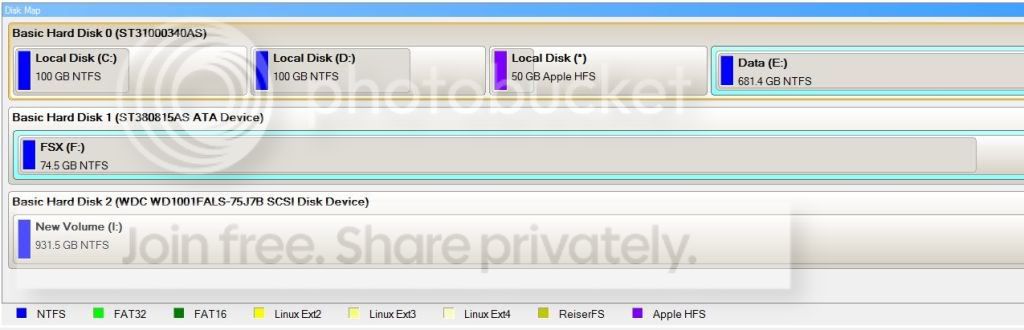
Can someone direct me as to the proper way to do this? If you refer to the attached picture, you'll notice I have 3 partitions on the existing (source) HD right now but I would be happy with just taking the first partition only (where Windows 7 is) and cloning it to the new HD and leaving the rest of the partitions/data on the old drive and continue using it as storage. Obviously once the OS is cloned, I would want to delete the OS from the first (source) drive. The new (target) drive is the third disk shown in the image.

Thanks!

hdview.jpg
 

My Computer My Computer

At a glance

Win 7 Ultimate x64Intel i7 950 OC'd @ 4.0Ghz (SpeedStep ON)3x2GB Patriot Extreme Viper II Sector 7 DDR3 ...ATI MSI 5870 900mhz/1300mhz
OS
Win 7 Ultimate x64
CPU
Intel i7 950 OC'd @ 4.0Ghz (SpeedStep ON)
Motherboard
ASUS P6X58D-E BIOS 0303
Memory
3x2GB Patriot Extreme Viper II Sector 7 DDR3 @ 1600mhz
Graphics Card(s)
ATI MSI 5870 900mhz/1300mhz
Sound Card
Onboard Realtek ALC889
Monitor(s) Displays
2 X 24" BenQ G2412HD
Screen Resolution
1920x1080p
Hard Drives
Intel X25-M 80 GB (SSD)
W.D. Caviar Black 1TB (SATA)
Seagate Barricuda 1TB (SATA)
Seagate Barricuda 80GB (SATA)
PSU
Corsair AX850
Case
Antec 1200
Cooling
Lots and Lots of Air!
Keyboard
Razer Lycosa
Mouse
Microsoft Sidewinder
Internet Speed
25Mbps/1Mbps
You say cloning.

I therefore assume you don't mean imaging and restoring.

I'm not sure if Paragon is capable of cloning a drive. It might.

Acronis makes an imaging product that can also clone. If you are cloning to a Western Digital or Seagate hard drive, you can download a free version of Acronis from their websites. You may be able to download a 30 day trial directly from Acronis as well.

Cloning effectively transfers a system to a new hard drive without an intervening image. You could just as easily use an imaging product to make an image and then restore it to the new drive, provided you have a place to store the image before the restoration process.

Neither process is 100% reliable, so take the necessary precautions before you begin--anticipate what you will do if cloning or imaging fails.
 

My Computer My Computer

At a glance

Windows 7 Home Premium SP1, 64-bitIntel Skylake i5-6600K, not overclocked8 GB HyperX DDR4-2666 (2 x 4 GB)none; graphics are integrated on CPU
Computer type
PC/Desktop
Computer Manufacturer/Model Number
Ignatz Special; 4 speed manual gearbox; factory air conditioning; one of one
OS
Windows 7 Home Premium SP1, 64-bit
CPU
Intel Skylake i5-6600K, not overclocked
Motherboard
AsRock Z170M Extreme 4, micro ATX
Memory
8 GB HyperX DDR4-2666 (2 x 4 GB)
Graphics Card(s)
none; graphics are integrated on CPU
Sound Card
onboard: Realtek ALC1150; external: USB Behringer UF0-202
Monitor(s) Displays
Dell S2340M 23 inch IPS
Screen Resolution
1600 x 900
Hard Drives
System: Crucial MX100 series SSD, 128 GB;
Data: Samsung Spinpoint 103SJ, 1 TB;
Backup: WD Caviar Green WD30EZRX-00D8PB0, 3 TB
PSU
Rosewill SilentNight 500 watt fanless, semi-modular
Case
Antec Solo II
Cooling
Noctua NH-U12S; Noctua F12 intake, Noctua S12A exhaust
Keyboard
Microsoft 200 6JH-00001 USB
Mouse
Dell or Microsoft optical wired; USB
Antivirus
Microsoft Security Essentials and Malwarebytes Premium
Browser
Pale Moon
Other Info
All fans PWM; speeds at idle: CPU circa 500 rpm; intake circa 600 rpm; exhaust circa 600 rpm; CPU temps 27 idle and 47 C load in a warm room (27 C/81 F) when running Intel Extreme Tuning Utility stress test.
Thanks, I had already somewhat found an answer and ended up using WD's version of Acronis. Yes I was installing a new Cavaiar Black drive and wanted to run my existing OS and setup off the new drive so it was a "clone" but I was curious if I could've just cloned the OS partition vs my entire 1gb drive to the new 1gb drive. In the end I just played it safe and cloned the entire drive. It took about 25-30 light years but eventually it all worked out!
 

My Computer My Computer

At a glance

Win 7 Ultimate x64Intel i7 950 OC'd @ 4.0Ghz (SpeedStep ON)3x2GB Patriot Extreme Viper II Sector 7 DDR3 ...ATI MSI 5870 900mhz/1300mhz
OS
Win 7 Ultimate x64
CPU
Intel i7 950 OC'd @ 4.0Ghz (SpeedStep ON)
Motherboard
ASUS P6X58D-E BIOS 0303
Memory
3x2GB Patriot Extreme Viper II Sector 7 DDR3 @ 1600mhz
Graphics Card(s)
ATI MSI 5870 900mhz/1300mhz
Sound Card
Onboard Realtek ALC889
Monitor(s) Displays
2 X 24" BenQ G2412HD
Screen Resolution
1920x1080p
Hard Drives
Intel X25-M 80 GB (SSD)
W.D. Caviar Black 1TB (SATA)
Seagate Barricuda 1TB (SATA)
Seagate Barricuda 80GB (SATA)
PSU
Corsair AX850
Case
Antec 1200
Cooling
Lots and Lots of Air!
Keyboard
Razer Lycosa
Mouse
Microsoft Sidewinder
Internet Speed
25Mbps/1Mbps
Back
Top