
Paragon Free Back Up and Recovery 2013

cheesum

New member
Member
Local time
6:08 AM
Messages
61
Hi all;
Recently, i have just completed a clean installation of Win 7 and have downloaded all my favourite drivers & software. Hence, i would like to treat this as a "factory/ stock" copy and to create a full system back of everything on my hard disk drive and burn it into a few DVDs. Hopefully, these will be bootable DVDs whereby i just need to boot from these DVDs to recover to my present state should my Hard Disk fails.

Question:
Can i do the above by using Paragon Free Back Up and Recovery 2013? So far, this is what have been done.

Choose option #1 -----> and proceed to burn everything in the Hard Disk.
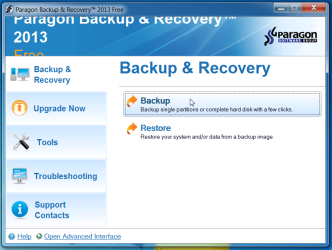
Paragon.png

Then, i just burn this into a few DVDs.
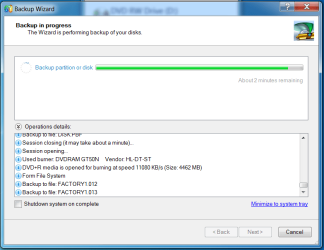
Burning into DVDs.png

Hence, are these bootable DVDs? Whereby should my HDD fails, then, i can just boot from these DVDs to my present state?
 

My Computer My Computer

At a glance

Windows 7 Home Premium 64Bit
Computer type
Laptop
Computer Manufacturer/Model Number
Lenovo Ideapad Y580
OS
Windows 7 Home Premium 64Bit

My Computer My Computer

At a glance

Microsoft Windows 7 Home Premium 64-bits 7601...Intel(R) Core(TM) i3 CPU M 370 @ 2.40GHz4,00 GBATI Mobility Radeon HD 5400 Series
Computer type
Laptop
Computer Manufacturer/Model Number
ACER ASPIRE 5742G
OS
Microsoft Windows 7 Home Premium 64-bits 7601 Multiprocessor Free Service Pack 1
CPU
Intel(R) Core(TM) i3 CPU M 370 @ 2.40GHz
Motherboard
Acer Aspire 5742G
Memory
4,00 GB
Graphics Card(s)
ATI Mobility Radeon HD 5400 Series
Sound Card
(1) AMD High Definition Audio Device (2) Realtek High Defi
Screen Resolution
1366 x 768 x 32 bits (4294967296 colors) @ 60 Hz
Hard Drives
WDC WD5000BEVT-22ZAT0
Ok.
I just checked the DVDs that i have burn just now. Unfortunately, there are not of .iso file.

In addition, i have just written to Paragon support team to request for a step by step instruction on how to create these recovery disks.
 

My Computer My Computer

At a glance

Windows 7 Home Premium 64Bit
Computer type
Laptop
Computer Manufacturer/Model Number
Lenovo Ideapad Y580
OS
Windows 7 Home Premium 64Bit
Backup & Recovery 2013 Free: open the Advanced interface, click Tools > Recovery Media Builder, follow the instructions, and you'll soon be protected against data disasters.
 

My Computer My Computer

At a glance

Microsoft Windows 7 Home Premium 64-bits 7601...Intel(R) Core(TM) i3 CPU M 370 @ 2.40GHz4,00 GBATI Mobility Radeon HD 5400 Series
Computer type
Laptop
Computer Manufacturer/Model Number
ACER ASPIRE 5742G
OS
Microsoft Windows 7 Home Premium 64-bits 7601 Multiprocessor Free Service Pack 1
CPU
Intel(R) Core(TM) i3 CPU M 370 @ 2.40GHz
Motherboard
Acer Aspire 5742G
Memory
4,00 GB
Graphics Card(s)
ATI Mobility Radeon HD 5400 Series
Sound Card
(1) AMD High Definition Audio Device (2) Realtek High Defi
Screen Resolution
1366 x 768 x 32 bits (4294967296 colors) @ 60 Hz
Hard Drives
WDC WD5000BEVT-22ZAT0
Paragon Free Back Up and Recovery Recovery Media Builder makes (1) one CD and is bootable for use when you cant access your OS.

The CD will give you option to access your compressed backup archive, default compression is around 100GB partition = 15GB archive that can be stored on say a external HDD. If your backup archive is C: (your OS) you will see the option to over write your present OS with the saved archived OS.

Saving your archive to DVD (if its your OS) will be expensive, a Flash Drive or external HDD would be better.

I used Paragon Free Back Up and Recovery for about 2 years and it works very well :)
 

My Computer My Computer

At a glance

Win 7 Pro x64, Win 10 Pro x64, Linux Light x86Core i7 3770KCrucial Ballistix Sport 8GBASUS GeForce GTX 650 Ti
Computer type
PC/Desktop
Computer Manufacturer/Model Number
Home Built
OS
Win 7 Pro x64, Win 10 Pro x64, Linux Light x86
CPU
Core i7 3770K
Motherboard
Gigabyte GA-Z77P-D3
Memory
Crucial Ballistix Sport 8GB
Graphics Card(s)
ASUS GeForce GTX 650 Ti
Sound Card
On board
Monitor(s) Displays
ASUS 22 W/S
Screen Resolution
1920 x 1080
Hard Drives
Intel 320 Series SSD, WD Caviar Black 1TB
PSU
Corsair CX 750w
Case
Black Night
Cooling
120mm fans front/back, Coolermaster Hyper 212 Evo
Keyboard
Razer Blackwidow Expert 2013 Mechanical Keyboard
Mouse
Logitech G300 Gaming Mouse
Internet Speed
20mb Unlimited
Antivirus
ZA Antivirus + Firewall
Browser
Cyberfox
Other Info
Powered USB Hub, External Drives 3 x 1TB, Phone Dock.
Backup & Recovery 2013 Free: open the Advanced interface, click Tools > Recovery Media Builder, follow the instructions, and you'll soon be protected against data disasters.

Thanks for your help. But following your step, will the bootable DVD can return the PC to its current state? Because my objective is to create recovery DVDs that are bootable which will return the PC to its current state.

PS: DVDs in my country is quite cheap.:D
 

My Computer My Computer

At a glance

Windows 7 Home Premium 64Bit
Computer type
Laptop
Computer Manufacturer/Model Number
Lenovo Ideapad Y580
OS
Windows 7 Home Premium 64Bit
Your DVDs don't need to be bootable its the Recovery Media CD that is, that lets you search for the backup archive, so you would need two optical drives -

1 - to run the Recovery Media CD
2 - for your DVDs
 

My Computer My Computer

At a glance

Win 7 Pro x64, Win 10 Pro x64, Linux Light x86Core i7 3770KCrucial Ballistix Sport 8GBASUS GeForce GTX 650 Ti
Computer type
PC/Desktop
Computer Manufacturer/Model Number
Home Built
OS
Win 7 Pro x64, Win 10 Pro x64, Linux Light x86
CPU
Core i7 3770K
Motherboard
Gigabyte GA-Z77P-D3
Memory
Crucial Ballistix Sport 8GB
Graphics Card(s)
ASUS GeForce GTX 650 Ti
Sound Card
On board
Monitor(s) Displays
ASUS 22 W/S
Screen Resolution
1920 x 1080
Hard Drives
Intel 320 Series SSD, WD Caviar Black 1TB
PSU
Corsair CX 750w
Case
Black Night
Cooling
120mm fans front/back, Coolermaster Hyper 212 Evo
Keyboard
Razer Blackwidow Expert 2013 Mechanical Keyboard
Mouse
Logitech G300 Gaming Mouse
Internet Speed
20mb Unlimited
Antivirus
ZA Antivirus + Firewall
Browser
Cyberfox
Other Info
Powered USB Hub, External Drives 3 x 1TB, Phone Dock.
Back
Top