Parallel port card need help

Bios does not recognizes this parallel port card and when I want to change from ECP to EPP I can not do this because in BIOS is just serial port A
 

My Computer

OS
Windows 7 ultimate 32bit.
Hello casi. Welcome to the Forum.

Did you install a W7 driver for that parallel port card?
You can't get it to work without the correct driver.
 

My Computer

Computer type
PC/Desktop
Computer Manufacturer/Model Number
Home Built - Jan 2013
OS
Windows 7 64 Bit Home Premium SP1
CPU
i7-3820
Motherboard
Asus P9X79-PRO - Bios 4608
Memory
GSkill F3-14900CL9Q - 16GB
Graphics Card(s)
EVGA GeForce GTX660 - Driver 352.86
Sound Card
On board Realtek ALC898
Monitor(s) Displays
Acer S271HL
Screen Resolution
1920 x 1080
Hard Drives
#1- Samsung 840 Pro Series
#2- Western Digital WD1002FAEX Sata3 Black
#3- Western Digital WD1002FAEX Sata3 Black
PSU
Corsair CMPSU-850TX-V2 - 850 watt (by Seasonic)
Case
Corsair Obsidian 550D
Cooling
Standard 3 120mm case fans, Cooler Master Hyper 212 EVO
Keyboard
MS KC-0405
Mouse
Intellimouse 5-button
Internet Speed
56 Mbits/Sec (on a good day)
Antivirus
Avast & Malwarebytes
Browser
Firefox
Other Info
Asus DVD - DRW-24B1ST 24X
Hello thanks for replay.

Yes I have install driver for Windows 7
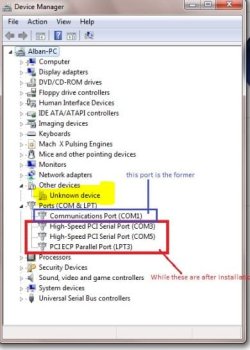
Before installation was only Communications Port (COM1)
After installation are :
High-Speed PCI Serial Port(COM3)
High-Speed PCI Serial Port(COM5)
PCI ECP Parallel Port (LPT3)


Casi
 

My Computer

OS
Windows 7 ultimate 32bit.
Does you motherboard have a built-in parallel port?
If not, the BIOS will not have any settings for one. It's been a long time since I've used a parallel port card but I recall that everything is recognized on the software level, not the hardware level. I don't believe the BIOS would see a PCI card as a parallel port, just another device.

You want to open the Device Manager and check to see if there is a parallel port listed. Check the settings of the port against the specifications for the card. If the port is shown and is configured correctly you should be able to print to that port.

What is your core problem? A printer that won't print?
It would help to know the specs of your computer and the model of printer you are trying to use.
 

My Computer

Computer type
PC/Desktop
Computer Manufacturer/Model Number
Home Built - Jan 2013
OS
Windows 7 64 Bit Home Premium SP1
CPU
i7-3820
Motherboard
Asus P9X79-PRO - Bios 4608
Memory
GSkill F3-14900CL9Q - 16GB
Graphics Card(s)
EVGA GeForce GTX660 - Driver 352.86
Sound Card
On board Realtek ALC898
Monitor(s) Displays
Acer S271HL
Screen Resolution
1920 x 1080
Hard Drives
#1- Samsung 840 Pro Series
#2- Western Digital WD1002FAEX Sata3 Black
#3- Western Digital WD1002FAEX Sata3 Black
PSU
Corsair CMPSU-850TX-V2 - 850 watt (by Seasonic)
Case
Corsair Obsidian 550D
Cooling
Standard 3 120mm case fans, Cooler Master Hyper 212 EVO
Keyboard
MS KC-0405
Mouse
Intellimouse 5-button
Internet Speed
56 Mbits/Sec (on a good day)
Antivirus
Avast & Malwarebytes
Browser
Firefox
Other Info
Asus DVD - DRW-24B1ST 24X
Hello casi,
I have a few questions for you,
1/ How do you know this card is running in ECP mode?
2/ Did you receive a utilities package for this card with the drivers, the utilities package would possibly contain a program to change mode.
3/ "PCI ECP Parallel Port (LPT3)" is this reported in the BIOS or Device Manager?

I suspect that the card has an inbuilt BIOS where these changes are made I have tried searching the internet for answers but have found none :(
It may be that these functions change automatically, or as I have previously mentioned you may need a program that will allow you to do this in Windows. Lastly if the device shows up in Device Manager right clicking on the device may give you the option to change mode.
I hope this helps
 

My Computer

Computer Manufacturer/Model Number
Something I threw together
OS
Windows 7 Ultimate x64
CPU
Intel Core i7-2600K
Motherboard
Asus P8P67
Memory
16 GB G Skill F3-10666 CL9D-4GBRL
Graphics Card(s)
ATI Radeon HD 6870
Sound Card
ATI Radeon HDMI / Realtek ALC892
Monitor(s) Displays
2 x 22" standard monitors / LG32LC56v TV to watch films
Screen Resolution
1920 x1080
Hard Drives
2 x OCZ Vertex2 111.79GB
3 x Samsung103SJ
1 x Samsung103UJ
1 x WD3200BEVT
1 x Hitachi5K320-160
PSU
Thermaltake Toughpower Cable Management 750W
Case
Antec 300
Cooling
Noctua NH-U12P SE2 and 5 120mm Case fans
Keyboard
Microsoft Comfort Curve Keyboard 2000
Mouse
Hama M3110 / Logitech M305
Internet Speed
16000
Other Info
I have also used Fedora, Suse, Ubuntu Linux
And all other Windows from 95 to date except ME
Hello guys for replay.

TVeblen I do not need for printer but for CNC machine
 

Attachments

  • New Bitmap Image.jpg
    New Bitmap Image.jpg
    107.4 KB · Views: 308

My Computer

OS
Windows 7 ultimate 32bit.
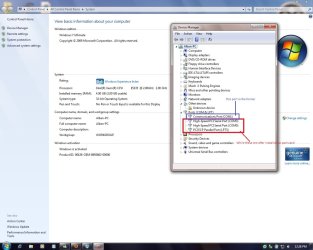
POOCH here in this picture shows that is ECP


I have installation with CD and I think the drivers are OK
PCI ECP Parallel Port (LPT3) is reported on device manager not on BIOS
 

My Computer

OS
Windows 7 ultimate 32bit.
The adapter will not show in BIOS as a parallel port.
Because it is a PCI card and not a standard parallel port.
 

My Computer

Computer type
PC/Desktop
Computer Manufacturer/Model Number
Home Built - Jan 2013
OS
Windows 7 64 Bit Home Premium SP1
CPU
i7-3820
Motherboard
Asus P9X79-PRO - Bios 4608
Memory
GSkill F3-14900CL9Q - 16GB
Graphics Card(s)
EVGA GeForce GTX660 - Driver 352.86
Sound Card
On board Realtek ALC898
Monitor(s) Displays
Acer S271HL
Screen Resolution
1920 x 1080
Hard Drives
#1- Samsung 840 Pro Series
#2- Western Digital WD1002FAEX Sata3 Black
#3- Western Digital WD1002FAEX Sata3 Black
PSU
Corsair CMPSU-850TX-V2 - 850 watt (by Seasonic)
Case
Corsair Obsidian 550D
Cooling
Standard 3 120mm case fans, Cooler Master Hyper 212 EVO
Keyboard
MS KC-0405
Mouse
Intellimouse 5-button
Internet Speed
56 Mbits/Sec (on a good day)
Antivirus
Avast & Malwarebytes
Browser
Firefox
Other Info
Asus DVD - DRW-24B1ST 24X
I have installation with CD and I think the drivers are OK
Yes I agree the drivers are installed, Do you know what the unknown device is? was it there before?
PCI ECP Parallel Port (LPT3) is reported on device manager not on BIOS
Ok when you right click this device what options do you get?

Is your CNC machine recognised? and does it work?
 

Attachments

  • Capture.JPG
    Capture.JPG
    40.2 KB · Views: 52

My Computer

Computer Manufacturer/Model Number
Something I threw together
OS
Windows 7 Ultimate x64
CPU
Intel Core i7-2600K
Motherboard
Asus P8P67
Memory
16 GB G Skill F3-10666 CL9D-4GBRL
Graphics Card(s)
ATI Radeon HD 6870
Sound Card
ATI Radeon HDMI / Realtek ALC892
Monitor(s) Displays
2 x 22" standard monitors / LG32LC56v TV to watch films
Screen Resolution
1920 x1080
Hard Drives
2 x OCZ Vertex2 111.79GB
3 x Samsung103SJ
1 x Samsung103UJ
1 x WD3200BEVT
1 x Hitachi5K320-160
PSU
Thermaltake Toughpower Cable Management 750W
Case
Antec 300
Cooling
Noctua NH-U12P SE2 and 5 120mm Case fans
Keyboard
Microsoft Comfort Curve Keyboard 2000
Mouse
Hama M3110 / Logitech M305
Internet Speed
16000
Other Info
I have also used Fedora, Suse, Ubuntu Linux
And all other Windows from 95 to date except ME
I have installation with CD and I think the drivers are OK
Yes I agree the drivers are installed, Do you know what the unknown device is? was it there before? or is it your CNC machine
PCI ECP Parallel Port (LPT3) is reported on device manager not on BIOS
Ok when you right click this device what options do you get?

Is your CNC machine recognised? and does it work?
 

My Computer

Computer Manufacturer/Model Number
Something I threw together
OS
Windows 7 Ultimate x64
CPU
Intel Core i7-2600K
Motherboard
Asus P8P67
Memory
16 GB G Skill F3-10666 CL9D-4GBRL
Graphics Card(s)
ATI Radeon HD 6870
Sound Card
ATI Radeon HDMI / Realtek ALC892
Monitor(s) Displays
2 x 22" standard monitors / LG32LC56v TV to watch films
Screen Resolution
1920 x1080
Hard Drives
2 x OCZ Vertex2 111.79GB
3 x Samsung103SJ
1 x Samsung103UJ
1 x WD3200BEVT
1 x Hitachi5K320-160
PSU
Thermaltake Toughpower Cable Management 750W
Case
Antec 300
Cooling
Noctua NH-U12P SE2 and 5 120mm Case fans
Keyboard
Microsoft Comfort Curve Keyboard 2000
Mouse
Hama M3110 / Logitech M305
Internet Speed
16000
Other Info
I have also used Fedora, Suse, Ubuntu Linux
And all other Windows from 95 to date except ME
I have installation with CD and I think the drivers are OK
Yes I agree the drivers are installed, Do you know what the unknown device is? was it there before?
PCI ECP Parallel Port (LPT3) is reported on device manager not on BIOS
Ok when you right click this device what options do you get?

Is your CNC machine recognised? and does it work?

I don't know what is unknown device no there wasn't
 

My Computer

OS
Windows 7 ultimate 32bit.
CNC machine connected with computers but computer not sending data in CNC .
I don't know what to do
I've tried all methods but nothing.
 

My Computer

OS
Windows 7 ultimate 32bit.
Have you installed drivers for the CNC machine? maybe that is the unknown device.
 

My Computer

Computer Manufacturer/Model Number
Something I threw together
OS
Windows 7 Ultimate x64
CPU
Intel Core i7-2600K
Motherboard
Asus P8P67
Memory
16 GB G Skill F3-10666 CL9D-4GBRL
Graphics Card(s)
ATI Radeon HD 6870
Sound Card
ATI Radeon HDMI / Realtek ALC892
Monitor(s) Displays
2 x 22" standard monitors / LG32LC56v TV to watch films
Screen Resolution
1920 x1080
Hard Drives
2 x OCZ Vertex2 111.79GB
3 x Samsung103SJ
1 x Samsung103UJ
1 x WD3200BEVT
1 x Hitachi5K320-160
PSU
Thermaltake Toughpower Cable Management 750W
Case
Antec 300
Cooling
Noctua NH-U12P SE2 and 5 120mm Case fans
Keyboard
Microsoft Comfort Curve Keyboard 2000
Mouse
Hama M3110 / Logitech M305
Internet Speed
16000
Other Info
I have also used Fedora, Suse, Ubuntu Linux
And all other Windows from 95 to date except ME
Back
Top