Parental Control / Content Advisor.

Lee1075

New member
Local time
3:11 PM
Messages
6
Location
Duisburg / Germany
I am having a few problems setting up a PC that i have bought for my son as a Christmas present. Seeing as he is only 13 my ex wife has asked me if i could make sure that he cannot access "xxx" websites :devil:, he has also previously entered gambling websites without realizing what the consequences can be, that cost the ex a few $.
I have set his Pc up using two accounts, one for his mum as Administrator and then his as a normal user. Thus he cannot change over the internet settings.
The first problem i have encountered is when i start windows using his account, i am automatically prompted to enter the administrators password to let programs boot that are in the start menu. For example GPU-Z.

The second problem is with the internet content advisor, i have set "sexual material & Nudity to limited, yet no matter what i-net site i try to open i am again asked to enter the admins password??????, i can’t even open these forums.

There must be a way around that, my ex wife is not to handy with PC´s, so i would love to get this set up.

Any help would be appreciated.

Edit: His Windows version is Win 7 Home Premium.
 

My Computer

OS
Windows 7 Ultimate 64 Bit
CPU
AMD Phenom X4 9950BE
Motherboard
Asus Crosshair II
Memory
OCZ Reaper DDR2 1066
Graphics Card(s)
Saffire Toxic HD4870
Sound Card
Supreme FX II
Monitor(s) Displays
Samsung T220HD
Screen Resolution
1650x1080
Hard Drives
WD Caviar
PSU
Thermaltake Tough Power 750W
Case
Thermaltake Soprano
Cooling
Artic Cooling Xtreme
Keyboard
Logitech G15
Mouse
Logitech MX Laser
You could use the content advisor instead. This is a little bit of a more aggressive approach, as it blocks everything within IE by default, and is only unlocked with a password.

I tested it out a bit to be sure, and it works pretty well. Once you enable content advisor, it asks you for password for every site visited, but you can set each site to allow always, allow just once, or never allow. While this is inconvenient at first, it is very strict on what he can access, but won't give you loads of grief when he logs in to his account.

Another option is to use your router to block content during a certain time period during the day, if you know approximately when he's going to be on. This method usually works best when it's someone who has their own computer though, as you can block content to that computer, as opposed to just having to worry about his profile on your main computer (which leads to some of the issues you encountered).
 

My Computer

Computer Manufacturer/Model Number
ASUS K70IO-B1
OS
Windows 7 Home Premium 32bit
CPU
Intel Core 2 Duo
Motherboard
Asus
Memory
4GB DDR2
Graphics Card(s)
NVidia GeForce GT 120M
Sound Card
Realtek
Monitor(s) Displays
17in stock
Hard Drives
320gb 7200 rpm
PSU
Unknown
Case
Laptop
Cooling
Stock
I am having a few problems setting up a PC that i have bought for my son as a Christmas present. Seeing as he is only 13 my ex wife has asked me if i could make sure that he cannot access "xxx" websites :devil:, he has also previously entered gambling websites without realizing what the consequences can be, that cost the ex a few $.
I have set his Pc up using two accounts, one for his mum as Administrator and then his as a normal user. Thus he cannot change over the internet settings.
The first problem i have encountered is when i start windows using his account, i am automatically prompted to enter the administrators password to let programs boot that are in the start menu. For example GPU-Z.

The second problem is with the internet content advisor, i have set "sexual material & Nudity to limited, yet no matter what i-net site i try to open i am again asked to enter the admins password??????, i can’t even open these forums.

There must be a way around that, my ex wife is not to handy with PC´s, so i would love to get this set up.

Any help would be appreciated.

Edit: His Windows version is Win 7 Home Premium.

Because you have setup your sons account as a limited user, it will always ask for an admin username & password whenever he tries to perform an action that requires administrative rights.

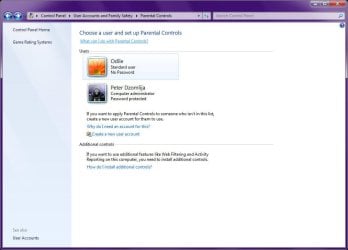
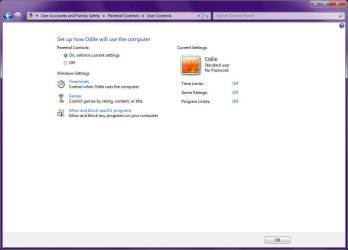
If you go into Parental Controls, you can adjust what he can/cannot do:

Image1.jpg
Image2.jpg
Windows Parental Controls

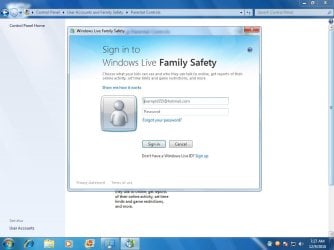
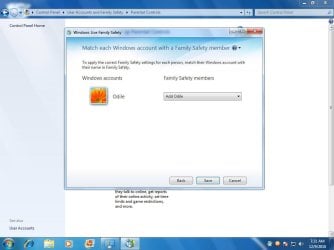
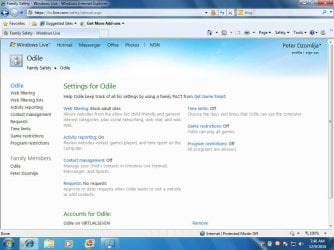
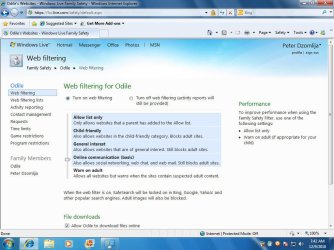
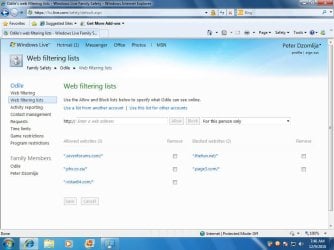
If you download and install Windows Live Family Safety 2011, you will be able to apply website filtering also, and be able to monitor and modify access rights access online:

Image3.jpg
Sign in to Windows Live Family Safety

Image4.jpg
Select account to monitor

Image5.jpg
Add user not currently being monitored

Image6.jpg
View user settings

Image7.jpg
Change Webfiltering levels

Image8.jpg
Allow or Block specific websites


Hope the above infor helps with protecting your son from bad websites...
 
Last edited by a moderator:

My Computer

Computer type
PC/Desktop
Computer Manufacturer/Model Number
Virtual Machine
OS
Windows 7 Professional 32-bit SP1
CPU
AMD A4/A6
Motherboard
Intel Corporation 440BX Desktop Reference Platform
Memory
3.00GB EDO
Graphics Card(s)
VMware SVGA 3D
Sound Card
High Definition Audio Device
Monitor(s) Displays
Generic Non-PnP Monitor on VMware SVGA 3D
Screen Resolution
1440x900
Hard Drives
1 x 60GB VMware Virtual SATA Hard Drive ATA Device
Antivirus
Kaspersky Total Security
Thank you very much!! i shall try all that out and post the results.
 

My Computer

OS
Windows 7 Ultimate 64 Bit
CPU
AMD Phenom X4 9950BE
Motherboard
Asus Crosshair II
Memory
OCZ Reaper DDR2 1066
Graphics Card(s)
Saffire Toxic HD4870
Sound Card
Supreme FX II
Monitor(s) Displays
Samsung T220HD
Screen Resolution
1650x1080
Hard Drives
WD Caviar
PSU
Thermaltake Tough Power 750W
Case
Thermaltake Soprano
Cooling
Artic Cooling Xtreme
Keyboard
Logitech G15
Mouse
Logitech MX Laser

My Computer

Computer type
PC/Desktop
OS
openSUSE 13.1 64bit
CPU
i7
Motherboard
Gigabyte UD5
Memory
6gb Gskill matched DDR3
Graphics Card(s)
Radeon HD4600
Sound Card
All onboard
Monitor(s) Displays
HP 2159v
Hard Drives
120gb Samsung SSD for the OS
2 * 1tb WD Caviar Black for storage
PSU
Corsair 750w
Case
Antec 920
Cooling
Aksas Nero
Back
Top