partioning help!

AussieGuy92

i am Awesome
Pro User
Local time
9:36 AM
Messages
422
Location
Commonweath of Australia
i installed windows 7 64 bit on my acer laptop with an 80gb hard drive the drive is divided into to equal parts windows installed some system files on the second hard drive i want to un partion the hard drive and make it one windows drive is a way with out having to reinstall windows?
 

My Computer

Computer Manufacturer/Model Number
HP Pavilion p6795a
OS
windows 7 64 bit
CPU
intel core i5 3.30GHz Quad Core
Motherboard
HP
Memory
6gb
Graphics Card(s)
AMD RADEON HD 6450 1GB Dedicated
Sound Card
ATI HIGH DEFINITION SOUND
Monitor(s) Displays
LG
Screen Resolution
16:9 Hd
Hard Drives
1TB
Cooling
Fan
Keyboard
Wireless
Mouse
HP wireless keyboard and mouse
Internet Speed
fast enough
Other Info
Beast Of A Machine!
Yes.

Do you mean that Windows installed some system files on a second hard drive?

Or do you mean that Windows installed some system files on a second partition on the only hard drive in your computer?

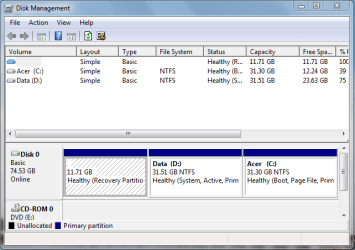
Can you post a screen shot of disk management on your computer?
 

My Computer

Computer type
PC/Desktop
Computer Manufacturer/Model Number
Ignatz Special; 4 speed manual gearbox; factory air conditioning; one of one
OS
Windows 7 Home Premium SP1, 64-bit
CPU
Intel Skylake i5-6600K, not overclocked
Motherboard
AsRock Z170M Extreme 4, micro ATX
Memory
8 GB HyperX DDR4-2666 (2 x 4 GB)
Graphics Card(s)
none; graphics are integrated on CPU
Sound Card
onboard: Realtek ALC1150; external: USB Behringer UF0-202
Monitor(s) Displays
Dell S2340M 23 inch IPS
Screen Resolution
1600 x 900
Hard Drives
System: Crucial MX100 series SSD, 128 GB;
Data: Samsung Spinpoint 103SJ, 1 TB;
Backup: WD Caviar Green WD30EZRX-00D8PB0, 3 TB
PSU
Rosewill SilentNight 500 watt fanless, semi-modular
Case
Antec Solo II
Cooling
Noctua NH-U12S; Noctua F12 intake, Noctua S12A exhaust
Keyboard
Microsoft 200 6JH-00001 USB
Mouse
Dell or Microsoft optical wired; USB
Antivirus
Microsoft Security Essentials and Malwarebytes Premium
Browser
Pale Moon
Other Info
All fans PWM; speeds at idle: CPU circa 500 rpm; intake circa 600 rpm; exhaust circa 600 rpm; CPU temps 27 idle and 47 C load in a warm room (27 C/81 F) when running Intel Extreme Tuning Utility stress test.
windows installed files on the second partion on the only hard drive on my laptop
 

Attachments

  • screeenshot.PNG
    screeenshot.PNG
    17.4 KB · Views: 13
  • Capture 1.PNG
    Capture 1.PNG
    1.9 KB · Views: 4
  • Capture 2.PNG
    Capture 2.PNG
    1.9 KB · Views: 5

My Computer

Computer Manufacturer/Model Number
HP Pavilion p6795a
OS
windows 7 64 bit
CPU
intel core i5 3.30GHz Quad Core
Motherboard
HP
Memory
6gb
Graphics Card(s)
AMD RADEON HD 6450 1GB Dedicated
Sound Card
ATI HIGH DEFINITION SOUND
Monitor(s) Displays
LG
Screen Resolution
16:9 Hd
Hard Drives
1TB
Cooling
Fan
Keyboard
Wireless
Mouse
HP wireless keyboard and mouse
Internet Speed
fast enough
Other Info
Beast Of A Machine!
so these are the folders that windows installed. on the (D) data partion
 

My Computer

Computer Manufacturer/Model Number
HP Pavilion p6795a
OS
windows 7 64 bit
CPU
intel core i5 3.30GHz Quad Core
Motherboard
HP
Memory
6gb
Graphics Card(s)
AMD RADEON HD 6450 1GB Dedicated
Sound Card
ATI HIGH DEFINITION SOUND
Monitor(s) Displays
LG
Screen Resolution
16:9 Hd
Hard Drives
1TB
Cooling
Fan
Keyboard
Wireless
Mouse
HP wireless keyboard and mouse
Internet Speed
fast enough
Other Info
Beast Of A Machine!
There are ways to do what you want to do, but they involve installing and using other software. I am not familiar with that software, but others on this forum are.

Why do you think some Windows files are on the wrong partition?

Do you want to get rid of the recovery partition also?
 

My Computer

Computer type
PC/Desktop
Computer Manufacturer/Model Number
Ignatz Special; 4 speed manual gearbox; factory air conditioning; one of one
OS
Windows 7 Home Premium SP1, 64-bit
CPU
Intel Skylake i5-6600K, not overclocked
Motherboard
AsRock Z170M Extreme 4, micro ATX
Memory
8 GB HyperX DDR4-2666 (2 x 4 GB)
Graphics Card(s)
none; graphics are integrated on CPU
Sound Card
onboard: Realtek ALC1150; external: USB Behringer UF0-202
Monitor(s) Displays
Dell S2340M 23 inch IPS
Screen Resolution
1600 x 900
Hard Drives
System: Crucial MX100 series SSD, 128 GB;
Data: Samsung Spinpoint 103SJ, 1 TB;
Backup: WD Caviar Green WD30EZRX-00D8PB0, 3 TB
PSU
Rosewill SilentNight 500 watt fanless, semi-modular
Case
Antec Solo II
Cooling
Noctua NH-U12S; Noctua F12 intake, Noctua S12A exhaust
Keyboard
Microsoft 200 6JH-00001 USB
Mouse
Dell or Microsoft optical wired; USB
Antivirus
Microsoft Security Essentials and Malwarebytes Premium
Browser
Pale Moon
Other Info
All fans PWM; speeds at idle: CPU circa 500 rpm; intake circa 600 rpm; exhaust circa 600 rpm; CPU temps 27 idle and 47 C load in a warm room (27 C/81 F) when running Intel Extreme Tuning Utility stress test.
What operating system did you have installed before?
 

My Computer

Computer type
PC/Desktop
Computer Manufacturer/Model Number
76~2.0
OS
Windows 7 Ult x64 - SP1/ Windows 8 Pro x64
CPU
Intel Core i5-3570K 4.6GHz
Motherboard
Gigabyte GA-Z77X UD3H, f18
Memory
8GB (2X4GB) DDR3 1600 Corsair Vengeance CL8 1.5v
Graphics Card(s)
Sapphire HD 7770 Vapor-X OC 1GB DDR5
Sound Card
Onboard VIA VT2021
Monitor(s) Displays
22" LCD Dell
Screen Resolution
1680x1050
Hard Drives
Samsung 840Pro 128GB SSD,
Seagate Barracuda 500GB SATA2 7200rpm 32MB cache, Seagate Barracuda 1TB SATA2 7200rpm 32MB cache,
PSU
Corsair HX650W
Case
Cooler Master Storm Scout
Cooling
Corsair H80 2x12cm Noctua NF P12 , 2x14cm case fans
Keyboard
Logitech Wave
Mouse
CM Sentinel
Internet Speed
Dismal
Antivirus
Avast
Browser
Opera Next
Other Info
Haswell laptop: HP Envy 17t-j, i7-4700MQ, GeForce 740M 2GB DDR3, 17.3" Full HD 1920x1080, 16GB RAM, Samsung 840 Pro 128GB, 1TB Hitachi 7200 HDD,
Desktop: eSATA ports,
External eSATA Seagate 500GB SATA2 7200rpm,
External WD USB 500GB
i had vista 32 bit and windows moved it to a folder windows.old and i think cause i upgraded to 64 bit that there was not enough room for all of windows to properly install. i want to make it one windows partion with out hopefully having to re- partion it and re install windows. yes i guess i want my recover partion gone cause it does not show up in my computer and i don't really have a use for it?

it is a easy way to do this or will i have to pay a computer technition 100 dollars to re-slove this issue.
 

My Computer

Computer Manufacturer/Model Number
HP Pavilion p6795a
OS
windows 7 64 bit
CPU
intel core i5 3.30GHz Quad Core
Motherboard
HP
Memory
6gb
Graphics Card(s)
AMD RADEON HD 6450 1GB Dedicated
Sound Card
ATI HIGH DEFINITION SOUND
Monitor(s) Displays
LG
Screen Resolution
16:9 Hd
Hard Drives
1TB
Cooling
Fan
Keyboard
Wireless
Mouse
HP wireless keyboard and mouse
Internet Speed
fast enough
Other Info
Beast Of A Machine!
Why not use a ghost program to back up the OS in full and then re-partition it or un-partition it. then reload the back up where you want it ??

or for that matter why not just reformat it real fast that will wipe it all and partitions clean then install factory fresh..
 

My Computer

Computer Manufacturer/Model Number
HP's, Dell's
OS
Win-7HP, VistaHP, XP
CPU
AMD Athlon II 240 dual-core processor 5050E 2,6 GHz
Memory
6GB
Graphics Card(s)
1GB NVIDIA GeForce GT 220 [DVI, HDMI, VGA adapter]
Sound Card
Asus Xonar Essence STX
Monitor(s) Displays
HP 2159m 21.5-inch 16:9 Full LCD HD Widescreen
Screen Resolution
1920x1080
Hard Drives
500GB 7200 rpm SATA 3Gb/s hard drive
Seagate EHD 250gb
Seagate EHD 1T
Internet Speed
16mb
ok so how would i wipe a partitions so the drive is blank cause i dont mind re installing windows is there a guide?
 

My Computer

Computer Manufacturer/Model Number
HP Pavilion p6795a
OS
windows 7 64 bit
CPU
intel core i5 3.30GHz Quad Core
Motherboard
HP
Memory
6gb
Graphics Card(s)
AMD RADEON HD 6450 1GB Dedicated
Sound Card
ATI HIGH DEFINITION SOUND
Monitor(s) Displays
LG
Screen Resolution
16:9 Hd
Hard Drives
1TB
Cooling
Fan
Keyboard
Wireless
Mouse
HP wireless keyboard and mouse
Internet Speed
fast enough
Other Info
Beast Of A Machine!
Assuming this is dualboot. Your C:\ from the image is your current 'live' OS which is w7, right?

But w7 is not you original OS which you would have installed on the original C parition. Vista is. Currently Vista is on D:\.

Now you want to remove the D:\ which is your original system partion which has all the boot files in it. If this is the case you will need to transfer those boot files to your current C:\.

As for which program to resize your partition, i have used Acronis Disk Director and it does it's to perfect.
 

My Computer

Computer Manufacturer/Model Number
Lenovo ThinkPad T60
OS
Windows 7 Ultimate 64Bit
CPU
GenuineIntel Intel(R) Core(TM) DuoCore T2400 @ 1.83GHz
Motherboard
Intel(R) 82801G (ICH7 Family)
Memory
2.00 GB
Graphics Card(s)
Mobile Intel(R) 945 Express Chipset
Sound Card
SoundMAX Integrated Digital HD Audio
Monitor(s) Displays
ThinkPad Display
Screen Resolution
1400x1050
Hard Drives
100Gb SATA
Keyboard
Standard Keyboard
Mouse
HID-compliant Mouse
Internet Speed
Cable Broadband - 54Mbps
Other Info
Intel(R) PRO/1000 PL Network Connection
11a/b/g Wireless LAN Mini PCI Express Adapter
ok so how would i wipe a partitions so the drive is blank cause i dont mind re installing windows is there a guide?

i replied back to your email man.

also another post of yours in a different section kinda u asking related to this.

As said there just depends on how you have it set up plus computer itself if it is a recovery partition or factory or if you made them. Plus if it is a upgrade win7 or a full version.

Check your mail and ill send you that prgm im talkin about for this plus backup and/or recreating partitions and wiping them clean and explain what you asked me in the mail as well.
 

My Computer

Computer Manufacturer/Model Number
HP's, Dell's
OS
Win-7HP, VistaHP, XP
CPU
AMD Athlon II 240 dual-core processor 5050E 2,6 GHz
Memory
6GB
Graphics Card(s)
1GB NVIDIA GeForce GT 220 [DVI, HDMI, VGA adapter]
Sound Card
Asus Xonar Essence STX
Monitor(s) Displays
HP 2159m 21.5-inch 16:9 Full LCD HD Widescreen
Screen Resolution
1920x1080
Hard Drives
500GB 7200 rpm SATA 3Gb/s hard drive
Seagate EHD 250gb
Seagate EHD 1T
Internet Speed
16mb
ok i got the two main partitions one is there a way to get rid of the recovery with out having to re install windows again.
 

My Computer

Computer Manufacturer/Model Number
HP Pavilion p6795a
OS
windows 7 64 bit
CPU
intel core i5 3.30GHz Quad Core
Motherboard
HP
Memory
6gb
Graphics Card(s)
AMD RADEON HD 6450 1GB Dedicated
Sound Card
ATI HIGH DEFINITION SOUND
Monitor(s) Displays
LG
Screen Resolution
16:9 Hd
Hard Drives
1TB
Cooling
Fan
Keyboard
Wireless
Mouse
HP wireless keyboard and mouse
Internet Speed
fast enough
Other Info
Beast Of A Machine!
Yes but with one of the mentioned programs but.. why would you want to do that anyways ?? It's awesome feature and always good to have on there just incase.

Can maybe make another partition tho next to it or splityour main or even on your EHD if have one. i forget what your working with and trying to do "exactly" again. can you refresh me ?

-----------------

never mind i just read back some so.. Yeah as you said you dont mind re installing windows so.. uhm.. do you have or did you make the recovery disc's ?? as that will whip everything out and reinstall the main C and your OS plus create the back up recovery partition again as well so its like factory.

If you wanted to not use that recovery drive yes you could whip it out by cleaning whats in it and use it for something else. ( as far as im thinking right now you can with no problems i dont believe) But i really wouldnt advise it anyways as i said thats a good thing and feature to have on there.
 

My Computer

Computer Manufacturer/Model Number
HP's, Dell's
OS
Win-7HP, VistaHP, XP
CPU
AMD Athlon II 240 dual-core processor 5050E 2,6 GHz
Memory
6GB
Graphics Card(s)
1GB NVIDIA GeForce GT 220 [DVI, HDMI, VGA adapter]
Sound Card
Asus Xonar Essence STX
Monitor(s) Displays
HP 2159m 21.5-inch 16:9 Full LCD HD Widescreen
Screen Resolution
1920x1080
Hard Drives
500GB 7200 rpm SATA 3Gb/s hard drive
Seagate EHD 250gb
Seagate EHD 1T
Internet Speed
16mb
Back
Top