I have two HDDs, one with windows XP installed on it [17GB],
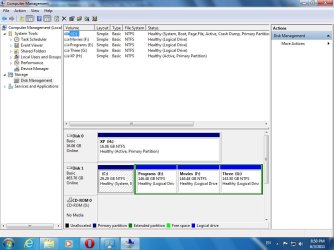
As has been requested, please post a screenshot from DISKMGMT.MSC in your Win7 partition.
But I'm going to guess that your 17GB WinXP partition was on one hard drive where there is also the 143GB "movies" partition. Total size 160GB or so for that drive?
Those two are probably C and D when you are booted to WinXP.
and another one with 7 [500GB], I installed each one without the other HDD plugged into my computer, so when i want to use XP i boot from the 17 HD, and when I want to boot from 7 I boot from the 500 HD, which is my 1st boot device.
Did you have reason why you installed Win7 as your second OS this way?
Just because you have a second hard drive and wanted to install Win7 there, you didn't need to (a) manually change "hard disk #1" in the BIOS to your new drive, or (b) disconnect the original hard drive to force the BIOS to change to the new drive as "hard disk #1", in order to install Win7 on the second drive.
If you had left the WinXP drive plugged in and still set as "hard disk #1" to the BIOS with the new second drive also present and visible to the Win7 installer, then the Win7 installer would have seen the previously existing WinXP already installed on hard drive one, and planted its own "boot manager" onto that WinXP system partition (since that's marked as the "active" partition on "hard disk #1"). Then it would have offered you the choice of where to install Win7... and you would have selected your second hard drive, and Win7 would have created the Win7 partition on that second drive.
Both WinXP and Win7 would then have been placed into a "boot manager menu" list, which would be presented to you at each boot... allowing you to then choose which OS you wanted to boot to. Win7 is normally the default in that list, following a Win7 install, but you could change that back to WinXP if you preferred that OS to be your default on this boot manager menu list.
Then, at boot time, the BIOS would always go to the "active" partition on what it sees as "hard disk #1", which is your original WinXP partition on the first hard drive, boot manager selected and run from that "active" partition on "hard disk #1". The boot manager menu list would be presented showing both WinXP and Win7 as options, and you'd then choose which Windows you wanted to boot to... either WinXP on the original hard drive, or Win7 on the second hard drive.
This approach would mean you'd never have to fool with BIOS settings or hard drive cables to boot... just pick your Windows from the boot manager menu. That's normally the preferred installation method for a new Win7 added to an existing WinXP environment, whether you have multiple partitions on one hard drive or multiple hard drives. Boot manager.
So, on windows XP all the partitions are working fine, on 7 there's one partition that doesn't open and tells me that access is denied, I searched a bit around and knew that I need to give my account the authority to fully control the partition and the ownership, I did so but nothing happened, activated the Administrator account from cmd, and it's working fine on it, but can't make it work on any other account, what should I do other than reinstalling the windows?
PS: this partition is not the system partition, it's just my movies partition[size 143 GB, free 3GB]
If you're the administrator userid on Win7 (and I assume you are) you can "take ownership" of that drive, which will eliminate the "access is denied" for the entire drive.
Presumably your own userid (only user, first user) has "administrator" rights. Also, you should have a password... as opposed to a non-password user. Yes?
One other final thought... you won't need 500GB for a Win7 partition on the second drive. My own recommendation would be to use Partition Wizard to partition that second drive, into say 150GB for Win7 and 350GB for a second data partition over there. Win7 won't really require more than 30-45GB for itself, and the rest is "user documents", etc. on what will be C to Win7 when you boot to Win7.
All four of your partitions (two on the first hard drive, and two on the second hard drive) can be lettered by each OS as you see fit. For convenience, I'd suggest making D and E your two "data partitions" when viewed from each OS, WinXP and Win7. Then make F your "opposite OS" partition when viewed from each OS. So F is your Win7 partition when you're booted to WinXP, and F is your WinXP partition when booted to Win7. Keeping consistent and intuitive drive letters for both Windows environments will make it easier for you to navigate no matter which OS you're booted to.
Please post a screenshot from DISKMGMT.


 , actually I've installed both operating systems this way to completely separate them from each other, also wanted the boot to be as fast as possible.