Partition and Hard Drive Help

Infinite

Closed as requested
Local time
9:35 AM
Messages
958
Hi Guys,

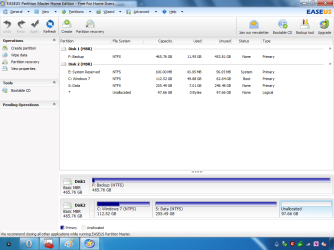
I need to fix my Hard Drives/Partitioning as it is all muddled up over different hard drives:
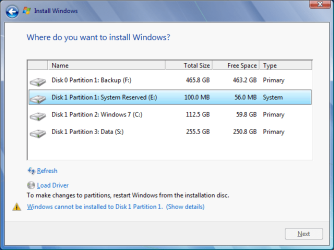
Example Image.pngExample Image 2.png

I am planning to install Windows 7 to my Backup Disk, copy the contents from my Data Partition to the Backup Disk. Format the Disk with Data, Win7 and 97GB Unallocated. Then install Windows 7 to that disk again. Then format the Backup Disk after re-transferring all of the contents.

I cannot unplug a Hard Drive and I do not have a Windows Install Disk/USB (until 7 days), just an ISO.

Basically I just want to reinstall Windows 7 and Data to Disk 0 and have Disk 1 empty.

I am currently using Disk 2 (EASEUS) and Disk 1 (DiskMGMT).

I installed Windows 7 to the Backup Drive 20 minutes ago.
 

My Computer

Computer type
PC/Desktop
Computer Manufacturer/Model Number
Novatech iRush Pro
OS
Windows 7 Ultimate SP1 - 64 Bit
CPU
Intel Core i5 2500k
Motherboard
Foxconn H67M-S/H67M-V/H67
Memory
2x4GB DDR3 1333Hz
Graphics Card(s)
Ati Radeon 6770
Sound Card
None
Monitor(s) Displays
Samsung S22B150
Screen Resolution
1920x1080
Hard Drives
2x500GB
PSU
500W
Cooling
Fan
Keyboard
HP KU0316
Mouse
Wireless Logitech M185
Internet Speed
20MB/s
Antivirus
Avast Free
Browser
Google Chrome
Other Info
Logitech M185 Mouse
KU-M316 Keyboard
Why do you want to install Win7 to the Backup drive and then reinstall it to the original drive?

Why don't you just move the data from the Win7 HD to Backup (that's what it's for, right?) then boot installer to Custom install, delete all partitions and clean reinstall to the Win7 HD?

Then you can create whatever partitions you want on each HD for storage.
 
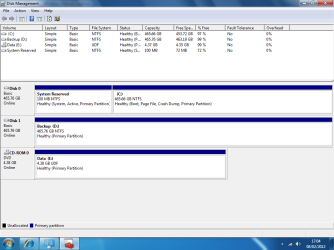
I can't delete Partitions unless I burn it to a Disk and boot from there:
Example.png

Or shall I boot the installer from the Backup Disk?
 

My Computer

Computer type
PC/Desktop
Computer Manufacturer/Model Number
Novatech iRush Pro
OS
Windows 7 Ultimate SP1 - 64 Bit
CPU
Intel Core i5 2500k
Motherboard
Foxconn H67M-S/H67M-V/H67
Memory
2x4GB DDR3 1333Hz
Graphics Card(s)
Ati Radeon 6770
Sound Card
None
Monitor(s) Displays
Samsung S22B150
Screen Resolution
1920x1080
Hard Drives
2x500GB
PSU
500W
Cooling
Fan
Keyboard
HP KU0316
Mouse
Wireless Logitech M185
Internet Speed
20MB/s
Antivirus
Avast Free
Browser
Google Chrome
Other Info
Logitech M185 Mouse
KU-M316 Keyboard
You could have reinstalled over C by running the installer from it's desktop.

I would not proceed without having bootable media for rescue if necessary. Is there some reason you cannot wait to obtain a DVD or flash stick?

In addition if your plan for the target HD is to delete all partitions and reinstall now, Win7 will assume another drive letter than C since its installer is being run from an OS and not booted.

The best partitioning scheme is one which has been thought-out based on your needs for storage and backup, is never done impulsively even if that means leaving one big partition until you are sure.

Start with planning your backups to be on another HD. When the OS HD becomes cramped you have the option to move User folders to another HD, too.
 
Well I will get some Disks and post back.
 

My Computer

Computer type
PC/Desktop
Computer Manufacturer/Model Number
Novatech iRush Pro
OS
Windows 7 Ultimate SP1 - 64 Bit
CPU
Intel Core i5 2500k
Motherboard
Foxconn H67M-S/H67M-V/H67
Memory
2x4GB DDR3 1333Hz
Graphics Card(s)
Ati Radeon 6770
Sound Card
None
Monitor(s) Displays
Samsung S22B150
Screen Resolution
1920x1080
Hard Drives
2x500GB
PSU
500W
Cooling
Fan
Keyboard
HP KU0316
Mouse
Wireless Logitech M185
Internet Speed
20MB/s
Antivirus
Avast Free
Browser
Google Chrome
Other Info
Logitech M185 Mouse
KU-M316 Keyboard
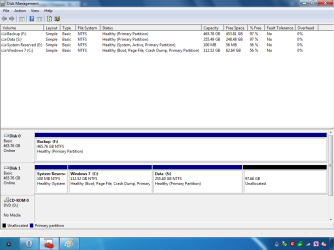
Sorry about the delay: here:

Diskmgmt.png

Is it normal for the System Partition to be Primary?
 
Last edited:

My Computer

Computer type
PC/Desktop
Computer Manufacturer/Model Number
Novatech iRush Pro
OS
Windows 7 Ultimate SP1 - 64 Bit
CPU
Intel Core i5 2500k
Motherboard
Foxconn H67M-S/H67M-V/H67
Memory
2x4GB DDR3 1333Hz
Graphics Card(s)
Ati Radeon 6770
Sound Card
None
Monitor(s) Displays
Samsung S22B150
Screen Resolution
1920x1080
Hard Drives
2x500GB
PSU
500W
Cooling
Fan
Keyboard
HP KU0316
Mouse
Wireless Logitech M185
Internet Speed
20MB/s
Antivirus
Avast Free
Browser
Google Chrome
Other Info
Logitech M185 Mouse
KU-M316 Keyboard
System partitions are always Primary. They have to be. With Win 7 you could possibly install to a secondary drive but the System Reserve Partition would still be on Disk0 and still be a primary partition.

Not sure what you are trying to accomplish?

As it is now, your screen shot of DM, looks just fine. Sys Reserve on main disk, Win 7 as second partition on main disk and then a second disk as one big drive.
What about that setup don't you like?
 

My Computer

OS
7 x64
I agree with edwar, there's nothing wrong with your current drive setup.

You have the master boot record and Windows exactly where Windows would expect them to be.

Your data backup is on another drive, which is good practice as it means restoring or reinstalling Windows becomes a lot easier.

A hard drive can have up to four primary partitions with the fourth being an extended primary partition that can accommodate up to 128 logical partitions.

Generally speaking, the system reserved and operating system partitions will be primary partitions, whereas data can be stored on a primary or logical partition.

Disk partitioning - Wikipedia, the free encyclopedia
 

My Computer

Computer Manufacturer/Model Number
HP Pavilion Elite 495UK
OS
Windows 7 Ultimate SP1 64-Bit
CPU
Intel Core i7 870 @ 2.93GHz
Motherboard
MSI 2A9C (CPU1)
Memory
8Gb Dual-Channel DDR3 @ 664MHz
Graphics Card(s)
nVidia GeForce GTX 460 1024MB dedicated RAM
Sound Card
Realtek HD Audio
Monitor(s) Displays
HP2310i
Screen Resolution
1920 x 1080
Hard Drives
1x1954GB Hitachi HDS22020ALA 330 (RAID), 1x1954GB Hitachi External for backup and storage
PSU
460W
Case
HP Elite
Cooling
Air cooled
Keyboard
Logitech K750 solar-powered keyboard
Mouse
Logitech Wireless M180 mouse
Internet Speed
2Mb
Other Info
Pure Avanti Flow Internet Radio with iPod Dock, 64Gb iPod, HP USB Speakers, Sony MDR-V500 Headphones, Sony Vaio F-Series Laptop
OK Thanks for the advice guys. I have just installed Linux to the drive Windows 7 is on.

"You must spread some Reputation around before giving it to seavixen32 again."
 

My Computer

Computer type
PC/Desktop
Computer Manufacturer/Model Number
Novatech iRush Pro
OS
Windows 7 Ultimate SP1 - 64 Bit
CPU
Intel Core i5 2500k
Motherboard
Foxconn H67M-S/H67M-V/H67
Memory
2x4GB DDR3 1333Hz
Graphics Card(s)
Ati Radeon 6770
Sound Card
None
Monitor(s) Displays
Samsung S22B150
Screen Resolution
1920x1080
Hard Drives
2x500GB
PSU
500W
Cooling
Fan
Keyboard
HP KU0316
Mouse
Wireless Logitech M185
Internet Speed
20MB/s
Antivirus
Avast Free
Browser
Google Chrome
Other Info
Logitech M185 Mouse
KU-M316 Keyboard
Thanks for the thought Infinite, it's appreciated. :)
 

My Computer

Computer Manufacturer/Model Number
HP Pavilion Elite 495UK
OS
Windows 7 Ultimate SP1 64-Bit
CPU
Intel Core i7 870 @ 2.93GHz
Motherboard
MSI 2A9C (CPU1)
Memory
8Gb Dual-Channel DDR3 @ 664MHz
Graphics Card(s)
nVidia GeForce GTX 460 1024MB dedicated RAM
Sound Card
Realtek HD Audio
Monitor(s) Displays
HP2310i
Screen Resolution
1920 x 1080
Hard Drives
1x1954GB Hitachi HDS22020ALA 330 (RAID), 1x1954GB Hitachi External for backup and storage
PSU
460W
Case
HP Elite
Cooling
Air cooled
Keyboard
Logitech K750 solar-powered keyboard
Mouse
Logitech Wireless M180 mouse
Internet Speed
2Mb
Other Info
Pure Avanti Flow Internet Radio with iPod Dock, 64Gb iPod, HP USB Speakers, Sony MDR-V500 Headphones, Sony Vaio F-Series Laptop
Sorry about the delay: here:

View attachment 197377

Is it normal for the System Partition to be Primary?

That is perfect, the only thing I do different is I make 2 partitions on D: one for my disk image and one for all my programs ( the program files ) they are still installed on C: and all of my data.
 

My Computer

Computer type
PC/Desktop
Computer Manufacturer/Model Number
Skylake Special #666
OS
Windows 10 Pro x64
CPU
Intel Core i7 6700K
Motherboard
Asus Sabertooth Z170 Mark 1
Memory
GSkill TridentZ RGB 16GB 3600 16-16-16-36
Graphics Card(s)
EVGA GTX 980 Ti SC x2
Sound Card
Realtek High Definition
Monitor(s) Displays
AOC G2460PG
Screen Resolution
1920 x 1080 144Hz
Hard Drives
Samsung 860 Pro 256GB, Seagate Barracuda 4TB x2
PSU
EVGA 1000 P2, EVGA White Custom Braided Cables
Case
Corsair Vengeance C70 Gunmetal Black
Cooling
Corsair H100i v2, Corsair ML120 x2, Thermal Grizzly Kryonaut
Keyboard
Logitech G910 Orion Spectrum
Mouse
Logitech G700s
Internet Speed
Verizon Fios Quantum Gateway 75/75
Antivirus
Windows Defender, Malwarebytes Free 3.8.3
Browser
Chrome
Other Info
Corsair SP120 x4, LG Blu-ray Drive, Durabrand HT-395 100 Watt Dolby Digital Amp, Corsair H2100 Wireless 7.1 Headset
Back
Top