Solved Partition arrangement for 1 Terabyte Harddrive Win7 Pro x64

castle555

New member
Local time
1:08 PM
Messages
4
Location
Sacramento Valley
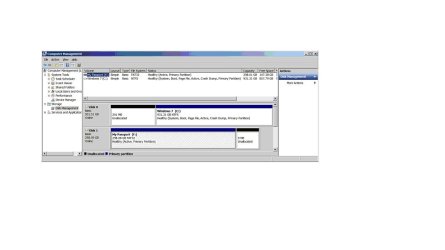
Partitions correctly set-up? 831.12 GB unallocated. Can this be moved to allocate to the C: Win7 partition without re-doing a clean install ? Fix or leave alone?
Partition-DiskMgmnt.jpg
 

My Computer My Computer

At a glance

Windows 7 Professional x64Intel Core i5-2500K 3.30GHz8.00GBAMD Radeon HD 6800 Series
Computer type
PC/Desktop
Computer Manufacturer/Model Number
Custom Build
OS
Windows 7 Professional x64
CPU
Intel Core i5-2500K 3.30GHz
Motherboard
ASUS
Memory
8.00GB
Graphics Card(s)
AMD Radeon HD 6800 Series
Antivirus
Microsoft Security Essentials
Browser
Firefox 21.0
install easybcd and move bootmanger to C http://www.sevenforums.com/tutorials/209885-bootmgr-move-c-easybcd.html


Reboot and post diskmanagement screenshot again

After succesful bootmgr move and reboot, you can delete volume "system reserved".

3393d1232613602-partition-volume-delete-delete_step1.jpg


Now extend C volume.

3396d1232617536-partition-volume-extend-extend_step1.jpg


You want to have the 201MB unallocated space as well? if so, download partition wizard home Free download Magic Partition Manager Software, partition magic alternative, free partition magic, partition magic Windows 7 and server partition software - Partition Wizard Online and do How to Move/Resize Partition with partition manager? Partition Wizard Move/Resize Partition Video Help. (move left slider of C volume). Don't forget to press apply afterwards.

Best done using bootable cd Partition Wizard Bootable CD allows user to manage partition directly with partition manager bootable CD.
 
Last edited:

My Computer My Computer

At a glance

Microsoft Windows 7 Home Premium 64-bits 7601...Intel(R) Core(TM) i3 CPU M 370 @ 2.40GHz4,00 GBATI Mobility Radeon HD 5400 Series
Computer type
Laptop
Computer Manufacturer/Model Number
ACER ASPIRE 5742G
OS
Microsoft Windows 7 Home Premium 64-bits 7601 Multiprocessor Free Service Pack 1
CPU
Intel(R) Core(TM) i3 CPU M 370 @ 2.40GHz
Motherboard
Acer Aspire 5742G
Memory
4,00 GB
Graphics Card(s)
ATI Mobility Radeon HD 5400 Series
Sound Card
(1) AMD High Definition Audio Device (2) Realtek High Defi
Screen Resolution
1366 x 768 x 32 bits (4294967296 colors) @ 60 Hz
Hard Drives
WDC WD5000BEVT-22ZAT0
Never seen the system reserved partition on the right side of C like that, how did you manage that. What`s wrong with the font on your pc ? Can barely read your pic. :(

Just turn the unallocated space into a partition.

You should also add that 201 MB unallocated to C.

Personally, I would start over.

http://www.sevenforums.com/tutorials/1649-clean-install-windows-7-a.html
 

My Computer My Computer

At a glance

Windows 10 Pro x64Intel Core i7 6700KGSkill TridentZ RGB 16GB 3600 16-16-16-36EVGA GTX 980 Ti SC x2
Computer type
PC/Desktop
Computer Manufacturer/Model Number
Skylake Special #666
OS
Windows 10 Pro x64
CPU
Intel Core i7 6700K
Motherboard
Asus Sabertooth Z170 Mark 1
Memory
GSkill TridentZ RGB 16GB 3600 16-16-16-36
Graphics Card(s)
EVGA GTX 980 Ti SC x2
Sound Card
Realtek High Definition
Monitor(s) Displays
AOC G2460PG
Screen Resolution
1920 x 1080 144Hz
Hard Drives
Samsung 860 Pro 256GB, Seagate Barracuda 4TB x2
PSU
EVGA 1000 P2, EVGA White Custom Braided Cables
Case
Corsair Vengeance C70 Gunmetal Black
Cooling
Corsair H100i v2, Corsair ML120 x2, Thermal Grizzly Kryonaut
Keyboard
Logitech G910 Orion Spectrum
Mouse
Logitech G700s
Internet Speed
Verizon Fios Quantum Gateway 75/75
Antivirus
Windows Defender, Malwarebytes Free 3.8.3
Browser
Chrome
Other Info
Corsair SP120 x4, LG Blu-ray Drive, Durabrand HT-395 100 Watt Dolby Digital Amp, Corsair H2100 Wireless 7.1 Headset
"system reserved" has bootmgr and bootmenu. But this info can be on any primary partition which is active. So system reserved is not needed at all!

It has other purpose (bitlocker): BitLocker is unavailable for Windows 7 Professional and it cannot be downloaded and installed. It is available for Windows 7 Ultimate and Windows 7 Enterprise editions.

You have win7 professional, so bitlocker is not possible.
 

My Computer My Computer

At a glance

Microsoft Windows 7 Home Premium 64-bits 7601...Intel(R) Core(TM) i3 CPU M 370 @ 2.40GHz4,00 GBATI Mobility Radeon HD 5400 Series
Computer type
Laptop
Computer Manufacturer/Model Number
ACER ASPIRE 5742G
OS
Microsoft Windows 7 Home Premium 64-bits 7601 Multiprocessor Free Service Pack 1
CPU
Intel(R) Core(TM) i3 CPU M 370 @ 2.40GHz
Motherboard
Acer Aspire 5742G
Memory
4,00 GB
Graphics Card(s)
ATI Mobility Radeon HD 5400 Series
Sound Card
(1) AMD High Definition Audio Device (2) Realtek High Defi
Screen Resolution
1366 x 768 x 32 bits (4294967296 colors) @ 60 Hz
Hard Drives
WDC WD5000BEVT-22ZAT0
You could probably leave it as it is if it performs well.

I've also never seen SysReserved on the right side and am not sure how you got it there. There's certainly no reason to get rid of it, and if you start over you should delete all partitions during install which will issue it again - but on the left side per normal.

I would just create a Logical extended partition in the Unallocated space so you can add as many Logical sub-partitions as you want without worrying about bumping up against the 4 Primary partition limit. Partition / Extended : Logical Drives - Windows 7 Forums
Partition Wizard Create Partition Video Help
 
Partition Fix Win7 x64

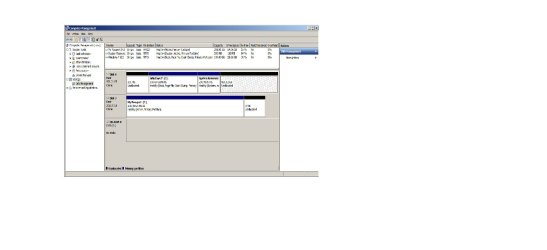
I followed the advice and instruction you folks kindly provided and was able to accomplish this so far:

Downloaded both EasyBCD and Mini-Partition Wizard and ran them and was not able to figure how to to add the 201mb to the C: partition.
DiskMgmnt6-3-13.jpg
Thanks
 
Last edited:

My Computer My Computer

At a glance

Windows 7 Professional x64Intel Core i5-2500K 3.30GHz8.00GBAMD Radeon HD 6800 Series
Computer type
PC/Desktop
Computer Manufacturer/Model Number
Custom Build
OS
Windows 7 Professional x64
CPU
Intel Core i5-2500K 3.30GHz
Motherboard
ASUS
Memory
8.00GB
Graphics Card(s)
AMD Radeon HD 6800 Series
Antivirus
Microsoft Security Essentials
Browser
Firefox 21.0
Gregrocker
you weren't the only one to comment on this anomaly;
quote: "I've also never seen SysReserved on the right side and am not sure how you got it there. There's certainly no reason to get rid of it, and if you start over you should delete all partitions during install which will issue it again - but on the left side per normal"

If there's another way to accomlish something, I usually manage to screw it up then fix it.
To get that SysReserved partition on the right side, which was not intentional, I ran the Partition program at Windows 7 setup two times.
Remember the old axiom: "A little knowledge can be dangerous."
 

My Computer My Computer

At a glance

Windows 7 Professional x64Intel Core i5-2500K 3.30GHz8.00GBAMD Radeon HD 6800 Series
Computer type
PC/Desktop
Computer Manufacturer/Model Number
Custom Build
OS
Windows 7 Professional x64
CPU
Intel Core i5-2500K 3.30GHz
Motherboard
ASUS
Memory
8.00GB
Graphics Card(s)
AMD Radeon HD 6800 Series
Antivirus
Microsoft Security Essentials
Browser
Firefox 21.0

My Computer My Computer

At a glance

Windows 7 Professional x64Intel Core i5-2500K 3.30GHz8.00GBAMD Radeon HD 6800 Series
Computer type
PC/Desktop
Computer Manufacturer/Model Number
Custom Build
OS
Windows 7 Professional x64
CPU
Intel Core i5-2500K 3.30GHz
Motherboard
ASUS
Memory
8.00GB
Graphics Card(s)
AMD Radeon HD 6800 Series
Antivirus
Microsoft Security Essentials
Browser
Firefox 21.0
Back
Top