Solved Partition changes causes no hilbernation.

corruptDNA

New member
Member
Local time
5:38 PM
Messages
90
I recently decided to create a new partition so i shrank my C; partition (where windows is installed) to create a new one but it was not possible to do so because already had 4 primary partitions.. (i think.. ) ..
but regardless, i wanted to create a new partition so i can install ubuntu, which i was able to do so successfully on the free space that i got from shrinking the C drive.
Now the problem comes here, after i shrunk the partition, in was unable to hilbernate my computer. At first i thought it was because of dual boot , but since the problem occurred directly after shrinking the partition i think its partition related.
So i googled and found it can be fixed by using cmd on administrative priviliges and turning on powercfg -h off and then on .

So that didnt work, so please help me out... i use hilbernate a lot..

Edit: Added my computer specs using cpu-z as an attachment.
 

Attachments

Last edited:

My Computer My Computer

Computer type
Laptop
Computer Manufacturer/Model Number
Dell Inspiron 7559
OS
Windows 10 64 bit
CPU
Intel(R) Core(TM) i7-6700HQ CPU @ 2.60GHz (8 CPUs), ~2.6GHz
Memory
16 GB RAM
Graphics Card(s)
NVIDIA GeForce GTX 960M
Monitor(s) Displays
1
Screen Resolution
1920 x 1080
Hard Drives
Samsung SSD 850 EVO M.2 250GB (NTFS, 238.3 GB)
ST1000LM014-1EJ164 (NTFS, 940.5 GB)
Please post back a screenshot of your maximized Disk Mgmt drive map and listings: Screen Shots

It's possible you converted to Dynamic. After three Primaries you can add as many Logical as you want, but four Primaries is the limit before conversion.

Using GRUB bootloader on the same HD can also corrupt Win7 beyond repair. You can try deleting the the Linux distro in Disk Mgmt, mark Win7 partition Active (if it's not) then run Startup Repair - Run 3 Separate Times

If this fails reinstall the Display driver by uninstalling in Device Manager, then reboot.

Try with and without Hybrid sleep. Set Sleep to 1 minute and Hibernate to 2 minutes to test.
 
Last edited:
I recently decided to create a new partition so i shrank my C; partition (where windows is installed) to create a new one but it was not possible to do so because already had 4 primary partitions.. (i think.. ) ..
but regardless, i wanted to create a new partition so i can install ubuntu, which i was able to do so successfully on the free space that i got from shrinking the C drive.
Now the problem comes here, after i shrunk the partition, in was unable to hilbernate my computer. At first i thought it was because of dual boot , but since the problem occurred directly after shrinking the partition i think its partition related.
So i googled and found it can be fixed by using cmd on administrative priviliges and turning on powercfg -h off and then on .

So that didnt work, so please help me out... i use hilbernate a lot..

When you installed Ubuntu, did you have install grub2 in the MBR (the default)? Windows seems to require its bootloader code in the MBR to hibernate properly. I don't know how adept you are with Linux, but you can boot with your install CD/USB, run the Live session, and chroot to your installed Ubuntu. There you can install grub2 to the partition that Ubuntu is on:

grub-install -f /dev/sdax (where x is the partition)
update grub

Then you need to boot back into Windows. I recommend using EasyBCD to then put Windows' bootloader back in the MBR and make an entry for your Ubuntu.

If this is making absolutely no sense, you might want to simply reinstall Ubuntu. Use the 'custom layout' selection to assign your partitions, and at the bottom specify in the dropdown thing that you want grub2 in sda-whatever instead of plain sda (which signifies the MBR).

It's all very doable - I rearrange my partitions all the time.
 

My Computer My Computer

Computer Manufacturer/Model Number
Compaq Presario SR5518F (desktop)
OS
Windows 7 Home Premium 64bit
CPU
Intel Pentium Dual Core E2180 @2GHz
Motherboard
MSI "Boston"
Memory
4 GB
Graphics Card(s)
NVIDIA GeForce 8500 GT
Sound Card
Integrated - Realtek High Definition Audio
Monitor(s) Displays
Acer
Hard Drives
Hitachi HDP725025GLA380 ATA Device
Optiarc DVD RW AD-7201S5 ATA Device
Internet Speed
5 Mbps
@gregrocker:
I dont mind posting the screenshots, but can you give me a brief explanation on how to get "maximized Disk Mgmt drive map and listings" ..
and yes, i did delete ubuntu, but then there was nothing to boot windows as grub replaced the original boot loader so then i would encounter "grub rescue" (my worst nightmare.. "

since my laptop came with windows preloaded, i couldnt just pop in a windows 7 cd as i didnt have one so i just reinstalled ubuntu so i could use windows.. (the ubuntu was installed on the space i shrunk from c.. )


@sgage:
i dont know if i installed grub legacy or grub 2 but it replaced the original bootloader and it was installed by default when i was installing ubuntu..
and i dont need to use the live cd, i can access ubuntu normally as grub is still installed and i didnt wipe the ubuntu partition..
i understand the chroot part of installing grub to another sda but will is there another way to restore the original mbr than using EasyBcd?

Thanks a lot for replying guys, i really appreciate it.. :) As soon as i get my laptop fixed, i will browse the forums so i can help other people (if the problem is in my knowledge) just like you did.. :)
 

My Computer My Computer

Computer type
Laptop
Computer Manufacturer/Model Number
Dell Inspiron 7559
OS
Windows 10 64 bit
CPU
Intel(R) Core(TM) i7-6700HQ CPU @ 2.60GHz (8 CPUs), ~2.6GHz
Memory
16 GB RAM
Graphics Card(s)
NVIDIA GeForce GTX 960M
Monitor(s) Displays
1
Screen Resolution
1920 x 1080
Hard Drives
Samsung SSD 850 EVO M.2 250GB (NTFS, 238.3 GB)
ST1000LM014-1EJ164 (NTFS, 940.5 GB)
Enough space?

Just a thought.
Is there enough space on your Windows partition for the Hibernation file?
 

My Computer My Computer

Computer type
PC/Desktop
Computer Manufacturer/Model Number
n/a
OS
W7 Ultimate SP1, LM19.2 MATE, W10 Home 1703, W10 Pro 1703 VM, #All 64 bit
CPU
AMD Phenom II x6 1100T, 3.3 GHz
Motherboard
ASUS M4A88T-M/USB3 (AM3)
Memory
12GB DDR3 1333 G-Skill (4GB x 2), G-Skill (2GB x 2)
Graphics Card(s)
NVIDIA GeForce GTX 660
Sound Card
Realtek?
Monitor(s) Displays
Samsung S23B350
Screen Resolution
1920x1080
Hard Drives
WD Green 2TB (SATA), WD Green 3TB (SATA), WD Blue 4TB (SATA), WD Blue 6TB (SATA)
PSU
Cooler Master
Case
Antec GX300 Tower
Cooling
3x Antec TRICOOL 120mm Fans
Mouse
Wired Optical
Internet Speed
DSL
Antivirus
Avast
Browser
Pale Moon (64 bit)
Other Info
2018-12-27 Upgraded HDDs
2015-12-10 Upgraded case, graphics card, storage
2015-08-15 Upgraded motherboard & RAM
2015-07-15 Upgraded LM17.1 to LM17.2
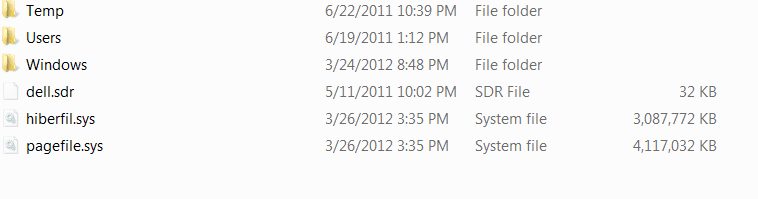
yes more than enough as you can see below and my drive where the hilberfil.sys is located still has 151 gb of space left..
 

Attachments

  • Untitled.png
    Untitled.png
    5.3 KB · Views: 6

My Computer My Computer

Computer type
Laptop
Computer Manufacturer/Model Number
Dell Inspiron 7559
OS
Windows 10 64 bit
CPU
Intel(R) Core(TM) i7-6700HQ CPU @ 2.60GHz (8 CPUs), ~2.6GHz
Memory
16 GB RAM
Graphics Card(s)
NVIDIA GeForce GTX 960M
Monitor(s) Displays
1
Screen Resolution
1920 x 1080
Hard Drives
Samsung SSD 850 EVO M.2 250GB (NTFS, 238.3 GB)
ST1000LM014-1EJ164 (NTFS, 940.5 GB)
Type Disk Management in Start Search box, click result, maxmize window to full screen.

Open the Snipping Tool in Start menu and take a rectangular snip of drive map with listings, save file, then post back using paper clip in reply box: Screen Shots

To delete Linux, you would normally mark Win7 partition or it's 100mb System Reserved (preferred) partition Active, delete Linux partition, then boot DVD/Repair CD to run Startup Repair - Run 3 Separate Times until WIn7 starts on its own. Partition - Mark as Active

But GRUB corruption sometimes requires wiping the HD with Diskpart Clean Command accessing DISKPART At PC Startup.

Let us see the screenshot to make sure there are no other problems.
 
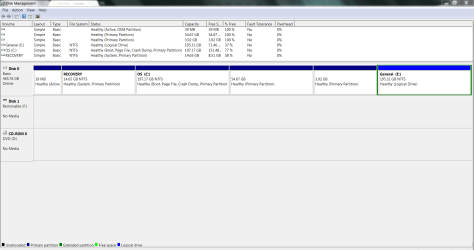
Here:
Capture.PNG
 

My Computer My Computer

Computer type
Laptop
Computer Manufacturer/Model Number
Dell Inspiron 7559
OS
Windows 10 64 bit
CPU
Intel(R) Core(TM) i7-6700HQ CPU @ 2.60GHz (8 CPUs), ~2.6GHz
Memory
16 GB RAM
Graphics Card(s)
NVIDIA GeForce GTX 960M
Monitor(s) Displays
1
Screen Resolution
1920 x 1080
Hard Drives
Samsung SSD 850 EVO M.2 250GB (NTFS, 238.3 GB)
ST1000LM014-1EJ164 (NTFS, 940.5 GB)
Your OEM wants the System boot files on the Recovery partition. The Active flag should also be there signifying this and so that repair will not try to write them to the tiny OEM partition and error out. So mark Recovery Active now.

Then delete Linux partition in Disk Management, boot DVD or REpair CD to run Startup Repair - Run 3 Separate Times.

It's questionable that Recovery will run now after having GRUB imposed on it, but you can try cueing it up from within Win7 or from boot to see if it is at least accessible. Likewise the OEM tools partition may have been corrupted so I would try running Hardware Diagnostics from the OS or boot to see if it works too. It is good to run the tests occasionally anyway.

Once it's configured correctly we'll look at your Hibernate issue if it still exists.
 
oke so i marked the recovery as active, but as soon as i did that, the 50 so gb became free.. (turned green ) , is that a problem? cause i think thats were linux was kept.. should i be able to restart normally?
 

My Computer My Computer

Computer type
Laptop
Computer Manufacturer/Model Number
Dell Inspiron 7559
OS
Windows 10 64 bit
CPU
Intel(R) Core(TM) i7-6700HQ CPU @ 2.60GHz (8 CPUs), ~2.6GHz
Memory
16 GB RAM
Graphics Card(s)
NVIDIA GeForce GTX 960M
Monitor(s) Displays
1
Screen Resolution
1920 x 1080
Hard Drives
Samsung SSD 850 EVO M.2 250GB (NTFS, 238.3 GB)
ST1000LM014-1EJ164 (NTFS, 940.5 GB)
There are more steps given than marking Recovery Active. You must complete all steps to see if it will start after imposing GRUB on the HD.
 

Something really looks weird to me in this screenshot. How are you getting so many primary partitions on this disk?

Edit: Just re-read your first post. Wonder if the forcing of creating a new primary partition, on a disk that appears to me already had one too many, is part of the problem. Even if it isn't part of the problem, I wonder what other instabilities would arise...
 

My Computer My Computer

OS
Windows 7 Ultimate x64
Something really looks weird to me in this screenshot. How are you getting so many primary partitions on this disk?

Good catch, sibbil. It doesn't appear correct but since Linux is on the 54 gb in this screenshot it might be misreporting one or more partitions. There is a limit of three Primary and unlimited Logical partitions, or Four Primary partitions.

What I would do now is delete the 54 gb and 3gb Primary partitions, then resize the data or Win7 partitions to fill the space. Free Partition Wizard bootable CD can resize to the left if needed, while Disk Management can Extend a partition to the right: Partition or Volume - Extend.
 
i wouldnt delete the 3 gp partition as it was alone from the very begining when i bought my laptop, so maybe there is something important there? but the 54 gb wasnt allowed till i used another software to make a partition but it failed but instead screwed the primary partition counter.. because after it failed i was somehow magically able to make the 54 gb a partition..

oke guys, so after i marked recovery as active, my 58gb which was not Free, became free.. (see older post for older screenshot of disk management.. ), also changed color to green..
so before i restarted my computer, i didnt understand what a startup repair completely, so i tried to use a "System repair disk ".. so i created one and restarted my computer, but was unfortunately taken to grub rescue, so i decided to use the cd, which was a fail because i got a long number error ..
so since i had no other alternative, i reinstalled ubuntu so i could regain access, but this time when i was installing i used custom install and marked the 58 free gb as swap, and installed the bootloader on the general drive...
so what to do now?
 

My Computer My Computer

Computer type
Laptop
Computer Manufacturer/Model Number
Dell Inspiron 7559
OS
Windows 10 64 bit
CPU
Intel(R) Core(TM) i7-6700HQ CPU @ 2.60GHz (8 CPUs), ~2.6GHz
Memory
16 GB RAM
Graphics Card(s)
NVIDIA GeForce GTX 960M
Monitor(s) Displays
1
Screen Resolution
1920 x 1080
Hard Drives
Samsung SSD 850 EVO M.2 250GB (NTFS, 238.3 GB)
ST1000LM014-1EJ164 (NTFS, 940.5 GB)
I doubt whether any of those manufacturer's partitions are going to run now. But you can back up your files from Ubuntu and try running Factory Recovery now from it's hotkey after marking it Active again. Then before installing Linux again perhaps you should ask us here how to go about it first.

If you still want to try repairing Win7 then boot the Repair CD you burned by tapping the one-time Boot Menu key given on first screen at boot to trigger the disk. If not set disk drive first to boot in BIOS setup following these steps: How to Boot your Computer from a Bootable CD or DVD

Then mark Recovery Active and run Startup Repair 3 separate times with reboots in between each, until Win7 starts. If this fails, mark Win7 partition Active and repeat.

If the Repair disk fails then burn a WIn7 installation DVD to try the repairs or go ahead and boot it to wipe the HD to get rid of GRUB corruption to reinstall Win7: At first DVD screen press Shift + F10, type in Command Prompt:
Diskpart
list disk
Select disk # (replace # with Win7 disk#)
Clean
Exit

Then follow these steps to Clean Reinstall - Factory OEM Windows 7. Everything you need to do this is in the blue link.
 
actually, the problem is solved, i was able to hilbernate after i installed the new ubuntu..(hilbernate from windows 7) i dont know whether its from marking the recovery as active or by installing the bootloader on another drive, but the problem is solved!! thanks a lot guys, really appreciate it..
but i have one more question, how do you restore the original mbr.. (still using the grub from the installation of ubuntu.. ) should i make a new thread for it or continue in this one??
 

My Computer My Computer

Computer type
Laptop
Computer Manufacturer/Model Number
Dell Inspiron 7559
OS
Windows 10 64 bit
CPU
Intel(R) Core(TM) i7-6700HQ CPU @ 2.60GHz (8 CPUs), ~2.6GHz
Memory
16 GB RAM
Graphics Card(s)
NVIDIA GeForce GTX 960M
Monitor(s) Displays
1
Screen Resolution
1920 x 1080
Hard Drives
Samsung SSD 850 EVO M.2 250GB (NTFS, 238.3 GB)
ST1000LM014-1EJ164 (NTFS, 940.5 GB)
Edit GRUB files

You could edit the appropriate GRUB related files in Linux.
My friend (a Linux expert) helped me do that on my PC, so my default boot OS is W7.

:eek: Remember to backup your original config files, BEFORE you start editing them. :eek:
 

My Computer My Computer

Computer type
PC/Desktop
Computer Manufacturer/Model Number
n/a
OS
W7 Ultimate SP1, LM19.2 MATE, W10 Home 1703, W10 Pro 1703 VM, #All 64 bit
CPU
AMD Phenom II x6 1100T, 3.3 GHz
Motherboard
ASUS M4A88T-M/USB3 (AM3)
Memory
12GB DDR3 1333 G-Skill (4GB x 2), G-Skill (2GB x 2)
Graphics Card(s)
NVIDIA GeForce GTX 660
Sound Card
Realtek?
Monitor(s) Displays
Samsung S23B350
Screen Resolution
1920x1080
Hard Drives
WD Green 2TB (SATA), WD Green 3TB (SATA), WD Blue 4TB (SATA), WD Blue 6TB (SATA)
PSU
Cooler Master
Case
Antec GX300 Tower
Cooling
3x Antec TRICOOL 120mm Fans
Mouse
Wired Optical
Internet Speed
DSL
Antivirus
Avast
Browser
Pale Moon (64 bit)
Other Info
2018-12-27 Upgraded HDDs
2015-12-10 Upgraded case, graphics card, storage
2015-08-15 Upgraded motherboard & RAM
2015-07-15 Upgraded LM17.1 to LM17.2
Links for Windows 7 SP1 ISO from Microsoft’s official distributer | Raymond.CC Blog
^^not cracked, you need a key to install..

got a windows 7 64 bit iso from there..
ran startup three times, will post result as soon as its done, lets hope the mbr is restored, cause i dont like seeing grub rescue.. (apparently, the partitions where linux was kept got corrupted.. >.> so first im gonna restore the mbr, backup the files i want, and then install windows again from scratch... (have windows key on back of my computer.. <3 )

Edit-
Ran it twice, first time didnt fix it, and second time it said that windows cannot fix this problem, so i ran command prompt and wrote
BootRec.exe /fixmbr
and it worked!! it booted...
but do i have to run start up repair again? one more time??
 

My Computer My Computer

Computer type
Laptop
Computer Manufacturer/Model Number
Dell Inspiron 7559
OS
Windows 10 64 bit
CPU
Intel(R) Core(TM) i7-6700HQ CPU @ 2.60GHz (8 CPUs), ~2.6GHz
Memory
16 GB RAM
Graphics Card(s)
NVIDIA GeForce GTX 960M
Monitor(s) Displays
1
Screen Resolution
1920 x 1080
Hard Drives
Samsung SSD 850 EVO M.2 250GB (NTFS, 238.3 GB)
ST1000LM014-1EJ164 (NTFS, 940.5 GB)
Normally you'd only need to run Startup Repair again if you're using the bootrec command to force it to show an installation to repair. Do you have Win7 booting now?

Now install EasyBCD as shown in Dual boot Ubuntu-Win7 to add Ubuntu.
 
Back
Top