Solved Partition Data(E:) suddenly appeared

cobace742

New member
Local time
2:00 PM
Messages
4
I had to repair my laptop screen lately and i've left it with a guy for 2 or 3 days. Since then i'm a little paranoid, he asked me for my password and i gave it to him.

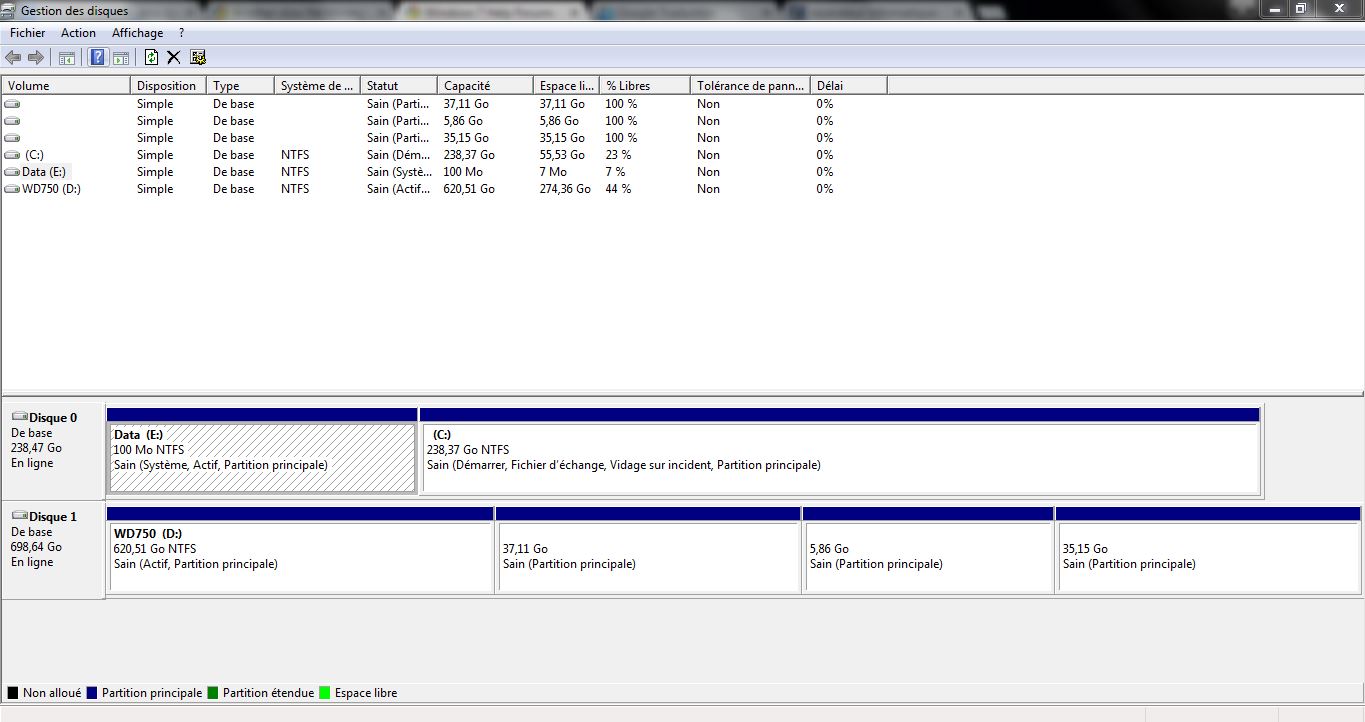
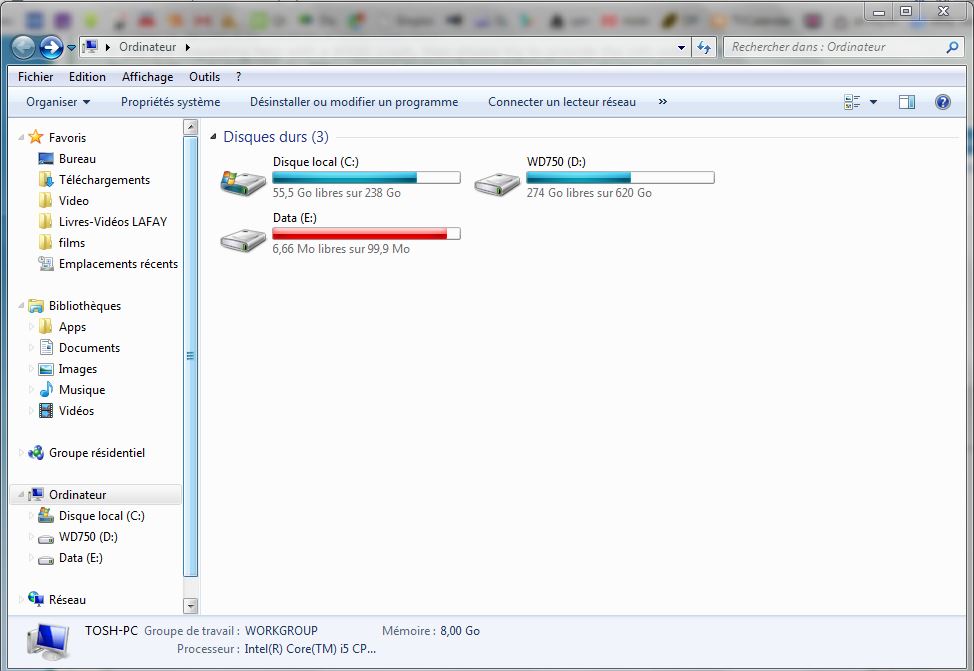
First weird thing i noticed, is that a data partition (100Mo) suddenly appeared :
4BnPabq.jpg

j64xJAP.jpg


What do you think ?
I'm also interested in an in-depth scan if you would please assist me.

Thank you.
 

My Computer

Computer type
Laptop
Computer Manufacturer/Model Number
Toshiba L655-1KE
OS
Windows 7 Professional x64 (build 7601) Service Pack 1
CPU
Intel Core i5 480M @2.67Ghz (Arrandale)
Motherboard
TOSHIBA Portable PC Base Board Version
Memory
Kingston 8,00*Go Dual-Channel DDR3 @ 533MHz (7-7-7-20)
Graphics Card(s)
Radeon HD 5400
Hard Drives
238GB Samsung SSD 840 PRO Seri SCSI Disk Device (SSD)
698GB Seagate ST750LX0 03-1AC154 SCSI Disk Device (SATA)
Antivirus
Eset Smart Security 8
Browser
Google Chrome
Hello,
A new installation of Windows 7 usually places a 100 mb partition on the main drive. It is a system reserved partition and it is normal. I usually hide it by removing the drive letter using the OS Disk Management utility, since it seems best not to mess with its content. Here's a related link.
Regards-
 

My Computer

Computer type
PC/Desktop
Computer Manufacturer/Model Number
Home Build - Acuarius
OS
Triple Boot - Win 10 x64Pro + Win 7 x64 Ultimate + WinXP-mce x1
CPU
AMD FX 8370e
Motherboard
AsRock Fx990 Extreme 9
Memory
Patriot 32GB Viper III DDR3 2133
Graphics Card(s)
Sapphire Radeon VAPOR-X R9 290X 8GB + Asus 5870 [V2]
Sound Card
Realtek ALC 898
Monitor(s) Displays
LCD 1) ASUS PB287Q - LCD 2) HP 2304 - LCD 3) Asus VW266H
Screen Resolution
1) 4k - 2) 1920 x 1200 - 3) 1920 x 1200
Hard Drives
- System C: - 128GB Corsair Force GT SSD
- System D: - 128GB Crucial C-300 SSD
- Seagate 3 TB x2 Hitachi SATA 3 [6Gb/s]

- MediaSonic HF2-SU3S2
- 5 TB backup
PSU
CoolerMaster Silent Pro Gold 1000
Case
Cosmos - Cooler Master 1000
Cooling
CoolerMaster 240M Liquid
Keyboard
Logitec MK-700
Mouse
Logitec MK-700
Internet Speed
DSL - ~ 15 Mb
Antivirus
F-Secure
Browser
Chrome / Opera / EI9
Other Info
I miss my C-64...1541 5 1/4 DD ... and my A-500...
If you want to be on the safe side & put your mind at ease, it wouldn't hurt to run a scan with TDSSkiller. It's a quick scan & will tell you if you have any rootkits.
 

My Computer

Computer type
PC/Desktop
Computer Manufacturer/Model Number
Dell Hell oh Well
OS
Win 7 32 Home Premium, Win 7 64 Pro, Win 8.1, Win 10
CPU
Intel Core 2 Duo 2.93GHz
Memory
Not much with my ADHD
Graphics Card(s)
ATI Radeon HD 4350
Monitor(s) Displays
24" HDTV/Monitor
Screen Resolution
Blurry after a Scotch or 2
Hard Drives
1 HDD 250 GB, 1 HDD 1 TB, 3 - 1 TB Externals
Case
Don't get on my case...man :D
Cooling
I have an Air Conditioner & Diet Pepsi
Keyboard
Saitek Cyborg
Mouse
10 yr old MS optical mouse that still works
Internet Speed
Never fast enough
Antivirus
Various
Browser
Various
Thank you for your replies. TDSSkiller didn't find anything.

But i also noticed that my CPU is very often used at 100% even though i'm just using Chrome and Spotify.
 

My Computer

Computer type
Laptop
Computer Manufacturer/Model Number
Toshiba L655-1KE
OS
Windows 7 Professional x64 (build 7601) Service Pack 1
CPU
Intel Core i5 480M @2.67Ghz (Arrandale)
Motherboard
TOSHIBA Portable PC Base Board Version
Memory
Kingston 8,00*Go Dual-Channel DDR3 @ 533MHz (7-7-7-20)
Graphics Card(s)
Radeon HD 5400
Hard Drives
238GB Samsung SSD 840 PRO Seri SCSI Disk Device (SSD)
698GB Seagate ST750LX0 03-1AC154 SCSI Disk Device (SATA)
Antivirus
Eset Smart Security 8
Browser
Google Chrome
If you would like to go in depth exploring what is causing this, there is a free program called Process Explorer by Sysinternals. It will show what is running, how much CPU usage a program is using & give you the option to do a web search on any item. (R click on item, at the bottom of the list "search online."

https://technet.microsoft.com/en-us/sysinternals/bb896653

Have you run a scan with a malware scanner such as Malwarebytes or AdwCleaner? Malwarebytes free will work fine, just be sure to uncheck "start free pro trial" at the end of the installation & do a full system scan.
 

My Computer

Computer type
PC/Desktop
Computer Manufacturer/Model Number
Dell Hell oh Well
OS
Win 7 32 Home Premium, Win 7 64 Pro, Win 8.1, Win 10
CPU
Intel Core 2 Duo 2.93GHz
Memory
Not much with my ADHD
Graphics Card(s)
ATI Radeon HD 4350
Monitor(s) Displays
24" HDTV/Monitor
Screen Resolution
Blurry after a Scotch or 2
Hard Drives
1 HDD 250 GB, 1 HDD 1 TB, 3 - 1 TB Externals
Case
Don't get on my case...man :D
Cooling
I have an Air Conditioner & Diet Pepsi
Keyboard
Saitek Cyborg
Mouse
10 yr old MS optical mouse that still works
Internet Speed
Never fast enough
Antivirus
Various
Browser
Various
I've already used Process Explorer to see if anything was abnormal, but everything was fine, chrome wasn't using more than 20% tops, and the rest was about ~75% and used by System Idle Process (is it normal ?).

Nothing detected by Malwarebytes Anti-Mawlare nor AdwCleaner.

Maybe you can guide me for one last test with Combo ?

Thank you very much.
 

My Computer

Computer type
Laptop
Computer Manufacturer/Model Number
Toshiba L655-1KE
OS
Windows 7 Professional x64 (build 7601) Service Pack 1
CPU
Intel Core i5 480M @2.67Ghz (Arrandale)
Motherboard
TOSHIBA Portable PC Base Board Version
Memory
Kingston 8,00*Go Dual-Channel DDR3 @ 533MHz (7-7-7-20)
Graphics Card(s)
Radeon HD 5400
Hard Drives
238GB Samsung SSD 840 PRO Seri SCSI Disk Device (SSD)
698GB Seagate ST750LX0 03-1AC154 SCSI Disk Device (SATA)
Antivirus
Eset Smart Security 8
Browser
Google Chrome
If nothing was detected, then it looks good. 75% is good. It wouldn't be a good idea to mess with Combofix since it's easy to hose your system & is more of a heavy duty tool for badly compromised systems. I have little experience with it, so the way things look, I would recommend against it.

Jacee has experience with it, as do other people, so if you want, you can ask them if they think you need to run it.

http://www.sevenforums.com/system-security/227589-do-not-use-combofix-your-own.html

This is a 'specialized/heavy duty tool' and it can render your computer as a doorstop if not used without trained supervision. :cry:

Please don't download and run it unless you are asked to do so by a "certified" malware instuctor who has gone through the use and special training of this Application.

You have been warned. :warn:
 
Last edited:

My Computer

Computer type
PC/Desktop
Computer Manufacturer/Model Number
Dell Hell oh Well
OS
Win 7 32 Home Premium, Win 7 64 Pro, Win 8.1, Win 10
CPU
Intel Core 2 Duo 2.93GHz
Memory
Not much with my ADHD
Graphics Card(s)
ATI Radeon HD 4350
Monitor(s) Displays
24" HDTV/Monitor
Screen Resolution
Blurry after a Scotch or 2
Hard Drives
1 HDD 250 GB, 1 HDD 1 TB, 3 - 1 TB Externals
Case
Don't get on my case...man :D
Cooling
I have an Air Conditioner & Diet Pepsi
Keyboard
Saitek Cyborg
Mouse
10 yr old MS optical mouse that still works
Internet Speed
Never fast enough
Antivirus
Various
Browser
Various
Ok, thanks for your help.
 

My Computer

Computer type
Laptop
Computer Manufacturer/Model Number
Toshiba L655-1KE
OS
Windows 7 Professional x64 (build 7601) Service Pack 1
CPU
Intel Core i5 480M @2.67Ghz (Arrandale)
Motherboard
TOSHIBA Portable PC Base Board Version
Memory
Kingston 8,00*Go Dual-Channel DDR3 @ 533MHz (7-7-7-20)
Graphics Card(s)
Radeon HD 5400
Hard Drives
238GB Samsung SSD 840 PRO Seri SCSI Disk Device (SSD)
698GB Seagate ST750LX0 03-1AC154 SCSI Disk Device (SATA)
Antivirus
Eset Smart Security 8
Browser
Google Chrome
Glad you got it sorted :). Keep an eye on your system & be sure to run your scanners on a regular basis. Remember, no program gets everything 100%, so use both scanners as well as your AV to run system scans

Something you may want to consider doing is making a system image. If disaster strikes, you can easily restore to the time you made the system image. Keep the image on an external drive if possible.

http://www.sevenforums.com/tutorials/663-backup-complete-computer-create-image-backup.html
 

My Computer

Computer type
PC/Desktop
Computer Manufacturer/Model Number
Dell Hell oh Well
OS
Win 7 32 Home Premium, Win 7 64 Pro, Win 8.1, Win 10
CPU
Intel Core 2 Duo 2.93GHz
Memory
Not much with my ADHD
Graphics Card(s)
ATI Radeon HD 4350
Monitor(s) Displays
24" HDTV/Monitor
Screen Resolution
Blurry after a Scotch or 2
Hard Drives
1 HDD 250 GB, 1 HDD 1 TB, 3 - 1 TB Externals
Case
Don't get on my case...man :D
Cooling
I have an Air Conditioner & Diet Pepsi
Keyboard
Saitek Cyborg
Mouse
10 yr old MS optical mouse that still works
Internet Speed
Never fast enough
Antivirus
Various
Browser
Various
Back
Top