Solved Partition disappeared

Mister Wolly

New member
Local time
7:32 AM
Messages
6
Hi all.

I bought a new SSD about 3 months ago, partitioned it no worries. Windows on one, and downloads and games on the other.

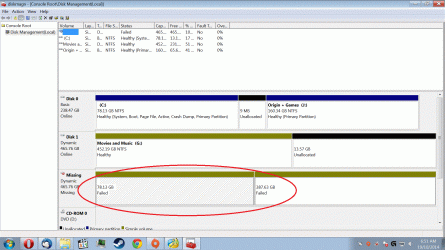
All of a sudden, the Steam and downloads partition has disappeared. dskmgnt can see it, but it says failed. I have tried to 'reactivate volume' but it does nothing.
Mini Disk partition wizard can see the partition also, but attempting to recover it will wipe all my steam data.

Are there any other tools I can use to try to recover this partition?

Thanks.
 

Attachments
  • nosteam.gif
    nosteam.gif
    298.7 KB · Views: 5

My Computer

Computer type
PC/Desktop
Computer Manufacturer/Model Number
Custom
OS
Windows 7 x64
CPU
i5k 3.50ghz
Motherboard
GA-BA-UD3A
Memory
8Gig
Graphics Card(s)
HD 6970
Sound Card
Asus Xonar
Screen Resolution
Dell S2440L
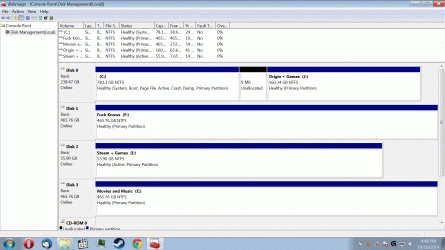
That may not be a partition but 2 partitions, usually means the HDD has failed. And it looks like it was a 500GB HDD. The image shows 3 HDDs with 3 partitions on the first and 2 partitions on each of the other HDDs.
 

My Computer

Computer type
PC/Desktop
Computer Manufacturer/Model Number
Customs, Dell, Gateway, HP, Toshiba, Acer, ASUS
OS
Windows 7 Ultimate 64-bit, Windows 8.1 64-bit, Mac OS X 10.10, Linux Mint 17, Windows 10 Pro TP
Keyboard
Microsoft
Mouse
Microsoft
Hi Berton

Thanks for your reply. The 500g drive was not plugged in correctly, it has been now and I can see that fine.

The steam partition is still missing. I have a 256g drive that I split in half. I then installed windows on one half, and steam and games on the other. Its the steam partition thats missing. The drive I spose is fine as I am talking to you through windows which is on that drive.....
 
Last edited:

My Computer

Computer type
PC/Desktop
Computer Manufacturer/Model Number
Custom
OS
Windows 7 x64
CPU
i5k 3.50ghz
Motherboard
GA-BA-UD3A
Memory
8Gig
Graphics Card(s)
HD 6970
Sound Card
Asus Xonar
Screen Resolution
Dell S2440L
Looks like someone converted Disks 1 and 2 to Dynamic disks which are meant only to span a partition across multiple HD's. Normally this happens only after a warning is given that one is about to exceed four Primary partitions which will convert the disk to Dynamic. Otherwise someone had to go out of their way to convert to Dynamic as it cannot be done accidentally.

The only way to convert back to Basic disk without destroying data is by performing Option 1 in http://www.sevenforums.com/tutorials/26829-convert-dynamic-disk-basic-disk.html?ltr=C using Partition Wizard's last version which offers conversion for free. Any other method will destroy the data so follow the steps closely, first for Disk1.

Once Disk 1 is recovered you can attempt to convert Disk2. If it fails after several attempts with PW you can try one of the other methods to see if it will both convert and recover. If not I would test the drive's condition using maker's HD Diagnostic followed by http://www.sevenforums.com/tutorials/433-disk-check.html. Report back results.
 
Last edited:
Well, Im not sure why, but a re jiggle on the cables, IE making all the IDE HDD's on one channel and all the SSD's on the other channel, seemed to have fixed the missing partitions.

Another question though, how can I make the smaller partitions join the larger ones having one big one?
 

My Computer

Computer type
PC/Desktop
Computer Manufacturer/Model Number
Custom
OS
Windows 7 x64
CPU
i5k 3.50ghz
Motherboard
GA-BA-UD3A
Memory
8Gig
Graphics Card(s)
HD 6970
Sound Card
Asus Xonar
Screen Resolution
Dell S2440L
Ok Greg.

Once I have copied the data across, I will convert the dick to basic. I will post a screenshot after this is complete.
 

My Computer

Computer type
PC/Desktop
Computer Manufacturer/Model Number
Custom
OS
Windows 7 x64
CPU
i5k 3.50ghz
Motherboard
GA-BA-UD3A
Memory
8Gig
Graphics Card(s)
HD 6970
Sound Card
Asus Xonar
Screen Resolution
Dell S2440L
Tell us what you want to change.

You should back up your data from the failing disk asap too.
 
Greg.

Is the disk failing? should I make a backup now?
 

Attachments

  • Heapsbetter.gif
    Heapsbetter.gif
    288 KB · Views: 3

My Computer

Computer type
PC/Desktop
Computer Manufacturer/Model Number
Custom
OS
Windows 7 x64
CPU
i5k 3.50ghz
Motherboard
GA-BA-UD3A
Memory
8Gig
Graphics Card(s)
HD 6970
Sound Card
Asus Xonar
Screen Resolution
Dell S2440L
Do you know how the disk had been converted to Dynamic? Are you just randomly playing with settings without concern for how close you came to losing everything?

Now you have a bunch of new disks thrown in. It looks correct but you must never have the Active flag on any but the System drive, so remove it from I now: Partition - Mark as Inactive - Windows 7 Forums

If you're worried about the disk that said it failed when it was converted to Dynamic then test it with the maker's HD Diagnostic CD scan, followed by a full http://www.sevenforums.com/tutorials/433-disk-check.html. This will tell you the certain condition of the drive.
 
Im pretty sure this is solved.

Thanks to all that helped especially gregrocker
 

My Computer

Computer type
PC/Desktop
Computer Manufacturer/Model Number
Custom
OS
Windows 7 x64
CPU
i5k 3.50ghz
Motherboard
GA-BA-UD3A
Memory
8Gig
Graphics Card(s)
HD 6970
Sound Card
Asus Xonar
Screen Resolution
Dell S2440L
Back
Top