
Solved Partition Drive:D

recycler

New member
Member
Local time
5:30 AM
Messages
81
Hi all

I am curious to know if i can partition the above named drive which contains my recovery partition.it is quite a large volume with a lot of free space.if so could somebody kindly"talk" me through the process.thank you in advance for any help offered.Disc Management.png
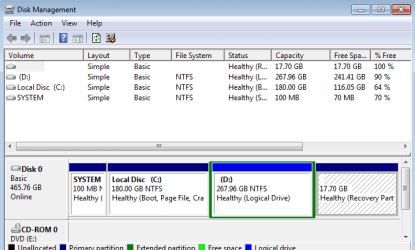
hope the screenshot is of some assistance.

recycler
 

My Computer

Computer type
Laptop
Computer Manufacturer/Model Number
Samsung S3510
OS
Windows 7 Home Premium 64Bit SP1
CPU
Intel Celeron T3500 @2.10Ghz
Motherboard
Samsung RV410/RV510/S3510/E3510 (U2E1)
Memory
3.00GB Dual ChanelDDR3 @398MHz (6-6-6-15)
Graphics Card(s)
Intel Mobile Intel 4 Series Express Chipset Family
Hard Drives
465GB Western Digital WDC WD 5000BEVT-35 Aorto (SATA)
931 GB Samsung HD 103 SI USB Device (USB (SATA)
Antivirus
McAfee Livesafe
Browser
Google Chrome
D is a logical drive within an extended partition and you can carve it up into a dozen or more smaller drives if you want.

I don't use logical drives, but I'd assume you can do it in a normal manner by using menus from the "action" menu, or probably with a right click on D itself. You'll probably see choices such as "shrink volume", which would create some unallocated space, and then you'd turn that unallocated space into a logical drive, also from menus.

Your recovery partition is NOT part of D as near as I can tell. It's separate.
 

My Computer

Computer type
PC/Desktop
Computer Manufacturer/Model Number
Ignatz Special; 4 speed manual gearbox; factory air conditioning; one of one
OS
Windows 7 Home Premium SP1, 64-bit
CPU
Intel Skylake i5-6600K, not overclocked
Motherboard
AsRock Z170M Extreme 4, micro ATX
Memory
8 GB HyperX DDR4-2666 (2 x 4 GB)
Graphics Card(s)
none; graphics are integrated on CPU
Sound Card
onboard: Realtek ALC1150; external: USB Behringer UF0-202
Monitor(s) Displays
Dell S2340M 23 inch IPS
Screen Resolution
1600 x 900
Hard Drives
System: Crucial MX100 series SSD, 128 GB;
Data: Samsung Spinpoint 103SJ, 1 TB;
Backup: WD Caviar Green WD30EZRX-00D8PB0, 3 TB
PSU
Rosewill SilentNight 500 watt fanless, semi-modular
Case
Antec Solo II
Cooling
Noctua NH-U12S; Noctua F12 intake, Noctua S12A exhaust
Keyboard
Microsoft 200 6JH-00001 USB
Mouse
Dell or Microsoft optical wired; USB
Antivirus
Microsoft Security Essentials and Malwarebytes Premium
Browser
Pale Moon
Other Info
All fans PWM; speeds at idle: CPU circa 500 rpm; intake circa 600 rpm; exhaust circa 600 rpm; CPU temps 27 idle and 47 C load in a warm room (27 C/81 F) when running Intel Extreme Tuning Utility stress test.
Exactly what is it that you want to see after the re-partitioning is done? System Reserved we agree cannot be touched. I vote to leave C partition as is, you have room to add more programs as needed. Would you like to have your D partition merge with what is now the Recovery partition, thus ending up with a larger D partition?
 

My Computer

Computer type
PC/Desktop
Computer Manufacturer/Model Number
Antec desktop; Acer Aspire laptops
OS
Windows 7 Professional 64-bit
CPU
Desktop i5; Acers i5 & i7
Memory
desktop 16GB; 1 Acer 8GB & 1 Acer 16GB
Hard Drives
1TB split into 2 equal partitions [OS and data] usable by RJS
Internet Speed
AT&T DSL
Browser
FF, GChrome, msIE
Other Info
Windows 7 Firewall, Emsisoft AM/AV, MSE [scan-only], SpywareBlaster, Ruiware/BillP combine
hi to the forum

thank you guys ignatzatsonic and rolandjs for your very speedy replies it is most appreciated.what i was really interested in doing is basically creating some extra storage space for pics,music etc.if i understand things correctly i would not be touching "C" drive.what i meant is there's 240 odd GB's of space there (on D) and basically i would like to utilise it as needed without doing any damage elsewhere.does that make sense at all?

your views are most appreciated.

recycler
 

My Computer

Computer type
Laptop
Computer Manufacturer/Model Number
Samsung S3510
OS
Windows 7 Home Premium 64Bit SP1
CPU
Intel Celeron T3500 @2.10Ghz
Motherboard
Samsung RV410/RV510/S3510/E3510 (U2E1)
Memory
3.00GB Dual ChanelDDR3 @398MHz (6-6-6-15)
Graphics Card(s)
Intel Mobile Intel 4 Series Express Chipset Family
Hard Drives
465GB Western Digital WDC WD 5000BEVT-35 Aorto (SATA)
931 GB Samsung HD 103 SI USB Device (USB (SATA)
Antivirus
McAfee Livesafe
Browser
Google Chrome
Yes, that makes sense.

You need to shrink D, which creates unallocated space, otherwise known as free space. You then make a new partition from that free space and format it and give it a drive letter, presumably E.

You do that from menus, as I stated in earlier post.

C and your recovery partition would be unaffected.

You can choose how much to shrink D from the menus.

You could use a third party program such as Partition Wizard to do it, but i don't think you have to do that.
 

My Computer

Computer type
PC/Desktop
Computer Manufacturer/Model Number
Ignatz Special; 4 speed manual gearbox; factory air conditioning; one of one
OS
Windows 7 Home Premium SP1, 64-bit
CPU
Intel Skylake i5-6600K, not overclocked
Motherboard
AsRock Z170M Extreme 4, micro ATX
Memory
8 GB HyperX DDR4-2666 (2 x 4 GB)
Graphics Card(s)
none; graphics are integrated on CPU
Sound Card
onboard: Realtek ALC1150; external: USB Behringer UF0-202
Monitor(s) Displays
Dell S2340M 23 inch IPS
Screen Resolution
1600 x 900
Hard Drives
System: Crucial MX100 series SSD, 128 GB;
Data: Samsung Spinpoint 103SJ, 1 TB;
Backup: WD Caviar Green WD30EZRX-00D8PB0, 3 TB
PSU
Rosewill SilentNight 500 watt fanless, semi-modular
Case
Antec Solo II
Cooling
Noctua NH-U12S; Noctua F12 intake, Noctua S12A exhaust
Keyboard
Microsoft 200 6JH-00001 USB
Mouse
Dell or Microsoft optical wired; USB
Antivirus
Microsoft Security Essentials and Malwarebytes Premium
Browser
Pale Moon
Other Info
All fans PWM; speeds at idle: CPU circa 500 rpm; intake circa 600 rpm; exhaust circa 600 rpm; CPU temps 27 idle and 47 C load in a warm room (27 C/81 F) when running Intel Extreme Tuning Utility stress test.
Thank you very much indeed ignatzatsonic for your very fast and helpful reply.you certainly have described it very clearly indeed.if you can leave it with me for a few days (other stuff goin on) i will check it out and get back to you probably in a new thread.many thanks again man.

kudos

recycler:D
 

My Computer

Computer type
Laptop
Computer Manufacturer/Model Number
Samsung S3510
OS
Windows 7 Home Premium 64Bit SP1
CPU
Intel Celeron T3500 @2.10Ghz
Motherboard
Samsung RV410/RV510/S3510/E3510 (U2E1)
Memory
3.00GB Dual ChanelDDR3 @398MHz (6-6-6-15)
Graphics Card(s)
Intel Mobile Intel 4 Series Express Chipset Family
Hard Drives
465GB Western Digital WDC WD 5000BEVT-35 Aorto (SATA)
931 GB Samsung HD 103 SI USB Device (USB (SATA)
Antivirus
McAfee Livesafe
Browser
Google Chrome
Recycler:

You ought to at least consider why you need another partition.

Maybe it's easily justifiable; maybe not.

Generally---it's a good idea to minimize the number of partitions because more partitions increase the chance on running out of space on any given partition. You can never accurately estimate the growth rate of the occupied space within a partition and you are likely to run out of space sooner than your estimate on at least one partition. That's a pain to deal with.

You might be better served by just making a new folder within D and using it to store whatever you anticipate putting on this new partition under consideration.
 

My Computer

Computer type
PC/Desktop
Computer Manufacturer/Model Number
Ignatz Special; 4 speed manual gearbox; factory air conditioning; one of one
OS
Windows 7 Home Premium SP1, 64-bit
CPU
Intel Skylake i5-6600K, not overclocked
Motherboard
AsRock Z170M Extreme 4, micro ATX
Memory
8 GB HyperX DDR4-2666 (2 x 4 GB)
Graphics Card(s)
none; graphics are integrated on CPU
Sound Card
onboard: Realtek ALC1150; external: USB Behringer UF0-202
Monitor(s) Displays
Dell S2340M 23 inch IPS
Screen Resolution
1600 x 900
Hard Drives
System: Crucial MX100 series SSD, 128 GB;
Data: Samsung Spinpoint 103SJ, 1 TB;
Backup: WD Caviar Green WD30EZRX-00D8PB0, 3 TB
PSU
Rosewill SilentNight 500 watt fanless, semi-modular
Case
Antec Solo II
Cooling
Noctua NH-U12S; Noctua F12 intake, Noctua S12A exhaust
Keyboard
Microsoft 200 6JH-00001 USB
Mouse
Dell or Microsoft optical wired; USB
Antivirus
Microsoft Security Essentials and Malwarebytes Premium
Browser
Pale Moon
Other Info
All fans PWM; speeds at idle: CPU circa 500 rpm; intake circa 600 rpm; exhaust circa 600 rpm; CPU temps 27 idle and 47 C load in a warm room (27 C/81 F) when running Intel Extreme Tuning Utility stress test.
that is just amazing ignatzatsonic.i was considering asking the forum if i could just save stuff to the drive without all this agro basically.thank you again for clearing that up.i will just create the folder because i was unsure at first about saving to the drive.great weight lifted thank you so much once again man.kudos to you.

recycler:roflmao:
 

My Computer

Computer type
Laptop
Computer Manufacturer/Model Number
Samsung S3510
OS
Windows 7 Home Premium 64Bit SP1
CPU
Intel Celeron T3500 @2.10Ghz
Motherboard
Samsung RV410/RV510/S3510/E3510 (U2E1)
Memory
3.00GB Dual ChanelDDR3 @398MHz (6-6-6-15)
Graphics Card(s)
Intel Mobile Intel 4 Series Express Chipset Family
Hard Drives
465GB Western Digital WDC WD 5000BEVT-35 Aorto (SATA)
931 GB Samsung HD 103 SI USB Device (USB (SATA)
Antivirus
McAfee Livesafe
Browser
Google Chrome
Many of us use "d drive" as d for data :) I was interested in whether you wanted to make the Recovery Partition part of D partition, however, once that happens, there is no more Factory Recovery possible.
 

My Computer

Computer type
PC/Desktop
Computer Manufacturer/Model Number
Antec desktop; Acer Aspire laptops
OS
Windows 7 Professional 64-bit
CPU
Desktop i5; Acers i5 & i7
Memory
desktop 16GB; 1 Acer 8GB & 1 Acer 16GB
Hard Drives
1TB split into 2 equal partitions [OS and data] usable by RJS
Internet Speed
AT&T DSL
Browser
FF, GChrome, msIE
Other Info
Windows 7 Firewall, Emsisoft AM/AV, MSE [scan-only], SpywareBlaster, Ruiware/BillP combine
hi rolandjs thank you for your post. i never intended to mess with anything i dont know enough about.that certainly includes recovery partition.i thank you sincerely for your advice on this matter and for removing any (potential) temptation.may i offer my sincere thanks to ignatzatsonic also for all the super clear advice.i have now the option of extra space if needed.i am marking this thread solved with the greatest of thanks.

recycler
 

My Computer

Computer type
Laptop
Computer Manufacturer/Model Number
Samsung S3510
OS
Windows 7 Home Premium 64Bit SP1
CPU
Intel Celeron T3500 @2.10Ghz
Motherboard
Samsung RV410/RV510/S3510/E3510 (U2E1)
Memory
3.00GB Dual ChanelDDR3 @398MHz (6-6-6-15)
Graphics Card(s)
Intel Mobile Intel 4 Series Express Chipset Family
Hard Drives
465GB Western Digital WDC WD 5000BEVT-35 Aorto (SATA)
931 GB Samsung HD 103 SI USB Device (USB (SATA)
Antivirus
McAfee Livesafe
Browser
Google Chrome
Back
Top