I've got a 320GB drive that came from the factory as such
3 partitions defined ( 199MB System, 2XXGB Primary, 13GB RECOVERY )
The 2XXGB one took all remaining space.
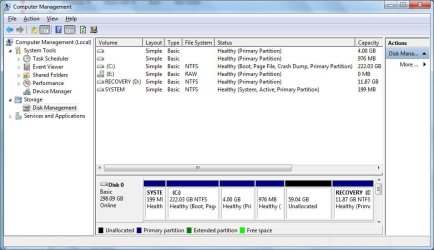
I shrunk the 2XXGB one by taking 65GB out of it, which left the same above with 65GB unallocated ( see below for the position of the unallocate space on the disk ).
I then created a small 4GB partition and 1GB partition for Linux fun testing. Now, I need to use more of the 60 GB that are still free, but can't because I get the message that I cannot create a new volume because I've reached MAX number volumes already.
Searching around, I've found that what I really have is 3 Primary partitions and 1 Extended Partition ( holds two logical partitions: 4GB and 1GB linux fun stuff ). What I need to do is continue adding logical partitions to the extended partition, but can't find a way to extend the extended partition into the unallocated space, which is directly to the right of it in disk management view. It seems this should be possible, but I can't find a way.
I've tried with the GUI, no luck as extend is not selectable in the menu. I've tried with the diskpart to "create logical partition size=4096, etc, but have had zero luck with it.
Please let me know how I can create additional partitions/logical drives/anything something that I can then format and use with an OS.
Here's my current configs:
DISKPART> list disk
Disk ### Status Size Free Dyn Gpt
-------- ------------- ------- ------- --- ---
* Disk 0 Online 298 GB 1024 KB
DISKPART> list partition
Partition ### Type Size Offset
------------- ---------------- ------- -------
Partition 1 Primary 199 MB 1024 KB
Partition 2 Primary 222 GB 200 MB
Partition 0 Extended 5073 MB 222 GB
Partition 4 Logical 4096 MB 222 GB
Partition 5 Logical 976 MB 226 GB
Partition 3 Primary 11 GB 286 GB
DISKPART> list volume
Volume ### Ltr Label Fs Type Size Status Info
---------- --- ----------- ----- ---------- ------- --------- --------
Volume 0 E RAW DVD-ROM 2048 B Healthy
Volume 1 SYSTEM NTFS Partition 199 MB Healthy System
Volume 2 C NTFS Partition 222 GB Healthy Boot
Volume 3 D RECOVERY NTFS Partition 11 GB Healthy
The layout depicted on the GUI in Windows7 shows things like this, in this order:
SYSTEM 199MB Healthy ( SYSTEM, Active, Primary Partition )
C: 222.03 GB Healthy ( Boot, Page File, Crash Dump, Primary Partition )
no label 4GB Healthy ( Primary Partition )
no label 1GB Healthy ( Primary Partition )
no label 59.04 GB Unallocated
RECOVERY ( D: ) 11.87 GB NTFS Healthy ( Primary Partition )
The ubuntu disk management shows the above first two "no label" entries as being a member of an extended partition and this seems to be reflected in the diskpart output above.
What to do? Thanks in advance, all comments welcome.
Thanks
-unix
3 partitions defined ( 199MB System, 2XXGB Primary, 13GB RECOVERY )
The 2XXGB one took all remaining space.
I shrunk the 2XXGB one by taking 65GB out of it, which left the same above with 65GB unallocated ( see below for the position of the unallocate space on the disk ).
I then created a small 4GB partition and 1GB partition for Linux fun testing. Now, I need to use more of the 60 GB that are still free, but can't because I get the message that I cannot create a new volume because I've reached MAX number volumes already.
Searching around, I've found that what I really have is 3 Primary partitions and 1 Extended Partition ( holds two logical partitions: 4GB and 1GB linux fun stuff ). What I need to do is continue adding logical partitions to the extended partition, but can't find a way to extend the extended partition into the unallocated space, which is directly to the right of it in disk management view. It seems this should be possible, but I can't find a way.
I've tried with the GUI, no luck as extend is not selectable in the menu. I've tried with the diskpart to "create logical partition size=4096, etc, but have had zero luck with it.
Please let me know how I can create additional partitions/logical drives/anything something that I can then format and use with an OS.
Here's my current configs:
DISKPART> list disk
Disk ### Status Size Free Dyn Gpt
-------- ------------- ------- ------- --- ---
* Disk 0 Online 298 GB 1024 KB
DISKPART> list partition
Partition ### Type Size Offset
------------- ---------------- ------- -------
Partition 1 Primary 199 MB 1024 KB
Partition 2 Primary 222 GB 200 MB
Partition 0 Extended 5073 MB 222 GB
Partition 4 Logical 4096 MB 222 GB
Partition 5 Logical 976 MB 226 GB
Partition 3 Primary 11 GB 286 GB
DISKPART> list volume
Volume ### Ltr Label Fs Type Size Status Info
---------- --- ----------- ----- ---------- ------- --------- --------
Volume 0 E RAW DVD-ROM 2048 B Healthy
Volume 1 SYSTEM NTFS Partition 199 MB Healthy System
Volume 2 C NTFS Partition 222 GB Healthy Boot
Volume 3 D RECOVERY NTFS Partition 11 GB Healthy
The layout depicted on the GUI in Windows7 shows things like this, in this order:
SYSTEM 199MB Healthy ( SYSTEM, Active, Primary Partition )
C: 222.03 GB Healthy ( Boot, Page File, Crash Dump, Primary Partition )
no label 4GB Healthy ( Primary Partition )
no label 1GB Healthy ( Primary Partition )
no label 59.04 GB Unallocated
RECOVERY ( D: ) 11.87 GB NTFS Healthy ( Primary Partition )
The ubuntu disk management shows the above first two "no label" entries as being a member of an extended partition and this seems to be reflected in the diskpart output above.
What to do? Thanks in advance, all comments welcome.
Thanks
-unix
My Computer
- OS
- windows 7