Partition Magic

Anderson2

New member
Power User
Local time
6:33 PM
Messages
188
My new laptop is coming soon with Windows 7 Home Premium preinstalled. Until now I have used Partition Magic version 8 to divide my HD into system and data partitions for easier backups in XP. Anyone know if PM 8 will work safely in W 7 or will I need to upgrade it?
Any built-in utilities to do the same (partition non-destructively) in W 7 or any free utilities that work in W 7?
Thanks
 

My Computer

OS
Windows 7
Disk managment inside windows itself, or GParted is freeware
 

My Computer

Computer type
PC/Desktop
OS
Windows 7 Ultimate x64
CPU
i7 4770
Motherboard
MSI Z87 Mpower
Memory
16GB corsair vengenance
Graphics Card(s)
Palit GT640
Sound Card
MOTU Ultralite mk3 hybrid
Monitor(s) Displays
AOC
Screen Resolution
1024x768
Hard Drives
1) 1tb
PSU
850w
Keyboard
Microsoft Fingerprint Keyboard
Internet Speed
10MBs
Other Info
COMPTIA A+ Certified
My new laptop is coming soon with Windows 7 Home Premium preinstalled. Until now I have used Partition Magic version 8 to divide my HD into system and data partitions for easier backups in XP. Anyone know if PM 8 will work safely in W 7 or will I need to upgrade it?
Any built-in utilities to do the same (partition non-destructively) in W 7 or any free utilities that work in W 7?
Thanks
Here is a brief tutorial on using GParted

http://www.sevenforums.com/software/22723-hard-drive-partitions-changing-gparted.html

Cheers!
Robert
 

My Computer

OS
...
My new laptop is coming soon with Windows 7 Home Premium preinstalled. Until now I have used Partition Magic version 8 to divide my HD into system and data partitions for easier backups in XP. Anyone know if PM 8 will work safely in W 7 or will I need to upgrade it?
Any built-in utilities to do the same (partition non-destructively) in W 7 or any free utilities that work in W 7?
Thanks
Hi Anderson2,

Did you see my reply re: PM8 on your other thread? Let me know if it was unclear or if you have other questions. The partitioning software alternatives provided here are also great.

Cheers,

Walker
Windows Outreach Team
 

My Computer

Computer Manufacturer/Model Number
HP Pavilion dm3 (netbook) *** 27" iMac (Dual-Boot)
OS
Windows 7 Home Premium (64-bit) *** Windows XP SP3 (32-bit), OSX 10.6
CPU
AMD Athlon Neo X2 1.6GHz *** Intel Core i7 Quad Core 2.8GHz
Memory
4.00 GB *** 4.00 GB
Graphics Card(s)
ATI Radeon HD 3200, 384MB *** ATI Radeon HD 4850, 1GB
Sound Card
ATI High Definition Audio *** ATI High Definition Audio
Monitor(s) Displays
LG Flatron W2053TX
Screen Resolution
1600 x 900 (monitor), 1266 x 768 (laptop) *** 2560 x 1440
Hard Drives
300 GB SATA (internal), 500 GB HP SimpleSave (external) *** 1 TB SATA (internal), 160 GB LaCie (external)
Mouse
Logitech Cordless Optical Mouse for Notebooks
Internet Speed
Broadband
Thanks for the response - and for the reference to the other thread.

For better or worse my new laptop is coming with the 64 bit version of W 7 Home Premium. Sounds like Partition Magic is a no-no in W7 so I need to find an alternative.

My new laptop will come with W 7 pre-installed on a 500 MB HD. I like to keep my data on a separate partition from the system (easier backups and restore for one) which is why I was inquiring about PM. I need a non destructive way to create a new data partition from what I expect will be a single partition install in 64 bit W 7. Can W7's built-in HD utility create or resize another partition from the partition on which it is already installed?

Easus's free software only works for 32 bit W 7. I'll check to see if its paid versions can handle 64 bit safely.

(On the same theme, does W 7's built-in backup utility create an "image" backup capable of restoring a destroyed *system* partition or will I need a separate utility because W 7's utility just does a file backup?)
 

My Computer

OS
Windows 7
Thanks for the response - and for the reference to the other thread.

For better or worse my new laptop is coming with the 64 bit version of W 7 Home Premium. Sounds like Partition Magic is a no-no in W7 so I need to find an alternative.

My new laptop will come with W 7 pre-installed on a 500 MB HD. I like to keep my data on a separate partition from the system (easier backups and restore for one) which is why I was inquiring about PM. I need a non destructive way to create a new data partition from what I expect will be a single partition install in 64 bit W 7. Can W7's built-in HD utility create or resize another partition from the partition on which it is already installed?

Easus's free software only works for 32 bit W 7. I'll check to see if its paid versions can handle 64 bit safely.

(On the same theme, does W 7's built-in backup utility create an "image" backup capable of restoring a destroyed *system* partition or will I need a separate utility because W 7's utility just does a file backup?)
Anderson2;

I have used Partition Magic for 20 years, but the time came to move on. GParted is a complete utility, I use it with both my 32 bit and 64 bit 7 computers.

I downloaded the free Partition Wizard and found it to be similar to GParted except for its limitation to Fat32 and NTFS files systems. If one was only interested in Windows that is not an issue. Also 32 bit and 64 bit compatible.

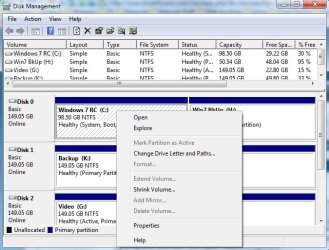
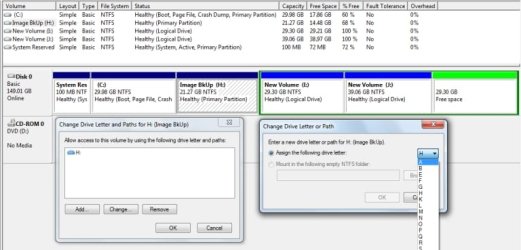
The Windows 7 Disk Management utility includes some convenient features and is missing other import ones. You are able to shrink the C: drive and create new partitions, format, and assign a drive letters.
disk_manage_00.jpg

diskManagement_01.jpg

It may serve your purpose at the start, but later you will need a more complete utility.

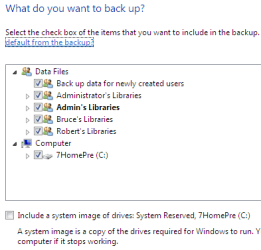
The Windows 7 Backup and Image utility is likewise convenient, but many here have expressed their preferences for the features of other software. I have used the opensource Clonezilla successfully, and as I also use Linux it serves all my needs. I have placed a link underneath my signature.

backup_01.png

backup_02.png

You are able to restore the "Image" from the 7 DVD, the Repair CD, or through the 100 MB System Partition if 7 is allowed to create that during installation.

 

My Computer

OS
...

My Computer

Computer Manufacturer/Model Number
HP Pavilion p6218f
OS
Windows 7 Home Premium 64-bit
CPU
AMD Athlon II X3 Triple Core
Motherboard
FOXCONN ALOE
Memory
8GB DDR3
Graphics Card(s)
ATI Radeon HD 4650 (1GB)
Monitor(s) Displays
Dual Monitor: Benq G2410HD (23.6") & Dell 1708FP (17")
Screen Resolution
1920 x 1080 & 1280 x 1024
Hard Drives
Internal: 1TB Western Digital Green, 32MB cachce
External: 500GB Western Digital Green, 32MB cache
PSU
300W
Keyboard
Logitech Access 600
Mouse
Logitech
Internet Speed
Cable - varies
Thank you Iseeuu for that excellent and complete reply. Very helpful indeed.
And thank you Ryan 7. It is good to know that it works fine in 64 too.
 
Last edited:

My Computer

OS
Windows 7
Thank you Iseeuu for that excellent and complete reply. Very helpful indeed.
And thank you Ryan 7. It is good to know that it works fine in 64 too.
You are quite welcome! We are all here to help, if we can.

Happy surfing!
Robert
 

My Computer

OS
...
Back
Top