Partition management

addicted

New member
Local time
1:29 AM
Messages
5
Location
Jordan
Hi all , i am a new member here just singed up hope i will be a benifit for this site as i will demand help from all .

Anyway , i dont know if its the right place to start my thread ( feel free mods to move it to the right place ) , i want to ask you for a help which i really need urgently and here is my problem :


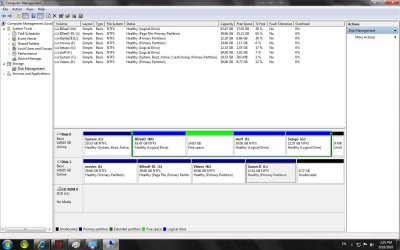
I am having a problem with C drive ( system ) size , there is no space to install any program ( 250 mb ) and this drives me crazy , i need to merge or resize the drive without losing any installed progams or formatting , tried DM panel which gave me the chance to shrink a partition and get free unallocated 10 GB to add for drive C and thats the problem , i just cant expand it.
I have 2 HDD's , Sata 150 GB in which the C partition is and WD 150 GB in which the unallocated space lies.
Any kind of help will be appreciated and thank you in advance .

regards ;
Mohammed
 

My Computer

Computer Manufacturer/Model Number
Home made
OS
Windows 7 ultimate
CPU
Core 2 Duo @ 3.00 Ghz
Motherboard
Intel
Memory
2.00 GB
Graphics Card(s)
GF 8500 GT 1.00 GB
Monitor(s) Displays
Samsung 21 inch wide screen
Hard Drives
Sata 150 GB
WD 150 GB
Keyboard
Microsoft Curve
Mouse
Microsoft Gaming
Internet Speed
1 Mb

My Computer

Computer Manufacturer/Model Number
Home made
OS
Windows 7 ultimate
CPU
Core 2 Duo @ 3.00 Ghz
Motherboard
Intel
Memory
2.00 GB
Graphics Card(s)
GF 8500 GT 1.00 GB
Monitor(s) Displays
Samsung 21 inch wide screen
Hard Drives
Sata 150 GB
WD 150 GB
Keyboard
Microsoft Curve
Mouse
Microsoft Gaming
Internet Speed
1 Mb

My Computers

System One System Two

  • Computer type
    PC/Desktop
    Computer Manufacturer/Model Number
    ChillBlast - Custom to my design
    OS
    Windows 11 Pro x64 [Latest Release and Release Preview]
    CPU
    Ryzen 9 5950X, 3.8 - 5.2 MHz
    Motherboard
    Asus Prime X570-Pro
    Memory
    64GB [2 x 32GB] DDR4 3200MHz
    Graphics Card(s)
    4GB NVIDIA GEFORCE GTX 1650 Ti
    Sound Card
    On-board SPDIF to 5.1 System + HDMI [5.1 system]
    Monitor(s) Displays
    32" UHD 32 Bit HDR Monitor + 43" UHD 4K 32Bit HDR TV
    Screen Resolution
    2 x 3840 x 2160 @60Hz
    Hard Drives
    1TB M2 SSD OS, 500GB Fast Access SSD, 2 x 8TB Data + Various Externals from 1TB to 4TB, 10TB NAS
    PSU
    NZXT C750 80 PLUS Gold 750W Modular PSU
    Case
    Workstation Case [Matt Black]
    Cooling
    NZXT Kraken X63 280mm CPU Cooler +2x Quiet Case fans
    Keyboard
    Logitech Wireless MX Keys & K400 + others
    Mouse
    Logitech Wireless MX Master 3S
    Internet Speed
    920 MB Down 50 MB Up
    Antivirus
    BitDefender Total Security Pro
    Browser
    Chrome (always run latest Non-Beta)
    Other Info
    Also run ...
    Laptop - Quad 8GB - Windows 10 Pro x64
    Nexus 7 Android tablet x2
    Samsung 10.2" tablet
    Blackview TAB 8 4G Android Tablet c/w Keyboard
    Wacom Intuos Pro Medium Pen Pad
    Wacom Intuos Pro Small Pen Pad
    Wacom Expresskeys Remote
    Loopdeck+ Graphics Controller
    Shuttle Pro v2 Control
  • Computer type
    Laptop
    System Manufacturer/Model Number
    Dell XPS 17 10750H
    OS
    Windows 11 Pro x64 Latest RP
    CPU
    Intel I7 10750H 5.0GHz
    Motherboard
    Dell XPS
    Memory
    32GB [2x16GB] DDR4 2933 MHz
    Graphics Card(s)
    nVidia GTX1650Ti 4 GB GDDR6
    Sound Card
    Stock [Realtek] 4 Speaker
    Monitor(s) Displays
    17" IPS UHD+ Infinity Edge Touchscreen
    Screen Resolution
    3840 x 2400
    Hard Drives
    2TB M2 NVMe, 4TB External + various 500GB & 1TB External NVMe (also have access to spinner HDD from
    PSU
    Stock
    Case
    Stock XPS Aluminium & Carbon Fibre
    Cooling
    Stock - Active Fan Control
    Keyboard
    Backlit + Various Logitech
    Mouse
    Stock Track Pad + Logitech MX Trackball
    Internet Speed
    72 MB Down 18MB Up
    Browser
    Chrome
    Other Info
    Also run ...
    Laptop - Quad 8GB - Windows 10 Pro x64
    Nexus 7 Android tablet x2
    10.2" tablet
    Sony Z3 Android Smartphone
    Wacom Intuos Pro Medium Pen Pad
    Wacom Intuos Pro Small Pen Pad
    Wacom Expresskeys Remote
    Loopdeck+ Graphics Controller
    Shuttle Pro v2 Control Pad
    10TB NAS

My Computer

Computer Manufacturer/Model Number
Home made
OS
Windows 7 ultimate
CPU
Core 2 Duo @ 3.00 Ghz
Motherboard
Intel
Memory
2.00 GB
Graphics Card(s)
GF 8500 GT 1.00 GB
Monitor(s) Displays
Samsung 21 inch wide screen
Hard Drives
Sata 150 GB
WD 150 GB
Keyboard
Microsoft Curve
Mouse
Microsoft Gaming
Internet Speed
1 Mb
Please do not discuss illegal cracks here as this is a legit site.

Post back a Disk Mgmt screenshot of your full drive map and listings, using Snipping Tool in STart Menu, attach file using Paper Clip in Reply box. Tell us exactly what you want to do, then we can give you the steps. .

If you want to expand your C: partition to take up any remaining space on the HD, then you have to back up data and delete the partitions adjacent to it first, then use Disk Mgmt to extend C to the right, or a 3rd party partition manager to extend/resize to the left.
 
addicted,

To second what Greg said, in all aspects.

Please use the Snipping Tool to make a snapshot of DiskManagement output.

Be sure to maximize the DiskManagement output before making the "snip".
 

My Computer

Computer Manufacturer/Model Number
Toshiba Satellite S875D-S7239 laptop
OS
MS Windows 7 Ultimate SP1 64-bit
CPU
AMD A10-4600M
Motherboard
AMD Pumori (Socket FT1)
Memory
6.00 GB Dual-Channel DDR3 @ 798MHz (11-11-12-28)
Graphics Card(s)
AMD Radeon HD 7660G
Sound Card
High Definition Audio Device
Monitor(s) Displays
Generic PnP Monitor (1600x900@60Hz)
Screen Resolution
1600x900@60Hz
Hard Drives
SSD 119GB Corsair CSSD-V128GB2 ATA Device
Keyboard
Standard PS/2 Keyboard
Mouse
HP Wireless Optical Mobile Mouse Model FHA-3410
Internet Speed
What the local pub, local coffee shop offers.
Other Info
Optical Drive:MATSHITA BD-CMB UJ160B ATA Device


Also have an Asus ha1002xp netbook with Win 7 Ultimate installed.
addicted,

To second what Greg said, in all aspects.

Please use the Snipping Tool to make a snapshot of DiskManagement output.

Be sure to maximize the DiskManagement output before making the "snip".


sorry for discussing the cracked program.
 

Attachments

  • DM.jpg
    DM.jpg
    126.5 KB · Views: 29

My Computer

Computer Manufacturer/Model Number
Home made
OS
Windows 7 ultimate
CPU
Core 2 Duo @ 3.00 Ghz
Motherboard
Intel
Memory
2.00 GB
Graphics Card(s)
GF 8500 GT 1.00 GB
Monitor(s) Displays
Samsung 21 inch wide screen
Hard Drives
Sata 150 GB
WD 150 GB
Keyboard
Microsoft Curve
Mouse
Microsoft Gaming
Internet Speed
1 Mb
The problem is that your available space is in the middle of an extended Logical partition and therefore not available to C: for resizing into.

There are two ways to do what you want:

1) Move the data off the extended Logical partition parts M,F and G, then delete the entire extended Logical partition in Disk Management. Now extend C: into the unallocated space created. You may also create another data partition in the space if you wish. http://www.sevenforums.com/tutorials/2670-partition-volume-extend.html

2) To avoid moving the data off, use free Partition Wizard bootable CD to Modify>Convert to Primary the extended Logical partition, click OK. Now rightclick on converted partition to Resize, slide left grey border to the right to make enough room to extend C: as you wish, click OK. Finally, rightclick C and Resize by dragging right border to the right to cover all of the empty space you just created, OK. Apply all steps.
 
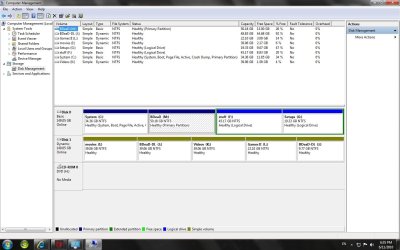
thanks to all who tried to help , i finally managed to do what i wanted to do

i had to free the partition next to C and merged it using free partition wizard without losing any data here is the result :
 

Attachments

  • DM modified.jpg
    DM modified.jpg
    122.2 KB · Views: 14

My Computer

Computer Manufacturer/Model Number
Home made
OS
Windows 7 ultimate
CPU
Core 2 Duo @ 3.00 Ghz
Motherboard
Intel
Memory
2.00 GB
Graphics Card(s)
GF 8500 GT 1.00 GB
Monitor(s) Displays
Samsung 21 inch wide screen
Hard Drives
Sata 150 GB
WD 150 GB
Keyboard
Microsoft Curve
Mouse
Microsoft Gaming
Internet Speed
1 Mb
Back
Top