Partition - Mark as Active

How to Mark a Partition as Active in Windows 7

Contents


   Information
Marking a partition as active on a basic disk means that the computer will use the loader (an operating system tool) on that partition to start the operating system.


At various times the need to mark a partition as active arises. This will show you two ways of doing so.
   Note

  • You must be logged on as an administrator to mark a partition as active.
  • You can't make a logical drive or an extended partition active. Only a primary partition can be made active.
  • There can be only one active partition per physical hard disk.
  • If you have multiple hard disks installed on your computer, it's possible for each hard disk to have a partition set as active. However, the active partition on the first hard disk that your computer's BIOS detects is the one that will start the computer.
   Warning
Do not mark a partition as active if it doesn't contain the loader for an operating system. Doing so will make your computer unbootable.

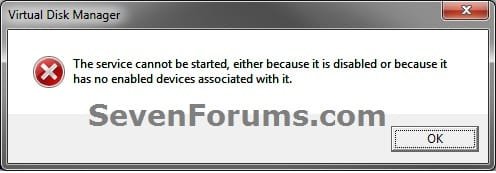
If you disable the Disk Defragmenter service, then you will get the error below when you try to do anything in Disk Management. If you get this error, then make sure that the Disk Defragmenter service is set to only Manual.
Error.jpg


METHOD ONE

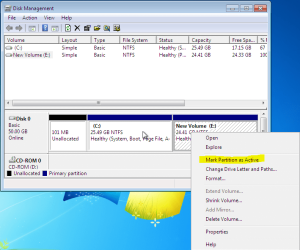
Mark as Active in Disk Management

1. Type diskmgmt.msc into the start menu, and press enter.

2. Right click on the partition you want to mark as active, and select Mark Partition as Active.
Capture.PNG
That's it!

If you can't boot into Windows, use method 2.


METHOD TWO

Mark as Active in Command Prompt

1. Boot into your Windows 7 installation or repair disc.

   Tip
If you don't have a Windows 7 installation DVD, you can Create a Repair Disc.


2. When you get to the language screen, press Shift+F10.


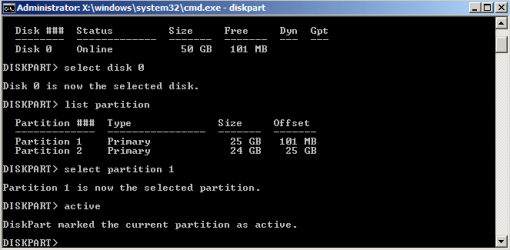
3. Enter diskpart, then list disk after diskpart is loaded.


4. Enter select disk [number of the disk the partition is on].


5. Enter list partition, followed by select partition [partition number].


6. Type active.Capture1.PNG
There you go! You can now close the command prompt and reboot your computer.
   Tip
You can also use this method from within Windows. Type cmd into the start menu and press enter.


METHOD THREE

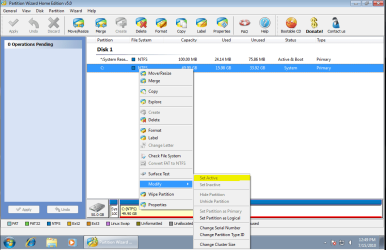
Mark as Active in Partition Wizard

1. Download a copy of the Partition Wizard Bootable CD.

2. Boot it up, right-click on the partition, and select Modify>Set Active.
PWIZ.PNG


Last edited by a moderator:
What are you trying to do here? I assume marking the partition as active is not your end goal; perhaps we can get to the root of the matter without worrying about a System label.
 

My Computer

Computer Manufacturer/Model Number
Custom
OS
Windows 7 Professional x64
CPU
Intel i7 2600K OC'd @ 4620 MHz
Motherboard
Asus P8Z68-V Pro
Memory
16GB GSkill Sniper 2133 Mhz (4x4GB)
Graphics Card(s)
EVGA GeForce GTX 480 SuperClocked+
Sound Card
Realtek High Definition Audio
Monitor(s) Displays
2x Acer S273HLbmii 27"
Screen Resolution
2 x 1920x1080
Hard Drives
64GB Crucial M4 SSD

Storage: Hitachi 1TB 5400RPM, Samsung 1.5TB 5400RPM
PSU
Corsair HW Series 750w (modular)
Case
Cooler Master HAF 932 Advanced Blue Edition
Cooling
CM Hyper 212+ CPU cooler, 3x 230mm + 1x 140mm case fans
Keyboard
Logitech MK320 (wireless)
Mouse
Logitech MK320 (wireless)
Internet Speed
30 Mb/s : 2 Mb/s
THANK YOU GREGROCKER!!!

We use this tutorial many times every day to rescue Win7.

Greg, I would like to thank you from the bottom of my heart for having this link! What a life saver! My son's Dell Inspiron M5110 crashed and we could not get it to do anything but f12 and f2. I had the Official Dell Disk set, but even when reinstalling Windows 7, I would get "Missing Operating System" on restart! I was going crazy. I work on the laptop for hours on my own, then 5 hours with different Dell support to no avail! I did what you said above, the first time I got a command control screen on restart, whoops, wrong partition. I got back in using the windows disk, did what you said again but partitioned a different number. Walla! Bells and whistles, I got it to reinstall windows from scratch! My God's Blessing be upon you! Thank You!
 

My Computer

Computer type
Laptop
Computer Manufacturer/Model Number
HP and Dell
OS
Windows 7
Thanks Guys!! the diskpart did it for me. :)
 

My Computer

Computer type
PC/Desktop
Computer Manufacturer/Model Number
Dell
OS
Windows 7
CPU
Intel i5
Need help. Minitool partition wizard is not working. I get the option to select it after rebooting with a flash stick, but then when I select it, I get this message

error:/boot/bz/image3 has invalid signature
error: you need to load the kernel first

press any key to continue.

I need to active the mbr as I deactivated not knowing what I was doing, now the cpu will not start, end of story. PUtting a 2nd hard drive in will not work either since windows will not recognize the 2nd drive.
 

My Computer

Computer type
PC/Desktop
OS
Iowa
AHA...!!! Please correct me if i'me wrong on this hypothesis! I'me having issues with my dual os boot system when i unplug one of the os-drives. One has Win2k and the other is Win7. I wish to remove / unplug / wipe the Win2k BUT when i do this i get ‘Reboot and select proper boot device or insert boot media in selected boot device and press a key’. This STILL happens after i used the Win7 repair disk & command prompt & bootrec.exe /rebuildbcd /fixmbr /fixboot . This STILL happens after i wiped the Boot Manager menu & took Win2k off the boot list by using EasyBCD. Now, after this when I yank the Win2k drive i get the error 'Reboot and select yada yada' so, i looked in Disk Management and saw Win2k (System, Active, Primary Partition) and Win7 (Boot, Page File, Crash Dump, Primary Partition), so IS the "Active" causing the Win7 drive with "No-Active" to cause the ‘Reboot and select proper boot device or insert boot media in selected boot device and press a key’?

Thanks for any brainy replys, it's appreciated. ;}
 

My Computer

Computer type
PC/Desktop
Computer Manufacturer/Model Number
Intel
OS
Win 2000 Pro x32 SP4 / Win 7 Home Premium x64
CPU
3.2 Gig Dual Core
Motherboard
Asus P5G41T-M/CSM
Memory
4 gIG
Graphics Card(s)
Nvidia GeForce 8300 GS
Hard Drives
C: NTFS 80 Gig SATA Win 2000 Pro Os
D: NTFS 250 Gig SATA Win 7 Os
E: NTFS 500 Gig SATA File Archive
F: NTFS 500 Gig IDE USB External File Archive backup
yes. Your win 7 disk needs an active partition and the boot critical files need to be on there.

If you remove the win2k disk first, then run startup repair from booted media (it might take 2 or 3 runs) that should do the job
 

My Computers

System One System Two

  • Computer type
    PC/Desktop
    OS
    7 X64
    CPU
    i5 8400
    Motherboard
    gigabyte b365m ds3h
    Memory
    2x8gb 3200mhz
    Hard Drives
    various
    PSU
    pure power 11 400w cm
    Case
    Coolermaster
    Cooling
    cryorig m9i
  • Computer type
    PC/Desktop
    OS
    7x64
    CPU
    g5400
    Motherboard
    ga b365m ds3h
    Memory
    8gb ddr4 2400
    PSU
    xfx pro 450w
yes. Your win 7 disk needs an active partition and the boot critical files need to be on there.

If you remove the win2k disk first, then run startup repair from booted media (it might take 2 or 3 runs) that should do the job

Ok, i did prior attempt to repair the Win7 with the retail CD, and after 3 tries it still was finding "something" (sorry, i'me a LOT MORE explicit and observant than that) so no joy there, but i WILL attempt the auto-repair again from the retail cd for a few tries once i set / mark the drive as "active" (YES, i DO understand only 1 partition can me marked AND needs to be basic NTSF and Simple (?))

The boot "files" (shown in the Disk Management window (with all the other drives) are on the Win7 drive so that's good, although i still can't understand "why" it was'nt set Active by / when i installed Win7. I'll give you the prognosis over the weekend, thank you thank you.

OH, almost forgot, i'll yank the Win2k after i put the Active on the Win7, and then boot from the CD.
 

My Computer

Computer type
PC/Desktop
Computer Manufacturer/Model Number
Intel
OS
Win 2000 Pro x32 SP4 / Win 7 Home Premium x64
CPU
3.2 Gig Dual Core
Motherboard
Asus P5G41T-M/CSM
Memory
4 gIG
Graphics Card(s)
Nvidia GeForce 8300 GS
Hard Drives
C: NTFS 80 Gig SATA Win 2000 Pro Os
D: NTFS 250 Gig SATA Win 7 Os
E: NTFS 500 Gig SATA File Archive
F: NTFS 500 Gig IDE USB External File Archive backup
Back
Top