Partition not showing up

ks112

New member
Local time
10:44 PM
Messages
3
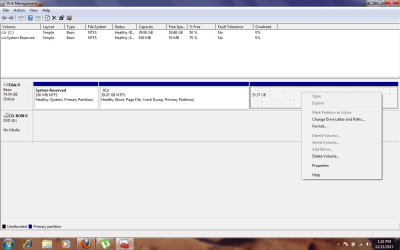
Guys i was trying to re size my partition on my laptop. i didn't complete the operation, but when i opened my drives the D drive was missing. NEED urgent help on the matter:confused:

Error.png
 

My Computer

Computer type
Laptop
Computer Manufacturer/Model Number
hp
OS
Windows 7 ultimate x86
There is great amount of data in it and i cant delete it!
 

My Computer

Computer type
Laptop
Computer Manufacturer/Model Number
hp
OS
Windows 7 ultimate x86
Please provide more information.

What partition were you trying resize... C or D? What were the sizes of C and D before you did whatever you did and D disappeared?

How big is the drive itself?

What 3rd-party software and method or Windows commands/technique did you use to resize whichever partition you were trying to resize?

Did you reboot following the resize, or are we looking at DISKMGMT output immediately after the resize?
 

My Computer

Computer type
PC/Desktop
Computer Manufacturer/Model Number
Home-built, two systems (1) and (2)
OS
Windows 7 Pro x64 (1), Win7 Pro X64 (2)
CPU
i5-3350p 3.1Ghz/6MB-cache (1); E8400 3.0Ghz/6MB-cache (2)
Motherboard
ASUS P8Z77-V Pro (1); ASUS P5Q3 (2)
Memory
8GB PC3-12800 DDR3 (1); 4GB PC3-10600 DDR3 (2)
Graphics Card(s)
ATI HD7750 (1), (see TV cards); ATI R7 250 (2)
Sound Card
Realtek ALC892 HD Audio (1); Realtek ALC1200 HD Audio (2)
Monitor(s) Displays
Eizo HD2441W LCD, Eizo S2433W (1); Eizo 24" S2433W (2)
Screen Resolution
1920x1200, 1920x1200 (1); 1920x1200 (2)
Hard Drives
(1) 1TB SATA-II (7200RPM), 2x2TB SATA-III (7200RPM), 250GB SATA-III (10000RPM) for OS; 2x2TB external USB 3.0

(2) 320GB SATA-II (7200RPM), 750GB SATA-II (7200RPM), 150GB SATA-II (10000RPM) for OS; 2TB external USB 3.0
PSU
Nesteq ECS-6001 600W (1); Nesteq ECS-5001 500W (2)
Case
Acousti-Case 360 (1) and (2)
Cooling
Noctua NH-U12P SE2 for CPU, 2x120mm case fans (1) and (2)
Keyboard
IBM PS/2 (1) and (2)
Mouse
Logitech MX Revolution wireless (1); Microsoft wired (2)
Internet Speed
100mbps down / 10mbps up
Antivirus
Microsoft Security Essentials; Malwarebyte Anti-Malware Pro
Browser
Firefox
Other Info
Ceton InfiniTV 4-tuner cablecard-enabled TV card as well as Hauppauge HVR-2250 OTA/ATSC 2-tuner TV card in (1), running under Win7 WMC
Please provide more information.

What partition were you trying resize... C or D? What were the sizes of C and D before you did whatever you did and D disappeared?

How big is the drive itself?

What 3rd-party software and method or Windows commands/technique did you use to resize whichever partition you were trying to resize?

Did you reboot following the resize, or are we looking at DISKMGMT output immediately after the resize?

The size was 40GB in size the label was D. I didnt get a chance to do the resize and partition is showing in the easeuse partition software i am using only not in the MY COMPUTER window. When i search any thing in that label nothing appears
 

My Computer

Computer type
Laptop
Computer Manufacturer/Model Number
hp
OS
Windows 7 ultimate x86
The size was 40GB in size the label was D.
Well there is that 36GB space on the drive to the right of C, which is obviously what used to be D. As to why it's not recognized as D I'm not sure.


I didnt get a chance to do the resize and partition is showing in the easeuse partition software i am using only not in the MY COMPUTER window. When i search any thing in that label nothing appears
Well the graphical presentation from DISKMGMT that you've posted is essentially the same information that My Computer (i.e. Windows Explorer) knows about. So that 36GB "raw" space is simply not recognized for some reason.

I don't know about Easeus. But I do know about Partition Wizard which is a HIGHLY RECOMMENDED piece of free software known to most members on this forum. It is intuitive and easy to use, and it is 100% reliable. Partition Wizard has a "partition recovery" feature that might very likely discover that the 36GB space on your drive to the right of C is, indeed, your former D partition and is still intact and can be returned to usable status.

So since I don't know anything about Easeus, my recommendation is to download Free Partition Wizard and install it, and then to use its "partition recovery" function (selected on the left side of the GUI interface from the list of functions). It will open a window that allows you to browse/select for a drive, and then it will examine it to see if a "lost partition" on that drive does exist and can be recovered. It will not touch any of the data in that partition. It only recreates the partition table on the drive if necessary to correctly describe this once-lost and now-recovered partition, and also restores a drive letter (which you might be offered to choose, I can't remember exactly, but if so you'd obviously choose D) for the now restored partition to Windows.

As you know, you do NOT want to "format" that 36GB space since it is full of real data which very likely is perfectly intact and undamaged. It's only the drive letter itself which for some reason Windows has lost track of as a formatted partition, and which Partition Wizard can very likely restore for you.


INCIDENTALLY... Partition Wizard can also be used to do the resize of C that you wanted to do, and I can vouch for its 100% reliability (as opposed to Easeus which I know nothing about). But because it's the operating system drive it will require a reboot to complete.

So you have two choices here:

(1) you can begin the resize of C while running the program under Windows, and then it will tell you it needs to reboot to complete. You give it the OK, and the system reboots. Just before bringing up the desktop Partition Wizard's boot-time software will kick in to complete the resize of C. When finished, it will proceed with the normal Windows startup and you'll get to your desktop with C resized as you wanted.

(2) you make a standalone boot CD of Partition Wizard. Then you boot from this CD and then you can do the resize of C right there, while running from the standalone boot CD. When finished, just close the standalone GUI and boot to Windows. Your C partition is now resized.

 

My Computer

Computer type
PC/Desktop
Computer Manufacturer/Model Number
Home-built, two systems (1) and (2)
OS
Windows 7 Pro x64 (1), Win7 Pro X64 (2)
CPU
i5-3350p 3.1Ghz/6MB-cache (1); E8400 3.0Ghz/6MB-cache (2)
Motherboard
ASUS P8Z77-V Pro (1); ASUS P5Q3 (2)
Memory
8GB PC3-12800 DDR3 (1); 4GB PC3-10600 DDR3 (2)
Graphics Card(s)
ATI HD7750 (1), (see TV cards); ATI R7 250 (2)
Sound Card
Realtek ALC892 HD Audio (1); Realtek ALC1200 HD Audio (2)
Monitor(s) Displays
Eizo HD2441W LCD, Eizo S2433W (1); Eizo 24" S2433W (2)
Screen Resolution
1920x1200, 1920x1200 (1); 1920x1200 (2)
Hard Drives
(1) 1TB SATA-II (7200RPM), 2x2TB SATA-III (7200RPM), 250GB SATA-III (10000RPM) for OS; 2x2TB external USB 3.0

(2) 320GB SATA-II (7200RPM), 750GB SATA-II (7200RPM), 150GB SATA-II (10000RPM) for OS; 2TB external USB 3.0
PSU
Nesteq ECS-6001 600W (1); Nesteq ECS-5001 500W (2)
Case
Acousti-Case 360 (1) and (2)
Cooling
Noctua NH-U12P SE2 for CPU, 2x120mm case fans (1) and (2)
Keyboard
IBM PS/2 (1) and (2)
Mouse
Logitech MX Revolution wireless (1); Microsoft wired (2)
Internet Speed
100mbps down / 10mbps up
Antivirus
Microsoft Security Essentials; Malwarebyte Anti-Malware Pro
Browser
Firefox
Other Info
Ceton InfiniTV 4-tuner cablecard-enabled TV card as well as Hauppauge HVR-2250 OTA/ATSC 2-tuner TV card in (1), running under Win7 WMC
Back
Top