
Solved Partition on a 2Tb drive appears to have corrtupted an entire folder

p23185

New member
Member
Local time
11:55 AM
Messages
46
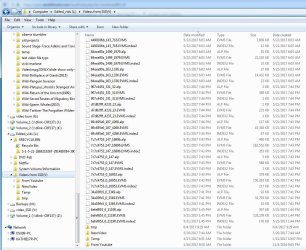
I turn on my PC this morning with Win 7 Pro 64bit and the L partition on the 2Tb HD has completed destroyed hundreds of video MPG files and turned them into the following:
https://www.sevenforums.com/attachment.php?attachmentid=399218&stc=1&d=1496602693


I tried to find events in the event viewer and came up with some that look like this under the security tab
Code Integrity determined that the page hashes of an image file are not valid. The file could be improperly signed without page hashes or corrupt due to unauthorized modification. The invalid hashes could indicate a potential disk device error.

File Name: \Device\HarddiskVolume3\Windows\System32\sxs.dll

Anyone know what that means?
 

Attachments
  • TRIA4BD.jpg
    TRIA4BD.jpg
    160.3 KB · Views: 4

My Computer My Computer

At a glance

Windows 7 Ultimate x64i7-26008GbBFGgts250
Computer Manufacturer/Model Number
me/na
OS
Windows 7 Ultimate x64
CPU
i7-2600
Motherboard
Asus P8P67eluxe_i7-2600
Memory
8Gb
Graphics Card(s)
BFGgts250
Sound Card
mobo
Monitor(s) Displays
Acer P236H
Hard Drives
500Gb system Hitachi
1000Gb video Seagate 6.0 Gp/s SATA
1000Gb special project Seagate 3.0Gb/s SATA
PSU
thermaltake_600w
Case
Antec_900
Cooling
fans
Have you got pinnacle studio or Linux they could be used by these enterprise volume management
 

My Computer My Computer

At a glance

win 8 32 bit
Computer type
PC/Desktop
OS
win 8 32 bit

My Computer My Computer

At a glance

Windows 7 Ultimate x64i7-26008GbBFGgts250
Computer Manufacturer/Model Number
me/na
OS
Windows 7 Ultimate x64
CPU
i7-2600
Motherboard
Asus P8P67eluxe_i7-2600
Memory
8Gb
Graphics Card(s)
BFGgts250
Sound Card
mobo
Monitor(s) Displays
Acer P236H
Hard Drives
500Gb system Hitachi
1000Gb video Seagate 6.0 Gp/s SATA
1000Gb special project Seagate 3.0Gb/s SATA
PSU
thermaltake_600w
Case
Antec_900
Cooling
fans
All I have to go on is the extention can you open any wth notepad or vlc see what happens.
he only other thought is that its ransome ware encypting files

Please download and save FRST 64bit or FRST 32 bit to your Desktop.

http://download.bleepingcomputer.com/farbar/FRST.exe

http://download.bleepingcomputer.com/farbar/FRST64.exe

Right click to run as administrator (XP users click run after receipt of Windows Security Warning - Open File). When the tool opens click Yes to disclaimer.

Make sure that Addition option is checked.
Press Scan button.
It will produce a log called FRST.txt in the same directory the tool is run from.
Please copy and paste log back .
The first time the tool is run it generates another log (Addition.txt - also located in the same directory as FRST.exe/FRST64.exe).
 

My Computer My Computer

At a glance

win 8 32 bit
Computer type
PC/Desktop
OS
win 8 32 bit
Have you got pinnacle studio or Linux they could be used by these enterprise volume management
NO to Linux - this is an exclusive Win 7 Pro set up
 

My Computer My Computer

At a glance

Windows 7 Ultimate x64i7-26008GbBFGgts250
Computer Manufacturer/Model Number
me/na
OS
Windows 7 Ultimate x64
CPU
i7-2600
Motherboard
Asus P8P67eluxe_i7-2600
Memory
8Gb
Graphics Card(s)
BFGgts250
Sound Card
mobo
Monitor(s) Displays
Acer P236H
Hard Drives
500Gb system Hitachi
1000Gb video Seagate 6.0 Gp/s SATA
1000Gb special project Seagate 3.0Gb/s SATA
PSU
thermaltake_600w
Case
Antec_900
Cooling
fans
@ OP Just curious if you tried renaming one of the files with .MPG [or whatever the previous extension was] to see if it then plays normally? Perhaps they were just renamed.
 

My Computer My Computer

At a glance

Win 7 Ultimate 64-bit
OS
Win 7 Ultimate 64-bit
@ OP Just curious if you tried renaming one of the files with .MPG [or whatever the previous extension was] to see if it then plays normally? Perhaps they were just renamed.
I haven't because none of them are they typical size of the files I generate - 3.2 Gb - 4.3Gb These are all much smaller and resemble nothing that was in this folder "Videos from SSD(V)" last night
 

My Computer My Computer

At a glance

Windows 7 Ultimate x64i7-26008GbBFGgts250
Computer Manufacturer/Model Number
me/na
OS
Windows 7 Ultimate x64
CPU
i7-2600
Motherboard
Asus P8P67eluxe_i7-2600
Memory
8Gb
Graphics Card(s)
BFGgts250
Sound Card
mobo
Monitor(s) Displays
Acer P236H
Hard Drives
500Gb system Hitachi
1000Gb video Seagate 6.0 Gp/s SATA
1000Gb special project Seagate 3.0Gb/s SATA
PSU
thermaltake_600w
Case
Antec_900
Cooling
fans
Of course, I didn't look at the file size, sorry. Have you tried using MS Search function for *.MPG to see if the files were moved elsewhere?

PS I'd personally find the manuf's disk utility for that drive to see if the drive is healthy.
 

My Computer My Computer

At a glance

Win 7 Ultimate 64-bit
OS
Win 7 Ultimate 64-bit
All I have to go on is the extention can you open any wth notepad or vlc see what happens.
he only other thought is that its ransome ware encypting files

Please download and save FRST 64bit or FRST 32 bit to your Desktop.

http://download.bleepingcomputer.com/farbar/FRST.exe

http://download.bleepingcomputer.com/farbar/FRST64.exe

Right click to run as administrator (XP users click run after receipt of Windows Security Warning - Open File). When the tool opens click Yes to disclaimer.

Make sure that Addition option is checked.
Press Scan button.
It will produce a log called FRST.txt in the same directory the tool is run from.
Please copy and paste log back .
The first time the tool is run it generates another log (Addition.txt - also located in the same directory as FRST.exe/FRST64.exe).
Here are the two attachments (not evident how I get them into this response!)
 

Attachments

My Computer My Computer

At a glance

Windows 7 Ultimate x64i7-26008GbBFGgts250
Computer Manufacturer/Model Number
me/na
OS
Windows 7 Ultimate x64
CPU
i7-2600
Motherboard
Asus P8P67eluxe_i7-2600
Memory
8Gb
Graphics Card(s)
BFGgts250
Sound Card
mobo
Monitor(s) Displays
Acer P236H
Hard Drives
500Gb system Hitachi
1000Gb video Seagate 6.0 Gp/s SATA
1000Gb special project Seagate 3.0Gb/s SATA
PSU
thermaltake_600w
Case
Antec_900
Cooling
fans
Nothing in the scan showing try opening a file in notepad and post the first 20 lines see if it tells us what it is
 

My Computer My Computer

At a glance

win 8 32 bit
Computer type
PC/Desktop
OS
win 8 32 bit
Nothing in the scan showing try opening a file in notepad and post the first 20 lines see if it tells us what it is
I spent the entire day recreating the MP2 files from the Studio 20 folders saving them all to the folder with the garbage. An hour ago I looked and there were at least 30 files of approx 1.6Gb size each. Now there is NOTHING, but the 374 files of jibberish. WHAT IS GOING ON?

I imported two of the first ones on the list and they are included below. NOT readable by me.
 

Attachments

My Computer My Computer

At a glance

Windows 7 Ultimate x64i7-26008GbBFGgts250
Computer Manufacturer/Model Number
me/na
OS
Windows 7 Ultimate x64
CPU
i7-2600
Motherboard
Asus P8P67eluxe_i7-2600
Memory
8Gb
Graphics Card(s)
BFGgts250
Sound Card
mobo
Monitor(s) Displays
Acer P236H
Hard Drives
500Gb system Hitachi
1000Gb video Seagate 6.0 Gp/s SATA
1000Gb special project Seagate 3.0Gb/s SATA
PSU
thermaltake_600w
Case
Antec_900
Cooling
fans
TONIGHT I HAVE DISCOVERED THAT WHEN STUDIO 20 ULITIMATE IS CLOSED ALL THE EXPORTED FILES TO MY L:drive into the folder name "Videos from SSD(V)", end up being deleted. Some how in the Studio 20 setup screen where all the other file locations were set to C:\***** the render location was the place on the L drive. So upon closing Studio it cleaned the folder out with the exception of those unreadable files. I moved it back to the C:\ drive and now I can start saving the MP2 files again. I have no idea why Studio thought to grab that drive/folder - I certainly did not change it since I wasn't even familar with the setup panel - I had been using it the way it installed!!!

So I guess I now know what happened to all my files in that L: folder location - must have been last night when it went crazy
 

My Computer My Computer

At a glance

Windows 7 Ultimate x64i7-26008GbBFGgts250
Computer Manufacturer/Model Number
me/na
OS
Windows 7 Ultimate x64
CPU
i7-2600
Motherboard
Asus P8P67eluxe_i7-2600
Memory
8Gb
Graphics Card(s)
BFGgts250
Sound Card
mobo
Monitor(s) Displays
Acer P236H
Hard Drives
500Gb system Hitachi
1000Gb video Seagate 6.0 Gp/s SATA
1000Gb special project Seagate 3.0Gb/s SATA
PSU
thermaltake_600w
Case
Antec_900
Cooling
fans
Back
Top