Partition or Volume - Delete

How to Delete a Partition or Volume in Windows 7 and Windows 8


   Information
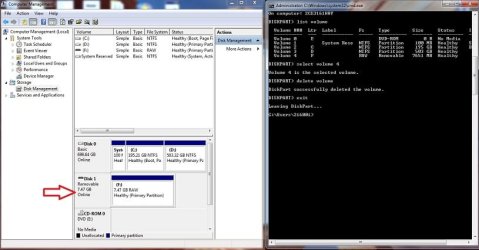
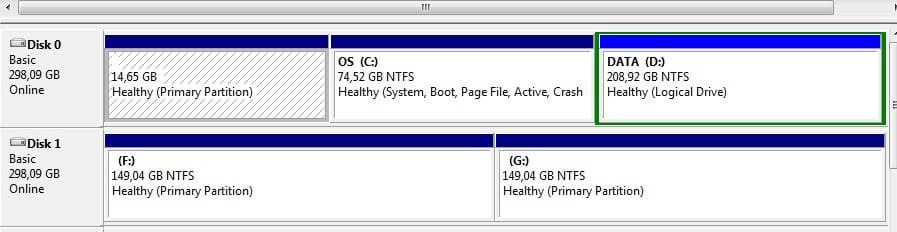
This will show you how to delete a partition or volume on a hard disk using Disk Management or Diskpart in Windows 7 and Windows 8 to create empty unallocated space that you can use to create new partitions with.

   Note


  • You will not be able to delete the Windows partition that you are currently logged in to. The only way would be to delete it at boot or during a Windows installation.
  • You also can't delete the system partition, boot partition, or any partition that contains the virtual memory paging file, because Windows needs this information to startup and run properly.
   Warning

  • You must be logged on in an administrator account to be able to do this tutorial.
  • When you delete a partition, all data on the partition is erased.
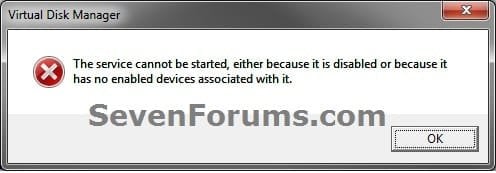
  • If you disable the Disk Defragmenter service, then you will get the error below when you try to do anything in Disk Management. If you get this error, then make sure that the Disk Defragmenter service is set to only Manual.
Error.jpg


OPTION ONE

To Delete Partition or Volume using Disk Management

1. Press the Windows + R keys to open the Run dialog, type diskmgmt.msc, and Press Enter.

2. In the middle pane, right click on the partition of a disk that you want to delete, and click/tap on Delete Volume. (see screenshot below)
NOTE: If the partition is a logical partition, then you will need to delete the free space again to have it as unallocated space. Delete_Step1.jpg3. Click/tap on Yes to confirm deletion. (see screenshot below) Delete_Step2.jpg
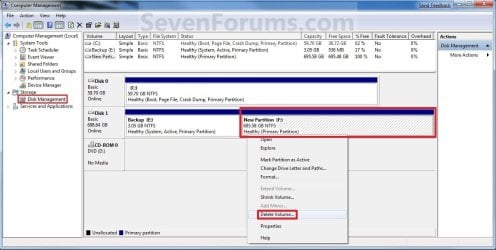
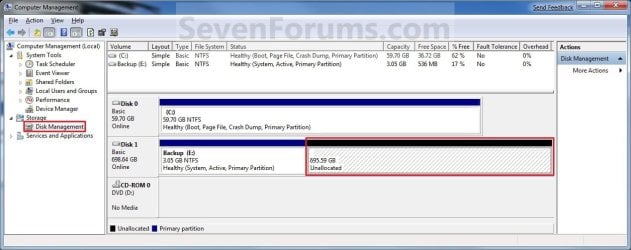
4. The selected partition (step 2) is now deleted and is unallocated space on the disk. If not, then delete the partition again until it displays as unallocated space like below. (see screenshot below)
NOTE: You can now use this unallocated space to create a new partition with, or extend another adjacent partition on that same hard disk into it. Delete_Step3.jpg
5. You can now close Disk Management if you like.


OPTION TWO

To Delete Partition or Volume using Diskpart Command

1. Open an elevated command prompt in Windows 7 or Windows 8, or a command prompt at boot in Windows 7 and Windows 8.

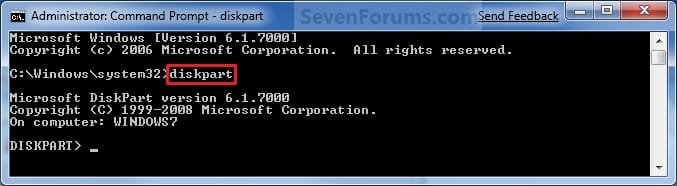
2. In the command prompt, type diskpart and press Enter. (See screenshot below) CMD_Delete_Step1.jpg
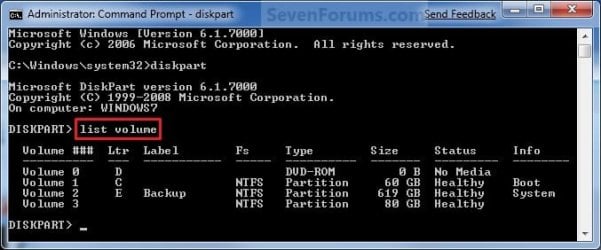
3. In the command prompt, type list volume and press Enter. (See screenshot below)
NOTE: This will give you a list of volume numbers to select from to delete. CMD_Delete_Step2.jpg
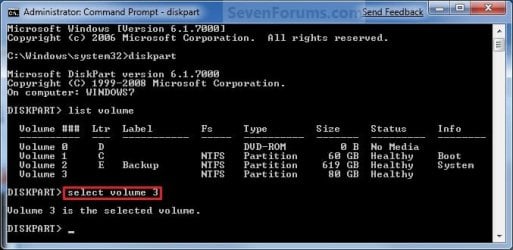
4. In the command prompt, type select volume # and press Enter. (See screenshot below)
NOTE: You would substitute # for the volume number listed that you want to delete. For example, I want to delete the listed volume 3, so I would type select volume 3 and press Enter. CMD_Delete_Step3.jpg
5. In the command prompt, type delete volume and press Enter. (See screenshot below)
NOTE: If it fails to delete, then use type delete volume override and press enter instead. CMD_Delete_Step4.jpg
6. In the command prompt, type exit and press Enter. (See screenshot below) CMD_Delete_Step5.jpg
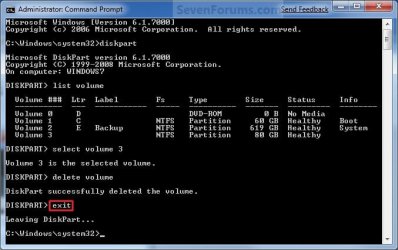
7. Close the command prompt.

8. The selected partition (step 4) is now deleted and is unallocated space on the disk.
NOTE: You can use this unallocated space to create a new partition with, or extend another partition on that same hard disk into it.
That's it,
Shawn


Last edited:
hey guys i need help
i tried the first way and it says i cant delete it

so i tried the second way and i typed in delete volume and says cannot delete
so i tried the overdrive mode and says cannot delete in the current boot, system, pagefile crashdump or hibernation volume.

please help

Matt:

Post a screenshot of your Windows Disk Management so we can visualize what you are talking about.

Might be best to do that in a fresh thread.

What partition are you trying to delete?
 
Last edited by a moderator:

My Computer

Computer type
PC/Desktop
Computer Manufacturer/Model Number
Ignatz Special; 4 speed manual gearbox; factory air conditioning; one of one
OS
Windows 7 Home Premium SP1, 64-bit
CPU
Intel Skylake i5-6600K, not overclocked
Motherboard
AsRock Z170M Extreme 4, micro ATX
Memory
8 GB HyperX DDR4-2666 (2 x 4 GB)
Graphics Card(s)
none; graphics are integrated on CPU
Sound Card
onboard: Realtek ALC1150; external: USB Behringer UF0-202
Monitor(s) Displays
Dell S2340M 23 inch IPS
Screen Resolution
1600 x 900
Hard Drives
System: Crucial MX100 series SSD, 128 GB;
Data: Samsung Spinpoint 103SJ, 1 TB;
Backup: WD Caviar Green WD30EZRX-00D8PB0, 3 TB
PSU
Rosewill SilentNight 500 watt fanless, semi-modular
Case
Antec Solo II
Cooling
Noctua NH-U12S; Noctua F12 intake, Noctua S12A exhaust
Keyboard
Microsoft 200 6JH-00001 USB
Mouse
Dell or Microsoft optical wired; USB
Antivirus
Microsoft Security Essentials and Malwarebytes Premium
Browser
Pale Moon
Other Info
All fans PWM; speeds at idle: CPU circa 500 rpm; intake circa 600 rpm; exhaust circa 600 rpm; CPU temps 27 idle and 47 C load in a warm room (27 C/81 F) when running Intel Extreme Tuning Utility stress test.
Hi all I followed the DISKPART steps and it said - Successfully deleted the volume. after exiting and going back to Disk Management it still tells me that it is a Healthy (Primary Partition) with a RAW File System. I have refreshed Disk Management and closed and opened it again. Did I mention that it is a USB that I am trying to re create. I started with a successful DISKPART (clean all) that has also not removed the MBR by the looks of things. Any help or advise would be greatly appreciated please.

Mike Walter
 

Attachments

  • DISKPART.jpg
    DISKPART.jpg
    88.6 KB · Views: 482

My Computer

Computer type
Laptop
Computer Manufacturer/Model Number
HP
OS
Windows 7 pro 64 bit
CPU
Core i5
Motherboard
Intel
Memory
4 Gig
Graphics Card(s)
Intel Graphics 4000
Hard Drives
Model Hitachi HTS547575A9E384 ATA Device 750 Gig
Antivirus
Kaspersky
Browser
Chrome

My Computer

Computer type
PC/Desktop
Computer Manufacturer/Model Number
Self built custom
OS
64-bit Windows 11 Pro for Workstations
CPU
Intel i7-8700K OC'd to 5 GHz
Motherboard
ASUS ROG Maximus XI Formula Z390
Memory
64 GB (4x16GB) G.SKILL TridentZ RGB DDR4 3600 MHz
Graphics Card(s)
ASUS ROG-STRIX-GTX1080TI-O11G-GAMING
Sound Card
Integrated
Monitor(s) Displays
2 x Samsung Odyssey G7 27"
Screen Resolution
2560x1440
Hard Drives
1TB Samsung 990 PRO M.2,
4TB Samsung 990 PRO PRO M.2,
TerraMaster F8 SSD Plus NAS
PSU
Seasonic Prime Titanium 850W
Case
Thermaltake Core P3
Cooling
Corsair Hydro H115i
Keyboard
Logitech wireless K800
Mouse
Logitech MX Master 4
Internet Speed
2 Gb/s Download and 100 Mb/s Upload
Antivirus
Malwarebyte Anti-Malware Premium
Browser
Google Chrome
Other Info
Logitech Z625 speaker system,
Logitech BRIO 4K Pro webcam,
HP Color LaserJet Pro MFP M477fdn,
APC SMART-UPS RT 1000 XL - SURT1000XLI,
Galaxy S23 Plus phone
Hi Brink

Thank you and thanks for replying I did do a clean all using DISKPART 1st and it said it was successful even though the MBR seems to still be there.

Mike
 

My Computer

Computer type
Laptop
Computer Manufacturer/Model Number
HP
OS
Windows 7 pro 64 bit
CPU
Core i5
Motherboard
Intel
Memory
4 Gig
Graphics Card(s)
Intel Graphics 4000
Hard Drives
Model Hitachi HTS547575A9E384 ATA Device 750 Gig
Antivirus
Kaspersky
Browser
Chrome
I have also done a disk wipe and partition re create using Mini Tool Partition Wizard now and still there seems to be no change, it still shows as RAW and I cannot format it.
 

My Computer

Computer type
Laptop
Computer Manufacturer/Model Number
HP
OS
Windows 7 pro 64 bit
CPU
Core i5
Motherboard
Intel
Memory
4 Gig
Graphics Card(s)
Intel Graphics 4000
Hard Drives
Model Hitachi HTS547575A9E384 ATA Device 750 Gig
Antivirus
Kaspersky
Browser
Chrome

My Computer

Computer type
PC/Desktop
Computer Manufacturer/Model Number
Self built custom
OS
64-bit Windows 11 Pro for Workstations
CPU
Intel i7-8700K OC'd to 5 GHz
Motherboard
ASUS ROG Maximus XI Formula Z390
Memory
64 GB (4x16GB) G.SKILL TridentZ RGB DDR4 3600 MHz
Graphics Card(s)
ASUS ROG-STRIX-GTX1080TI-O11G-GAMING
Sound Card
Integrated
Monitor(s) Displays
2 x Samsung Odyssey G7 27"
Screen Resolution
2560x1440
Hard Drives
1TB Samsung 990 PRO M.2,
4TB Samsung 990 PRO PRO M.2,
TerraMaster F8 SSD Plus NAS
PSU
Seasonic Prime Titanium 850W
Case
Thermaltake Core P3
Cooling
Corsair Hydro H115i
Keyboard
Logitech wireless K800
Mouse
Logitech MX Master 4
Internet Speed
2 Gb/s Download and 100 Mb/s Upload
Antivirus
Malwarebyte Anti-Malware Premium
Browser
Google Chrome
Other Info
Logitech Z625 speaker system,
Logitech BRIO 4K Pro webcam,
HP Color LaserJet Pro MFP M477fdn,
APC SMART-UPS RT 1000 XL - SURT1000XLI,
Galaxy S23 Plus phone
Disk Manager wont allow me to the options are all grayed out, if I try with Mini Tool it tells me apply all changes successfully but it still shows as unalocated in Mini Tool and as Healthy Primary RAW in Disk Management.
 

My Computer

Computer type
Laptop
Computer Manufacturer/Model Number
HP
OS
Windows 7 pro 64 bit
CPU
Core i5
Motherboard
Intel
Memory
4 Gig
Graphics Card(s)
Intel Graphics 4000
Hard Drives
Model Hitachi HTS547575A9E384 ATA Device 750 Gig
Antivirus
Kaspersky
Browser
Chrome
And if I try and create using DISKPART I get the following error:
Disk 1 is now the selected disk.

DISKPART> CREATE PARTITION PRIMARY

No usable free extent could be found. It may be that there is insufficient
free space to create a partition at the specified size and offset. Specify
different size and offset values or don't specify either to create the
maximum sized partition. It may be that the disk is partitioned using the MBR di
sk
partitioning format and the disk contains either 4 primary partitions, (no
more partitions may be created), or 3 primary partitions and one extended
partition, (only logical drives may be created).

DISKPART>
 

My Computer

Computer type
Laptop
Computer Manufacturer/Model Number
HP
OS
Windows 7 pro 64 bit
CPU
Core i5
Motherboard
Intel
Memory
4 Gig
Graphics Card(s)
Intel Graphics 4000
Hard Drives
Model Hitachi HTS547575A9E384 ATA Device 750 Gig
Antivirus
Kaspersky
Browser
Chrome
It seem it has a bad Track 0 I tried an unconditional format and this is the response I received :
C:\Users\216001>FORMAT F: /U
Insert new disk for drive F:
and press ENTER when ready...
The type of the file system is RAW.
The new file system is FAT32.
Verifying 7651M
Invalid media or Track 0 bad - disk unusable. :cry:
 

My Computer

Computer type
Laptop
Computer Manufacturer/Model Number
HP
OS
Windows 7 pro 64 bit
CPU
Core i5
Motherboard
Intel
Memory
4 Gig
Graphics Card(s)
Intel Graphics 4000
Hard Drives
Model Hitachi HTS547575A9E384 ATA Device 750 Gig
Antivirus
Kaspersky
Browser
Chrome
Does the USB flash drive happen to have a write protect tab feature on it? If so, then you will need to turn it off first.

In addition, you might see if you may be able to format the USB flash drive after using the free Active KillDisk on it.
 

My Computer

Computer type
PC/Desktop
Computer Manufacturer/Model Number
Self built custom
OS
64-bit Windows 11 Pro for Workstations
CPU
Intel i7-8700K OC'd to 5 GHz
Motherboard
ASUS ROG Maximus XI Formula Z390
Memory
64 GB (4x16GB) G.SKILL TridentZ RGB DDR4 3600 MHz
Graphics Card(s)
ASUS ROG-STRIX-GTX1080TI-O11G-GAMING
Sound Card
Integrated
Monitor(s) Displays
2 x Samsung Odyssey G7 27"
Screen Resolution
2560x1440
Hard Drives
1TB Samsung 990 PRO M.2,
4TB Samsung 990 PRO PRO M.2,
TerraMaster F8 SSD Plus NAS
PSU
Seasonic Prime Titanium 850W
Case
Thermaltake Core P3
Cooling
Corsair Hydro H115i
Keyboard
Logitech wireless K800
Mouse
Logitech MX Master 4
Internet Speed
2 Gb/s Download and 100 Mb/s Upload
Antivirus
Malwarebyte Anti-Malware Premium
Browser
Google Chrome
Other Info
Logitech Z625 speaker system,
Logitech BRIO 4K Pro webcam,
HP Color LaserJet Pro MFP M477fdn,
APC SMART-UPS RT 1000 XL - SURT1000XLI,
Galaxy S23 Plus phone
There is no write protection tab on this one, I am busy downloading Active Killdisk quick will let you know what the result is. I would really like to get it working as it was a gift from a customer and is quite funky.
 

My Computer

Computer type
Laptop
Computer Manufacturer/Model Number
HP
OS
Windows 7 pro 64 bit
CPU
Core i5
Motherboard
Intel
Memory
4 Gig
Graphics Card(s)
Intel Graphics 4000
Hard Drives
Model Hitachi HTS547575A9E384 ATA Device 750 Gig
Antivirus
Kaspersky
Browser
Chrome
Hi Brink

Nope it still failed right at the end of the format unfortunately, going to try and Kill it again and then see perhaps format and partition in Diskpart instead of Disk Manager.
 

My Computer

Computer type
Laptop
Computer Manufacturer/Model Number
HP
OS
Windows 7 pro 64 bit
CPU
Core i5
Motherboard
Intel
Memory
4 Gig
Graphics Card(s)
Intel Graphics 4000
Hard Drives
Model Hitachi HTS547575A9E384 ATA Device 750 Gig
Antivirus
Kaspersky
Browser
Chrome
Ok so after struggling for hours I came accross out an old flash drive that I remembered had the same issue, would not format. been lying in my draw for probably 2 years :) I followed your process as set out here by yourself, clean all, New primary partition etc etc and voila it worked 1st time. Guess I must resign myself to the fact that this one will now lie in the draw for a few years.

Thanks for all the help Brink< not going to give up on just yet will let you know if I find a solution.

Mike
 

My Computer

Computer type
Laptop
Computer Manufacturer/Model Number
HP
OS
Windows 7 pro 64 bit
CPU
Core i5
Motherboard
Intel
Memory
4 Gig
Graphics Card(s)
Intel Graphics 4000
Hard Drives
Model Hitachi HTS547575A9E384 ATA Device 750 Gig
Antivirus
Kaspersky
Browser
Chrome
Mike,

I hope you manage to get it to work again, but it does look like it may have died on you. :(
 

My Computer

Computer type
PC/Desktop
Computer Manufacturer/Model Number
Self built custom
OS
64-bit Windows 11 Pro for Workstations
CPU
Intel i7-8700K OC'd to 5 GHz
Motherboard
ASUS ROG Maximus XI Formula Z390
Memory
64 GB (4x16GB) G.SKILL TridentZ RGB DDR4 3600 MHz
Graphics Card(s)
ASUS ROG-STRIX-GTX1080TI-O11G-GAMING
Sound Card
Integrated
Monitor(s) Displays
2 x Samsung Odyssey G7 27"
Screen Resolution
2560x1440
Hard Drives
1TB Samsung 990 PRO M.2,
4TB Samsung 990 PRO PRO M.2,
TerraMaster F8 SSD Plus NAS
PSU
Seasonic Prime Titanium 850W
Case
Thermaltake Core P3
Cooling
Corsair Hydro H115i
Keyboard
Logitech wireless K800
Mouse
Logitech MX Master 4
Internet Speed
2 Gb/s Download and 100 Mb/s Upload
Antivirus
Malwarebyte Anti-Malware Premium
Browser
Google Chrome
Other Info
Logitech Z625 speaker system,
Logitech BRIO 4K Pro webcam,
HP Color LaserJet Pro MFP M477fdn,
APC SMART-UPS RT 1000 XL - SURT1000XLI,
Galaxy S23 Plus phone
Hello and sorry for my English!
I would like to delete the "D" partition and I would like to have only one. In a few words to expand my "C" volume.
I read some of the post here and if I well understood it is possible and not so very complicated to do it.
Thank you for any help.
 

Attachments

  • diskmanagment.jpg
    diskmanagment.jpg
    44.8 KB · Views: 130

My Computer

Computer type
Laptop
Computer Manufacturer/Model Number
Asus
OS
Windows 7 home premium x64
Memory
8 Giga
Antivirus
Trend Micro Internet Security
Hello Mariocap, and welcome to Seven Forums. :)

That's correct. This will be an easy one for you. You'll just need to delete the "D" partition until it shows as "unallocated". Afterwards, you'll be able to extend "C" into the unallocated space to have it added to "C".
 

My Computer

Computer type
PC/Desktop
Computer Manufacturer/Model Number
Self built custom
OS
64-bit Windows 11 Pro for Workstations
CPU
Intel i7-8700K OC'd to 5 GHz
Motherboard
ASUS ROG Maximus XI Formula Z390
Memory
64 GB (4x16GB) G.SKILL TridentZ RGB DDR4 3600 MHz
Graphics Card(s)
ASUS ROG-STRIX-GTX1080TI-O11G-GAMING
Sound Card
Integrated
Monitor(s) Displays
2 x Samsung Odyssey G7 27"
Screen Resolution
2560x1440
Hard Drives
1TB Samsung 990 PRO M.2,
4TB Samsung 990 PRO PRO M.2,
TerraMaster F8 SSD Plus NAS
PSU
Seasonic Prime Titanium 850W
Case
Thermaltake Core P3
Cooling
Corsair Hydro H115i
Keyboard
Logitech wireless K800
Mouse
Logitech MX Master 4
Internet Speed
2 Gb/s Download and 100 Mb/s Upload
Antivirus
Malwarebyte Anti-Malware Premium
Browser
Google Chrome
Other Info
Logitech Z625 speaker system,
Logitech BRIO 4K Pro webcam,
HP Color LaserJet Pro MFP M477fdn,
APC SMART-UPS RT 1000 XL - SURT1000XLI,
Galaxy S23 Plus phone
Ok thank you.
I must use the way explained on the first post of the Thread right?
 

My Computer

Computer type
Laptop
Computer Manufacturer/Model Number
Asus
OS
Windows 7 home premium x64
Memory
8 Giga
Antivirus
Trend Micro Internet Security
Correct. :)
 

My Computer

Computer type
PC/Desktop
Computer Manufacturer/Model Number
Self built custom
OS
64-bit Windows 11 Pro for Workstations
CPU
Intel i7-8700K OC'd to 5 GHz
Motherboard
ASUS ROG Maximus XI Formula Z390
Memory
64 GB (4x16GB) G.SKILL TridentZ RGB DDR4 3600 MHz
Graphics Card(s)
ASUS ROG-STRIX-GTX1080TI-O11G-GAMING
Sound Card
Integrated
Monitor(s) Displays
2 x Samsung Odyssey G7 27"
Screen Resolution
2560x1440
Hard Drives
1TB Samsung 990 PRO M.2,
4TB Samsung 990 PRO PRO M.2,
TerraMaster F8 SSD Plus NAS
PSU
Seasonic Prime Titanium 850W
Case
Thermaltake Core P3
Cooling
Corsair Hydro H115i
Keyboard
Logitech wireless K800
Mouse
Logitech MX Master 4
Internet Speed
2 Gb/s Download and 100 Mb/s Upload
Antivirus
Malwarebyte Anti-Malware Premium
Browser
Google Chrome
Other Info
Logitech Z625 speaker system,
Logitech BRIO 4K Pro webcam,
HP Color LaserJet Pro MFP M477fdn,
APC SMART-UPS RT 1000 XL - SURT1000XLI,
Galaxy S23 Plus phone
Done, it was very easy.....thank you.
 

My Computer

Computer type
Laptop
Computer Manufacturer/Model Number
Asus
OS
Windows 7 home premium x64
Memory
8 Giga
Antivirus
Trend Micro Internet Security
You're most welcome. :)
 

My Computer

Computer type
PC/Desktop
Computer Manufacturer/Model Number
Self built custom
OS
64-bit Windows 11 Pro for Workstations
CPU
Intel i7-8700K OC'd to 5 GHz
Motherboard
ASUS ROG Maximus XI Formula Z390
Memory
64 GB (4x16GB) G.SKILL TridentZ RGB DDR4 3600 MHz
Graphics Card(s)
ASUS ROG-STRIX-GTX1080TI-O11G-GAMING
Sound Card
Integrated
Monitor(s) Displays
2 x Samsung Odyssey G7 27"
Screen Resolution
2560x1440
Hard Drives
1TB Samsung 990 PRO M.2,
4TB Samsung 990 PRO PRO M.2,
TerraMaster F8 SSD Plus NAS
PSU
Seasonic Prime Titanium 850W
Case
Thermaltake Core P3
Cooling
Corsair Hydro H115i
Keyboard
Logitech wireless K800
Mouse
Logitech MX Master 4
Internet Speed
2 Gb/s Download and 100 Mb/s Upload
Antivirus
Malwarebyte Anti-Malware Premium
Browser
Google Chrome
Other Info
Logitech Z625 speaker system,
Logitech BRIO 4K Pro webcam,
HP Color LaserJet Pro MFP M477fdn,
APC SMART-UPS RT 1000 XL - SURT1000XLI,
Galaxy S23 Plus phone
Back
Top