Partition or Volume - Delete

How to Delete a Partition or Volume in Windows 7 and Windows 8


   Information
This will show you how to delete a partition or volume on a hard disk using Disk Management or Diskpart in Windows 7 and Windows 8 to create empty unallocated space that you can use to create new partitions with.

   Note


  • You will not be able to delete the Windows partition that you are currently logged in to. The only way would be to delete it at boot or during a Windows installation.
  • You also can't delete the system partition, boot partition, or any partition that contains the virtual memory paging file, because Windows needs this information to startup and run properly.
   Warning

  • You must be logged on in an administrator account to be able to do this tutorial.
  • When you delete a partition, all data on the partition is erased.
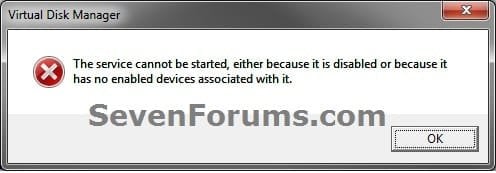
  • If you disable the Disk Defragmenter service, then you will get the error below when you try to do anything in Disk Management. If you get this error, then make sure that the Disk Defragmenter service is set to only Manual.
Error.jpg


OPTION ONE

To Delete Partition or Volume using Disk Management

1. Press the Windows + R keys to open the Run dialog, type diskmgmt.msc, and Press Enter.

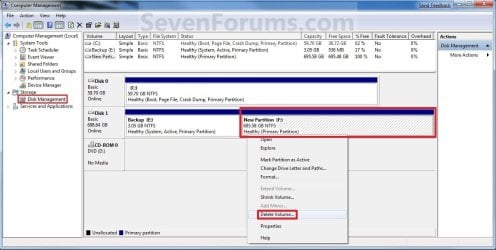
2. In the middle pane, right click on the partition of a disk that you want to delete, and click/tap on Delete Volume. (see screenshot below)
NOTE: If the partition is a logical partition, then you will need to delete the free space again to have it as unallocated space. Delete_Step1.jpg3. Click/tap on Yes to confirm deletion. (see screenshot below) Delete_Step2.jpg
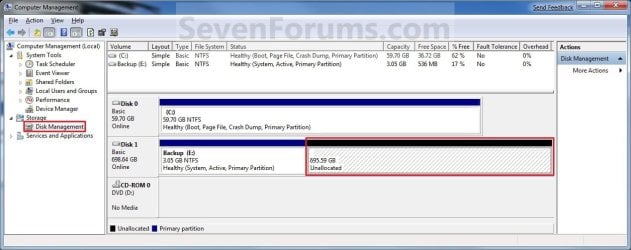
4. The selected partition (step 2) is now deleted and is unallocated space on the disk. If not, then delete the partition again until it displays as unallocated space like below. (see screenshot below)
NOTE: You can now use this unallocated space to create a new partition with, or extend another adjacent partition on that same hard disk into it. Delete_Step3.jpg
5. You can now close Disk Management if you like.


OPTION TWO

To Delete Partition or Volume using Diskpart Command

1. Open an elevated command prompt in Windows 7 or Windows 8, or a command prompt at boot in Windows 7 and Windows 8.

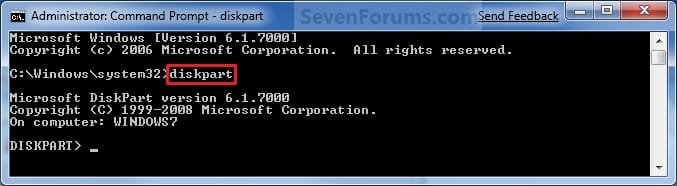
2. In the command prompt, type diskpart and press Enter. (See screenshot below) CMD_Delete_Step1.jpg
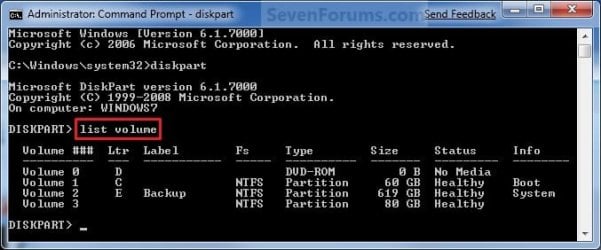
3. In the command prompt, type list volume and press Enter. (See screenshot below)
NOTE: This will give you a list of volume numbers to select from to delete. CMD_Delete_Step2.jpg
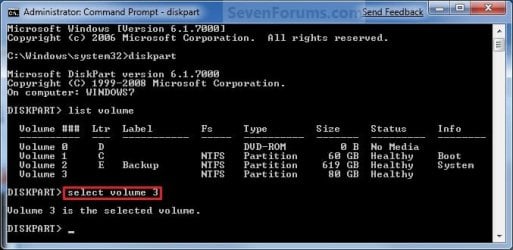
4. In the command prompt, type select volume # and press Enter. (See screenshot below)
NOTE: You would substitute # for the volume number listed that you want to delete. For example, I want to delete the listed volume 3, so I would type select volume 3 and press Enter. CMD_Delete_Step3.jpg
5. In the command prompt, type delete volume and press Enter. (See screenshot below)
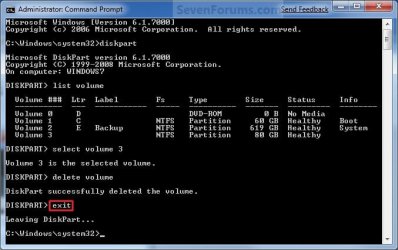
NOTE: If it fails to delete, then use type delete volume override and press enter instead. CMD_Delete_Step4.jpg
6. In the command prompt, type exit and press Enter. (See screenshot below) CMD_Delete_Step5.jpg
7. Close the command prompt.

8. The selected partition (step 4) is now deleted and is unallocated space on the disk.
NOTE: You can use this unallocated space to create a new partition with, or extend another partition on that same hard disk into it.
That's it,
Shawn


Last edited:
Hello Screen Shoot Attached

Please see the screen shoot and tell me the solution
 

Attachments

  • partition.png
    partition.png
    163.2 KB · Views: 161

My Computer

OS
Windows 7
That free space is on an extended partition. It will not let you extend C into that space, unless you first convert the extended partition to a Primary one.

Use Partition Wizard to assist you in this process.
 

My Computer

Computer Manufacturer/Model Number
Custom
OS
Windows 7 Professional x64
CPU
Intel i7 2600K OC'd @ 4620 MHz
Motherboard
Asus P8Z68-V Pro
Memory
16GB GSkill Sniper 2133 Mhz (4x4GB)
Graphics Card(s)
EVGA GeForce GTX 480 SuperClocked+
Sound Card
Realtek High Definition Audio
Monitor(s) Displays
2x Acer S273HLbmii 27"
Screen Resolution
2 x 1920x1080
Hard Drives
64GB Crucial M4 SSD

Storage: Hitachi 1TB 5400RPM, Samsung 1.5TB 5400RPM
PSU
Corsair HW Series 750w (modular)
Case
Cooler Master HAF 932 Advanced Blue Edition
Cooling
CM Hyper 212+ CPU cooler, 3x 230mm + 1x 140mm case fans
Keyboard
Logitech MK320 (wireless)
Mouse
Logitech MK320 (wireless)
Internet Speed
30 Mb/s : 2 Mb/s
thanks

wohoo thanks alot i have done it. I did it set partition as primary from partition wizard and then delete it from disk management and then extent it thanks aloooot
 

My Computer

OS
Windows 7
Great, glad it worked. :)

Let us know if you need anything else.
 

My Computer

Computer Manufacturer/Model Number
Custom
OS
Windows 7 Professional x64
CPU
Intel i7 2600K OC'd @ 4620 MHz
Motherboard
Asus P8Z68-V Pro
Memory
16GB GSkill Sniper 2133 Mhz (4x4GB)
Graphics Card(s)
EVGA GeForce GTX 480 SuperClocked+
Sound Card
Realtek High Definition Audio
Monitor(s) Displays
2x Acer S273HLbmii 27"
Screen Resolution
2 x 1920x1080
Hard Drives
64GB Crucial M4 SSD

Storage: Hitachi 1TB 5400RPM, Samsung 1.5TB 5400RPM
PSU
Corsair HW Series 750w (modular)
Case
Cooler Master HAF 932 Advanced Blue Edition
Cooling
CM Hyper 212+ CPU cooler, 3x 230mm + 1x 140mm case fans
Keyboard
Logitech MK320 (wireless)
Mouse
Logitech MK320 (wireless)
Internet Speed
30 Mb/s : 2 Mb/s
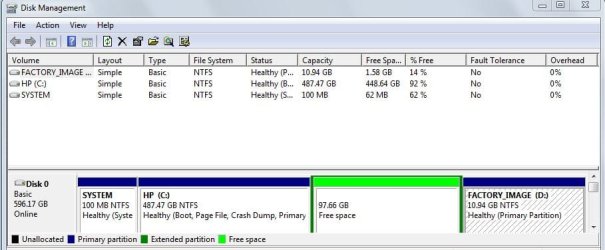
I can't modify he partition labelled "unallocated" - all options but "Create" and the four at the bottom of the right-click menu are greyed out.
What should I do?


aca4c9.jpg
 
Last edited:

My Computer

OS
Windows 7

My Computer

Computer Manufacturer/Model Number
Custom
OS
Windows 7 Professional x64
CPU
Intel i7 2600K OC'd @ 4620 MHz
Motherboard
Asus P8Z68-V Pro
Memory
16GB GSkill Sniper 2133 Mhz (4x4GB)
Graphics Card(s)
EVGA GeForce GTX 480 SuperClocked+
Sound Card
Realtek High Definition Audio
Monitor(s) Displays
2x Acer S273HLbmii 27"
Screen Resolution
2 x 1920x1080
Hard Drives
64GB Crucial M4 SSD

Storage: Hitachi 1TB 5400RPM, Samsung 1.5TB 5400RPM
PSU
Corsair HW Series 750w (modular)
Case
Cooler Master HAF 932 Advanced Blue Edition
Cooling
CM Hyper 212+ CPU cooler, 3x 230mm + 1x 140mm case fans
Keyboard
Logitech MK320 (wireless)
Mouse
Logitech MK320 (wireless)
Internet Speed
30 Mb/s : 2 Mb/s
That is a Logical drive, that's all I can tell from that snip. Could you please post a screenshot of the full Disk Management window?

Type diskmgmt.msc into the start menu and press enter.
 

My Computer

Computer Manufacturer/Model Number
Custom
OS
Windows 7 Professional x64
CPU
Intel i7 2600K OC'd @ 4620 MHz
Motherboard
Asus P8Z68-V Pro
Memory
16GB GSkill Sniper 2133 Mhz (4x4GB)
Graphics Card(s)
EVGA GeForce GTX 480 SuperClocked+
Sound Card
Realtek High Definition Audio
Monitor(s) Displays
2x Acer S273HLbmii 27"
Screen Resolution
2 x 1920x1080
Hard Drives
64GB Crucial M4 SSD

Storage: Hitachi 1TB 5400RPM, Samsung 1.5TB 5400RPM
PSU
Corsair HW Series 750w (modular)
Case
Cooler Master HAF 932 Advanced Blue Edition
Cooling
CM Hyper 212+ CPU cooler, 3x 230mm + 1x 140mm case fans
Keyboard
Logitech MK320 (wireless)
Mouse
Logitech MK320 (wireless)
Internet Speed
30 Mb/s : 2 Mb/s
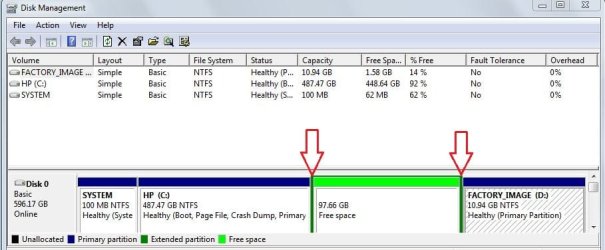
Try right-clicking on the unallocated space and selecting "Delete". Then create a new partition in that space.

You may also try right-clicking in the dark green space indicated by the red arrows.

diskman.JPG
 

My Computer

Computer Manufacturer/Model Number
Custom
OS
Windows 7 Professional x64
CPU
Intel i7 2600K OC'd @ 4620 MHz
Motherboard
Asus P8Z68-V Pro
Memory
16GB GSkill Sniper 2133 Mhz (4x4GB)
Graphics Card(s)
EVGA GeForce GTX 480 SuperClocked+
Sound Card
Realtek High Definition Audio
Monitor(s) Displays
2x Acer S273HLbmii 27"
Screen Resolution
2 x 1920x1080
Hard Drives
64GB Crucial M4 SSD

Storage: Hitachi 1TB 5400RPM, Samsung 1.5TB 5400RPM
PSU
Corsair HW Series 750w (modular)
Case
Cooler Master HAF 932 Advanced Blue Edition
Cooling
CM Hyper 212+ CPU cooler, 3x 230mm + 1x 140mm case fans
Keyboard
Logitech MK320 (wireless)
Mouse
Logitech MK320 (wireless)
Internet Speed
30 Mb/s : 2 Mb/s
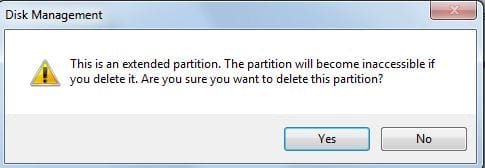
I had thought of doing that, but the warning I get is scary - will the space be able to be allocated to another partition afterward?

deletewarn.JPG
 

My Computer

OS
Windows 7
Yes, no worries. :)
 

My Computer

Computer Manufacturer/Model Number
Custom
OS
Windows 7 Professional x64
CPU
Intel i7 2600K OC'd @ 4620 MHz
Motherboard
Asus P8Z68-V Pro
Memory
16GB GSkill Sniper 2133 Mhz (4x4GB)
Graphics Card(s)
EVGA GeForce GTX 480 SuperClocked+
Sound Card
Realtek High Definition Audio
Monitor(s) Displays
2x Acer S273HLbmii 27"
Screen Resolution
2 x 1920x1080
Hard Drives
64GB Crucial M4 SSD

Storage: Hitachi 1TB 5400RPM, Samsung 1.5TB 5400RPM
PSU
Corsair HW Series 750w (modular)
Case
Cooler Master HAF 932 Advanced Blue Edition
Cooling
CM Hyper 212+ CPU cooler, 3x 230mm + 1x 140mm case fans
Keyboard
Logitech MK320 (wireless)
Mouse
Logitech MK320 (wireless)
Internet Speed
30 Mb/s : 2 Mb/s
:D Thanks :D - issue resolved.

ok.JPG

That warning message is really misleading - it should at least state that after deletion, the freed space could be added to the partition on the left, which is all I wanted to do.
 

My Computer

OS
Windows 7
The truth is, it has to be there because an extended partition often contains logical drives. It would be terrible for someone to try to delete the extended partition, only later to realize that all the sub-partitions inside were deleted too.

Anyway, thanks for the report, glad you got it all figured out now.
 

My Computer

Computer Manufacturer/Model Number
Custom
OS
Windows 7 Professional x64
CPU
Intel i7 2600K OC'd @ 4620 MHz
Motherboard
Asus P8Z68-V Pro
Memory
16GB GSkill Sniper 2133 Mhz (4x4GB)
Graphics Card(s)
EVGA GeForce GTX 480 SuperClocked+
Sound Card
Realtek High Definition Audio
Monitor(s) Displays
2x Acer S273HLbmii 27"
Screen Resolution
2 x 1920x1080
Hard Drives
64GB Crucial M4 SSD

Storage: Hitachi 1TB 5400RPM, Samsung 1.5TB 5400RPM
PSU
Corsair HW Series 750w (modular)
Case
Cooler Master HAF 932 Advanced Blue Edition
Cooling
CM Hyper 212+ CPU cooler, 3x 230mm + 1x 140mm case fans
Keyboard
Logitech MK320 (wireless)
Mouse
Logitech MK320 (wireless)
Internet Speed
30 Mb/s : 2 Mb/s
Hello, its my first post here. i found this topic interesting re: windows 7.
i got only one HDD in my pc, it has two (2) partitions; C: & D: respectively. i got windows 7 ultimate 64bit on my drive C: and my drive D: is for extra storage. i wanted to maximize my single HDD for more programs, and that i planned to delete drive D: and lucky me, i stumbled on this thread.

i need some guidance through info from the professionals while i'll do this using the detailed procedures above. if i will eventually delete drive D: (which will ultimately be unallocated - space in my HDD), can i use the unallocated space from drive D:'s deletion to extend the storage of my drive C: without reformatting my pc?

in the end, there will only be one partition in my HDD (C:) for the full capacity (500GB). because i am planning to add another HDD for another drive in my pc, i prefer having only one partition/HDD.
 

My Computer

Computer Manufacturer/Model Number
Personal Build
OS
Windows 7 Ultimate 64bit
CPU
AMD Phenom II X6 1055T Thuban 2.8GHz 6x512KB L2 Cache Socket
Motherboard
ASUS M4A785TD-M EVO Socket AM3/ AMD 785G/ DDR3/ HDMI MATX
Memory
Mushkin DDR3 4096MB HP3-12800 996659AM Kit
Graphics Card(s)
Sapphire Radeon HD5870 1GB DDR5 DVI/HDMI/DisplayPort PCI-Exp
Sound Card
Creative Sound Blaster PCI Express X-Fi Titanium 7.1
Monitor(s) Displays
Samsung 32" LCD TV
Screen Resolution
1360 x 768
Hard Drives
2 x WD Caviar Black WD5001AALS 500GB 7200RPM 32MB Cache SATA
PSU
Cooler Master Silent Pro RS850-AMBAJ3-UK 850W SLI Ready
Case
Cooler Master HAF 932 RC-932-KKN1-GP Black Steel ATX Full To
Cooling
Cooler Master V8
Keyboard
Microsoft Digital Multimedia Pro
Mouse
HAMA Multimedia Wireless
Internet Speed
54kbps
Other Info
Edifier X3 2.1 Speakers (Music)
Edifier M3500 5.1 Speakers (Movies & Gaming)
AeroCool V12XT Digital/Touchscreen Fan Controller
LOGISYS 12" inch Dual Red Cold Cathode Light
Yes only one partition on your hard drive will be left if you follow this tutorial:

http://www.sevenforums.com/tutorials/2670-partition-volume-extend.html


Although, I personally would keep 2 partitions, one for the OS, things like windows updates, and important programs like antivirus....

The second partition can be something like a User/Data partition. Programs, files, folders, etc....

Good Luck!
 

My Computers

System One System Two

  • Computer type
    PC/Desktop
    Computer Manufacturer/Model Number
    PowerSpec G164
    OS
    WIN10
    CPU
    AMD Ryzen 5 3600 6-Core Processor 3.59 GHz
    Memory
    16.0 GB
    Internet Speed
    VERY FAST>>>!!!
  • Antivirus
    ESET Security Premium
Yes only one partition on your hard drive will be left if you follow this tutorial:

http://www.sevenforums.com/tutorials/2670-partition-volume-extend.html


Although, I personally would keep 2 partitions, one for the OS, things like windows updates, and important programs like antivirus....

The second partition can be something like a User/Data partition. Programs, files, folders, etc....

Good Luck!

but i don't have to reformat the HDD right? i will lost nothing after the procedure ( given that i have nothing stored on my drive D: ), it will work just fine?
 

My Computer

Computer Manufacturer/Model Number
Personal Build
OS
Windows 7 Ultimate 64bit
CPU
AMD Phenom II X6 1055T Thuban 2.8GHz 6x512KB L2 Cache Socket
Motherboard
ASUS M4A785TD-M EVO Socket AM3/ AMD 785G/ DDR3/ HDMI MATX
Memory
Mushkin DDR3 4096MB HP3-12800 996659AM Kit
Graphics Card(s)
Sapphire Radeon HD5870 1GB DDR5 DVI/HDMI/DisplayPort PCI-Exp
Sound Card
Creative Sound Blaster PCI Express X-Fi Titanium 7.1
Monitor(s) Displays
Samsung 32" LCD TV
Screen Resolution
1360 x 768
Hard Drives
2 x WD Caviar Black WD5001AALS 500GB 7200RPM 32MB Cache SATA
PSU
Cooler Master Silent Pro RS850-AMBAJ3-UK 850W SLI Ready
Case
Cooler Master HAF 932 RC-932-KKN1-GP Black Steel ATX Full To
Cooling
Cooler Master V8
Keyboard
Microsoft Digital Multimedia Pro
Mouse
HAMA Multimedia Wireless
Internet Speed
54kbps
Other Info
Edifier X3 2.1 Speakers (Music)
Edifier M3500 5.1 Speakers (Movies & Gaming)
AeroCool V12XT Digital/Touchscreen Fan Controller
LOGISYS 12" inch Dual Red Cold Cathode Light
If you follow the tutorial, it doesn't say anything about reformatting. Short answer NO! :D:D

Make sure you backup if needed whatever is one the D drive. It's not by chance a recovery partition from a manufacture, that you may need in the future??
 

My Computers

System One System Two

  • Computer type
    PC/Desktop
    Computer Manufacturer/Model Number
    PowerSpec G164
    OS
    WIN10
    CPU
    AMD Ryzen 5 3600 6-Core Processor 3.59 GHz
    Memory
    16.0 GB
    Internet Speed
    VERY FAST>>>!!!
  • Antivirus
    ESET Security Premium
If you follow the tutorial, it doesn't say anything about reformatting. Short answer NO! :D:D

Make sure you backup if needed whatever is one the D drive. It's not by chance a recovery partition from a manufacture, that you may need in the future??

thanks mate! i just wanna be sure of it. :D there's nothing of high importance my drive D:, actually just a few mp3 files. i'll give it ago later on, and am gonna post some issues that i may encounter during the process.

am gonna get another HDD for a drive D: after the process. :)

thanks again... :D
 

My Computer

Computer Manufacturer/Model Number
Personal Build
OS
Windows 7 Ultimate 64bit
CPU
AMD Phenom II X6 1055T Thuban 2.8GHz 6x512KB L2 Cache Socket
Motherboard
ASUS M4A785TD-M EVO Socket AM3/ AMD 785G/ DDR3/ HDMI MATX
Memory
Mushkin DDR3 4096MB HP3-12800 996659AM Kit
Graphics Card(s)
Sapphire Radeon HD5870 1GB DDR5 DVI/HDMI/DisplayPort PCI-Exp
Sound Card
Creative Sound Blaster PCI Express X-Fi Titanium 7.1
Monitor(s) Displays
Samsung 32" LCD TV
Screen Resolution
1360 x 768
Hard Drives
2 x WD Caviar Black WD5001AALS 500GB 7200RPM 32MB Cache SATA
PSU
Cooler Master Silent Pro RS850-AMBAJ3-UK 850W SLI Ready
Case
Cooler Master HAF 932 RC-932-KKN1-GP Black Steel ATX Full To
Cooling
Cooler Master V8
Keyboard
Microsoft Digital Multimedia Pro
Mouse
HAMA Multimedia Wireless
Internet Speed
54kbps
Other Info
Edifier X3 2.1 Speakers (Music)
Edifier M3500 5.1 Speakers (Movies & Gaming)
AeroCool V12XT Digital/Touchscreen Fan Controller
LOGISYS 12" inch Dual Red Cold Cathode Light
cool!

it works like a charm..

thanks to the admin and the rest of the contributors..

long live WINDOWS 7!!!
 

My Computer

Computer Manufacturer/Model Number
Personal Build
OS
Windows 7 Ultimate 64bit
CPU
AMD Phenom II X6 1055T Thuban 2.8GHz 6x512KB L2 Cache Socket
Motherboard
ASUS M4A785TD-M EVO Socket AM3/ AMD 785G/ DDR3/ HDMI MATX
Memory
Mushkin DDR3 4096MB HP3-12800 996659AM Kit
Graphics Card(s)
Sapphire Radeon HD5870 1GB DDR5 DVI/HDMI/DisplayPort PCI-Exp
Sound Card
Creative Sound Blaster PCI Express X-Fi Titanium 7.1
Monitor(s) Displays
Samsung 32" LCD TV
Screen Resolution
1360 x 768
Hard Drives
2 x WD Caviar Black WD5001AALS 500GB 7200RPM 32MB Cache SATA
PSU
Cooler Master Silent Pro RS850-AMBAJ3-UK 850W SLI Ready
Case
Cooler Master HAF 932 RC-932-KKN1-GP Black Steel ATX Full To
Cooling
Cooler Master V8
Keyboard
Microsoft Digital Multimedia Pro
Mouse
HAMA Multimedia Wireless
Internet Speed
54kbps
Other Info
Edifier X3 2.1 Speakers (Music)
Edifier M3500 5.1 Speakers (Movies & Gaming)
AeroCool V12XT Digital/Touchscreen Fan Controller
LOGISYS 12" inch Dual Red Cold Cathode Light
Back
Top