
Partition or Volume - Extend

How to Extend a Partition or Volume in Windows 7

   Information
This will show you how to extend a hard disk partition or volume into a empty unallocated space on the same hard disk to make it larger using Disk Management or Diskpart in Windows 7.
   Warning
You must be logged on in an administrator account to do this tutorial.

If you disable the Disk Defragmenter service, then you will get the error below when you try to do anything in Disk Management. If you get this error, then make sure that the Disk Defragmenter service is set to only Manual.
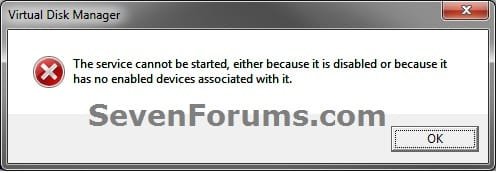
Error.jpg


OPTION ONE

Using Disk Management


1. If you have not already, you will first need to delete the partition or volume that you want to extend into to make it unallocated space.

2. Open the Control Panel (icons view), and click on the Administrative Tools icon. then close the Control Panel window.

3. Click on Computer Management in Administrative Tools, then close the Administrative Tools window.

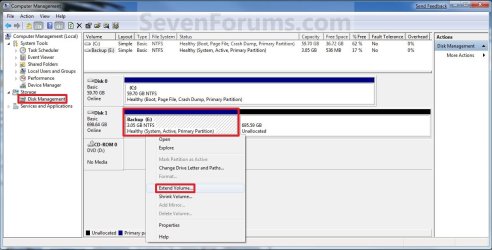
4. In the left pane under Storage, click on Disk Management. (See screenshot below)
Extend_Step1.jpg
5. In the middle pane, right click on the partition or volume directly adjacent (left) of the unallocated space that you want to extend into, and click on Extend Volume. (See screenshot above)

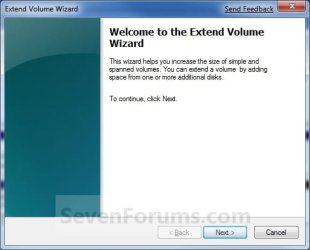
6. Click on the Next button. (See screenshot below)
Extend_Step2.jpg
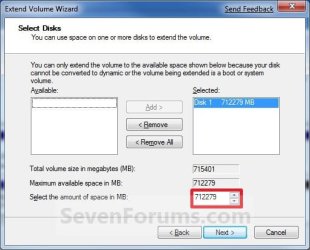
7. Type in how many MB (1 GB = 1024 MB) you want to use from the unallocated space to extend the selected partition (step 5) into, then click on the Next button. (See screenshot below)
NOTE: If you want to use all of the unallocated space to extend into, then type in the maximum available space shown for the unallocated space.
Extend_Step3.jpg
8. Click on the Finish button. (See screenshot below)
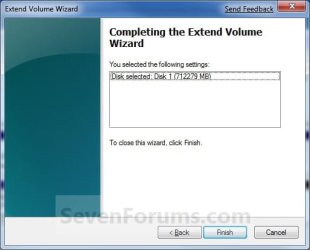
Extend_Step4.jpg
9. The partition or volume has now been extended into the assigned unallocted space (step 7). (See screenshot below)
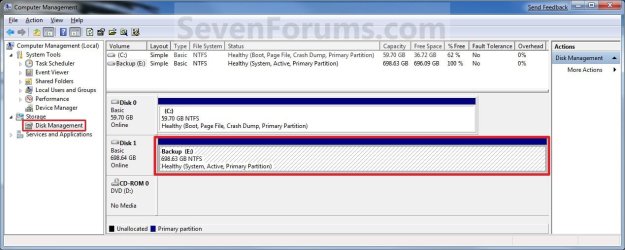
Extend_Step5.jpg
10. Close the Computer Management window. (See screenshot above)


OPTION TWO

Using Diskpart in a Elevated Command Prompt


1. If you have not already, you will first need to delete the partition or volume that you want to extend into to make it unallocated space.

2. Open a elevated command prompt, or a command prompt at boot.

3. In the elevated command prompt, type diskpart and press Enter. (See screenshot below)
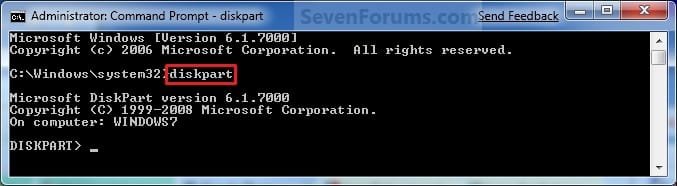
CMD_Extend_Step1.jpg
4. In the elevated command prompt, type list disk and press Enter. (See screenshot below)
NOTE: This is to help you ID the disk that has Free space that you want to extend into, and to see the disk size to make it easier to ID it's volume number in step 5. For example, Disk 1.
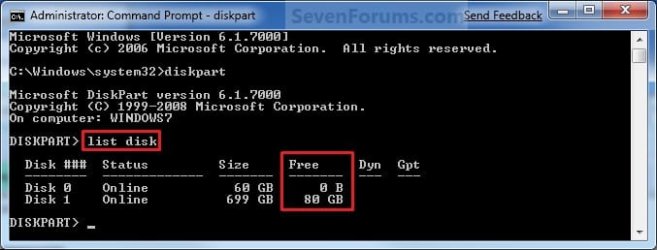
CMD_Extend_Step2.jpg
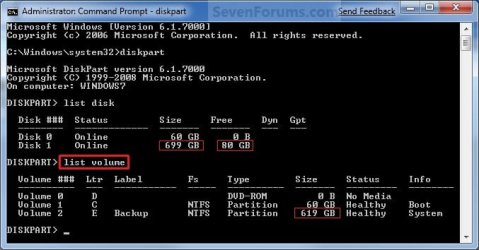
5. In the elevated command prompt, type list volume and press Enter. (See screenshot below)
NOTE: Look for the volume number that has the same Size as from the size in step 4 minus the Free space. For example, Volume 2.
CMD_Extend_Step3.jpg
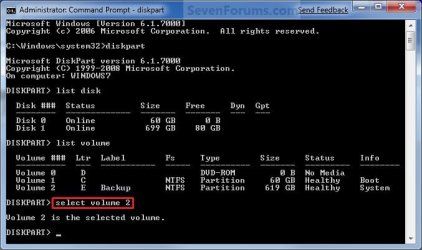
6. In the elevated command prompt, type select volume # and press Enter. (See screenshot below)
NOTE: You would substitute # for the volume number listed that you want to extend. For example, I want to extend the listed volume 2 since, so I would type select volume 2 and press Enter.
CMD_Extend_Step4.jpg
7. To Extend into All of the Unallocated Space
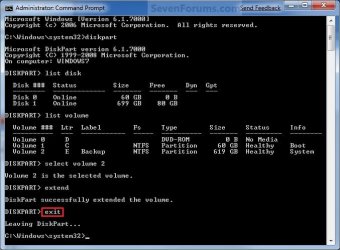
A) In the elevated command prompt, type extend and press Enter. (See screenshot below)
NOTE: The unallocated space will be removed and added completely to the selected partiton or volume (step 6).
CMD_Extend_Step5.jpg
B) Go to step 9.
8. To Extend into the Unallocated Space by a Specified Size
A) In the elevated command prompt, type extend size=(# in MB) and press Enter.
NOTE: You would substitute (# in MB) for how many MB (1 GB = 1024 MB) you want to use of the unallocated space (free space shown in step 4) to be extended into. For example, if I only wanted to extend into 5 GB of the unallocated space, then I would type extend size=5120 and press Enter.
9. In the elevated command prompt, type exit and press Enter. (See screenshot below)
CMD_Extend_Step6.jpg
10. Close the elevated command prompt.

11. The selected partition or volume (step 6) has now been extended into the unallocated space to make it larger.
NOTE: If you did step 8 instead of 7, then you can use the rest of the unallocated space to create a new partition with if you like.
That's it,
Shawn


Last edited:
Hey brink

I want to extend my Drive E. which is a logical drive. Suppose I shrink 50gb from drive C.

Now as you mentioned I need to delete the partition. Would that create in data-loss ??
 

My Computer

OS
Windows 7 Home Premium 64
Hello Aqibsunesara, and welcome to Seven Forums.

Please go ahead and post a screenshot of your Disk Management (diskmgmt.msc) window showing the full drive layout first to see what options you may have. :)
 

My Computer

Computer type
PC/Desktop
Computer Manufacturer/Model Number
Self built custom
OS
64-bit Windows 11 Pro for Workstations
CPU
Intel i7-8700K OC'd to 5 GHz
Motherboard
ASUS ROG Maximus XI Formula Z390
Memory
64 GB (4x16GB) G.SKILL TridentZ RGB DDR4 3600 MHz
Graphics Card(s)
ASUS ROG-STRIX-GTX1080TI-O11G-GAMING
Sound Card
Integrated
Monitor(s) Displays
2 x Samsung Odyssey G7 27"
Screen Resolution
2560x1440
Hard Drives
1TB Samsung 990 PRO M.2,
4TB Samsung 990 PRO PRO M.2,
TerraMaster F8 SSD Plus NAS
PSU
Seasonic Prime Titanium 850W
Case
Thermaltake Core P3
Cooling
Corsair Hydro H115i
Keyboard
Logitech wireless K800
Mouse
Logitech MX Master 4
Internet Speed
2 Gb/s Download and 100 Mb/s Upload
Antivirus
Malwarebyte Anti-Malware Premium
Browser
Google Chrome
Other Info
Logitech Z625 speaker system,
Logitech BRIO 4K Pro webcam,
HP Color LaserJet Pro MFP M477fdn,
APC SMART-UPS RT 1000 XL - SURT1000XLI,
Galaxy S23 Plus phone
I couldn't get a screenshot but do we need to format the logical or primary drive to extend it's volume through an unallocated space?


Sent from my iPhone using SevenForums app
 

My Computer

OS
Windows 7 Home Premium 64
I couldn't get a screenshot but do we need to format the logical or primary drive to extend it's volume through an unallocated space?


Sent from my iPhone using SevenForums app
Impossible to tell without a screenshot of Disk Management.
 

My Computer

Computer Manufacturer/Model Number
HP, Dell, Gateway, Toshiba - 4 laptops and 2 desktops
OS
Vista, Windows7, Mint Mate, Zorin, Windows 8
CPU
from 1.6GHz Duo to i7
Monitor(s) Displays
2x HP w2207
Hard Drives
5x HDD, 7x SSD, 12x Externals
Keyboard
with trackball - no mices
Mouse
Trackball mice
Internet Speed
DSL 6000
Hello, i'm still unable to extend my partition size.
the volume i want to extend is on the right of the unallocated space, so i tried the Diskpart on cmd (Option Two).
i have tried to use both step 7 and step 8 but Virtual Disk Service always gave these error messages.

"extend" : Virtual Disk Service error, the size of the extent is less than the minimum.
"extend size=5120" : Virtual Disk Service error, There is not enough usable space for this operation.

screenshot of my disk management :

2woyoic.jpg
 
Last edited by a moderator:

My Computer

OS
Windows 7 Home Premium 64bit
CPU
AMD Phenom II X6 1090T
Motherboard
MSI 890FXA-GD70
Memory
GSkill Flare 2x2GB DDR3
Graphics Card(s)
AMD Radeon HD 6850
Sound Card
Creative USB SB X-FI Surround 5.1 - External
Monitor(s) Displays
Samsung BX2250 22"
Screen Resolution
1920x1080
Hard Drives
Corsair Force GT 120GB SSD
WDC Black 1TB SATA3
PSU
NZXT Hale90 750W
Case
NZXT Phantom White
Cooling
Noctua NH-U9B SE2
Keyboard
Logitech Wireless K350
Mouse
Logitech Wireless Mouse
Hello Cliff,

You will not be able to use Disk Management to extend D: into the unallocated space since the unallocated space is to the left instead of the right of the partition that you want to extend. Normally with Disk Management in this case, you would have to delete D: to have Disk 1 as all unallocated space, then create a new partition from that using all of the space.

However, you can use the free program Partition Wizard Home Edition to do this. In this program, right click on your D: drive, click on Move/Resize, add (up arrow) all the unallocated space to the "Partition Size", click on OK, and click on Apply (check mark) on the toolbar at the top left. :)

Hope this helps,
Shawn
 

My Computer

Computer type
PC/Desktop
Computer Manufacturer/Model Number
Self built custom
OS
64-bit Windows 11 Pro for Workstations
CPU
Intel i7-8700K OC'd to 5 GHz
Motherboard
ASUS ROG Maximus XI Formula Z390
Memory
64 GB (4x16GB) G.SKILL TridentZ RGB DDR4 3600 MHz
Graphics Card(s)
ASUS ROG-STRIX-GTX1080TI-O11G-GAMING
Sound Card
Integrated
Monitor(s) Displays
2 x Samsung Odyssey G7 27"
Screen Resolution
2560x1440
Hard Drives
1TB Samsung 990 PRO M.2,
4TB Samsung 990 PRO PRO M.2,
TerraMaster F8 SSD Plus NAS
PSU
Seasonic Prime Titanium 850W
Case
Thermaltake Core P3
Cooling
Corsair Hydro H115i
Keyboard
Logitech wireless K800
Mouse
Logitech MX Master 4
Internet Speed
2 Gb/s Download and 100 Mb/s Upload
Antivirus
Malwarebyte Anti-Malware Premium
Browser
Google Chrome
Other Info
Logitech Z625 speaker system,
Logitech BRIO 4K Pro webcam,
HP Color LaserJet Pro MFP M477fdn,
APC SMART-UPS RT 1000 XL - SURT1000XLI,
Galaxy S23 Plus phone
Hi Shawn,
i've successfully extend the partition by using Partition Wizard.
there's still 8MB of unallocated space after the operation though, is it normal?

thank you :)
 

My Computer

OS
Windows 7 Home Premium 64bit
CPU
AMD Phenom II X6 1090T
Motherboard
MSI 890FXA-GD70
Memory
GSkill Flare 2x2GB DDR3
Graphics Card(s)
AMD Radeon HD 6850
Sound Card
Creative USB SB X-FI Surround 5.1 - External
Monitor(s) Displays
Samsung BX2250 22"
Screen Resolution
1920x1080
Hard Drives
Corsair Force GT 120GB SSD
WDC Black 1TB SATA3
PSU
NZXT Hale90 750W
Case
NZXT Phantom White
Cooling
Noctua NH-U9B SE2
Keyboard
Logitech Wireless K350
Mouse
Logitech Wireless Mouse
Yes, that's normal in Partition Wizard. It's for system use. Does it still show the 8 MB unallocated space in Disk Management?
 

My Computer

Computer type
PC/Desktop
Computer Manufacturer/Model Number
Self built custom
OS
64-bit Windows 11 Pro for Workstations
CPU
Intel i7-8700K OC'd to 5 GHz
Motherboard
ASUS ROG Maximus XI Formula Z390
Memory
64 GB (4x16GB) G.SKILL TridentZ RGB DDR4 3600 MHz
Graphics Card(s)
ASUS ROG-STRIX-GTX1080TI-O11G-GAMING
Sound Card
Integrated
Monitor(s) Displays
2 x Samsung Odyssey G7 27"
Screen Resolution
2560x1440
Hard Drives
1TB Samsung 990 PRO M.2,
4TB Samsung 990 PRO PRO M.2,
TerraMaster F8 SSD Plus NAS
PSU
Seasonic Prime Titanium 850W
Case
Thermaltake Core P3
Cooling
Corsair Hydro H115i
Keyboard
Logitech wireless K800
Mouse
Logitech MX Master 4
Internet Speed
2 Gb/s Download and 100 Mb/s Upload
Antivirus
Malwarebyte Anti-Malware Premium
Browser
Google Chrome
Other Info
Logitech Z625 speaker system,
Logitech BRIO 4K Pro webcam,
HP Color LaserJet Pro MFP M477fdn,
APC SMART-UPS RT 1000 XL - SURT1000XLI,
Galaxy S23 Plus phone
Yes it still showing on Disk Management, and it's on the left side of my D: partition/volume.
 

My Computer

OS
Windows 7 Home Premium 64bit
CPU
AMD Phenom II X6 1090T
Motherboard
MSI 890FXA-GD70
Memory
GSkill Flare 2x2GB DDR3
Graphics Card(s)
AMD Radeon HD 6850
Sound Card
Creative USB SB X-FI Surround 5.1 - External
Monitor(s) Displays
Samsung BX2250 22"
Screen Resolution
1920x1080
Hard Drives
Corsair Force GT 120GB SSD
WDC Black 1TB SATA3
PSU
NZXT Hale90 750W
Case
NZXT Phantom White
Cooling
Noctua NH-U9B SE2
Keyboard
Logitech Wireless K350
Mouse
Logitech Wireless Mouse
Cliff,

Could you post back with a screenshot showing the full HDD layout in Disk Management and Partition Wizard to help see what options you may have? :)

Are you able to use Partition Wizard with Move/Resize again to move the 8MB to D: ?
 

My Computer

Computer type
PC/Desktop
Computer Manufacturer/Model Number
Self built custom
OS
64-bit Windows 11 Pro for Workstations
CPU
Intel i7-8700K OC'd to 5 GHz
Motherboard
ASUS ROG Maximus XI Formula Z390
Memory
64 GB (4x16GB) G.SKILL TridentZ RGB DDR4 3600 MHz
Graphics Card(s)
ASUS ROG-STRIX-GTX1080TI-O11G-GAMING
Sound Card
Integrated
Monitor(s) Displays
2 x Samsung Odyssey G7 27"
Screen Resolution
2560x1440
Hard Drives
1TB Samsung 990 PRO M.2,
4TB Samsung 990 PRO PRO M.2,
TerraMaster F8 SSD Plus NAS
PSU
Seasonic Prime Titanium 850W
Case
Thermaltake Core P3
Cooling
Corsair Hydro H115i
Keyboard
Logitech wireless K800
Mouse
Logitech MX Master 4
Internet Speed
2 Gb/s Download and 100 Mb/s Upload
Antivirus
Malwarebyte Anti-Malware Premium
Browser
Google Chrome
Other Info
Logitech Z625 speaker system,
Logitech BRIO 4K Pro webcam,
HP Color LaserJet Pro MFP M477fdn,
APC SMART-UPS RT 1000 XL - SURT1000XLI,
Galaxy S23 Plus phone
Here's the screenshot :
141npfa.jpg


i've tried twice to resize it again. But the 8MB of unallocated space is still there even both process reported successfully resized it.
honestly, I don't mind if the 8MB space is unusable to me. Maybe it's for system use like you said before.
 

My Computer

OS
Windows 7 Home Premium 64bit
CPU
AMD Phenom II X6 1090T
Motherboard
MSI 890FXA-GD70
Memory
GSkill Flare 2x2GB DDR3
Graphics Card(s)
AMD Radeon HD 6850
Sound Card
Creative USB SB X-FI Surround 5.1 - External
Monitor(s) Displays
Samsung BX2250 22"
Screen Resolution
1920x1080
Hard Drives
Corsair Force GT 120GB SSD
WDC Black 1TB SATA3
PSU
NZXT Hale90 750W
Case
NZXT Phantom White
Cooling
Noctua NH-U9B SE2
Keyboard
Logitech Wireless K350
Mouse
Logitech Wireless Mouse
Yep, it looks like if you really want to get rid of the 8MB unallocated, you would need to run the Clean command on Disk 1 to make it all unallocated, then format the whole HDD (Disk 1) as D afterwards.

You would of course need to copy anything you do not want to lose on D to a separate HDD before doing the above so that you can copy it back afterwards.
 

My Computer

Computer type
PC/Desktop
Computer Manufacturer/Model Number
Self built custom
OS
64-bit Windows 11 Pro for Workstations
CPU
Intel i7-8700K OC'd to 5 GHz
Motherboard
ASUS ROG Maximus XI Formula Z390
Memory
64 GB (4x16GB) G.SKILL TridentZ RGB DDR4 3600 MHz
Graphics Card(s)
ASUS ROG-STRIX-GTX1080TI-O11G-GAMING
Sound Card
Integrated
Monitor(s) Displays
2 x Samsung Odyssey G7 27"
Screen Resolution
2560x1440
Hard Drives
1TB Samsung 990 PRO M.2,
4TB Samsung 990 PRO PRO M.2,
TerraMaster F8 SSD Plus NAS
PSU
Seasonic Prime Titanium 850W
Case
Thermaltake Core P3
Cooling
Corsair Hydro H115i
Keyboard
Logitech wireless K800
Mouse
Logitech MX Master 4
Internet Speed
2 Gb/s Download and 100 Mb/s Upload
Antivirus
Malwarebyte Anti-Malware Premium
Browser
Google Chrome
Other Info
Logitech Z625 speaker system,
Logitech BRIO 4K Pro webcam,
HP Color LaserJet Pro MFP M477fdn,
APC SMART-UPS RT 1000 XL - SURT1000XLI,
Galaxy S23 Plus phone
I feel it's unnecessary to wipe all the data and copy it again just because of this small space, so I think it's better to leave it unallocated.
Thanks for your great help, Shawn!
 

My Computer

OS
Windows 7 Home Premium 64bit
CPU
AMD Phenom II X6 1090T
Motherboard
MSI 890FXA-GD70
Memory
GSkill Flare 2x2GB DDR3
Graphics Card(s)
AMD Radeon HD 6850
Sound Card
Creative USB SB X-FI Surround 5.1 - External
Monitor(s) Displays
Samsung BX2250 22"
Screen Resolution
1920x1080
Hard Drives
Corsair Force GT 120GB SSD
WDC Black 1TB SATA3
PSU
NZXT Hale90 750W
Case
NZXT Phantom White
Cooling
Noctua NH-U9B SE2
Keyboard
Logitech Wireless K350
Mouse
Logitech Wireless Mouse
cliffflip, of I were you, I would not worry about the 8MB. That is such a small amount of disk space that it is not worth risking to lose the partition - and that has happened to me due to a small operational errot with partition wizard.

Fortunately I had images of everything on the disk so that I could easily recover. And imaging I always recommend before manipulating a partition.
 

My Computer

Computer Manufacturer/Model Number
HP, Dell, Gateway, Toshiba - 4 laptops and 2 desktops
OS
Vista, Windows7, Mint Mate, Zorin, Windows 8
CPU
from 1.6GHz Duo to i7
Monitor(s) Displays
2x HP w2207
Hard Drives
5x HDD, 7x SSD, 12x Externals
Keyboard
with trackball - no mices
Mouse
Trackball mice
Internet Speed
DSL 6000
You're welcome Cliff. I'm agree, it's not worth messing with now for such a small amount. :)
 

My Computer

Computer type
PC/Desktop
Computer Manufacturer/Model Number
Self built custom
OS
64-bit Windows 11 Pro for Workstations
CPU
Intel i7-8700K OC'd to 5 GHz
Motherboard
ASUS ROG Maximus XI Formula Z390
Memory
64 GB (4x16GB) G.SKILL TridentZ RGB DDR4 3600 MHz
Graphics Card(s)
ASUS ROG-STRIX-GTX1080TI-O11G-GAMING
Sound Card
Integrated
Monitor(s) Displays
2 x Samsung Odyssey G7 27"
Screen Resolution
2560x1440
Hard Drives
1TB Samsung 990 PRO M.2,
4TB Samsung 990 PRO PRO M.2,
TerraMaster F8 SSD Plus NAS
PSU
Seasonic Prime Titanium 850W
Case
Thermaltake Core P3
Cooling
Corsair Hydro H115i
Keyboard
Logitech wireless K800
Mouse
Logitech MX Master 4
Internet Speed
2 Gb/s Download and 100 Mb/s Upload
Antivirus
Malwarebyte Anti-Malware Premium
Browser
Google Chrome
Other Info
Logitech Z625 speaker system,
Logitech BRIO 4K Pro webcam,
HP Color LaserJet Pro MFP M477fdn,
APC SMART-UPS RT 1000 XL - SURT1000XLI,
Galaxy S23 Plus phone
I want to add Unallocated Space to another Drive Volume

Hello Shawn,

I hope that you are well.

...a long time no contact, which I suppose is a good thing since I've come to grips with Windows 7 far, far easier than I managed with Vista - an OS in which in my opinion, users were treated as Guinea Pigs for Windows 7 development...

I do now need your advice - please refer to the following snip;

Disk Management - Increase K to 100.00 GB.JPG

I wish to add the 40 GB of unallocated space to create 100 GB of volume on my archives - Tony's Records K: Drive.

Can you please advise or redirect me to the best way in which I can do this?

Cheers Mate,
Tony
 

My Computer

Computer Manufacturer/Model Number
Acer Aspire Timeline X Laptop - Model 5820TG - V1.23
OS
Windows 7 Home Premium x64 - SP1
CPU
Intel Core i5 @ 2.67GHz Arrandale 32nm Technology
Motherboard
Acer JM51_CP (CPU) Base Board Version
Memory
8 GB RAM [2 x 4 GB DDR3]
Graphics Card(s)
AMD Radeon HD 6650M, Intel (R) HD Graphics
Sound Card
Realtek HD Audio, ATI HD Audio Device
Monitor(s) Displays
Acer Aspire Notebook - 15.7"; Acer LCD Monitor X223Wsd - 22"
Screen Resolution
1366 x 768 x 60Hertz
Hard Drives
Notebook - 733GB Western Digital WDC WD7500BPVT- 22HXZT1 Sata.
External HDs [4];Maxtor One Touch4 - 500GB External HD [Drive M:\].Western Digital WDXMS1200TA - 120GB External HD. WD My Book 'Elite' 1TB External HD [Windows 7 dedicated - Partitioned
Mouse
Logitech Wireless V320 for Notebooks
Other Info
Brother MFC-465CN; PC to Fax/Scan/Copy/Photo Multi Function Centre. Epson Perfection V300 Photo Scanner.
Siemens Speedstream 6520 Router.
Wacom 'Bamboo Fun' CTE-650 PC Tablet, Stylus and Mouse. Logitech X-230 Notebook Stereo Speakers and Sub-woofer.
UAC - On. Internet - FireFox v13.0.1 & IE8.
Hon.RSM to the 4th [Assault Pioneer] Troop Pune Sepoys , and 3rd Troop Jodhpur Bengali Lancers
Hello Tony,

Good to hear from you mate. You may be able to use the free program Partition Wizard Home Edition to do this. In this program, right click on your K: drive, click on Move/Resize, add (up arrow) all the unallocated space to the "Partition Size", click on OK, and click on Apply (check mark) on the toolbar at the top left. :)
 

My Computer

Computer type
PC/Desktop
Computer Manufacturer/Model Number
Self built custom
OS
64-bit Windows 11 Pro for Workstations
CPU
Intel i7-8700K OC'd to 5 GHz
Motherboard
ASUS ROG Maximus XI Formula Z390
Memory
64 GB (4x16GB) G.SKILL TridentZ RGB DDR4 3600 MHz
Graphics Card(s)
ASUS ROG-STRIX-GTX1080TI-O11G-GAMING
Sound Card
Integrated
Monitor(s) Displays
2 x Samsung Odyssey G7 27"
Screen Resolution
2560x1440
Hard Drives
1TB Samsung 990 PRO M.2,
4TB Samsung 990 PRO PRO M.2,
TerraMaster F8 SSD Plus NAS
PSU
Seasonic Prime Titanium 850W
Case
Thermaltake Core P3
Cooling
Corsair Hydro H115i
Keyboard
Logitech wireless K800
Mouse
Logitech MX Master 4
Internet Speed
2 Gb/s Download and 100 Mb/s Upload
Antivirus
Malwarebyte Anti-Malware Premium
Browser
Google Chrome
Other Info
Logitech Z625 speaker system,
Logitech BRIO 4K Pro webcam,
HP Color LaserJet Pro MFP M477fdn,
APC SMART-UPS RT 1000 XL - SURT1000XLI,
Galaxy S23 Plus phone
I want to add Unallocated Space to another Drive Volume

Hello Tony,

Good to hear from you mate. You may be able to use the free program Partition Wizard Home Edition to do this. In this program, right click on your K: drive, click on Move/Resize, add (up arrow) all the unallocated space to the "Partition Size", click on OK, and click on Apply (check mark) on the toolbar at the top left. :)

Shawn Mate!

That worked as a gentle breeze, and as always, your advice was absolutely spot on. ;)

In the finish it left 47.79 MB of unallocated space, but hey, I can live with that as the K: Drive now sits at 99.95 GB!

Thanks Mate, you're one in a million...
...all the best and cheers,
Tony :thumbsup:

PS....pity there's no way to show that advice solved my problem
 
Last edited:

My Computer

Computer Manufacturer/Model Number
Acer Aspire Timeline X Laptop - Model 5820TG - V1.23
OS
Windows 7 Home Premium x64 - SP1
CPU
Intel Core i5 @ 2.67GHz Arrandale 32nm Technology
Motherboard
Acer JM51_CP (CPU) Base Board Version
Memory
8 GB RAM [2 x 4 GB DDR3]
Graphics Card(s)
AMD Radeon HD 6650M, Intel (R) HD Graphics
Sound Card
Realtek HD Audio, ATI HD Audio Device
Monitor(s) Displays
Acer Aspire Notebook - 15.7"; Acer LCD Monitor X223Wsd - 22"
Screen Resolution
1366 x 768 x 60Hertz
Hard Drives
Notebook - 733GB Western Digital WDC WD7500BPVT- 22HXZT1 Sata.
External HDs [4];Maxtor One Touch4 - 500GB External HD [Drive M:\].Western Digital WDXMS1200TA - 120GB External HD. WD My Book 'Elite' 1TB External HD [Windows 7 dedicated - Partitioned
Mouse
Logitech Wireless V320 for Notebooks
Other Info
Brother MFC-465CN; PC to Fax/Scan/Copy/Photo Multi Function Centre. Epson Perfection V300 Photo Scanner.
Siemens Speedstream 6520 Router.
Wacom 'Bamboo Fun' CTE-650 PC Tablet, Stylus and Mouse. Logitech X-230 Notebook Stereo Speakers and Sub-woofer.
UAC - On. Internet - FireFox v13.0.1 & IE8.
Hon.RSM to the 4th [Assault Pioneer] Troop Pune Sepoys , and 3rd Troop Jodhpur Bengali Lancers
You're most welcome Tony. :)
 

My Computer

Computer type
PC/Desktop
Computer Manufacturer/Model Number
Self built custom
OS
64-bit Windows 11 Pro for Workstations
CPU
Intel i7-8700K OC'd to 5 GHz
Motherboard
ASUS ROG Maximus XI Formula Z390
Memory
64 GB (4x16GB) G.SKILL TridentZ RGB DDR4 3600 MHz
Graphics Card(s)
ASUS ROG-STRIX-GTX1080TI-O11G-GAMING
Sound Card
Integrated
Monitor(s) Displays
2 x Samsung Odyssey G7 27"
Screen Resolution
2560x1440
Hard Drives
1TB Samsung 990 PRO M.2,
4TB Samsung 990 PRO PRO M.2,
TerraMaster F8 SSD Plus NAS
PSU
Seasonic Prime Titanium 850W
Case
Thermaltake Core P3
Cooling
Corsair Hydro H115i
Keyboard
Logitech wireless K800
Mouse
Logitech MX Master 4
Internet Speed
2 Gb/s Download and 100 Mb/s Upload
Antivirus
Malwarebyte Anti-Malware Premium
Browser
Google Chrome
Other Info
Logitech Z625 speaker system,
Logitech BRIO 4K Pro webcam,
HP Color LaserJet Pro MFP M477fdn,
APC SMART-UPS RT 1000 XL - SURT1000XLI,
Galaxy S23 Plus phone
Back
Top