
OK, I have a dual boot PC with the following partitions:
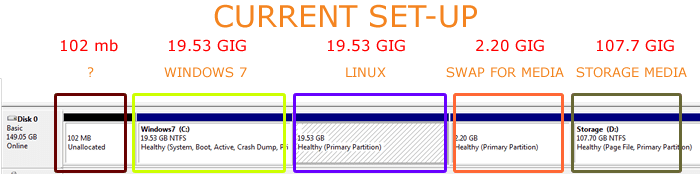
NTFS 102 MB (Unallocated) * Doing nothing?
NTFS 19.53 GIG (Healthy, System, Boot, Active, Crash Dump) * C Drive
ext4 19.53 GIG (Healthy, Primary Partition) * Holding Linux Ubuntu
ext4 2.20 GIG (Healthy, Primary Partition) * Acting as a Linux Swap Partition
NTFS 107.70 GIG (Healthy, Page File, Primary Partition) * D Drive
The C Drive only has 1 gig left of memory and I am rapidly running out of options of how to save space. Clearly the C Drive with only 20 GIG was incorrectly allocated such a tiny space...
Here is my plan.....
I would like to buy a solid state 160GIG and re-partition this....Ideally I would like to make the C Drive 40GIG, (seen here as Green) by reducing the D Drive, (seen here in blue). The purpose of the D Drive is to house media which can be accessed by either OS.
I must point out that the laptop works beautifully without any hitches but the problem is this C Drive which I wish I had made bigger with the installation.
Any ideas?
Can I just simply clone the hard drive then on a fresh harddrive create new partitions and place the above data in there?
Thanks!!!!!!!!!!!!!!!!!!
NTFS 102 MB (Unallocated) * Doing nothing?
NTFS 19.53 GIG (Healthy, System, Boot, Active, Crash Dump) * C Drive
ext4 19.53 GIG (Healthy, Primary Partition) * Holding Linux Ubuntu
ext4 2.20 GIG (Healthy, Primary Partition) * Acting as a Linux Swap Partition
NTFS 107.70 GIG (Healthy, Page File, Primary Partition) * D Drive
The C Drive only has 1 gig left of memory and I am rapidly running out of options of how to save space. Clearly the C Drive with only 20 GIG was incorrectly allocated such a tiny space...
Here is my plan.....
I would like to buy a solid state 160GIG and re-partition this....Ideally I would like to make the C Drive 40GIG, (seen here as Green) by reducing the D Drive, (seen here in blue). The purpose of the D Drive is to house media which can be accessed by either OS.
I must point out that the laptop works beautifully without any hitches but the problem is this C Drive which I wish I had made bigger with the installation.
Any ideas?
Can I just simply clone the hard drive then on a fresh harddrive create new partitions and place the above data in there?
Thanks!!!!!!!!!!!!!!!!!!
Attachments
My Computer
- Computer Manufacturer/Model Number
- Panasonic Toughbook CF F9
- OS
- Windows 7 Panasonic CF F9 (used to have CF F8)
