
Partition question

77273GU

New member
Power User
Local time
7:51 PM
Messages
62
Hello,
I would like to shrink my C drive to create a data volume. Heres a pic of my HD.
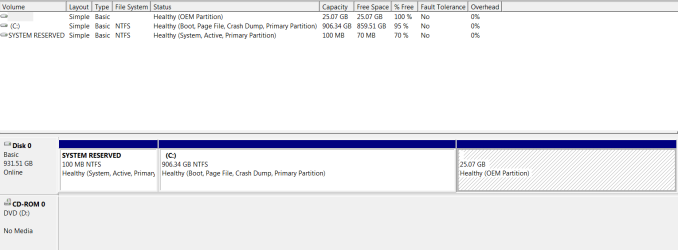
D_management.PNG

Ive searched and know how to shrink the drive thru disk management. Ill move my user folders and the public folders to the new volume thru each folders\ properties\ location tab. Then Ill add those folders to the search index thru index options.

A few questions.
Does this sound right? Am I missing anything?

What is a good size to shrink C drive to? I know its dependent on what disk management allows, but what should I shoot for?

Are there any other folders or anything else I would want to move the new volume?

Thanks
 

My Computer

Computer type
PC/Desktop
Computer Manufacturer/Model Number
Born on date-10-7-2011
OS
Windows 7 Home Premium 64bit
CPU
Intel Core i5-2500 K
Motherboard
Asus P8Z68-V Bios 0902
Memory
8GB J Skill- F312800CLD-8GBXM
Graphics Card(s)
Saphire 6870 & Intel HD 3000
Sound Card
Realtek HD Audio
Monitor(s) Displays
Asus VE258Q
Screen Resolution
1920 X 1080
Hard Drives
64g Crucial M4 SSD, 750g WD Caviar Black
PSU
Corsair TX 650 V2
Case
Corsair Carbide 400R
Cooling
Corsair H60
Keyboard
CM Storm Trigger Cherry Blues
Mouse
Logitech G500, G700
Depending what applications you've got installed, you could shrink your C partition to 100GB leaving 800GB free for your data partition.

Unfortunately, Windows 7's disk management utility is very basic and will probably only let you shrink the partition by half, leaving you with around 450GB for both your Windows and Data partition when you create it.

If you have a set of recovery disks to get you back to factory restore should you need to, you could delete the OEM recovery partion, extend your C partition to take up the space released, and then shrink it to create space for your data partition.

Just remember that recovering your system from DVDs rather than a recovery partition does take a lot longer.

You might want to consider downloading the free version of Partition Wizard to partition your drive as it will let you create a partition size you want.

You may also want to consider a clean install of Windows 7 using the OEM product key on your computer as a factory restore will wipe any partitions you have created and any data you haven't backed up first.

With a clean install you're not affecting anything other than your Windows partition when you carry it out.

Once you've got everything set up how you want create a complete system image backup and restore from that should the need arise.

Just be careful when you're changing the default location of your User folders and Public folders as a broken junction point or symbolic link will cause you problems.

In case you didn't know, Windows 7 uses these links to tell legacy software where the default save location is. For example, software written for Windows XP would look for My Documents, all the junction point does is point it to the Users\Documents folder in Windows 7, but if the junction point can't be seen or has been deleted, then the legacy software gets mightily confused.
 
Last edited:

My Computer

Computer Manufacturer/Model Number
HP Pavilion Elite 495UK
OS
Windows 7 Ultimate SP1 64-Bit
CPU
Intel Core i7 870 @ 2.93GHz
Motherboard
MSI 2A9C (CPU1)
Memory
8Gb Dual-Channel DDR3 @ 664MHz
Graphics Card(s)
nVidia GeForce GTX 460 1024MB dedicated RAM
Sound Card
Realtek HD Audio
Monitor(s) Displays
HP2310i
Screen Resolution
1920 x 1080
Hard Drives
1x1954GB Hitachi HDS22020ALA 330 (RAID), 1x1954GB Hitachi External for backup and storage
PSU
460W
Case
HP Elite
Cooling
Air cooled
Keyboard
Logitech K750 solar-powered keyboard
Mouse
Logitech Wireless M180 mouse
Internet Speed
2Mb
Other Info
Pure Avanti Flow Internet Radio with iPod Dock, 64Gb iPod, HP USB Speakers, Sony MDR-V500 Headphones, Sony Vaio F-Series Laptop
I don't know if it is something you want to hear as it sounds as if you have a pretty new system... but if you consider going through the motions Seavixen correctly described anyway... I'd advise on putting in a small (80g would be enough(?)) SSD disk and make that your new OS disk. It will speed things up even more (my W7 64b starts-up in a flash... and I get a 7.6 rating on my SSD) and it will leave you to do with your 1T storage disk as you like...
 

My Computer

Computer Manufacturer/Model Number
custom build
OS
Windows 7 64b Ultimate
CPU
I7-2600 3.40GHz - testing various OC levels..
Motherboard
ASUS Sabretooth
Memory
2x 4Gb DDR3/1333
Graphics Card(s)
GTX570 - testing OC levels
Sound Card
motherboard 7.1 DIG.
Monitor(s) Displays
2x Ilyama 24" E2409HDS-B1 2ms/DVI
Screen Resolution
1920 x 1080
Hard Drives
120 GB Intel Elmcrest SSD
1 TB SATAII 7200RPM/32MB
External 2TB USB3
PSU
Corsair Pro HX850W
Cooling
Coolermaster Hyper V8
Keyboard
Logitech G110
Mouse
Logitech G700
Internet Speed
25Mb
Other Info
CPU: 7,7 RAM: 7,7 GTX: 7,9 GTX 3D : 7,9 SSD 7,6
Overall 7,6 ...... now to speed up the SSD... ;)

Also use a Dell XPS M1710 on Vista 32b
Asus LT on Vista 32
3 older machines still doing fine on Linux/ubuntu but not used much anymore...
See how much Disk Mgmt will shrink C. If it isn't enough, download and burn to CD free Partition Wizard bootable CD to Resize C to get more unallocated space. Partition Wizard

I would then create a Logical Extended Partition using PW CD so you have the ability to add as many sub-partitions as you wish.
 
Hello.


You can use Windows disk management to shrink the C: partition as much as it will allow but I wouldn't take it much below 200 or 300GB, as you don't want to make life hard in future and you don't need third party software, Windows will do everything you need to do.

Using disk management to create a partition of the created unallocated space will give you an Extended partition by default, and that is a good option for your situation as you will be able to create as many Logical drives within the Extended partition as there are available drive letters.

Have a look at Method One of this tutorial at the link below to get some ideas and be sure to post back with any further questions you may have and to keep us informed.


If you should want/need a larger shrink, have a look at this link for some ideas.
 

My Computer

Computer Manufacturer/Model Number
* BFK Customs *
OS
W 7 64-bit Ultimate
CPU
Intel Q9550 Yorkfield
Motherboard
ASUS P5Q Pro
Memory
8GB Dominator 8500C5D
Graphics Card(s)
ATI : XFX 5870
Sound Card
Realtek HD Audio 7-1
Monitor(s) Displays
1x 47" LCD HDMI & 3x 26" LCD HDMI
Screen Resolution
1920x1080P & 1920x1200
Hard Drives
1x 80GB Intel X25-M G2 SSD : 1x 500GB & 1x 640GB WD Caviar Black(s)
PSU
Corsair 620HX
Case
Cooler Master RC-690
Cooling
Tuniq Tower 120, 2x 140mm and 3x 120mm case fans
Keyboard
Microsoft 500
Mouse
Razer Diamondback 3G
Internet Speed
14 Mb/s
Other Info
1x Koutech 3Gb/s SATA HDD Hot Swap Rack
Hey all, thanks for the help.
I will be trying this on a new computer. I'm in the process of returning this computer for a replacement. Thats another story though (bad mobo). Hopefully this will allow me the space I want.

@seavixen32
I did not know that changing the default location of folders would mess with XP programs. So if I understand correctly, if the latest oper. system supported by the program is XP and it wants to write something to a relocated folder it wont see the folder and the problems begin. What if the last oper. system listed for the program is Vista? If you don't change the default location of your folders doesn't that make it more cumbersome to navigate around?

@gregrocker
I'm going to download and burn the CD. If I cant get what I want with disk management then Ill use it as plan B

@Bare Foot Kid
I believe thats the method I was talking about. Instead of using command promt I was just going to right click on C partition \shrink\size\create logical partition.

So, with all your info, when I get the new computer this is what Ill try
1- Image system
2-See what disk management will give me. If its not enough I read where I can also temporarily disable system restore and or the page file to free up more space.
3-If I don't like what I get then Ill go with the Partition Wizard CD.

I think Ill try it on this computer before she goes back. Cant loose with that option.;)
 

My Computer

Computer type
PC/Desktop
Computer Manufacturer/Model Number
Born on date-10-7-2011
OS
Windows 7 Home Premium 64bit
CPU
Intel Core i5-2500 K
Motherboard
Asus P8Z68-V Bios 0902
Memory
8GB J Skill- F312800CLD-8GBXM
Graphics Card(s)
Saphire 6870 & Intel HD 3000
Sound Card
Realtek HD Audio
Monitor(s) Displays
Asus VE258Q
Screen Resolution
1920 X 1080
Hard Drives
64g Crucial M4 SSD, 750g WD Caviar Black
PSU
Corsair TX 650 V2
Case
Corsair Carbide 400R
Cooling
Corsair H60
Keyboard
CM Storm Trigger Cherry Blues
Mouse
Logitech G500, G700
Hello again.


Speaking of the new PC, the more you use the OS the less shrink disk management will give you, IOW do the shrink as soon as you get the new PC and you may not need PW. ;)

Have a look at this.
Be sure to post back here to keep us informed about the new and the old PC outcome.
 

My Computer

Computer Manufacturer/Model Number
* BFK Customs *
OS
W 7 64-bit Ultimate
CPU
Intel Q9550 Yorkfield
Motherboard
ASUS P5Q Pro
Memory
8GB Dominator 8500C5D
Graphics Card(s)
ATI : XFX 5870
Sound Card
Realtek HD Audio 7-1
Monitor(s) Displays
1x 47" LCD HDMI & 3x 26" LCD HDMI
Screen Resolution
1920x1080P & 1920x1200
Hard Drives
1x 80GB Intel X25-M G2 SSD : 1x 500GB & 1x 640GB WD Caviar Black(s)
PSU
Corsair 620HX
Case
Cooler Master RC-690
Cooling
Tuniq Tower 120, 2x 140mm and 3x 120mm case fans
Keyboard
Microsoft 500
Mouse
Razer Diamondback 3G
Internet Speed
14 Mb/s
Other Info
1x Koutech 3Gb/s SATA HDD Hot Swap Rack
I tried free Macrium the other night. Followed the tutorial by whs.

I'm having a problem with the boot CD. I ran a test- image and restore as explained in the tutorial.

Heres the problem. I select the CD as the boot device, put the boot CD in, hit enter, it loads to the 1st screen, I hit next and thats it. It just stops.

I tried it with the regular Linux boot CD and the compatibility mode CD. No Luck.

Haven't looked into an answer yet. Ill try a different brand CD and see if that works.
 

My Computer

Computer type
PC/Desktop
Computer Manufacturer/Model Number
Born on date-10-7-2011
OS
Windows 7 Home Premium 64bit
CPU
Intel Core i5-2500 K
Motherboard
Asus P8Z68-V Bios 0902
Memory
8GB J Skill- F312800CLD-8GBXM
Graphics Card(s)
Saphire 6870 & Intel HD 3000
Sound Card
Realtek HD Audio
Monitor(s) Displays
Asus VE258Q
Screen Resolution
1920 X 1080
Hard Drives
64g Crucial M4 SSD, 750g WD Caviar Black
PSU
Corsair TX 650 V2
Case
Corsair Carbide 400R
Cooling
Corsair H60
Keyboard
CM Storm Trigger Cherry Blues
Mouse
Logitech G500, G700
I'm not that much on back-up but you can click this link to start a thread over there.
 

My Computer

Computer Manufacturer/Model Number
* BFK Customs *
OS
W 7 64-bit Ultimate
CPU
Intel Q9550 Yorkfield
Motherboard
ASUS P5Q Pro
Memory
8GB Dominator 8500C5D
Graphics Card(s)
ATI : XFX 5870
Sound Card
Realtek HD Audio 7-1
Monitor(s) Displays
1x 47" LCD HDMI & 3x 26" LCD HDMI
Screen Resolution
1920x1080P & 1920x1200
Hard Drives
1x 80GB Intel X25-M G2 SSD : 1x 500GB & 1x 640GB WD Caviar Black(s)
PSU
Corsair 620HX
Case
Cooler Master RC-690
Cooling
Tuniq Tower 120, 2x 140mm and 3x 120mm case fans
Keyboard
Microsoft 500
Mouse
Razer Diamondback 3G
Internet Speed
14 Mb/s
Other Info
1x Koutech 3Gb/s SATA HDD Hot Swap Rack
In answer to your query about legacy programs, providing you don't mess with the default settings for Libraries and user folders, Windows 7 will cope quite happily with software written for older operating systems such as XP and Vista.
 

My Computer

Computer Manufacturer/Model Number
HP Pavilion Elite 495UK
OS
Windows 7 Ultimate SP1 64-Bit
CPU
Intel Core i7 870 @ 2.93GHz
Motherboard
MSI 2A9C (CPU1)
Memory
8Gb Dual-Channel DDR3 @ 664MHz
Graphics Card(s)
nVidia GeForce GTX 460 1024MB dedicated RAM
Sound Card
Realtek HD Audio
Monitor(s) Displays
HP2310i
Screen Resolution
1920 x 1080
Hard Drives
1x1954GB Hitachi HDS22020ALA 330 (RAID), 1x1954GB Hitachi External for backup and storage
PSU
460W
Case
HP Elite
Cooling
Air cooled
Keyboard
Logitech K750 solar-powered keyboard
Mouse
Logitech Wireless M180 mouse
Internet Speed
2Mb
Other Info
Pure Avanti Flow Internet Radio with iPod Dock, 64Gb iPod, HP USB Speakers, Sony MDR-V500 Headphones, Sony Vaio F-Series Laptop
Back
Top