

- Local time
- 11:43 AM
- Messages
- 42
Hello,
yesterday I have formatted my Computer. But first my System-Details:
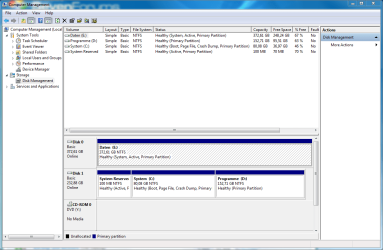
I have to Harddrives. The first one is splitted into two Partitions C:System and D: Programs. The second HDD is my Data-Drive E: Progams. I have activated the Admin-Account through the Computer-Management and usually work with an normal Account.
So I started the Windows 7 Setup via DVD and deleted the C: and D: Partition. After that i used to create the new partitions in the Windows Setup (again the same Partitions C: and D .
.
Everything works fine but I recognized that on E: appear some Folders with a long Number-Letter combination and behind the Partition E: in the System-Management there is the Status "System". So I dont know what went wrong or if everything is fine. But in my opinion the Partition C: has to be System and boot or am i wrong?
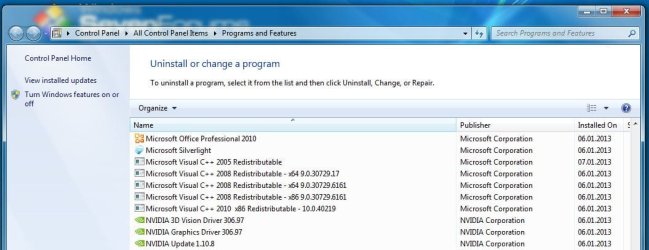
Then today I tried to install the HTC Sync Manager and I got the Error (corresponding): The File "VC Redist 2008 KB973522 (x86)" couldnt be found. The Installation will be aborted...
Has this something to do with the Problem I described first and is it necessary to reinstall Windows?
greetz.mowh
EDIT: all Windows Updates and V C++ 2005/2008 are installed
yesterday I have formatted my Computer. But first my System-Details:
I have to Harddrives. The first one is splitted into two Partitions C:System and D: Programs. The second HDD is my Data-Drive E: Progams. I have activated the Admin-Account through the Computer-Management and usually work with an normal Account.
So I started the Windows 7 Setup via DVD and deleted the C: and D: Partition. After that i used to create the new partitions in the Windows Setup (again the same Partitions C: and D
. Everything works fine but I recognized that on E: appear some Folders with a long Number-Letter combination and behind the Partition E: in the System-Management there is the Status "System". So I dont know what went wrong or if everything is fine. But in my opinion the Partition C: has to be System and boot or am i wrong?
Then today I tried to install the HTC Sync Manager and I got the Error (corresponding): The File "VC Redist 2008 KB973522 (x86)" couldnt be found. The Installation will be aborted...
Has this something to do with the Problem I described first and is it necessary to reinstall Windows?
greetz.mowh
EDIT: all Windows Updates and V C++ 2005/2008 are installed
Attachments
Last edited:
My Computer
- OS
- Windows 7 Prof. x64
- CPU
- AMD Athlon 64 X2 6000+
- Motherboard
- M2N SLI DELUXE
- Memory
- Kingston 4GB
- Graphics Card(s)
- ASUS Geforce 9800GTX+
- Sound Card
- On Board
- Monitor(s) Displays
- Samsung
- Screen Resolution
- 1680x1050

