Partition Table Corrupted on External USB drive

Rincewindwiz

New member
Member
VIP
Local time
4:09 PM
Messages
192
Hi


I have managed to corrupt the partition info on my USB HDD
the HDD is 465GB and I was moving (silly me) data onto it.
Went off to do stuff. Came back to check data and I can no longer access the drive. Windows explorer sulks and reports X:/ is not accessible. The parameter is incorrect
Disk Management reports 2 partitions (there was only one) of 40Mb and 100MB and the rest (465GB) unallocated
EaseUS partition recovery reports 2 partitions 465GB, 100 Mb and 465 GB unallocated

This looks sensible (in that the original drive was 465GB)

So how can I rebuild the original partition table and hopefully recover the data?
TFAI
 

My Computer My Computer

Computer type
Laptop
Computer Manufacturer/Model Number
HP ENVY DV6
OS
64 bit Win 7 Ultimate
Memory
12GB
Graphics Card(s)
NVIDIA 630M
Hard Drives
750GB

My Computer My Computer

Computer type
PC/Desktop
Computer Manufacturer/Model Number
HP Desktop & Compaq Laptop
OS
Win 10 x64, Linux Lite, Win 7 x64, BlackArch, & Kali
Hard Drives
Samsung 850 Pro 256Gb,
Hitachi HDD 1Tb,
Crucial MX SSD 250Gb
Segate 3Tb USB 3.0 Ext. Backup HDD
Internet Speed
150Mbps dn, 20Mbps up
Antivirus
Avast Free, Malwarebytes Anti-Exploit & Anti-Ransomware
Browser
Firefox, Chrome, Opera, & VPN
Partition table: Well its a 465Gb disk now showing 2 partitions of 465Gb and another of 100Mb so its hard to see what else it might be.
Ive tried EASUS partition recovery and it did nothing. Not too surprising since there were no lost partitions - just suspected corrupt partitions
The data recovery tool identifies some of the lost files and is a start but still does not repair the partition table and the recommended solution (save what you find and re-partition the HDD) is likely to destroy any chance of recovering the rest.


For a given HDD I wold expect the partition table to be 'standard' and am surprised there isn't software that will repair and existing table.
 

My Computer My Computer

Computer type
Laptop
Computer Manufacturer/Model Number
HP ENVY DV6
OS
64 bit Win 7 Ultimate
Memory
12GB
Graphics Card(s)
NVIDIA 630M
Hard Drives
750GB

My Computers My Computers

System One System Two

  • Computer type
    PC/Desktop
    OS
    7 X64
    CPU
    i5 8400
    Motherboard
    gigabyte b365m ds3h
    Memory
    2x8gb 3200mhz
    Hard Drives
    various
    PSU
    pure power 11 400w cm
    Case
    Coolermaster
    Cooling
    cryorig m9i
  • Computer type
    PC/Desktop
    OS
    7x64
    CPU
    g5400
    Motherboard
    ga b365m ds3h
    Memory
    8gb ddr4 2400
    PSU
    xfx pro 450w
Thanks - will try some other tools

And where/how might it find the partition table backup?
 

My Computer My Computer

Computer type
Laptop
Computer Manufacturer/Model Number
HP ENVY DV6
OS
64 bit Win 7 Ultimate
Memory
12GB
Graphics Card(s)
NVIDIA 630M
Hard Drives
750GB
If you can't recover the partitions, then the free minitool data recovery 6 is worth a try.
View attachment PowerDataRecovery.zip.apk
(it is a .zip file, take the .apk extension off the end)

If minitool data recovery doesn't do the job, then one of the better paid data recovery programs is active file recovery - it is also half the price of most others. It will scan first, then if it finds what you want, you need a license to recover the stuff.
Active@ File Recovery is a tool for data recovery. LSoft Technologies
 

My Computers My Computers

System One System Two

  • Computer type
    PC/Desktop
    OS
    7 X64
    CPU
    i5 8400
    Motherboard
    gigabyte b365m ds3h
    Memory
    2x8gb 3200mhz
    Hard Drives
    various
    PSU
    pure power 11 400w cm
    Case
    Coolermaster
    Cooling
    cryorig m9i
  • Computer type
    PC/Desktop
    OS
    7x64
    CPU
    g5400
    Motherboard
    ga b365m ds3h
    Memory
    8gb ddr4 2400
    PSU
    xfx pro 450w
Thanks - will try some other tools

And where/how might it find the partition table backup?

They scan the disk for it. If it knew the precise technical details, I would write a program myself.
 

My Computers My Computers

System One System Two

  • Computer type
    PC/Desktop
    OS
    7 X64
    CPU
    i5 8400
    Motherboard
    gigabyte b365m ds3h
    Memory
    2x8gb 3200mhz
    Hard Drives
    various
    PSU
    pure power 11 400w cm
    Case
    Coolermaster
    Cooling
    cryorig m9i
  • Computer type
    PC/Desktop
    OS
    7x64
    CPU
    g5400
    Motherboard
    ga b365m ds3h
    Memory
    8gb ddr4 2400
    PSU
    xfx pro 450w
Thx I'll give it a go.
But most of these seem to work at recovering a deleted partition not repairing an existing partition.
I was playing with DiskInternals partition recovery and it all looks fine, identifies the partition informaiton on the disk but will only search for files as opposed to repair the partition table.
Or is this not possible/practical?
 

My Computer My Computer

Computer type
Laptop
Computer Manufacturer/Model Number
HP ENVY DV6
OS
64 bit Win 7 Ultimate
Memory
12GB
Graphics Card(s)
NVIDIA 630M
Hard Drives
750GB
Are you sure it isn't damage to the filesystem?

Normally one would use checkdisk, but that might not work if explorer tells you it can't be accessed.

You are probably best trying to recover whatever files you can. Then after you have done that, you could try deleting the partitions, followed by partition recovery.
 

My Computers My Computers

System One System Two

  • Computer type
    PC/Desktop
    OS
    7 X64
    CPU
    i5 8400
    Motherboard
    gigabyte b365m ds3h
    Memory
    2x8gb 3200mhz
    Hard Drives
    various
    PSU
    pure power 11 400w cm
    Case
    Coolermaster
    Cooling
    cryorig m9i
  • Computer type
    PC/Desktop
    OS
    7x64
    CPU
    g5400
    Motherboard
    ga b365m ds3h
    Memory
    8gb ddr4 2400
    PSU
    xfx pro 450w
Done the recovery bit. Got some useful stuff but not much. I suspect most of it lies in the 465GB unallocated

So you reckon I should use a partition manager to delete the existing partitions and then try to recover them? Seems a bit Irish. If it works, it will get me back to where I am!
I could delete them all and create 1 new one but that will surely screw everything up (if it isnt already!)
 

My Computer My Computer

Computer type
Laptop
Computer Manufacturer/Model Number
HP ENVY DV6
OS
64 bit Win 7 Ultimate
Memory
12GB
Graphics Card(s)
NVIDIA 630M
Hard Drives
750GB
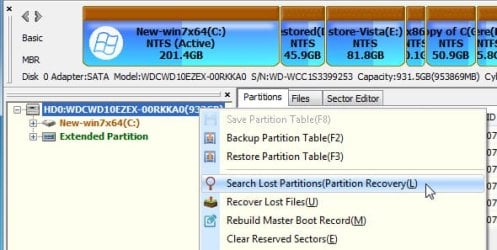
Have you tried scanning with diskgenius?

First try Tools>check partition table.

If that doesn't find an error, try scanning the whole disk - scans every sector, so it takes a while.

You need to discard anything it finds that you are certain is not correct. Then to apply the changes ( i.e. the info you have saved ) You go to the disk menu at the top > save partition table
 
Last edited:

My Computers My Computers

System One System Two

  • Computer type
    PC/Desktop
    OS
    7 X64
    CPU
    i5 8400
    Motherboard
    gigabyte b365m ds3h
    Memory
    2x8gb 3200mhz
    Hard Drives
    various
    PSU
    pure power 11 400w cm
    Case
    Coolermaster
    Cooling
    cryorig m9i
  • Computer type
    PC/Desktop
    OS
    7x64
    CPU
    g5400
    Motherboard
    ga b365m ds3h
    Memory
    8gb ddr4 2400
    PSU
    xfx pro 450w
DiskGenius seems to make progress.
So I can see the correct directory structure and can expand the various legs. But as soon as I click on a directory the program freezes (not responding).
It also freezes if I select the drive (J:) or indeed anything to do with the HDD except expand the directory structure.
Actually it has not frozen - according to task manager its reading data but slowly (100MB/s) so about 1.5 hour to read the disk. But then what will it do?!


so DiskGenius read the entire disk (well 500Gb - Why no progress bar?) and is now stuck. CPU changes between 12 and 13% and the memory usage changes so maybe it is doing something. But what and for how long?

Should I abandon this and go for partition repair (which will presumably scan the disc again) or what?


Update: And the cycle repeated 3 more times overnight. So I killed closed down Disk Genius.
Pity
 
Last edited:

My Computer My Computer

Computer type
Laptop
Computer Manufacturer/Model Number
HP ENVY DV6
OS
64 bit Win 7 Ultimate
Memory
12GB
Graphics Card(s)
NVIDIA 630M
Hard Drives
750GB
Back
Top