Partition table lost after Hibernate

You were trying to do a startup repair to a system with 2 active partitions, active is the flag that tells the repair procedure where to create the "new" boot files and that caused the confusion.
Gotya. Thanks for all the help. This saved me a reformat :party:
 

My Computer My Computer

Computer Manufacturer/Model Number
Gateway M6827
OS
Win 7 Professional 32-bit
CPU
Intel Core 2 Duo CPU T5750 @ 2.00 GHz
Memory
3GB
Monitor(s) Displays
ViewSonic Vx900
Screen Resolution
1280x1024
Hard Drives
150GB Hard Drive
You were trying to do a startup repair to a system with 2 active partitions, active is the flag that tells the repair procedure where to create the "new" boot files and that caused the confusion.


You are welcome; this is why we ask for a snip of disk management whenever possible, saves the confusion we (you and I) had. ;)
 

My Computer My Computer

Computer Manufacturer/Model Number
* BFK Customs *
OS
W 7 64-bit Ultimate
CPU
Intel Q9550 Yorkfield
Motherboard
ASUS P5Q Pro
Memory
8GB Dominator 8500C5D
Graphics Card(s)
ATI : XFX 5870
Sound Card
Realtek HD Audio 7-1
Monitor(s) Displays
1x 47" LCD HDMI & 3x 26" LCD HDMI
Screen Resolution
1920x1080P & 1920x1200
Hard Drives
1x 80GB Intel X25-M G2 SSD : 1x 500GB & 1x 640GB WD Caviar Black(s)
PSU
Corsair 620HX
Case
Cooler Master RC-690
Cooling
Tuniq Tower 120, 2x 140mm and 3x 120mm case fans
Keyboard
Microsoft 500
Mouse
Razer Diamondback 3G
Internet Speed
14 Mb/s
Other Info
1x Koutech 3Gb/s SATA HDD Hot Swap Rack
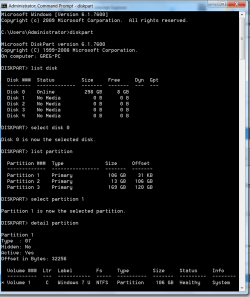
The instructions were confusing as to which partition on Disk0 to mark Active because DISKPART was giving you bad readouts from what you reported.

At this point, you should be asked to Detail Partition on each Disk0 partition so we could verify it intact and whether it is marked Active:

Capture.PNG

Once it's confirmed that 100mb or Win7 partition is marked Active, then run the Repairs with all other HD's unplugged - unless you want to detail each of the other HD's partitions to see if they are incorrectly marked Active.

 
You were trying to do a startup repair to a system with 2 active partitions, active is the flag that tells the repair procedure where to create the "new" boot files and that caused the confusion.


You are welcome; this is why we ask for a snip of disk management whenever possible, saves the confusion we (you and I) had. ;)
Well mate, if I could boot into Windows to get you the drivemap, then we both would have saved a lot of time!
 

My Computer My Computer

Computer Manufacturer/Model Number
Gateway M6827
OS
Win 7 Professional 32-bit
CPU
Intel Core 2 Duo CPU T5750 @ 2.00 GHz
Memory
3GB
Monitor(s) Displays
ViewSonic Vx900
Screen Resolution
1280x1024
Hard Drives
150GB Hard Drive
Greg just listed the other way to figure it out above but few understand all that and I decided to forgo that to see if the way we did it would yield results then that was the next order of business.
 

My Computer My Computer

Computer Manufacturer/Model Number
* BFK Customs *
OS
W 7 64-bit Ultimate
CPU
Intel Q9550 Yorkfield
Motherboard
ASUS P5Q Pro
Memory
8GB Dominator 8500C5D
Graphics Card(s)
ATI : XFX 5870
Sound Card
Realtek HD Audio 7-1
Monitor(s) Displays
1x 47" LCD HDMI & 3x 26" LCD HDMI
Screen Resolution
1920x1080P & 1920x1200
Hard Drives
1x 80GB Intel X25-M G2 SSD : 1x 500GB & 1x 640GB WD Caviar Black(s)
PSU
Corsair 620HX
Case
Cooler Master RC-690
Cooling
Tuniq Tower 120, 2x 140mm and 3x 120mm case fans
Keyboard
Microsoft 500
Mouse
Razer Diamondback 3G
Internet Speed
14 Mb/s
Other Info
1x Koutech 3Gb/s SATA HDD Hot Swap Rack
The instructions were confusing as to which partition on Disk0 to mark Active because DISKPART was giving you bad readouts from what you reported.

At this point, you should be asked to Detail Partition on each Disk0 partition so we could verify it intact and whether it is marked Active:

View attachment 100252

Once it's confirmed that 100mb or Win7 partition is marked Active, then run the Repairs with all other HD's unplugged - unless you want to detail each of the other HD's partitions to see if they are incorrectly marked Active.
Just checked (via gregrocker) and only the system (100MB) partition is marked active. Job well done guys. And now I know how to fix this in the future should it pop up.
 

My Computer My Computer

Computer Manufacturer/Model Number
Gateway M6827
OS
Win 7 Professional 32-bit
CPU
Intel Core 2 Duo CPU T5750 @ 2.00 GHz
Memory
3GB
Monitor(s) Displays
ViewSonic Vx900
Screen Resolution
1280x1024
Hard Drives
150GB Hard Drive
Greg just listed the other way to figure it out above but few understand all that and I decided to forgo that to see if the way we did it would yield results then that was the next order of business.

Another way is to ask for a camera snap of booted Partition Wizard drive map. Most will reply with it. PW is easier to read and use than Diskpart since its a picture.
 
Greg just listed the other way to figure it out above but few understand all that and I decided to forgo that to see if the way we did it would yield results then that was the next order of business.

Another way is to ask for a camera snap of booted Partition Wizard drive map. Most will reply with it. PW is more user-friendly than Diskpart since its a picture.


Those are both good, I'll remember them, especially the PW one.
 

My Computer My Computer

Computer Manufacturer/Model Number
* BFK Customs *
OS
W 7 64-bit Ultimate
CPU
Intel Q9550 Yorkfield
Motherboard
ASUS P5Q Pro
Memory
8GB Dominator 8500C5D
Graphics Card(s)
ATI : XFX 5870
Sound Card
Realtek HD Audio 7-1
Monitor(s) Displays
1x 47" LCD HDMI & 3x 26" LCD HDMI
Screen Resolution
1920x1080P & 1920x1200
Hard Drives
1x 80GB Intel X25-M G2 SSD : 1x 500GB & 1x 640GB WD Caviar Black(s)
PSU
Corsair 620HX
Case
Cooler Master RC-690
Cooling
Tuniq Tower 120, 2x 140mm and 3x 120mm case fans
Keyboard
Microsoft 500
Mouse
Razer Diamondback 3G
Internet Speed
14 Mb/s
Other Info
1x Koutech 3Gb/s SATA HDD Hot Swap Rack
Greg just listed the other way to figure it out above but few understand all that and I decided to forgo that to see if the way we did it would yield results then that was the next order of business.

Another way is to ask for a camera snap of booted Partition Wizard drive map. Most will reply with it. PW is easier to read and use than Diskpart since its a picture.
I don't know if that would have solved things. I ran several partition manager apps off of LiveCDs and none of them even showed the HD that actually had Windows on them. Strangely enough, only the Win 7 install DVD recognized that there were 2 HDs and showed me the partitions in each.

I tried, PW, Gparted, and ran a couple of tools off of Hiren's. Only Win 7 showed what was really going on. Strange no? I did type out the drivemap in my first post that Win 7 showed me. But I guess that detail was not enough to figure out exactly what the specific issue was.

PS: It's so much nicer to be able to discuss this issue after it's been solved rather than before when I was freaking out!
 

My Computer My Computer

Computer Manufacturer/Model Number
Gateway M6827
OS
Win 7 Professional 32-bit
CPU
Intel Core 2 Duo CPU T5750 @ 2.00 GHz
Memory
3GB
Monitor(s) Displays
ViewSonic Vx900
Screen Resolution
1280x1024
Hard Drives
150GB Hard Drive
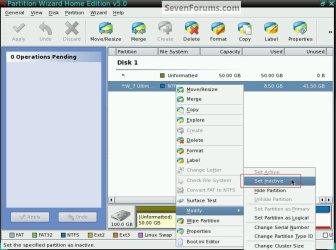
Nothing like this then eh? ;)


Set_Inactive.jpg
 

My Computer My Computer

Computer Manufacturer/Model Number
* BFK Customs *
OS
W 7 64-bit Ultimate
CPU
Intel Q9550 Yorkfield
Motherboard
ASUS P5Q Pro
Memory
8GB Dominator 8500C5D
Graphics Card(s)
ATI : XFX 5870
Sound Card
Realtek HD Audio 7-1
Monitor(s) Displays
1x 47" LCD HDMI & 3x 26" LCD HDMI
Screen Resolution
1920x1080P & 1920x1200
Hard Drives
1x 80GB Intel X25-M G2 SSD : 1x 500GB & 1x 640GB WD Caviar Black(s)
PSU
Corsair 620HX
Case
Cooler Master RC-690
Cooling
Tuniq Tower 120, 2x 140mm and 3x 120mm case fans
Keyboard
Microsoft 500
Mouse
Razer Diamondback 3G
Internet Speed
14 Mb/s
Other Info
1x Koutech 3Gb/s SATA HDD Hot Swap Rack
Barefoot called it for the fix here, removing DISK1 interference:

Do you actually have more than 1 Hard Disk Drive (HDD) connected in the PC?

If so you may have to disconnect the other HDD and leave only the one you want to do the startup repairs to, then you may have to start over and mark that as "Active" and then do the startup repairs.

See why when a snip of disk management (if available) is so helpful?

Good work, Barefoot, and with bad Diskpart output.
 

My Computer My Computer

Computer Manufacturer/Model Number
Gateway M6827
OS
Win 7 Professional 32-bit
CPU
Intel Core 2 Duo CPU T5750 @ 2.00 GHz
Memory
3GB
Monitor(s) Displays
ViewSonic Vx900
Screen Resolution
1280x1024
Hard Drives
150GB Hard Drive
Thanks Greg, I appreciate the compliment. :)
 

My Computer My Computer

Computer Manufacturer/Model Number
* BFK Customs *
OS
W 7 64-bit Ultimate
CPU
Intel Q9550 Yorkfield
Motherboard
ASUS P5Q Pro
Memory
8GB Dominator 8500C5D
Graphics Card(s)
ATI : XFX 5870
Sound Card
Realtek HD Audio 7-1
Monitor(s) Displays
1x 47" LCD HDMI & 3x 26" LCD HDMI
Screen Resolution
1920x1080P & 1920x1200
Hard Drives
1x 80GB Intel X25-M G2 SSD : 1x 500GB & 1x 640GB WD Caviar Black(s)
PSU
Corsair 620HX
Case
Cooler Master RC-690
Cooling
Tuniq Tower 120, 2x 140mm and 3x 120mm case fans
Keyboard
Microsoft 500
Mouse
Razer Diamondback 3G
Internet Speed
14 Mb/s
Other Info
1x Koutech 3Gb/s SATA HDD Hot Swap Rack
Nothing like this then eh? ;)


Well, it only showed one drive. And I didn't know that the drive that was being displayed was the slave, b/c they are identical drives. Next time I'm getting different drives.


I chose that particular snip to show one of the other things PW is capable of.


Have a look at these.

Partition Wizard : Use the Bootable CD

Dual Boot : Create Partitions Using PWBD

Partition : Recover Space Used by an Older OS
 

My Computer My Computer

Computer Manufacturer/Model Number
* BFK Customs *
OS
W 7 64-bit Ultimate
CPU
Intel Q9550 Yorkfield
Motherboard
ASUS P5Q Pro
Memory
8GB Dominator 8500C5D
Graphics Card(s)
ATI : XFX 5870
Sound Card
Realtek HD Audio 7-1
Monitor(s) Displays
1x 47" LCD HDMI & 3x 26" LCD HDMI
Screen Resolution
1920x1080P & 1920x1200
Hard Drives
1x 80GB Intel X25-M G2 SSD : 1x 500GB & 1x 640GB WD Caviar Black(s)
PSU
Corsair 620HX
Case
Cooler Master RC-690
Cooling
Tuniq Tower 120, 2x 140mm and 3x 120mm case fans
Keyboard
Microsoft 500
Mouse
Razer Diamondback 3G
Internet Speed
14 Mb/s
Other Info
1x Koutech 3Gb/s SATA HDD Hot Swap Rack
I tried, PW, Gparted, and ran a couple of tools off of Hiren's. Only Win 7 showed what was really going on. Strange no? I did type out the drivemap in my first post that Win 7 showed me. But I guess that detail was not enough to figure out exactly what the specific issue was.

A little pro-active troubleshooting based on the bad readouts:

Run http://www.sevenforums.com/tutorials/433-disk-check.html

Then test the HD using maker's diag/repair CD scan: http://www.tacktech.com/display.cfm?ttid=287

Hirens is dated with Win7 - PW boot CD is the best tool we've found. I would trust it over Disk Mgmt too hence the need for tests.
 
I tried, PW, Gparted, and ran a couple of tools off of Hiren's. Only Win 7 showed what was really going on. Strange no? I did type out the drivemap in my first post that Win 7 showed me. But I guess that detail was not enough to figure out exactly what the specific issue was.

A little pro-active troubleshooting based on the bad readouts:

Run http://www.sevenforums.com/tutorials/433-disk-check.html

Then test the HD using maker's diag/repair CD scan: Hard Drive Diagnostics Tools and Utilities (Storage) - TACKtech Corp.

Hirens is dated with Win7 - PW boot CD is the best tool we've found. I would trust it over Disk Mgmt too hence the need for tests.
Where can I get a PW boot CD?
 

My Computer My Computer

Computer Manufacturer/Model Number
Gateway M6827
OS
Win 7 Professional 32-bit
CPU
Intel Core 2 Duo CPU T5750 @ 2.00 GHz
Memory
3GB
Monitor(s) Displays
ViewSonic Vx900
Screen Resolution
1280x1024
Hard Drives
150GB Hard Drive
There is a link in any of the tutorials I posted links to in the post above.
 

My Computer My Computer

Computer Manufacturer/Model Number
* BFK Customs *
OS
W 7 64-bit Ultimate
CPU
Intel Q9550 Yorkfield
Motherboard
ASUS P5Q Pro
Memory
8GB Dominator 8500C5D
Graphics Card(s)
ATI : XFX 5870
Sound Card
Realtek HD Audio 7-1
Monitor(s) Displays
1x 47" LCD HDMI & 3x 26" LCD HDMI
Screen Resolution
1920x1080P & 1920x1200
Hard Drives
1x 80GB Intel X25-M G2 SSD : 1x 500GB & 1x 640GB WD Caviar Black(s)
PSU
Corsair 620HX
Case
Cooler Master RC-690
Cooling
Tuniq Tower 120, 2x 140mm and 3x 120mm case fans
Keyboard
Microsoft 500
Mouse
Razer Diamondback 3G
Internet Speed
14 Mb/s
Other Info
1x Koutech 3Gb/s SATA HDD Hot Swap Rack
I am a novice at understanding Acronis, MBR's, etc.
BUT

I did have to use Acronis a few times to replace my system with that image. I chose all 3, MBR, System Reserved and C.

Is that where I lost Hibernate?

Should I have only chosen drive C?

I still have that image. Is it still fixable?
 

My Computer My Computer

OS
7, 64 bit
I am a novice at understanding Acronis, MBR's, etc.
BUT

I did have to use Acronis a few times to replace my system with that image. I chose all 3, MBR, System Reserved and C.

Is that where I lost Hibernate?

Should I have only chosen drive C?

I still have that image. Is it still fixable?

You probably should post a new question, as this one has been solved (I'm the original poster). Your problem sounds different from mine. MBR = Master Boot Record, which is a way for your computer to tell which hard drive to try to load Windows from. The people on here are great, so post your question, in Installation and Setup Installation & Setup - Windows 7 Forums and they should be able to help you out.
 

My Computer My Computer

Computer Manufacturer/Model Number
Gateway M6827
OS
Win 7 Professional 32-bit
CPU
Intel Core 2 Duo CPU T5750 @ 2.00 GHz
Memory
3GB
Monitor(s) Displays
ViewSonic Vx900
Screen Resolution
1280x1024
Hard Drives
150GB Hard Drive
I appreciate your response. I did post I believe 3 differning threads and no one responded to any of the issues. Thanks
 

My Computer My Computer

OS
7, 64 bit
Back
Top