Partition Wizard : Use the Bootable CD

Use the Bootable Partition Wizard CD to Make Changes to the Windows Partition Structure

This outlines several uses for the Partition Wizard Bootable Disk (PWBD) some of which Windows is not able to do natively, to include converting an Extended partition / Logical drive to a Primary partition, to wipe secure erase a single partition and how to Shrink/Resize the left side of a Windows partition.
   Information

Partition Wizard is a very reliable tool for your tool kit and it's a free download for home / personal use, first download the PWBD ISO file to the desktop, be sure to get the PWBD and not the installed version; scroll down to see the download link for the Bootable CD ISO file at this link below.

Partition Wizard Free Bootable CD

Then you will need to burn the ISO to a CD, it was designed for use and works best from a CD rather than a DVD; it doesn't take any input at all from the user for Partition Wizard CD to setup, just relax and let it load all on its own.
   Warning

As with anything that makes changes to the Windows structure there is always the chance for an error to occur, it would be advisable to make reliable backups to the external media of your choice of any important data, i.e. pictures, music or documents, that you would not want to lose before you make any changes to your system.

Let's get started!
To boot the disk, in the BIOS set the PC boot order to boot first from the CD/DVD drive, insert the PWBD and restart the PC, it'll take a few minutes for it to setup with no input from the user needed.
Once the program has started you can remove the CD from the drive if you like.


Option One

Convert Extended / Logical to Primary


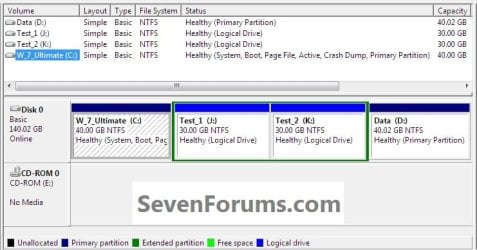
There are many reasons one may want to convert an Extended partition / Logical drive to a Primary partition, though I'm just going to show how here without going into why; this first snip below shows the partition structure I'm starting with.

Have a look at Method Two in this tutorial for a totally different type option.

Partition / Extended : Logical Drives
click an image to enlarge
1.1.jpg
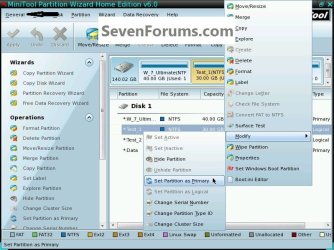
1) In the PW program right click the Extended / Logical to be converted and click Modify then click Set as Primary.
1.2.jpg
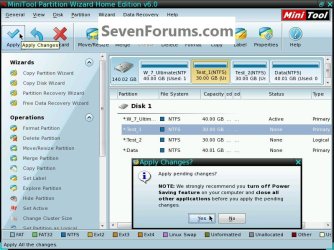
2) At the top left in the action bar click Apply then click Yes for the "Apply Changes" conformation dialog box; the whole process only takes seconds.
1.3.jpg
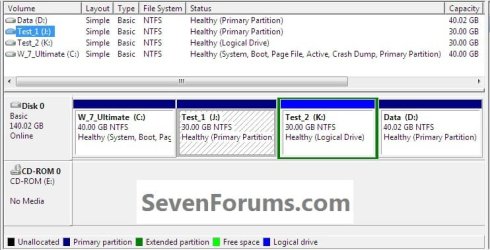
3) Then OK for the "Successful" dialog box and this is what you will have.

That's all, you're finished; remove the CD from the drive, at the upper left corner click General then Exit to close the Partition Wizard program and restart Windows.
1.5.jpg
1.6.jpg


Option Two

Wipe a Partition


   Warning

This method will completely overwrite any Partition or entire Hard Disk Drive / Solid State Drive that it's pointed at, it's known as a secure erase and after it finishes any and all data will not be recoverable at all, even by the best data recovery software so copy out or backup anything you don't want to lose before you start this procedure.

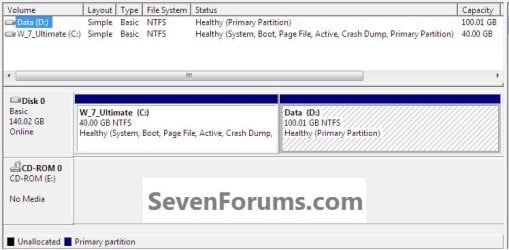
To be sure you have the correct partition for the wipe, type diskmgmt.msc into the Windows start menu start search box to view Windows disk management.

To boot the disk, in the BIOS set the PC boot order to boot first from the CD/DVD drive, insert the PWBD and restart the PC, it'll take a few minutes for it to setup with no input from the user needed.
Once the program has started you can remove the CD from the drive if you like.

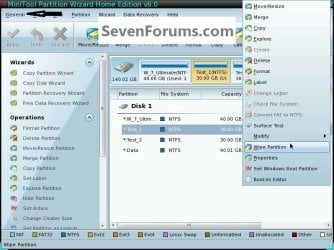
1) In Partition Wizard right click the partition you want to wipe secure erase and click Wipe Partition.
click an image to enlarge
2.1.jpg
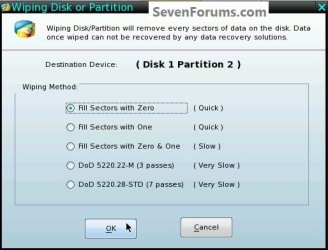
2) Select the type wipe you want in the dialog box that opens and click OK.
2.2.jpg
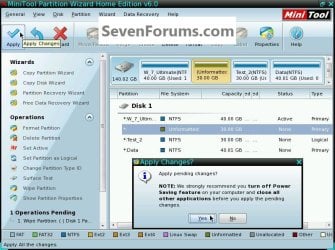
3) At the top left in the action bar click Apply; then for the "Apply Changes" dialog box click Yes to start the wipe.
2.3.jpg
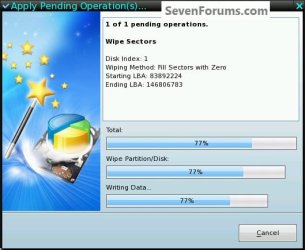
4) You will get a Pending box during the wipe; to do this 30GB took less than 20 minutes, on average they take about 1 hour per 300GB to complete; when it finishes click OK for the "Successful" dialog box.

That's all, you're finished; remove the CD from the drive, at the upper left corner click General then Exit to close the Partition Wizard program and restart Windows.
2.5.jpg


Option Three

Shrink the Left Side of a Windows Partition


The issue here is that Windows disk management will only shrink a partition from the right side, it will not natively shrink the left side of a partition and Partition Wizard will; this is useful in this type situation where you need to add space to the Windows C: partition and there is an existing data partition in the way and nowhere to move the data.

To boot the disk, in the BIOS set the PC boot order to boot first from the CD/DVD drive, insert the PWBD and restart the PC, it'll take a few minutes for it to setup with no input from the user needed.
Once the program has started you can remove the CD from the drive if you like.
click an image to enlarge
3.1.jpg
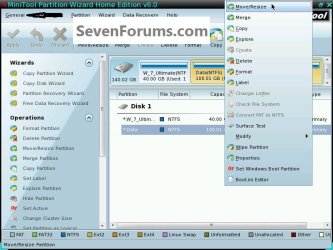
1) In the Partition Wizard program right click the partition you want to shrink and at the very top of the drop down menu that opens click Move/Resize.
3.2.jpg
2) In the Move/Resize box click to hold and drag the left side of the border / slider and drag it to the size you want to shrink the partition and click OK.
3.3.jpg
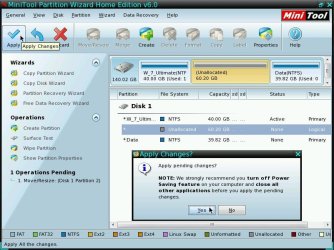
3) At the top left in the action bar click Apply then click Yes for the "Apply Changes" conformation dialog box.
3.4.jpg
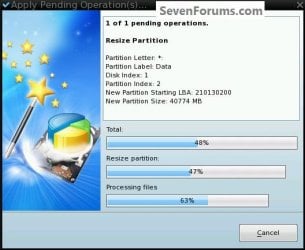
4) You will get a "Pending" graph but it depends how much data that has to be moved to know how long it will take, just relax and let it work without interruption; when it finishes click OK for the "Successful" dialog box.

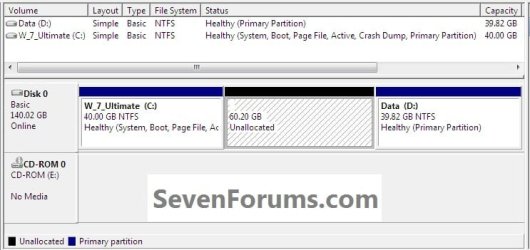
This will give you unallocated space in Windows disk management that can be created into a completely new partition or the Windows C: partition can be extended into the created unallocated space so the C: partition can be expanded; see the second snip down.

That's all, you're finished; remove the CD from the drive, at the upper left corner click General then Exit to close the Partition Wizard program and restart Windows.
3.6.jpg
3.8.jpg

Enjoy! :)


Last edited by a moderator:
Ah, that's what I was looking for :) Thank you :)
 

My Computer

Computer type
PC/Desktop
Computer Manufacturer/Model Number
Medion Erazer (note to self: insert model number) - with custom additions
OS
Windows 10 Pro x64
CPU
Intel Core i5 7400 @ 3.00GHz
Motherboard
OEM supllied with PC
Memory
8GB 2133Mhz DDR4 (OEM supplied)
Graphics Card(s)
Gygabyte Windforce GTX 1050Ti (Factory Overclocked)
Sound Card
Realtek
Monitor(s) Displays
Acer Al1980 + HKC
Screen Resolution
1360*768(HKC) / 1280*1024(Acer)
Hard Drives
1TB Toshiba
1TB WD Caviar Green
120GB Samsung Evo 840
PSU
OEM supplied (no power rating on case)
Case
OEM Supplied
Cooling
Stock
Keyboard
Logitech Wireless
Mouse
Logitect Wireless
Internet Speed
40Mb/s Down 10Mb/s Up
Antivirus
Defender
Browser
Firefox
You're very welcome my friend! :)
 

My Computer

Computer Manufacturer/Model Number
* BFK Customs *
OS
W 7 64-bit Ultimate
CPU
Intel Q9550 Yorkfield
Motherboard
ASUS P5Q Pro
Memory
8GB Dominator 8500C5D
Graphics Card(s)
ATI : XFX 5870
Sound Card
Realtek HD Audio 7-1
Monitor(s) Displays
1x 47" LCD HDMI & 3x 26" LCD HDMI
Screen Resolution
1920x1080P & 1920x1200
Hard Drives
1x 80GB Intel X25-M G2 SSD : 1x 500GB & 1x 640GB WD Caviar Black(s)
PSU
Corsair 620HX
Case
Cooler Master RC-690
Cooling
Tuniq Tower 120, 2x 140mm and 3x 120mm case fans
Keyboard
Microsoft 500
Mouse
Razer Diamondback 3G
Internet Speed
14 Mb/s
Other Info
1x Koutech 3Gb/s SATA HDD Hot Swap Rack
I have completely rewritten this from scratch to include a new layout and all completely new snips and text, it is all totally new and I hope it will find some use now.

:party:
 

My Computer

Computer Manufacturer/Model Number
* BFK Customs *
OS
W 7 64-bit Ultimate
CPU
Intel Q9550 Yorkfield
Motherboard
ASUS P5Q Pro
Memory
8GB Dominator 8500C5D
Graphics Card(s)
ATI : XFX 5870
Sound Card
Realtek HD Audio 7-1
Monitor(s) Displays
1x 47" LCD HDMI & 3x 26" LCD HDMI
Screen Resolution
1920x1080P & 1920x1200
Hard Drives
1x 80GB Intel X25-M G2 SSD : 1x 500GB & 1x 640GB WD Caviar Black(s)
PSU
Corsair 620HX
Case
Cooler Master RC-690
Cooling
Tuniq Tower 120, 2x 140mm and 3x 120mm case fans
Keyboard
Microsoft 500
Mouse
Razer Diamondback 3G
Internet Speed
14 Mb/s
Other Info
1x Koutech 3Gb/s SATA HDD Hot Swap Rack
Look good BFK, great work.
 

My Computer

Computer type
PC/Desktop
Computer Manufacturer/Model Number
76~2.0
OS
Windows 7 Ult x64 - SP1/ Windows 8 Pro x64
CPU
Intel Core i5-3570K 4.6GHz
Motherboard
Gigabyte GA-Z77X UD3H, f18
Memory
8GB (2X4GB) DDR3 1600 Corsair Vengeance CL8 1.5v
Graphics Card(s)
Sapphire HD 7770 Vapor-X OC 1GB DDR5
Sound Card
Onboard VIA VT2021
Monitor(s) Displays
22" LCD Dell
Screen Resolution
1680x1050
Hard Drives
Samsung 840Pro 128GB SSD,
Seagate Barracuda 500GB SATA2 7200rpm 32MB cache, Seagate Barracuda 1TB SATA2 7200rpm 32MB cache,
PSU
Corsair HX650W
Case
Cooler Master Storm Scout
Cooling
Corsair H80 2x12cm Noctua NF P12 , 2x14cm case fans
Keyboard
Logitech Wave
Mouse
CM Sentinel
Internet Speed
Dismal
Antivirus
Avast
Browser
Opera Next
Other Info
Haswell laptop: HP Envy 17t-j, i7-4700MQ, GeForce 740M 2GB DDR3, 17.3" Full HD 1920x1080, 16GB RAM, Samsung 840 Pro 128GB, 1TB Hitachi 7200 HDD,
Desktop: eSATA ports,
External eSATA Seagate 500GB SATA2 7200rpm,
External WD USB 500GB
Thank you very much Dave! :)
 

My Computer

Computer Manufacturer/Model Number
* BFK Customs *
OS
W 7 64-bit Ultimate
CPU
Intel Q9550 Yorkfield
Motherboard
ASUS P5Q Pro
Memory
8GB Dominator 8500C5D
Graphics Card(s)
ATI : XFX 5870
Sound Card
Realtek HD Audio 7-1
Monitor(s) Displays
1x 47" LCD HDMI & 3x 26" LCD HDMI
Screen Resolution
1920x1080P & 1920x1200
Hard Drives
1x 80GB Intel X25-M G2 SSD : 1x 500GB & 1x 640GB WD Caviar Black(s)
PSU
Corsair 620HX
Case
Cooler Master RC-690
Cooling
Tuniq Tower 120, 2x 140mm and 3x 120mm case fans
Keyboard
Microsoft 500
Mouse
Razer Diamondback 3G
Internet Speed
14 Mb/s
Other Info
1x Koutech 3Gb/s SATA HDD Hot Swap Rack
Maybe a trivial suggestion in the title but it could help some searches.
Instead of ..........Windows Structure....
maybe ..........Windows Partition Structure...........
 

My Computer

Computer type
PC/Desktop
Computer Manufacturer/Model Number
Own build
OS
Windows 7x64 Home Premium SP1
CPU
Intel i7 2600k
Motherboard
ASUS P8Z68 Deluxe
Memory
G.Skill Ripjaws (DDR3-1600) 2x4GB
Graphics Card(s)
Nvidia GeForce GTS 450; Intel HD Graphics 3000(GT2+)
Monitor(s) Displays
Dell Ultrasharp IPS panel U2311H, Samsung SyncMaster P2350
Screen Resolution
1920x1080
Hard Drives
Samsung 850 Pro SSD 256GB, Samsung SSD 840 120GB, Seagates 1TB Barracuda ST31000528AS x2
PSU
Seasonic M12II 520W
Case
Lian Li Lancool PC-K60
Cooling
Case: 1x120mm, 3x140mm CPU: Hyper 212+
Keyboard
Logitech MK520 (wireless)
Mouse
Logitech MK520
Internet Speed
6-7 Mbps
Antivirus
Norton Security Premium, Malwarebytes on 2 (MSE on 3rd PC)
Browser
FireFox
Other Info
Audio: Logitech Z523 2.1
Maybe a trivial suggestion in the title but it could help some searches.
Instead of ..........Windows Structure....
maybe ..........Windows Partition Structure...........


Thanks mate, I like it and it fits the space, that was my main concern. :shock:
 

My Computer

Computer Manufacturer/Model Number
* BFK Customs *
OS
W 7 64-bit Ultimate
CPU
Intel Q9550 Yorkfield
Motherboard
ASUS P5Q Pro
Memory
8GB Dominator 8500C5D
Graphics Card(s)
ATI : XFX 5870
Sound Card
Realtek HD Audio 7-1
Monitor(s) Displays
1x 47" LCD HDMI & 3x 26" LCD HDMI
Screen Resolution
1920x1080P & 1920x1200
Hard Drives
1x 80GB Intel X25-M G2 SSD : 1x 500GB & 1x 640GB WD Caviar Black(s)
PSU
Corsair 620HX
Case
Cooler Master RC-690
Cooling
Tuniq Tower 120, 2x 140mm and 3x 120mm case fans
Keyboard
Microsoft 500
Mouse
Razer Diamondback 3G
Internet Speed
14 Mb/s
Other Info
1x Koutech 3Gb/s SATA HDD Hot Swap Rack
barefoot kid i can not provide you with a rep.... so thank you for the tuit on making a bootable iso cd from partition wizard.
quester12
 

My Computer

Computer Manufacturer/Model Number
all custom built computers from scratch all intel boards
OS
multiple operating systems xp pro 32bit win7 64 bit pro and ultimate
CPU
all intel cpus
Motherboard
asus p8p67le p4p800 etc
Memory
kingston memory
Graphics Card(s)
ati nvidia evga xfx
Sound Card
soundblaster type or on board sound
Monitor(s) Displays
acer hp
Hard Drives
maxtor ides seagate ides and sata's western digital's
PSU
corsair ultra's pc and powercooling thermaltake's
Case
antec thermaltake cheiftec's
Cooling
cpu 's or fans various types used
Bare Foot Kid is on a sabbatical.
This is one of many great tutorials he has produced.
 

My Computer

Computer type
PC/Desktop
Computer Manufacturer/Model Number
Own build
OS
Windows 7x64 Home Premium SP1
CPU
Intel i7 2600k
Motherboard
ASUS P8Z68 Deluxe
Memory
G.Skill Ripjaws (DDR3-1600) 2x4GB
Graphics Card(s)
Nvidia GeForce GTS 450; Intel HD Graphics 3000(GT2+)
Monitor(s) Displays
Dell Ultrasharp IPS panel U2311H, Samsung SyncMaster P2350
Screen Resolution
1920x1080
Hard Drives
Samsung 850 Pro SSD 256GB, Samsung SSD 840 120GB, Seagates 1TB Barracuda ST31000528AS x2
PSU
Seasonic M12II 520W
Case
Lian Li Lancool PC-K60
Cooling
Case: 1x120mm, 3x140mm CPU: Hyper 212+
Keyboard
Logitech MK520 (wireless)
Mouse
Logitech MK520
Internet Speed
6-7 Mbps
Antivirus
Norton Security Premium, Malwarebytes on 2 (MSE on 3rd PC)
Browser
FireFox
Other Info
Audio: Logitech Z523 2.1
sorry if i post this here cuz i couldn't find the related topic,is there any way to copy win 7 os from an installed partition to another one in the same hard disk without loosing data?
 

My Computer

Computer type
PC/Desktop
OS
Windows 7 Ultimate 64bit
CPU
Intel Corei7
Memory
4GB
Graphics Card(s)
nVIDIA GeForce
sorry if i post this here cuz i couldn't find the related topic,is there any way to copy win 7 os from an installed partition to another one in the same hard disk without loosing data?
This is more of an imaging problem. The short answer is yes you can but it involves a few steps and comes with some risk because things can go wrong.
Maybe post a screen shot of your HDD partitions using Windows Disk management and the snipping tool. Can you give the reason why you basically want to do this move.
 

My Computer

Computer type
PC/Desktop
Computer Manufacturer/Model Number
Own build
OS
Windows 7x64 Home Premium SP1
CPU
Intel i7 2600k
Motherboard
ASUS P8Z68 Deluxe
Memory
G.Skill Ripjaws (DDR3-1600) 2x4GB
Graphics Card(s)
Nvidia GeForce GTS 450; Intel HD Graphics 3000(GT2+)
Monitor(s) Displays
Dell Ultrasharp IPS panel U2311H, Samsung SyncMaster P2350
Screen Resolution
1920x1080
Hard Drives
Samsung 850 Pro SSD 256GB, Samsung SSD 840 120GB, Seagates 1TB Barracuda ST31000528AS x2
PSU
Seasonic M12II 520W
Case
Lian Li Lancool PC-K60
Cooling
Case: 1x120mm, 3x140mm CPU: Hyper 212+
Keyboard
Logitech MK520 (wireless)
Mouse
Logitech MK520
Internet Speed
6-7 Mbps
Antivirus
Norton Security Premium, Malwarebytes on 2 (MSE on 3rd PC)
Browser
FireFox
Other Info
Audio: Logitech Z523 2.1
Thanks mjf for ur reply,its just a question that i wanna to know about it,so is it possible?
 

My Computer

Computer type
PC/Desktop
OS
Windows 7 Ultimate 64bit
CPU
Intel Corei7
Memory
4GB
Graphics Card(s)
nVIDIA GeForce
As I said yes it is possible.
 

My Computer

Computer type
PC/Desktop
Computer Manufacturer/Model Number
Own build
OS
Windows 7x64 Home Premium SP1
CPU
Intel i7 2600k
Motherboard
ASUS P8Z68 Deluxe
Memory
G.Skill Ripjaws (DDR3-1600) 2x4GB
Graphics Card(s)
Nvidia GeForce GTS 450; Intel HD Graphics 3000(GT2+)
Monitor(s) Displays
Dell Ultrasharp IPS panel U2311H, Samsung SyncMaster P2350
Screen Resolution
1920x1080
Hard Drives
Samsung 850 Pro SSD 256GB, Samsung SSD 840 120GB, Seagates 1TB Barracuda ST31000528AS x2
PSU
Seasonic M12II 520W
Case
Lian Li Lancool PC-K60
Cooling
Case: 1x120mm, 3x140mm CPU: Hyper 212+
Keyboard
Logitech MK520 (wireless)
Mouse
Logitech MK520
Internet Speed
6-7 Mbps
Antivirus
Norton Security Premium, Malwarebytes on 2 (MSE on 3rd PC)
Browser
FireFox
Other Info
Audio: Logitech Z523 2.1

My Computer

Computer type
PC/Desktop
Computer Manufacturer/Model Number
Own build
OS
Windows 7x64 Home Premium SP1
CPU
Intel i7 2600k
Motherboard
ASUS P8Z68 Deluxe
Memory
G.Skill Ripjaws (DDR3-1600) 2x4GB
Graphics Card(s)
Nvidia GeForce GTS 450; Intel HD Graphics 3000(GT2+)
Monitor(s) Displays
Dell Ultrasharp IPS panel U2311H, Samsung SyncMaster P2350
Screen Resolution
1920x1080
Hard Drives
Samsung 850 Pro SSD 256GB, Samsung SSD 840 120GB, Seagates 1TB Barracuda ST31000528AS x2
PSU
Seasonic M12II 520W
Case
Lian Li Lancool PC-K60
Cooling
Case: 1x120mm, 3x140mm CPU: Hyper 212+
Keyboard
Logitech MK520 (wireless)
Mouse
Logitech MK520
Internet Speed
6-7 Mbps
Antivirus
Norton Security Premium, Malwarebytes on 2 (MSE on 3rd PC)
Browser
FireFox
Other Info
Audio: Logitech Z523 2.1
It's not the same program as Partition Wizard. I apologise if I didn't make that clear.
 

My Computers

System One System Two

  • Computer type
    PC/Desktop
    Computer Manufacturer/Model Number
    ASUS CUSTOM BUILD IN THERMALTAKE LEVEL 10 GT CASE
    OS
    Windows 7 Ultimate, Windows 8.1 Pro, Linux Mint/Cinnimon (Triple Boot)
    CPU
    INTEL 6900K
    Motherboard
    X99-E WS USB 3.1
    Memory
    CORSAIR DOMINATOR PLATINUM 128GB
    Graphics Card(s)
    EVGA GTX 1070 FTW
    Sound Card
    Onboard Crystal Sound - very nice ;)
    Monitor(s) Displays
    SAMSUNG 4K 28"
    Screen Resolution
    3140 x 2160 - A little extreme. Need to change it.
    Hard Drives
    1) LSI LOGICAL VOLUME RAID 10 (250 GBX4) SSD ARRAY
    2) INTEL RAID 0 KINGSTON (2) SSD ARRAY
    3) INTEL RAID 1 SEAGATE (2) 1TB ARRAY (secured backup)
    4) INTEL RAID 1 SEAGATE HYBRID (2) (secure secured backup)
    5) AHCI SEAGATE 3TB (1) BACKUP & STORAGE (back
    PSU
    CORSAIR HX 1000i
    Case
    THERMAL TAKE LEVEL 10 GT
    Cooling
    NOCTUA TOWER COOLING - PUSH/PULL
    Keyboard
    LOGITECH PRODIGY (One day I'll get a real keyboard.)
    Mouse
    LOGITECH (One day I'll get a real mouse.)
    Internet Speed
    300 Gb down 12 up Intel(R) I210 Gigabit Network Connection
    Antivirus
    several - Network implementing vs from other PCs - ask me
    Browser
    Mostly FireFox these days
    Other Info
    NOT ENOUGH ROOM TO LIST ALL HARD DRIVES HERE. Cuts me off at 5. Did you know that if you run a network you can scan your PC for viruses via other PCs using several different virus scanners? No virus scanner gets it all. This is narrows down the window for contracting a virus. By using multiple operating systems you can use different virus scanners with no risk of conflict.
  • Antivirus
    KASPERSKY
Back
Top