Partition

shankly769

New member
Member
VIP
Local time
8:11 AM
Messages
173
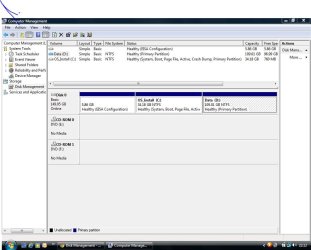
Hello i own a MSI EX600 laptop,it has a 35GB C Drive and a D Drive of 200GB,I like to increase the c drive,how should i?

Thanks
 

My Computer

Computer type
PC/Desktop
OS
Windows 7 Ultimate x32
CPU
AMD Athlom(tm064 Processor 3200+
Motherboard
K8M800-8237 EPPOX
Memory
2gb
Graphics Card(s)
NVIDIA GeForce 7600GT

My Computer

Computer type
Laptop
Computer Manufacturer/Model Number
HP ENVY 17-1150eg
OS
Windows 10 Pro x64 EN-GB
CPU
1.6 GHz Intel Core i7-720QM Processor
Memory
6 GB
Graphics Card(s)
ATI Mobility Radeon HD 5850 Graphics
Sound Card
Beats sound system with integrated subwoofer
Monitor(s) Displays
17" laptop display, 22" LED and 32" Full HD TV through HDMI
Screen Resolution
1600*900 (1), 1920*1080 (2&3)
Hard Drives
Internal: 2 x 500 GB SATA Hard Disk Drive 7200 rpm
External: 2TB for backups, 3TB USB3 network drive for media
Cooling
As Envy runs a bit warm, I have it on a Cooler Master pad
Keyboard
Logitech diNovo Media Desktop Laser (bluetooth)
Mouse
Logitech Performance Mouse MX
Internet Speed
50/10 Mbps VDSL
Antivirus
Windows Defender 4.3.9431.0
Browser
Maxthon 3.5.2., IE11
hi,thanks for the reply,i had to say to that i see this too BD-ROM DRIVE F,AT THE MOMENT IT HAVE 1GB RAM AND CAN BE EXTENDED WITH 4GB IN ALL AND DIDNT TOLD YOU THAT IT HAVE WIN VISTA HOME PREMIUM,

core 2 duo cpu t7250 @2.00 ghz 32bit
 

My Computer

Computer type
PC/Desktop
OS
Windows 7 Ultimate x32
CPU
AMD Athlom(tm064 Processor 3200+
Motherboard
K8M800-8237 EPPOX
Memory
2gb
Graphics Card(s)
NVIDIA GeForce 7600GT

My Computer

Computer type
Laptop
Computer Manufacturer/Model Number
HP ENVY 17-1150eg
OS
Windows 10 Pro x64 EN-GB
CPU
1.6 GHz Intel Core i7-720QM Processor
Memory
6 GB
Graphics Card(s)
ATI Mobility Radeon HD 5850 Graphics
Sound Card
Beats sound system with integrated subwoofer
Monitor(s) Displays
17" laptop display, 22" LED and 32" Full HD TV through HDMI
Screen Resolution
1600*900 (1), 1920*1080 (2&3)
Hard Drives
Internal: 2 x 500 GB SATA Hard Disk Drive 7200 rpm
External: 2TB for backups, 3TB USB3 network drive for media
Cooling
As Envy runs a bit warm, I have it on a Cooler Master pad
Keyboard
Logitech diNovo Media Desktop Laser (bluetooth)
Mouse
Logitech Performance Mouse MX
Internet Speed
50/10 Mbps VDSL
Antivirus
Windows Defender 4.3.9431.0
Browser
Maxthon 3.5.2., IE11
1. The BD-RON is irrelevant in this context.

2. 1GB of RAM and Vista is OK - samr procedure.

3. After you shrunk the D drive (see tutorial that Kari posted) you need to use the bootable CD of Partition Wizard (last entry 'Home' on the webpage). Download this .iso and burn it to CD. Then boot your laptop with that CD.

See this PW video tutorial on how to extend a partition.

The reason you need the Partition Wizard is because after you shrunk the D partition, the unallocated space will be to the right of partition D. Windows Disk Management or Command Prompt cannot deal with that. For Windows, the unallocated space has to be to the right of the partition that you want to extend (the C partition in your case). But PW can extend with any unallocated space on the disk. Just be aware that the operation may take a while because PW has to showe all the data of D to the right.
 

My Computer

Computer Manufacturer/Model Number
HP, Dell, Gateway, Toshiba - 4 laptops and 2 desktops
OS
Vista, Windows7, Mint Mate, Zorin, Windows 8
CPU
from 1.6GHz Duo to i7
Monitor(s) Displays
2x HP w2207
Hard Drives
5x HDD, 7x SSD, 12x Externals
Keyboard
with trackball - no mices
Mouse
Trackball mice
Internet Speed
DSL 6000
Good point Wolfgang, I didn't even think about the fact that the free space would be "at the wrong end". Partition Wizard solves this.
 

My Computer

Computer type
Laptop
Computer Manufacturer/Model Number
HP ENVY 17-1150eg
OS
Windows 10 Pro x64 EN-GB
CPU
1.6 GHz Intel Core i7-720QM Processor
Memory
6 GB
Graphics Card(s)
ATI Mobility Radeon HD 5850 Graphics
Sound Card
Beats sound system with integrated subwoofer
Monitor(s) Displays
17" laptop display, 22" LED and 32" Full HD TV through HDMI
Screen Resolution
1600*900 (1), 1920*1080 (2&3)
Hard Drives
Internal: 2 x 500 GB SATA Hard Disk Drive 7200 rpm
External: 2TB for backups, 3TB USB3 network drive for media
Cooling
As Envy runs a bit warm, I have it on a Cooler Master pad
Keyboard
Logitech diNovo Media Desktop Laser (bluetooth)
Mouse
Logitech Performance Mouse MX
Internet Speed
50/10 Mbps VDSL
Antivirus
Windows Defender 4.3.9431.0
Browser
Maxthon 3.5.2., IE11
Right Kari. That little detail is sometimes being forgotten.
 

My Computer

Computer Manufacturer/Model Number
HP, Dell, Gateway, Toshiba - 4 laptops and 2 desktops
OS
Vista, Windows7, Mint Mate, Zorin, Windows 8
CPU
from 1.6GHz Duo to i7
Monitor(s) Displays
2x HP w2207
Hard Drives
5x HDD, 7x SSD, 12x Externals
Keyboard
with trackball - no mices
Mouse
Trackball mice
Internet Speed
DSL 6000
Capture.JPG
 

My Computer

Computer type
PC/Desktop
OS
Windows 7 Ultimate x32
CPU
AMD Athlom(tm064 Processor 3200+
Motherboard
K8M800-8237 EPPOX
Memory
2gb
Graphics Card(s)
NVIDIA GeForce 7600GT
after all this i need to format,can i do factory default nstead?
 

My Computer

Computer type
PC/Desktop
OS
Windows 7 Ultimate x32
CPU
AMD Athlom(tm064 Processor 3200+
Motherboard
K8M800-8237 EPPOX
Memory
2gb
Graphics Card(s)
NVIDIA GeForce 7600GT
Sorry but I do not understand what you mean. Why do you need to format?

Anyway, you seem to have only a bit over 10GB of data on your D: drive. If you have an external USB hard drive to use, you could copy all your personal stuff from D: to external HD, then delete the whole D: drive, extend C: and create a new D: to remaining space. (If you do not understand something here, just come back and ask.)

Tutorials:
Kari
 

My Computer

Computer type
Laptop
Computer Manufacturer/Model Number
HP ENVY 17-1150eg
OS
Windows 10 Pro x64 EN-GB
CPU
1.6 GHz Intel Core i7-720QM Processor
Memory
6 GB
Graphics Card(s)
ATI Mobility Radeon HD 5850 Graphics
Sound Card
Beats sound system with integrated subwoofer
Monitor(s) Displays
17" laptop display, 22" LED and 32" Full HD TV through HDMI
Screen Resolution
1600*900 (1), 1920*1080 (2&3)
Hard Drives
Internal: 2 x 500 GB SATA Hard Disk Drive 7200 rpm
External: 2TB for backups, 3TB USB3 network drive for media
Cooling
As Envy runs a bit warm, I have it on a Cooler Master pad
Keyboard
Logitech diNovo Media Desktop Laser (bluetooth)
Mouse
Logitech Performance Mouse MX
Internet Speed
50/10 Mbps VDSL
Antivirus
Windows Defender 4.3.9431.0
Browser
Maxthon 3.5.2., IE11
If you mean reinstall by 'format', then it would be best if you predefine the C partition to the size you like. It must be a primary, active partition.
 

My Computer

Computer Manufacturer/Model Number
HP, Dell, Gateway, Toshiba - 4 laptops and 2 desktops
OS
Vista, Windows7, Mint Mate, Zorin, Windows 8
CPU
from 1.6GHz Duo to i7
Monitor(s) Displays
2x HP w2207
Hard Drives
5x HDD, 7x SSD, 12x Externals
Keyboard
with trackball - no mices
Mouse
Trackball mice
Internet Speed
DSL 6000
i want to mean that after i make my c drive bigger then i like to format c drive or if possible with this msi ex600 i do factory default.
 

My Computer

Computer type
PC/Desktop
OS
Windows 7 Ultimate x32
CPU
AMD Athlom(tm064 Processor 3200+
Motherboard
K8M800-8237 EPPOX
Memory
2gb
Graphics Card(s)
NVIDIA GeForce 7600GT
Back
Top