Partition

ark1227

New member
Local time
7:26 PM
Messages
50
hey,
ok so this is my problem

i want to partition my hard-drive so that i can have 2 partitions and 2 operating systems. but when i go to 'run' and type in diskmgmt.msc it gets the there and everything but when i want to partition, it only allows me to partition around 1.3gb
i have a 250gb hard-drive. i want to parition about 80gb.

Screenshot:
http://img269.imageshack.us/img269/9557/capturexxj.png

i already defragmented through Tuneup and Windows.

if you know anything i can do, please tell me

THANKS!
 

My Computer

Computer Manufacturer/Model Number
Hewlett-Packard HP 6730s Business Notebook
OS
Windows 7 Ultimate x86 & x64
CPU
Intel Centrino 2 with Intel Core 2 Duo
Memory
3GB
Graphics Card(s)
ATI Radeon Premium Graphics HD
Hard Drives
250GB HDD
5400 RPM
Case
Laptop
Cooling
Fan
Mouse
Microsoft Mouse 5000 BlueTrack Technology
Internet Speed
12Mb/s
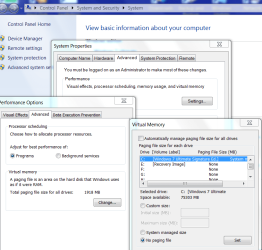
Try disabling Hibernation and disabling the paging file. Then try defragging again.

Hope this helps,
~Jonathan
 

My Computer

Computer Manufacturer/Model Number
Custom
OS
Windows 7 Professional x64
CPU
Intel i7 2600K OC'd @ 4620 MHz
Motherboard
Asus P8Z68-V Pro
Memory
16GB GSkill Sniper 2133 Mhz (4x4GB)
Graphics Card(s)
EVGA GeForce GTX 480 SuperClocked+
Sound Card
Realtek High Definition Audio
Monitor(s) Displays
2x Acer S273HLbmii 27"
Screen Resolution
2 x 1920x1080
Hard Drives
64GB Crucial M4 SSD

Storage: Hitachi 1TB 5400RPM, Samsung 1.5TB 5400RPM
PSU
Corsair HW Series 750w (modular)
Case
Cooler Master HAF 932 Advanced Blue Edition
Cooling
CM Hyper 212+ CPU cooler, 3x 230mm + 1x 140mm case fans
Keyboard
Logitech MK320 (wireless)
Mouse
Logitech MK320 (wireless)
Internet Speed
30 Mb/s : 2 Mb/s
Are you saying that it will not shrink the existing partition enough?

After following Jon's steps, try shrinking again.

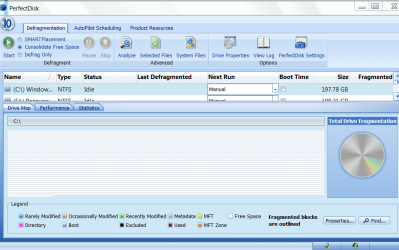
If it still will not shrink sufficiently, you will need to download and install Perfect Disk 10 trial version and do an offline defragging:

Capture.PNG

Note the setting to Consolidate free space. After this, it might be necessary to right click on drive and select System files to move system files out of the way. These operations will all run in boot mode.

This has worked about a dozen times for me when system files were in the way of shrinking.
 
It looks like you have unmovable files in the section that you want to shrink.
i.e. the defragmenter cannot move them and they in the bootsector you want to move.
Maybe defragging in safemode (if it's possible) might help, or defragging from another OS/bootdisk.
 

My Computer

Computer Manufacturer/Model Number
Custom Hack job
OS
Windows 7 Ultimate 64 bit
CPU
Intel(R) Core(TM)2 Quad CPU Q8200 @ 2.33GHz
Motherboard
GigaByte EP45-UD3
Memory
8 GB Kingston
Graphics Card(s)
Nvidia GeForce 9600GT
Sound Card
Soundblaster Audigy
Monitor(s) Displays
AOC x2 22"
Hard Drives
2 x Samsung 500GB (RAID)
2 x Samsung 2TB
1 x WD Green 2TB
1 x Seagate 1TB
1 x Samsung 500GB
PSU
Thermaltake QFan 750W
Case
CM Scout Gaming
Cooling
Coolermaster V10
Keyboard
Microsoft Wireless Keyboard 1000
Mouse
Microsoft Wireless Optical 2000
Internet Speed
320
Other Info
Winfast PVR2000CP
LG DVD-RAM DVD/RW/DL Super Multi
Linksys WMP300Nx2 Wireless Adapter
how do i disable the paging file?
i've heard of it before (something like pagefile.sys)
lol

thanks in advance!
 

My Computer

Computer Manufacturer/Model Number
Hewlett-Packard HP 6730s Business Notebook
OS
Windows 7 Ultimate x86 & x64
CPU
Intel Centrino 2 with Intel Core 2 Duo
Memory
3GB
Graphics Card(s)
ATI Radeon Premium Graphics HD
Hard Drives
250GB HDD
5400 RPM
Case
Laptop
Cooling
Fan
Mouse
Microsoft Mouse 5000 BlueTrack Technology
Internet Speed
12Mb/s
ok... still no luck
im gna go ahead and try it with gparted and see what happens.
 

My Computer

Computer Manufacturer/Model Number
Hewlett-Packard HP 6730s Business Notebook
OS
Windows 7 Ultimate x86 & x64
CPU
Intel Centrino 2 with Intel Core 2 Duo
Memory
3GB
Graphics Card(s)
ATI Radeon Premium Graphics HD
Hard Drives
250GB HDD
5400 RPM
Case
Laptop
Cooling
Fan
Mouse
Microsoft Mouse 5000 BlueTrack Technology
Internet Speed
12Mb/s
how do i disable the paging file?
i've heard of it before (something like pagefile.sys)
lol

thanks in advance!

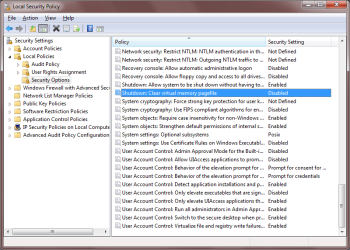
From RUN type secpol.msc
and navigate to local policies
select security options
and ENABLE shutdown: Clear virtual memory pagefile
(See pic)
Now reboot.
You can always disable this again later
 

Attachments

  • SECPOL.MSC - pagefile.png
    SECPOL.MSC - pagefile.png
    26.8 KB · Views: 122

My Computer

Computer Manufacturer/Model Number
Custom Hack job
OS
Windows 7 Ultimate 64 bit
CPU
Intel(R) Core(TM)2 Quad CPU Q8200 @ 2.33GHz
Motherboard
GigaByte EP45-UD3
Memory
8 GB Kingston
Graphics Card(s)
Nvidia GeForce 9600GT
Sound Card
Soundblaster Audigy
Monitor(s) Displays
AOC x2 22"
Hard Drives
2 x Samsung 500GB (RAID)
2 x Samsung 2TB
1 x WD Green 2TB
1 x Seagate 1TB
1 x Samsung 500GB
PSU
Thermaltake QFan 750W
Case
CM Scout Gaming
Cooling
Coolermaster V10
Keyboard
Microsoft Wireless Keyboard 1000
Mouse
Microsoft Wireless Optical 2000
Internet Speed
320
Other Info
Winfast PVR2000CP
LG DVD-RAM DVD/RW/DL Super Multi
Linksys WMP300Nx2 Wireless Adapter
Back
Top