Partition ?

darkhorse

New member
Power User
Local time
4:29 PM
Messages
514
Location
Denmark
Hi.

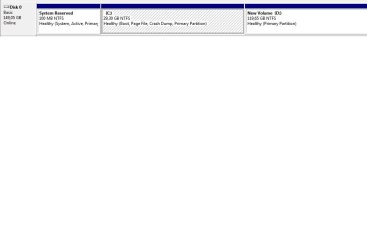
I have installed Win 7 Ultimate on a harddisk, but I encountered, that I haven't done the partition correct.

The C partition was to great, but via management I shrinked it to what I felt was the right size.

Now I want to add the not managed part of the disk to D.

How do I that ?.

Screenshot showing the present set up is attached
 

Attachments
  • expand.jpg
    expand.jpg
    22.4 KB · Views: 30

My Computer

Computer type
PC/Desktop
Computer Manufacturer/Model Number
Homemade
OS
Windows 7 Ultimate
CPU
E7300
Motherboard
ASUS P5Q DeLuxe
Memory
4g
Graphics Card(s)
NVIDIA GeForce 7300 LE
Sound Card
N/A
Monitor(s) Displays
Acer
Screen Resolution
1600x1200
Hard Drives
Samsung HD503HI ATA Device
PSU
Seasonic
Case
ATX
Cooling
FAN
Keyboard
Logitech
Mouse
HP
Internet Speed
20/2
Antivirus
MSE
Browser
IE9, Chrome, Firefox
Hi.

I have installed Win 7 Ultimate on a harddisk, but I encountered, that I haven't done the partition correct.

The C partition was to great, but via management I shrinked it to what I felt was the right size.

Now I want to add the not managed part of the disk to D.

How do I that ?.

Screenshot showing the present set up is attached


Is there any data on D?
 

My Computer

Computer Manufacturer/Model Number
HP Pavillion dv-7 1005 Tx
OS
Win 8 Release candidate 8400
CPU
[email protected]
Memory
4 gigs
Graphics Card(s)
Nvidia 9600M
Sound Card
HD built-in
Monitor(s) Displays
17" Wxga
Screen Resolution
1440x900
Cooling
none
Internet Speed
45Mb down 5Mb up
What I would do is move the data off of D: to delete it, then boot free Partition Wizard bootable CD, rightclick C, select Resize, then grab partition with a left click and slide the whole C partition all the way to the left, click OK.

Now rightclick in Unallocated space and create/name a New D: logical partition for your data, OK. Apply all steps.

When partition finishes copying data over, you may need to boot Win7 DVD Repair console or Repair CD to run Startup Repair up to 3 separate times with reboots to repair the MBR on Win7, since it has been moved into the preferred lower address of the HD: http://www.sevenforums.com/tutorials/681-startup-repair.html?ltr=S

If you are unable to copy the data off of D to do these steps, then we can give you steps using PW CD to move D and unallocated over to the far right, then copy C into the space made on the left side, which is the preferred lower address for the OS (closer to laser).

http://www.sevenforums.com/tutorials/93322-partition-wizard-use-bootable-cd.html?ltr=P
 
Hi.

I have installed Win 7 Ultimate on a harddisk, but I encountered, that I haven't done the partition correct.

The C partition was to great, but via management I shrinked it to what I felt was the right size.

Now I want to add the not managed part of the disk to D.

How do I that ?.

Screenshot showing the present set up is attached


Is there any data on D?

Code:
Yes, but never mind
 

My Computer

Computer type
PC/Desktop
Computer Manufacturer/Model Number
Homemade
OS
Windows 7 Ultimate
CPU
E7300
Motherboard
ASUS P5Q DeLuxe
Memory
4g
Graphics Card(s)
NVIDIA GeForce 7300 LE
Sound Card
N/A
Monitor(s) Displays
Acer
Screen Resolution
1600x1200
Hard Drives
Samsung HD503HI ATA Device
PSU
Seasonic
Case
ATX
Cooling
FAN
Keyboard
Logitech
Mouse
HP
Internet Speed
20/2
Antivirus
MSE
Browser
IE9, Chrome, Firefox
What I would do is move the data off of D: to delete it, then boot free Partition Wizard bootable CD, rightclick C, select Resize, then grab partition with a left click and slide the whole C partition all the way to the left, click OK.

Now rightclick in Unallocated space and create/name a New D: logical partition for your data, OK. Apply all steps.

When partition finishes copying data over, you may need to boot Win7 DVD Repair console or Repair CD to run Startup Repair up to 3 separate times with reboots to repair the MBR on Win7, since it has been moved into the preferred lower address of the HD: http://www.sevenforums.com/tutorials/681-startup-repair.html?ltr=S

If you are unable to copy the data off of D to do these steps, then we can give you steps using PW CD to move D and unallocated over to the far right, then copy C into the space made on the left side, which is the preferred lower address for the OS (closer to laser).

http://www.sevenforums.com/tutorials/93322-partition-wizard-use-bootable-cd.html?ltr=P


Thanks for the nice information. I have made a partitio-wizard-use-bootable cd, and have used it.
Before this, I'm sure I have deleted the C partiton, that means to start over again.

Would it be adviceable to used the partiton boot cd to make the partitions?. I ask because I always reverse the install on the wrong -the biggest- partition.

I have taken a photo, that shows what I did using the wndows 7 ultimate 64 bit install cd.
 

Attachments

  • part.jpg
    part.jpg
    36.3 KB · Views: 11

My Computer

Computer type
PC/Desktop
Computer Manufacturer/Model Number
Homemade
OS
Windows 7 Ultimate
CPU
E7300
Motherboard
ASUS P5Q DeLuxe
Memory
4g
Graphics Card(s)
NVIDIA GeForce 7300 LE
Sound Card
N/A
Monitor(s) Displays
Acer
Screen Resolution
1600x1200
Hard Drives
Samsung HD503HI ATA Device
PSU
Seasonic
Case
ATX
Cooling
FAN
Keyboard
Logitech
Mouse
HP
Internet Speed
20/2
Antivirus
MSE
Browser
IE9, Chrome, Firefox
Since you have deleted Win7 anyway and have nothing left on D, I would boot the Partition Wizard, select Wipe Disk on Disk tab to get the cleanest possible slate for your reinstall. One set of zeroes is fine.

Then you can repartition as you wish using Partition Wizard to create a Primary partition for Win7, Logical partition(s) for data.

Do you want to keep your data on a separate partition from Win7 so it is protected in it's own vault in case the OS won't start and requires reinstall? If so, then you need to make the Win7 partition large enough to install your programs.

Use this tutorial to put your User files on a separate partition after install: http://www.sevenforums.com/tutorials/18629-user-folders-change-default-location.html

If for some reason you want the 100mb System Reserved partition, then make your partitions using the Win7 DVD Custom>Drive Options to Create New, then Format.

Always back up your files and a Win7 Backup Image externally as HD's can and do fail, but the maker's Diag/Repair CD full scan can also often save them from failing.
 
Last edited:
;818408 said:
Since you have deleted Win7 anyway and have nothing left on D, I would boot the Partition Wizard, select Wipe Disk on Disk tab to get the cleanest possible slate for your reinstall. One set of zeroes is fine.

Then you can repartition as you wish using Partition Wizard to create a Primary partition for Win7, Logical partition(s) for data.

Do you want to keep your data on a separate partition from Win7 so it is protected in it's own vault in case the OS won't start and requires reinstall. If so, then you need to make the Win7 partition large enough to install your programs.

Use this tutorial to put your User files on a separate partition after install: http://www.sevenforums.com/tutorials/18629-user-folders-change-default-location.html

If for some reason you want the 100mb System Reserved partition, then make your partitions using the Win7 DVD Custom>Drive Options to Create New, then Format.

Hi gregrocker

Thannk for the reply, and valuable informations.
I will boot with the Partition Wizard, and wipe the disk.

I have a 160Gb SATA disk, that I want to give 30G for C, and the rest for D.

Is there a how to for using the Partition Wizard with respect to do it correct?.

Very nice on the 100mb system reserved partition.
 

My Computer

Computer type
PC/Desktop
Computer Manufacturer/Model Number
Homemade
OS
Windows 7 Ultimate
CPU
E7300
Motherboard
ASUS P5Q DeLuxe
Memory
4g
Graphics Card(s)
NVIDIA GeForce 7300 LE
Sound Card
N/A
Monitor(s) Displays
Acer
Screen Resolution
1600x1200
Hard Drives
Samsung HD503HI ATA Device
PSU
Seasonic
Case
ATX
Cooling
FAN
Keyboard
Logitech
Mouse
HP
Internet Speed
20/2
Antivirus
MSE
Browser
IE9, Chrome, Firefox
gregrocker.

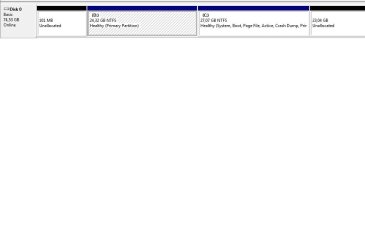
To be honest it succeded today to install W7 Ultimate, as you can see from the screenshot here.
But I think I will follow your advice with the Partition Wizard tomorrow.

Later today I tested it, but I need some info on it. I formatted both the C and the D drive, and after ehen I would install W7U, I couldn't do it.
So I have to set me better in to the Part Wiz :-)
 

Attachments

  • part.jpg
    part.jpg
    23.3 KB · Views: 10

My Computer

Computer type
PC/Desktop
Computer Manufacturer/Model Number
Homemade
OS
Windows 7 Ultimate
CPU
E7300
Motherboard
ASUS P5Q DeLuxe
Memory
4g
Graphics Card(s)
NVIDIA GeForce 7300 LE
Sound Card
N/A
Monitor(s) Displays
Acer
Screen Resolution
1600x1200
Hard Drives
Samsung HD503HI ATA Device
PSU
Seasonic
Case
ATX
Cooling
FAN
Keyboard
Logitech
Mouse
HP
Internet Speed
20/2
Antivirus
MSE
Browser
IE9, Chrome, Firefox
What's the exact problem with install? It looks fine, although not sure you'll have enough space on C to install all programs.

You'll definitely need to place your User files on D as shown in this video: http://www.sevenforums.com/tutorials/72427-data-partition.html

Here were the steps I prepared to partition using Partition Wizard if you really need to reinstall:
Boot the PW CD, select 1 for Screen Res, From DIsk tab, select Wipe Disk, apply one set of zeros (about half hour on your HD), OK, Apply.

Now rightclick on the empty drive map, select Create, type in Partition Label "Windows 7 Ultimate," Create as: Primary, Drive Letter: C, grab right grey border slide to left to make partition size (suggest 50gb), doublecheck each setting, OK.

Now rightclick on empty space in drive map select Create, type in "Data" or such, Create as: Logical, Drive Letter: D, size as you wish, check over settings again, OK., Apply all steps.

Now boot the WIn7 DVD, select Custom install, choose the C: Windows 7 partition, use Custom drive options to apply format one more time, then Install.

Once you get it set up as you like and running perfectly, save a Win7 Backup Image externally and never have to reinstall again, just reimage the C: partition in 15 minutes using DVD or Repair CD. http://www.sevenforums.com/tutorials/663-backup-complete-computer-create-image-backup.html
 
As mentioned, I formatted C and D partitions.
The I booted on the W7U DVD, but cold not get the install to initialize.

Yes the idea with D is also to place user files there.

Thanks for the link to the video.

Again many thanks for your great info, and as mentioned tomorrow I will
run over again :-)
 

My Computer

Computer type
PC/Desktop
Computer Manufacturer/Model Number
Homemade
OS
Windows 7 Ultimate
CPU
E7300
Motherboard
ASUS P5Q DeLuxe
Memory
4g
Graphics Card(s)
NVIDIA GeForce 7300 LE
Sound Card
N/A
Monitor(s) Displays
Acer
Screen Resolution
1600x1200
Hard Drives
Samsung HD503HI ATA Device
PSU
Seasonic
Case
ATX
Cooling
FAN
Keyboard
Logitech
Mouse
HP
Internet Speed
20/2
Antivirus
MSE
Browser
IE9, Chrome, Firefox
All but write the drive letter succeded. If I click, 'none' appears.
For C as well for D.

What have I not done ?
 

My Computer

Computer type
PC/Desktop
Computer Manufacturer/Model Number
Homemade
OS
Windows 7 Ultimate
CPU
E7300
Motherboard
ASUS P5Q DeLuxe
Memory
4g
Graphics Card(s)
NVIDIA GeForce 7300 LE
Sound Card
N/A
Monitor(s) Displays
Acer
Screen Resolution
1600x1200
Hard Drives
Samsung HD503HI ATA Device
PSU
Seasonic
Case
ATX
Cooling
FAN
Keyboard
Logitech
Mouse
HP
Internet Speed
20/2
Antivirus
MSE
Browser
IE9, Chrome, Firefox
Not sure, but I would not worry about it. Win7 will assign itself C: and you can assign D: later in Disk Mgmt.

Just be sure you install to C: and it is a Primary partition.
 
Not sure, but I would not worry about it. Win7 will assign itself C: and you can assign D: later in Disk Mgmt.

Just be sure you install to C: and it is a Primary partition.

I did not worry, but carried on eith the install, and you are right.
C and D is ok, and I nearly have installed W7U.

I just need the graphic driver, then I will make backup according to your link
bit up in this.
Thanks again M8
 

My Computer

Computer type
PC/Desktop
Computer Manufacturer/Model Number
Homemade
OS
Windows 7 Ultimate
CPU
E7300
Motherboard
ASUS P5Q DeLuxe
Memory
4g
Graphics Card(s)
NVIDIA GeForce 7300 LE
Sound Card
N/A
Monitor(s) Displays
Acer
Screen Resolution
1600x1200
Hard Drives
Samsung HD503HI ATA Device
PSU
Seasonic
Case
ATX
Cooling
FAN
Keyboard
Logitech
Mouse
HP
Internet Speed
20/2
Antivirus
MSE
Browser
IE9, Chrome, Firefox
Check Optional WIndows Updates first to see if it delivers the latest display driver. If not, find it on the Support Downloads webpage for your computer or Device.
 
Thank you, Microsoft has a driver for my NVIDIA card.

It can be viewed here. BUT with this card I have better resolution if I ran Windows XP on the same computer.
I have a HDD fast remove and plug case, where I can put my SATA HDD's into :-)
 

My Computer

Computer type
PC/Desktop
Computer Manufacturer/Model Number
Homemade
OS
Windows 7 Ultimate
CPU
E7300
Motherboard
ASUS P5Q DeLuxe
Memory
4g
Graphics Card(s)
NVIDIA GeForce 7300 LE
Sound Card
N/A
Monitor(s) Displays
Acer
Screen Resolution
1600x1200
Hard Drives
Samsung HD503HI ATA Device
PSU
Seasonic
Case
ATX
Cooling
FAN
Keyboard
Logitech
Mouse
HP
Internet Speed
20/2
Antivirus
MSE
Browser
IE9, Chrome, Firefox
Thank you, Microsoft has a driver for my NVIDIA card.

It can be viewed here. BUT with this card I have better resolution if I ran Windows XP on the same computer.
I have a HDD fast remove and plug case, where I can put my SATA HDD's into :-)


I forgot the screendump :-)
 

Attachments

  • display.jpg
    display.jpg
    4.3 KB · Views: 1

My Computer

Computer type
PC/Desktop
Computer Manufacturer/Model Number
Homemade
OS
Windows 7 Ultimate
CPU
E7300
Motherboard
ASUS P5Q DeLuxe
Memory
4g
Graphics Card(s)
NVIDIA GeForce 7300 LE
Sound Card
N/A
Monitor(s) Displays
Acer
Screen Resolution
1600x1200
Hard Drives
Samsung HD503HI ATA Device
PSU
Seasonic
Case
ATX
Cooling
FAN
Keyboard
Logitech
Mouse
HP
Internet Speed
20/2
Antivirus
MSE
Browser
IE9, Chrome, Firefox
Was this driver given by the installer, or later optional Windows Updates? Have you checked optional Updates lately?

How does it work compared to the latest driver on NVIDIA website?

There are no specs so I don't know what make/model computer you have, or built. Have you checked the maker's website for latest display driver? These are sometimes required.
 
First I installed the driver from the NVIDIA site.
After your words, I enter the Device Manager, and choosed Update the driver, where I found the Microsoft one.

Yes I have checked updates at the Microsoft site.


BUT it's not better, than the NVIDIA one.

The computer here is homebuilt. The mainboard is an ASUS P5Q Deluxe.

ASUS has no driver for the graphic board.
 

My Computer

Computer type
PC/Desktop
Computer Manufacturer/Model Number
Homemade
OS
Windows 7 Ultimate
CPU
E7300
Motherboard
ASUS P5Q DeLuxe
Memory
4g
Graphics Card(s)
NVIDIA GeForce 7300 LE
Sound Card
N/A
Monitor(s) Displays
Acer
Screen Resolution
1600x1200
Hard Drives
Samsung HD503HI ATA Device
PSU
Seasonic
Case
ATX
Cooling
FAN
Keyboard
Logitech
Mouse
HP
Internet Speed
20/2
Antivirus
MSE
Browser
IE9, Chrome, Firefox
Back
Top