Partitioning issues..

Raynian

New member
Member
VIP
Local time
7:57 AM
Messages
126
I wanted to transfer some space on my D drive ( logical ) to my main C drive (primary) as the default allocation for my C drive is getting used up.

I tried Paragon partition manager but it doesn't seem to allow me to do that.. it seem to treat the C and D drives as separate disks which limits the options I have. :cry:

Thx in advance for any help =D
 

My Computer

Computer type
Laptop
Computer Manufacturer/Model Number
Sony Vaio S 13 A
OS
Microsoft Windows 7 Professional 64-bit
CPU
Intel(R) Core(TM) i7-3520M CPU @ 2.90GHz
Memory
12.00 GB
Graphics Card(s)
(1) Intel(R) HD Graphics 4000 (2) NVIDIA GeForce GT 640M L
Screen Resolution
1600x900
Hard Drives
ATA SAMSUNG SSD 830 SCSI Disk Device
Mouse
Logitech / Microsoft touch Mouse
Other Info
Weight: 1.67 Kg

My Computer

Computer Manufacturer/Model Number
HP, Dell, Gateway, Toshiba - 4 laptops and 2 desktops
OS
Vista, Windows7, Mint Mate, Zorin, Windows 8
CPU
from 1.6GHz Duo to i7
Monitor(s) Displays
2x HP w2207
Hard Drives
5x HDD, 7x SSD, 12x Externals
Keyboard
with trackball - no mices
Mouse
Trackball mice
Internet Speed
DSL 6000
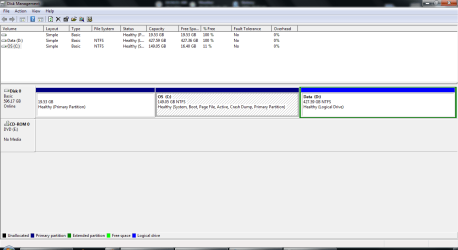
HDD DM1.PNG

OKay here it is :D

Will check out the link now ~
 

My Computer

Computer type
Laptop
Computer Manufacturer/Model Number
Sony Vaio S 13 A
OS
Microsoft Windows 7 Professional 64-bit
CPU
Intel(R) Core(TM) i7-3520M CPU @ 2.90GHz
Memory
12.00 GB
Graphics Card(s)
(1) Intel(R) HD Graphics 4000 (2) NVIDIA GeForce GT 640M L
Screen Resolution
1600x900
Hard Drives
ATA SAMSUNG SSD 830 SCSI Disk Device
Mouse
Logitech / Microsoft touch Mouse
Other Info
Weight: 1.67 Kg
The Green Rectangle indicates an EXTENDED partition - containing a logical drive.

The two Blue rectangles are Primary partitions.

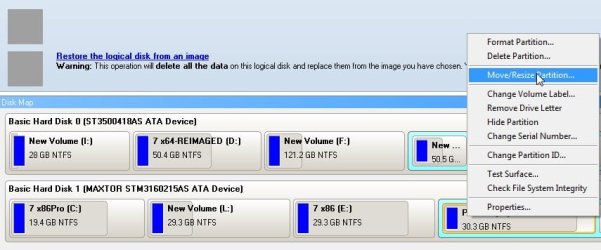
If you want to transfer space from an extended to a primary partition - you have do it like this:

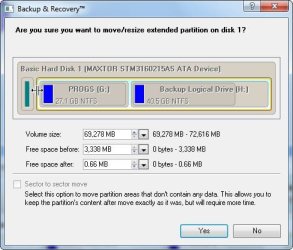
Rt click the logical drive and select Move/Resize

log-r1.jpg

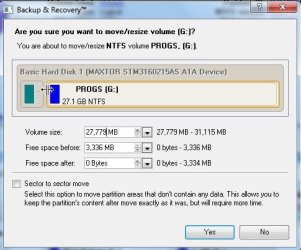
Drag it from the left to free the space you want , then Yes.

log-r2.jpg


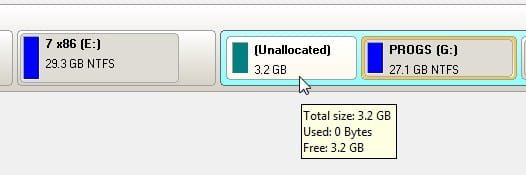
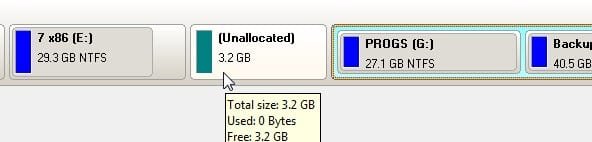
You can see there is space - but it is still inside the extended partition.


log-r3.jpg

Next RT click the extended partition ( grab it at the edge - as per the screenie ) and Select Move /Resize.

log-r4.jpg

Drag the left edge of the extended partition to the right ,as far as you want , then Yes.

log-r5.jpg

You can see the space is now outside the extended partition and next to the primary partition ( that's the blue one ).

log-r6.jpg


If you are happy with that amount of space there - click APPLY.

It may take a while because the data in the logical has to be physically moved to the right.

Now you can easily incorporate that space into the primary.
 

My Computers

System One System Two

  • Computer type
    PC/Desktop
    OS
    7 X64
    CPU
    i5 8400
    Motherboard
    gigabyte b365m ds3h
    Memory
    2x8gb 3200mhz
    Hard Drives
    various
    PSU
    pure power 11 400w cm
    Case
    Coolermaster
    Cooling
    cryorig m9i
  • Computer type
    PC/Desktop
    OS
    7x64
    CPU
    g5400
    Motherboard
    ga b365m ds3h
    Memory
    8gb ddr4 2400
    PSU
    xfx pro 450w
Note - in your case , the D drive appears to be empty.

In that case , it is very easy.

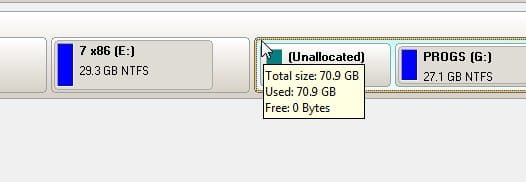
Simply Delete the D partition - you will see it becomes Unallocated space.

Then just Rt click the C partition, select Move /Resize and drag to the right to include as much of that space as you want. YES. APPLY.
 

My Computers

System One System Two

  • Computer type
    PC/Desktop
    OS
    7 X64
    CPU
    i5 8400
    Motherboard
    gigabyte b365m ds3h
    Memory
    2x8gb 3200mhz
    Hard Drives
    various
    PSU
    pure power 11 400w cm
    Case
    Coolermaster
    Cooling
    cryorig m9i
  • Computer type
    PC/Desktop
    OS
    7x64
    CPU
    g5400
    Motherboard
    ga b365m ds3h
    Memory
    8gb ddr4 2400
    PSU
    xfx pro 450w
Note - in your case , the D drive appears to be empty.

In that case , it is very easy.

Simply Delete the D partition - you will see it becomes Unallocated space.

Then just Rt click the C partition, select Move /Resize and drag to the right to include as much of that space as you want. YES. APPLY.

Thx alot for the detailed reply, but May I know which software are you using for disk partitioning ? =/
 

My Computer

Computer type
Laptop
Computer Manufacturer/Model Number
Sony Vaio S 13 A
OS
Microsoft Windows 7 Professional 64-bit
CPU
Intel(R) Core(TM) i7-3520M CPU @ 2.90GHz
Memory
12.00 GB
Graphics Card(s)
(1) Intel(R) HD Graphics 4000 (2) NVIDIA GeForce GT 640M L
Screen Resolution
1600x900
Hard Drives
ATA SAMSUNG SSD 830 SCSI Disk Device
Mouse
Logitech / Microsoft touch Mouse
Other Info
Weight: 1.67 Kg
Hi Raynian,

I have a lot of partitoning software - because it is an area that interests me.

I get given a lot of it.

However, in the screenshots I posted I was using the free Paragon backup and recovery

Free Backup Software: Paragon Backup & Recovery (Advanced) Free Edition - Overview

I added the move /resize to the right click menu - they appear to have missed it out by accident.

As far as I know, Paragon are the only products to align partitions correctly for nt6 operating systems.
 

My Computers

System One System Two

  • Computer type
    PC/Desktop
    OS
    7 X64
    CPU
    i5 8400
    Motherboard
    gigabyte b365m ds3h
    Memory
    2x8gb 3200mhz
    Hard Drives
    various
    PSU
    pure power 11 400w cm
    Case
    Coolermaster
    Cooling
    cryorig m9i
  • Computer type
    PC/Desktop
    OS
    7x64
    CPU
    g5400
    Motherboard
    ga b365m ds3h
    Memory
    8gb ddr4 2400
    PSU
    xfx pro 450w
Oh. I used paragon partition manager 11 but it couldnt seem to do the job. Perhaps I am just a lil blur =\

So I tried out the one in the link given by one poster above..

All seems to be working fine but now, it seems to have hung at the part where it is updating the system after a restart. It has been abt 30-40min already. Is the usual duration that long? I resized around 153GB to C from D.
 

My Computer

Computer type
Laptop
Computer Manufacturer/Model Number
Sony Vaio S 13 A
OS
Microsoft Windows 7 Professional 64-bit
CPU
Intel(R) Core(TM) i7-3520M CPU @ 2.90GHz
Memory
12.00 GB
Graphics Card(s)
(1) Intel(R) HD Graphics 4000 (2) NVIDIA GeForce GT 640M L
Screen Resolution
1600x900
Hard Drives
ATA SAMSUNG SSD 830 SCSI Disk Device
Mouse
Logitech / Microsoft touch Mouse
Other Info
Weight: 1.67 Kg
Pargon certainly can do the job - it makes you do it the correct, safe way - you can see how from the screenshots posted earlier.

Are you using Partition Wizard?

It should only take a few seconds to update system info.
 

My Computers

System One System Two

  • Computer type
    PC/Desktop
    OS
    7 X64
    CPU
    i5 8400
    Motherboard
    gigabyte b365m ds3h
    Memory
    2x8gb 3200mhz
    Hard Drives
    various
    PSU
    pure power 11 400w cm
    Case
    Coolermaster
    Cooling
    cryorig m9i
  • Computer type
    PC/Desktop
    OS
    7x64
    CPU
    g5400
    Motherboard
    ga b365m ds3h
    Memory
    8gb ddr4 2400
    PSU
    xfx pro 450w
Oh crap. That means.. Somehow it didn't work out too well.. Urgh.

Should I force shut my laptop now?
 

My Computer

Computer type
Laptop
Computer Manufacturer/Model Number
Sony Vaio S 13 A
OS
Microsoft Windows 7 Professional 64-bit
CPU
Intel(R) Core(TM) i7-3520M CPU @ 2.90GHz
Memory
12.00 GB
Graphics Card(s)
(1) Intel(R) HD Graphics 4000 (2) NVIDIA GeForce GT 640M L
Screen Resolution
1600x900
Hard Drives
ATA SAMSUNG SSD 830 SCSI Disk Device
Mouse
Logitech / Microsoft touch Mouse
Other Info
Weight: 1.67 Kg
Normally not a good idea - under the circumstances - I think you will have to.

See if you can start up after that.

If not , try the boot disc - you may need to use the partition recovery function.
 

My Computers

System One System Two

  • Computer type
    PC/Desktop
    OS
    7 X64
    CPU
    i5 8400
    Motherboard
    gigabyte b365m ds3h
    Memory
    2x8gb 3200mhz
    Hard Drives
    various
    PSU
    pure power 11 400w cm
    Case
    Coolermaster
    Cooling
    cryorig m9i
  • Computer type
    PC/Desktop
    OS
    7x64
    CPU
    g5400
    Motherboard
    ga b365m ds3h
    Memory
    8gb ddr4 2400
    PSU
    xfx pro 450w
Normally not a good idea - under the circumstances - I think you will have to.

See if you can start up after that.

If not , try the boot disc - you may need to use the partition recovery function.

Wow. I force-restarted and the miracle happened. Everything was fine ( from what i see ). The 153 GB was allocated to the C drive already. But the unallocated space still remained as it is. I have already created the partition for it.
 

My Computer

Computer type
Laptop
Computer Manufacturer/Model Number
Sony Vaio S 13 A
OS
Microsoft Windows 7 Professional 64-bit
CPU
Intel(R) Core(TM) i7-3520M CPU @ 2.90GHz
Memory
12.00 GB
Graphics Card(s)
(1) Intel(R) HD Graphics 4000 (2) NVIDIA GeForce GT 640M L
Screen Resolution
1600x900
Hard Drives
ATA SAMSUNG SSD 830 SCSI Disk Device
Mouse
Logitech / Microsoft touch Mouse
Other Info
Weight: 1.67 Kg
That was lucky.
 

My Computers

System One System Two

  • Computer type
    PC/Desktop
    OS
    7 X64
    CPU
    i5 8400
    Motherboard
    gigabyte b365m ds3h
    Memory
    2x8gb 3200mhz
    Hard Drives
    various
    PSU
    pure power 11 400w cm
    Case
    Coolermaster
    Cooling
    cryorig m9i
  • Computer type
    PC/Desktop
    OS
    7x64
    CPU
    g5400
    Motherboard
    ga b365m ds3h
    Memory
    8gb ddr4 2400
    PSU
    xfx pro 450w
Yeah.. Really lucky.

Thanks a great deal for the patience for helping me along ~ :)
 

My Computer

Computer type
Laptop
Computer Manufacturer/Model Number
Sony Vaio S 13 A
OS
Microsoft Windows 7 Professional 64-bit
CPU
Intel(R) Core(TM) i7-3520M CPU @ 2.90GHz
Memory
12.00 GB
Graphics Card(s)
(1) Intel(R) HD Graphics 4000 (2) NVIDIA GeForce GT 640M L
Screen Resolution
1600x900
Hard Drives
ATA SAMSUNG SSD 830 SCSI Disk Device
Mouse
Logitech / Microsoft touch Mouse
Other Info
Weight: 1.67 Kg
Back
Top