Partitioning my hard disk

kelvinwgr

New member
Hi Guys,

My laptop comes with 1 partition called (c: ) which consists of the windows 7 home premium OS. I would like to partition it so that I can separate my OS and Data.

I understand that there are a few tools available such as acronis and partition magic (not sure if there's other). Can I use it on my windows 7? And if yes, any idea how much harddisk space should be allocated for the OS portion?

Thanks.
 

My Computer

Computer Manufacturer/Model Number
Acer Timeline 3820T
OS
Windows 7 Home Premium 64-bits OS
Memory
2 GB Ram
Hard Drives
320 GB

My Computer

Computer Manufacturer/Model Number
HP, Dell, Gateway, Toshiba - 4 laptops and 2 desktops
OS
Vista, Windows7, Mint Mate, Zorin, Windows 8
CPU
from 1.6GHz Duo to i7
Monitor(s) Displays
2x HP w2207
Hard Drives
5x HDD, 7x SSD, 12x Externals
Keyboard
with trackball - no mices
Mouse
Trackball mice
Internet Speed
DSL 6000
Use Disk Mgmt as theog suggests then follow whs's excellent video showing how to set up a separate data partition.

Do not use Partition Magic.

For any partitioning needs which cannot be accomplished by Disk Mgmt use free Partition Wizard bootable CD which works flawlessly with Win7.
 
Hello kelvinwgr.


Don't go much less than 60GB as WHS has suggested so Windows will have enough room to expand as needed.
 

My Computer

Computer Manufacturer/Model Number
* BFK Customs *
OS
W 7 64-bit Ultimate
CPU
Intel Q9550 Yorkfield
Motherboard
ASUS P5Q Pro
Memory
8GB Dominator 8500C5D
Graphics Card(s)
ATI : XFX 5870
Sound Card
Realtek HD Audio 7-1
Monitor(s) Displays
1x 47" LCD HDMI & 3x 26" LCD HDMI
Screen Resolution
1920x1080P & 1920x1200
Hard Drives
1x 80GB Intel X25-M G2 SSD : 1x 500GB & 1x 640GB WD Caviar Black(s)
PSU
Corsair 620HX
Case
Cooler Master RC-690
Cooling
Tuniq Tower 120, 2x 140mm and 3x 120mm case fans
Keyboard
Microsoft 500
Mouse
Razer Diamondback 3G
Internet Speed
14 Mb/s
Other Info
1x Koutech 3Gb/s SATA HDD Hot Swap Rack
Use Disk Mgmt as theog suggests then follow whs's excellent video showing how to set up a separate data partition.

Do not use Partition Magic.

For any partitioning needs which cannot be accomplished by Disk Mgmt use free Partition Wizard bootable CD which works flawlessly with Win7.

Hi Guys, okay thanks for all the advice. Let me take some time to go through the tutorial and I will try it out.

Hi Greg, any reasons not to use partition magic? Does it screw up the OS or hdd?
 

My Computer

Computer Manufacturer/Model Number
Acer Timeline 3820T
OS
Windows 7 Home Premium 64-bits OS
Memory
2 GB Ram
Hard Drives
320 GB
Partition Magic has not been updated in several years. But you can try it just to see what it does to your system. It's a free world - LOL.
 

My Computer

Computer Manufacturer/Model Number
HP, Dell, Gateway, Toshiba - 4 laptops and 2 desktops
OS
Vista, Windows7, Mint Mate, Zorin, Windows 8
CPU
from 1.6GHz Duo to i7
Monitor(s) Displays
2x HP w2207
Hard Drives
5x HDD, 7x SSD, 12x Externals
Keyboard
with trackball - no mices
Mouse
Trackball mice
Internet Speed
DSL 6000
Don't just hack away with a partitioning tool and HOPE that will work; instead, use the Win7 Disk Management utility to shrink the "C" partition first. Then, reboot into Win7 a couple of times for it to make the necessary adjustments.

Then ... you can use your partitioning tool to create another partition.

Or, since you're already inside Win7, you can just use the same Win7 Disk Management utility to create and format a data partition.

And, yes, you CAN shrink the Win7 OS partition while inside Win7. You don't have to resort to third-party partitioning tools to do this.

If you DO want to use third-party tools, another one to consider is EASEUS Partition Master. They just updated it again to version 6.x, and a Home version is available from the website as a free download.
 

My Computer

Computer type
PC/Desktop
Computer Manufacturer/Model Number
Custom
OS
Win7 Pro 32-bit, Win8 Pro 32-bit
CPU
AMD Phenom II X6 1090T
Motherboard
Gigabyte
Memory
4GB ddr3 1300
Graphics Card(s)
AMD HD 4290 onboard
Sound Card
Builtin Realtek HD Audio
Monitor(s) Displays
Samsung 24" widescreen, LG 23" widescreen
Screen Resolution
1920x1200/1920x1080
Hard Drives
Kingston 256GB SSD
Keyboard
Logitech Illuminated Keyboard
Mouse
Logitech M705 wireless mouse
Antivirus
Norton Av 2013
Browser
IE v10
We see one OS screwed up per month on average by Partition Magic.

Any other 3rd party partition manager can fail during Resizing. Only PW has built-in Data Protection mode which will restart and attempt to Resize again if it fails, allowing you to interrupt it during startup countdown to start Win7 normally.

In your case, you can achieve what you want using Disk Management. If you need any more, just ask back for exact steps using PW CD.

http://www.sevenforums.com/tutorials/2672-partition-volume-shrink.html
http://www.sevenforums.com/tutorials/2674-partition-volume-create-new.html
 
Hi Guys. Thanks for the advice and I have decided not to use partition magic to partition my disk. I have read through the tutorial, however, I still have some questions and seek your professional advice.

I believe the shrink feature is only available in windows 7 os? I don't see it in windows xp. When I try to shrink my c drive, the value in "size of available shrink space in MB" is automatically generated (Please refer to screenshots). The value is less than half of my total harddisk size. Any idea how does this value come about? Basically, my concern here is that I wish to set a suitable disk size for OS as C drive and the rest to be used for data as D drive. (No gaming is involved)

The value "132741 MB", if I want to convert the value to GB, is the following way the correct to calculate:

132741 divided by 1024 = 129 GB (approximate)
 

Attachments

  • shrink.jpg
    shrink.jpg
    49.9 KB · Views: 5

My Computer

Computer Manufacturer/Model Number
Acer Timeline 3820T
OS
Windows 7 Home Premium 64-bits OS
Memory
2 GB Ram
Hard Drives
320 GB
Why don't you use Partition Wizard Home Edition (the bootble cd) as suggested. With Disk Management you run against the MFT which sits in the middle of the disk and cannot be moved by Disk Management. But the Partition Wizard can move it. just make sure you image your disk before you manipulate it - just in case things go wrong.
 

My Computer

Computer Manufacturer/Model Number
HP, Dell, Gateway, Toshiba - 4 laptops and 2 desktops
OS
Vista, Windows7, Mint Mate, Zorin, Windows 8
CPU
from 1.6GHz Duo to i7
Monitor(s) Displays
2x HP w2207
Hard Drives
5x HDD, 7x SSD, 12x Externals
Keyboard
with trackball - no mices
Mouse
Trackball mice
Internet Speed
DSL 6000
Why don't you use Partition Wizard Home Edition (the bootble cd) as suggested. With Disk Management you run against the MFT which sits in the middle of the disk and cannot be moved by Disk Management. But the Partition Wizard can move it. just make sure you image your disk before you manipulate it - just in case things go wrong.

Hi whs, I have downloaded PW home edition from the web and it is in (.iso) format. How do I make use of this (.iso) file to create a bootable cd? Do I just paste and write it onto a cd rom?
 

My Computer

Computer Manufacturer/Model Number
Acer Timeline 3820T
OS
Windows 7 Home Premium 64-bits OS
Memory
2 GB Ram
Hard Drives
320 GB
Windows 7 now has ISO burning capabilities but a lot of people still rely on third party progs/apps, I still use the free ImgBurn, after it's installed look at the help files in the program for tutorials on its use.


ImageBurn Free Software
 

My Computer

Computer Manufacturer/Model Number
* BFK Customs *
OS
W 7 64-bit Ultimate
CPU
Intel Q9550 Yorkfield
Motherboard
ASUS P5Q Pro
Memory
8GB Dominator 8500C5D
Graphics Card(s)
ATI : XFX 5870
Sound Card
Realtek HD Audio 7-1
Monitor(s) Displays
1x 47" LCD HDMI & 3x 26" LCD HDMI
Screen Resolution
1920x1080P & 1920x1200
Hard Drives
1x 80GB Intel X25-M G2 SSD : 1x 500GB & 1x 640GB WD Caviar Black(s)
PSU
Corsair 620HX
Case
Cooler Master RC-690
Cooling
Tuniq Tower 120, 2x 140mm and 3x 120mm case fans
Keyboard
Microsoft 500
Mouse
Razer Diamondback 3G
Internet Speed
14 Mb/s
Other Info
1x Koutech 3Gb/s SATA HDD Hot Swap Rack
I have downloaded PW home edition from the web and it is in (.iso) format. How do I make use of this (.iso) file to create a bootable cd? Do I just paste and write it onto a cd rom?

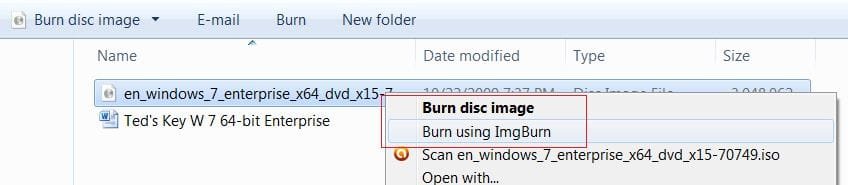
Right-click on the .iso file and choose Burn Disk Image


Windows 7 has built-in software to burn an ISO to CD/DVD.
 

My Computer

Computer Manufacturer/Model Number
Toshiba Satellite S875D-S7239 laptop
OS
MS Windows 7 Ultimate SP1 64-bit
CPU
AMD A10-4600M
Motherboard
AMD Pumori (Socket FT1)
Memory
6.00 GB Dual-Channel DDR3 @ 798MHz (11-11-12-28)
Graphics Card(s)
AMD Radeon HD 7660G
Sound Card
High Definition Audio Device
Monitor(s) Displays
Generic PnP Monitor (1600x900@60Hz)
Screen Resolution
1600x900@60Hz
Hard Drives
SSD 119GB Corsair CSSD-V128GB2 ATA Device
Keyboard
Standard PS/2 Keyboard
Mouse
HP Wireless Optical Mobile Mouse Model FHA-3410
Internet Speed
What the local pub, local coffee shop offers.
Other Info
Optical Drive:MATSHITA BD-CMB UJ160B ATA Device


Also have an Asus ha1002xp netbook with Win 7 Ultimate installed.
I have downloaded PW home edition from the web and it is in (.iso) format. How do I make use of this (.iso) file to create a bootable cd? Do I just paste and write it onto a cd rom?

Right-click on the .iso file and choose Burn Disk Image


Windows 7 has built-in software to burn an ISO to CD/DVD.

Hi, after right clicking on the .iso file, I can't locate any "burn disk image". Please help.
 

My Computer

Computer Manufacturer/Model Number
Acer Timeline 3820T
OS
Windows 7 Home Premium 64-bits OS
Memory
2 GB Ram
Hard Drives
320 GB
kelvin,
When you RIGHT-click on the .iso file, what are the options listed?
 

My Computer

Computer Manufacturer/Model Number
Toshiba Satellite S875D-S7239 laptop
OS
MS Windows 7 Ultimate SP1 64-bit
CPU
AMD A10-4600M
Motherboard
AMD Pumori (Socket FT1)
Memory
6.00 GB Dual-Channel DDR3 @ 798MHz (11-11-12-28)
Graphics Card(s)
AMD Radeon HD 7660G
Sound Card
High Definition Audio Device
Monitor(s) Displays
Generic PnP Monitor (1600x900@60Hz)
Screen Resolution
1600x900@60Hz
Hard Drives
SSD 119GB Corsair CSSD-V128GB2 ATA Device
Keyboard
Standard PS/2 Keyboard
Mouse
HP Wireless Optical Mobile Mouse Model FHA-3410
Internet Speed
What the local pub, local coffee shop offers.
Other Info
Optical Drive:MATSHITA BD-CMB UJ160B ATA Device


Also have an Asus ha1002xp netbook with Win 7 Ultimate installed.
kelvin,

What happens if you DOUBLE-CLICK on the .iso file?
 

My Computer

Computer Manufacturer/Model Number
Toshiba Satellite S875D-S7239 laptop
OS
MS Windows 7 Ultimate SP1 64-bit
CPU
AMD A10-4600M
Motherboard
AMD Pumori (Socket FT1)
Memory
6.00 GB Dual-Channel DDR3 @ 798MHz (11-11-12-28)
Graphics Card(s)
AMD Radeon HD 7660G
Sound Card
High Definition Audio Device
Monitor(s) Displays
Generic PnP Monitor (1600x900@60Hz)
Screen Resolution
1600x900@60Hz
Hard Drives
SSD 119GB Corsair CSSD-V128GB2 ATA Device
Keyboard
Standard PS/2 Keyboard
Mouse
HP Wireless Optical Mobile Mouse Model FHA-3410
Internet Speed
What the local pub, local coffee shop offers.
Other Info
Optical Drive:MATSHITA BD-CMB UJ160B ATA Device


Also have an Asus ha1002xp netbook with Win 7 Ultimate installed.
Why don't you use Partition Wizard Home Edition (the bootble cd) as suggested. With Disk Management you run against the MFT which sits in the middle of the disk and cannot be moved by Disk Management. But the Partition Wizard can move it. just make sure you image your disk before you manipulate it - just in case things go wrong.

Hi whs, I have downloaded PW home edition from the web and it is in (.iso) format. How do I make use of this (.iso) file to create a bootable cd? Do I just paste and write it onto a cd rom?
I think I used Roxio that I happen to have on my system. But the one that Bare Foot Kid has recommended is good too.
 

My Computer

Computer Manufacturer/Model Number
HP, Dell, Gateway, Toshiba - 4 laptops and 2 desktops
OS
Vista, Windows7, Mint Mate, Zorin, Windows 8
CPU
from 1.6GHz Duo to i7
Monitor(s) Displays
2x HP w2207
Hard Drives
5x HDD, 7x SSD, 12x Externals
Keyboard
with trackball - no mices
Mouse
Trackball mice
Internet Speed
DSL 6000
After installing the imgburn recommended by Bare Foot Kid, when I right click on the .iso file, there is a "burn express" on the list. Before that, there wasn't.

Karl, I am also interested in the windows 7 built in software which you were mentioning. What is the software called? Do I have to install it manually from anywhere in the windows?
 

My Computer

Computer Manufacturer/Model Number
Acer Timeline 3820T
OS
Windows 7 Home Premium 64-bits OS
Memory
2 GB Ram
Hard Drives
320 GB
Hello again kelvinwgr.


When you right click the ISO you should get these options, the top one is the default Windows 7 ISO burner.


click to enlarge
Burn.JPG
 

My Computer

Computer Manufacturer/Model Number
* BFK Customs *
OS
W 7 64-bit Ultimate
CPU
Intel Q9550 Yorkfield
Motherboard
ASUS P5Q Pro
Memory
8GB Dominator 8500C5D
Graphics Card(s)
ATI : XFX 5870
Sound Card
Realtek HD Audio 7-1
Monitor(s) Displays
1x 47" LCD HDMI & 3x 26" LCD HDMI
Screen Resolution
1920x1080P & 1920x1200
Hard Drives
1x 80GB Intel X25-M G2 SSD : 1x 500GB & 1x 640GB WD Caviar Black(s)
PSU
Corsair 620HX
Case
Cooler Master RC-690
Cooling
Tuniq Tower 120, 2x 140mm and 3x 120mm case fans
Keyboard
Microsoft 500
Mouse
Razer Diamondback 3G
Internet Speed
14 Mb/s
Other Info
1x Koutech 3Gb/s SATA HDD Hot Swap Rack
Back
Top