
Partitioning problem

cclloyd9785

Master of Technology
Power User
Local time
3:50 PM
Messages
662
Location
Boston, MA
I want to partition my 250 GB SATA internal drive into another partition of 20 GB.
I so far have a few partitions on there.

*: Toshiba System Volume (Primary, NTFS)
C: Windows 7 Partition (Primary, NTFS)
N: Movies partition (Primary, NTFS)
W: Second Windows 7 Partition (Primary, NTFS)

I want to shrink my C: from 130 GB to 110, and 20 GB. After i shrink it, its unallocated, so i tell it to create a simple volume, but when i reach the end of the wizard, it says something like if you do this OS will not load.

It had never given that message to me before when making any of the other partitions, so why is it doing that now, and is it safe to do that?
 

My Computer

Computer Manufacturer/Model Number
Toshiba Satellite L505D-S9565
OS
Windows 7 Home Premium x64, Mac OS X 10.6.2 x64
CPU
AMD Athlon X2 Dual-Core 2.1 GHz
Motherboard
Toshiba Built-In with Insyde H20 BIOS 1.40
Memory
4 GB DDR2 800 MHz
Graphics Card(s)
ATI Radeon HD Mobility 3100 Graphics 256MB to 1468 MB Shared
Sound Card
Realtek Mobile ALC272 HD Audio
Monitor(s) Displays
15.6" TFT LCD with TruBrite, Samsung 1080p HDTV
Screen Resolution
1366x768, 1920x1080
Hard Drives
❶:Main: Toshiba 250 GB SATA 5400 RPM
PSU
N/A
Case
N/A
Cooling
Built-in/Open window in winter :P
Keyboard
Built-in
Mouse
Build-in Symantics SmartTouch Pad
Internet Speed
55 MB/sec Down, 9 MB/sec Up
Other Info
❷:Backup: Seagate FreeAgent Desk USB 2.0 5400 RPM
❸:Media: Toshiba 640 GB USB 2.0 5400 RPM Portable Edition
Are you using Disk Management to shrink C?

Please post back a screenshot of your full Disk Mgmt drive map, using Snipping Tool in Start Menu, attaching file using paper clip in reply box.
 
attatched

Capture.PNG
 

My Computer

Computer Manufacturer/Model Number
Toshiba Satellite L505D-S9565
OS
Windows 7 Home Premium x64, Mac OS X 10.6.2 x64
CPU
AMD Athlon X2 Dual-Core 2.1 GHz
Motherboard
Toshiba Built-In with Insyde H20 BIOS 1.40
Memory
4 GB DDR2 800 MHz
Graphics Card(s)
ATI Radeon HD Mobility 3100 Graphics 256MB to 1468 MB Shared
Sound Card
Realtek Mobile ALC272 HD Audio
Monitor(s) Displays
15.6" TFT LCD with TruBrite, Samsung 1080p HDTV
Screen Resolution
1366x768, 1920x1080
Hard Drives
❶:Main: Toshiba 250 GB SATA 5400 RPM
PSU
N/A
Case
N/A
Cooling
Built-in/Open window in winter :P
Keyboard
Built-in
Mouse
Build-in Symantics SmartTouch Pad
Internet Speed
55 MB/sec Down, 9 MB/sec Up
Other Info
❷:Backup: Seagate FreeAgent Desk USB 2.0 5400 RPM
❸:Media: Toshiba 640 GB USB 2.0 5400 RPM Portable Edition
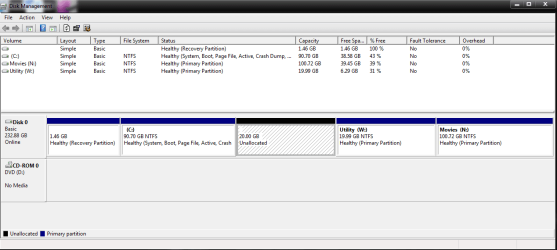
Have you tried booting the XP CD to see if it will allow you to create a partition in the 20gb space to format NTFS before install?

That empty Recovery Partition may need to be deleted if it is Primary since you can only have 4 total Primary Partitions.

But try creating/formatting with the XP installer first.

If at any time you lose the ability to boot Win7, boot into the DVD repair console, click through to recovery tools to run Startup Repair up to 3 separate times with reboots to repair MBR.
 
Last edited:
1. I dont have an XP install DVD. I have an ISO that I could burn, but i would probobly use my windows 7 one.

2. Will deleting the recovery volume do any harm? I dont even use Windows Backup. I use Norton Ghost which is pretty much like time machine. I just boot into the CD, and it restoes my computer to the EXACT way it was before i had the problem.
 

My Computer

Computer Manufacturer/Model Number
Toshiba Satellite L505D-S9565
OS
Windows 7 Home Premium x64, Mac OS X 10.6.2 x64
CPU
AMD Athlon X2 Dual-Core 2.1 GHz
Motherboard
Toshiba Built-In with Insyde H20 BIOS 1.40
Memory
4 GB DDR2 800 MHz
Graphics Card(s)
ATI Radeon HD Mobility 3100 Graphics 256MB to 1468 MB Shared
Sound Card
Realtek Mobile ALC272 HD Audio
Monitor(s) Displays
15.6" TFT LCD with TruBrite, Samsung 1080p HDTV
Screen Resolution
1366x768, 1920x1080
Hard Drives
❶:Main: Toshiba 250 GB SATA 5400 RPM
PSU
N/A
Case
N/A
Cooling
Built-in/Open window in winter :P
Keyboard
Built-in
Mouse
Build-in Symantics SmartTouch Pad
Internet Speed
55 MB/sec Down, 9 MB/sec Up
Other Info
❷:Backup: Seagate FreeAgent Desk USB 2.0 5400 RPM
❸:Media: Toshiba 640 GB USB 2.0 5400 RPM Portable Edition
Back
Top