Partitioning problem

sane83

New member
Local time
7:10 AM
Messages
7
I have 160 gb HD in which C drive i have installed XP. There are 6 partittions in total.

C:drive - 10gb
d: drive - 30gb
e: drive - 35 gb
f: drive - 20gb
G: drive - 10gb
h: drive - 47gb

Iam going to install WINDOWS 7 (fresh install) .. since my C drive is only 10gb , i thought of deleting my G drive partition and combining it with C. :sick:
Now my problem is , what will happen if i delete C and G partition.what would be the drive letter then. (i want drive letter as C.)
 

My Computer

Computer Manufacturer/Model Number
A8n -vm
OS
xp
CPU
AMD
Motherboard
Asus
Memory
1gb
Graphics Card(s)
nvidea gforce 256mb XFX
Sound Card
creative live 5.1
Monitor(s) Displays
Acer 17inch
Hard Drives
200gb
I have 160 gb HD in which C drive i have installed XP. There are 6 partittions in total.

C:drive - 10gb
d: drive - 30gb
e: drive - 35 gb
f: drive - 20gb
G: drive - 10gb
h: drive - 47gb

Iam going to install WINDOWS 7 (fresh install) .. since my C drive is only 10gb , i thought of deleting my G drive partition and combining it with C. :sick:
Now my problem is , what will happen if i delete C and G partition.what would be the drive letter then. (i want drive letter as C.)

To do what you want you are going to need a thrid party management tool like parigon disk suite. You want to delete c & G and move the free space so they can de combined. when you get ready to do it let us know


Ken
 

My Computer

Computer Manufacturer/Model Number
HP Pavillion dv-7 1005 Tx
OS
Win 8 Release candidate 8400
CPU
[email protected]
Memory
4 gigs
Graphics Card(s)
Nvidia 9600M
Sound Card
HD built-in
Monitor(s) Displays
17" Wxga
Screen Resolution
1440x900
Cooling
none
Internet Speed
45Mb down 5Mb up
I have 160 gb HD in which C drive i have installed XP. There are 6 partittions in total.

C:drive - 10gb
d: drive - 30gb
e: drive - 35 gb
f: drive - 20gb
G: drive - 10gb
h: drive - 47gb

Iam going to install WINDOWS 7 (fresh install) .. since my C drive is only 10gb , i thought of deleting my G drive partition and combining it with C. :sick:
Now my problem is , what will happen if i delete C and G partition.what would be the drive letter then. (i want drive letter as C.)

To do what you want you are going to need a thrid party management tool like parigon disk suite. You want to delete c & G and move the free space so they can de combined. when you get ready to do it let us know


Ken

Hi ken, I have an alternative suggestion for him. If he has the XP CD, he may delete C and G using XP Cd, and create a partition in that empty space (20 Gb) . The drive letter will be C. The same thing also may be done using Free Download Partition Wizard bootable CD, and after that it is just to install 7 there.

But I am not sure whether it is possible using 7 dvd. In my case, it failed to combine primary and extended logical partitions. Dont know whether it is the practice there , or my bad luck. Though the PW bootable Cd is is just good to manage your partitions.
 

My Computer

Computer type
PC/Desktop
Computer Manufacturer/Model Number
Self Assembled
OS
Microsoft Windows 10 Pro Insider Preview 64-bit
CPU
Intel(R) Core(TM) i3-4130 CPU @ 3.40GHz
Motherboard
Gigabyte Technology Co., Ltd. B85M-D3H
Memory
Corsair Vengence 4GB x2 (8.00GB Dual-Channel DDR3 @ 798MHz)
Graphics Card(s)
2047MB GeForce GTS 450 (ZOTAC International)
Sound Card
Onboard (Realtek High Definition Audio)
Monitor(s) Displays
LG Flatron E2040T
Screen Resolution
1600x900
Hard Drives
Western Digital 1 TB
Seagate 500 GB
PSU
Corsair VS550
Case
Cooler Master K380
Cooling
Cooler Master Seidon 120V Plus
Keyboard
Logitech MK260r
Mouse
Logitech MK260r
Internet Speed
PMPL Broadband
Antivirus
Windows Defender + MBAM
Browser
Firefox
Other Info
Dell Studio 15" Laptop
Please post back a screenshot of your full Disk Management drive map, using Snipping Tool in Start Menu, attach file using Paper Clip in Reply Box.

We can best give you the steps if we see the actual setup.
 
Thanks everyone.
@Arc i have XP CD..so if i delete the partition in that way my drive letter would be C (20gb).that would be fine.

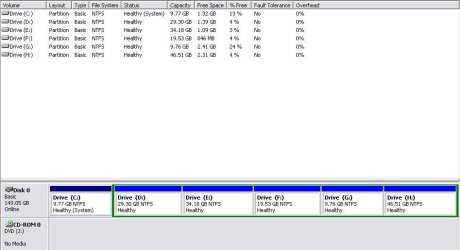
Here is the Screenshot of Disk mngmnt.
 

Attachments

  • drive.JPG
    drive.JPG
    41.4 KB · Views: 28

My Computer

Computer Manufacturer/Model Number
A8n -vm
OS
xp
CPU
AMD
Motherboard
Asus
Memory
1gb
Graphics Card(s)
nvidea gforce 256mb XFX
Sound Card
creative live 5.1
Monitor(s) Displays
Acer 17inch
Hard Drives
200gb
Thanks everyone.
@Arc i have XP CD..so if i delete the partition in that way my drive letter would be C (20gb).that would be fine.

Here is the Screenshot of Disk mngmnt.

Your screenshot is exactly what I have imagined , C is primary and the others are logical.

You insert the XP cd and boot from it. Delete the partitions C and G to get aprox. 10 GB free space, create a new partition in the empty space. As you have deleted C, the drive letter of the new partition will be C automatically . Now you are to exit the XP cd ( some setup error may be shown, but it need not to pay attention to them, as you are to install another OS there) .

No install windows 7 as per the tutorial http://www.sevenforums.com/tutorials/1649-clean-install-windows-7-a.html , and dont miss step 7 and step 8 . Otherwise there is a chance of some xp items remain there ( as you partitioned using xp cd)

But it would be better if you do the deleting and creating partition task using Partition wizard bootable cd ( link is in my previous post).
 

My Computer

Computer type
PC/Desktop
Computer Manufacturer/Model Number
Self Assembled
OS
Microsoft Windows 10 Pro Insider Preview 64-bit
CPU
Intel(R) Core(TM) i3-4130 CPU @ 3.40GHz
Motherboard
Gigabyte Technology Co., Ltd. B85M-D3H
Memory
Corsair Vengence 4GB x2 (8.00GB Dual-Channel DDR3 @ 798MHz)
Graphics Card(s)
2047MB GeForce GTS 450 (ZOTAC International)
Sound Card
Onboard (Realtek High Definition Audio)
Monitor(s) Displays
LG Flatron E2040T
Screen Resolution
1600x900
Hard Drives
Western Digital 1 TB
Seagate 500 GB
PSU
Corsair VS550
Case
Cooler Master K380
Cooling
Cooler Master Seidon 120V Plus
Keyboard
Logitech MK260r
Mouse
Logitech MK260r
Internet Speed
PMPL Broadband
Antivirus
Windows Defender + MBAM
Browser
Firefox
Other Info
Dell Studio 15" Laptop
thanksss :)..iam gonna do it now...will let you know after that..
 

My Computer

Computer Manufacturer/Model Number
A8n -vm
OS
xp
CPU
AMD
Motherboard
Asus
Memory
1gb
Graphics Card(s)
nvidea gforce 256mb XFX
Sound Card
creative live 5.1
Monitor(s) Displays
Acer 17inch
Hard Drives
200gb
Just as a note. Windows 7 is flexible with drive letters. Windows 7 will always be the C drive when you are booted into it. MS started this in Vista. I have a dual boot set up. In vista Vista is C:\ and Win7 is D:\
In Windows 7 Win7 is C:\ and Vista is D:\ Then I have a storage drive which is E in both systems.
 

My Computer

Computer Manufacturer/Model Number
Home Built
OS
Windows 7; Server 08; Window Home Server; Vista; XP
CPU
Intel E8400 @ 3.4Ghz
Motherboard
Gigabyte P35 DS3L
Memory
8 Gb Patriot DDr2 800
Graphics Card(s)
NVidia GTX460 OC
Sound Card
Onboard
Monitor(s) Displays
Samsung 21"
Screen Resolution
1920x1080
Hard Drives
Seagate 160Gb x2
Samsung 250Gb
PSU
Cooler Master 650w 52a on 12v
Case
Antec 300
Cooling
Stock
Keyboard
HP Standard USB
Mouse
Logitech 518
Internet Speed
25Mbit Down 1.5Mbit up
Other Info
http://www.speedtest.net/result/723924362.png
Test what happens when you boot the Partition Wizard CD to attempt to delete the G: sub-partition of the extended partition. You can cue up these operations with PW without having to apply them yet, to see how they pan out.

If just the G: partition will delete, then see if you can rightclick>Resize the extended partition by sliding the left border to the right to take up the unallocated space left by deleted G:. This should put the unallocated space to the left of G: next to C: so you can merge it with deleted C:

Next, see if you can delete the C: partition and if it will add it's deleted Unallocated space to the space left by G:

If this works to your satisfaction and you have the unallocated space to make one large C: partition as you wanted, then go ahead and Apply the steps after checking it all over several times. If you have any questions, post back here for more help.
 
Last edited:
Uh oh.


You can't do that with the XP cd - at least not without deleting the extended partition and getting into a serious data recovery situation.

Better use a 3rd party tool.

Paragon Pro/Server is by far the best - it's not free , though. ( They do a free edition - not all that many functions on the free edition - enough for what you want , so you could use that ).

Free Partition Manager Express - Leading partitioning software ...

The free edition with most functions is Partition Wizard - also capable of doing this job.

Free Download Partition Wizard
 

My Computers

System One System Two

  • Computer type
    PC/Desktop
    OS
    7 X64
    CPU
    i5 8400
    Motherboard
    gigabyte b365m ds3h
    Memory
    2x8gb 3200mhz
    Hard Drives
    various
    PSU
    pure power 11 400w cm
    Case
    Coolermaster
    Cooling
    cryorig m9i
  • Computer type
    PC/Desktop
    OS
    7x64
    CPU
    g5400
    Motherboard
    ga b365m ds3h
    Memory
    8gb ddr4 2400
    PSU
    xfx pro 450w
Uh oh.


You can't do that with the XP cd - at least not without deleting the extended partition and getting into a serious data recovery situation.

Hello SIW2 sir,
It's a humble presentation to you From Arc.
I am a great fan of you. I honor your supreme knowledge and respect your extremely high efficiency. I always follow your posts and tutorials; I learned a lot from those, and still doing so. I also remember that when I was a newbie, I exited Installation & Setup - Windows 7 Forums forum at your one word. Returned there after a long gap.

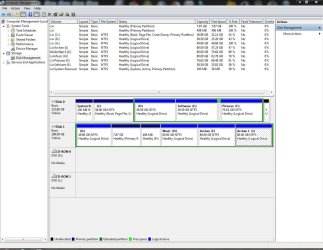
But sir, at the present issue, what I am saying is possible. Let me prove it. It is my disk management window. In disk 0, win 7 is installed in the primary partitions, and in disk 1, in the primary partitions, there are linux and swap for linux. I am planning to delete first three partitions (two primary and one logical extended) using XP cd.
1.JPG
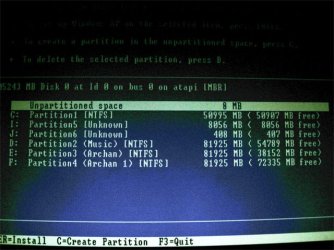
So I booted from XP cd, and it is the disk info as per the XP cd (I detouched the disk 0 earlier, hence G,H,I and J is shown as C,D,E and F)
2.JPG
Deleted C, I and J (I an J are primary, as linux were there, the format is said unknown there) and got the total free space as unpartitioned, as per the image below
3.jpg
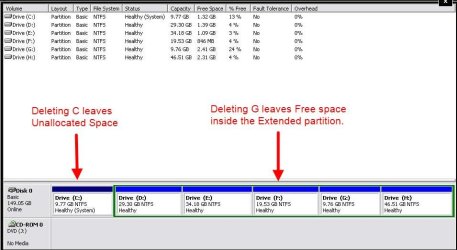
Now created a new partition there in the free space, formatted the partition using XP cd, exited from installation, attached disk 0 again and took the disk management screenshot which is this
4.JPG

So I if can , why anyone else cannot?
Sir, please dont take it otherwise. I just tried to justified myself. ( and in this process I lost my nice beloved Ubuntu linux installation.)
Hope you will accept my words. Waiting for your opinion in this regard.
 

My Computer

Computer type
PC/Desktop
Computer Manufacturer/Model Number
Self Assembled
OS
Microsoft Windows 10 Pro Insider Preview 64-bit
CPU
Intel(R) Core(TM) i3-4130 CPU @ 3.40GHz
Motherboard
Gigabyte Technology Co., Ltd. B85M-D3H
Memory
Corsair Vengence 4GB x2 (8.00GB Dual-Channel DDR3 @ 798MHz)
Graphics Card(s)
2047MB GeForce GTS 450 (ZOTAC International)
Sound Card
Onboard (Realtek High Definition Audio)
Monitor(s) Displays
LG Flatron E2040T
Screen Resolution
1600x900
Hard Drives
Western Digital 1 TB
Seagate 500 GB
PSU
Corsair VS550
Case
Cooler Master K380
Cooling
Cooler Master Seidon 120V Plus
Keyboard
Logitech MK260r
Mouse
Logitech MK260r
Internet Speed
PMPL Broadband
Antivirus
Windows Defender + MBAM
Browser
Firefox
Other Info
Dell Studio 15" Laptop
That Disk 1 is confusing me - from the colours, it looks like there are primary partitions and logical volumes inside an Extended partition.

Perhaps Disk Management is showing them as primary as it cannot recognise what they really are. What file system did they have on them?
 

My Computer

Computer type
PC/Desktop
Computer Manufacturer/Model Number
Scan 3XS P55 liteDAW
OS
Windows Home Premium (64)
CPU
Intel Core i7 860
Motherboard
Gigabyte GA-P55A-UD4
Memory
8GB (4x2GB) Corsair TwinX XMS3
Graphics Card(s)
1GB Gainward 9500 GT
Sound Card
M-Audio Delta 66
Monitor(s) Displays
Acer v223wBBd
Screen Resolution
1680 x 1050
Hard Drives
1 x 500 GB WD Barracuda (OS+Docs)
2 x 1TB Samsung Spinpoint F3 (Data)
PSU
Enermax EMD625AWT II - 625W Enermax Modu82+ II
Case
Fractal Design Define R2 Black
Cooling
Prolima Megahalems Super 6 Heatpipe Tower Cooler
Keyboard
Microsoft Digital Media Pro
Mouse
Belkin Optical Ergo
Internet Speed
8 Mbps nominal (14.9 achieved !)
Other Info
Digital Audio Workstation
Actually Disk 1 was 58 GB primary. It was a XP installation. Later I deleted XP and installed Ubuntu there, but not as dual boot (Thanks to Robert and Gladson! They helped me so much then). When I installed Ubuntu there, I used only 8 GB for Ubuntu, and formtted the rest 50 GB as logical. I did that using PW, coz at that time I came to know about PW from Gregrocker, and I was to experiment that tool :D
 

My Computer

Computer type
PC/Desktop
Computer Manufacturer/Model Number
Self Assembled
OS
Microsoft Windows 10 Pro Insider Preview 64-bit
CPU
Intel(R) Core(TM) i3-4130 CPU @ 3.40GHz
Motherboard
Gigabyte Technology Co., Ltd. B85M-D3H
Memory
Corsair Vengence 4GB x2 (8.00GB Dual-Channel DDR3 @ 798MHz)
Graphics Card(s)
2047MB GeForce GTS 450 (ZOTAC International)
Sound Card
Onboard (Realtek High Definition Audio)
Monitor(s) Displays
LG Flatron E2040T
Screen Resolution
1600x900
Hard Drives
Western Digital 1 TB
Seagate 500 GB
PSU
Corsair VS550
Case
Cooler Master K380
Cooling
Cooler Master Seidon 120V Plus
Keyboard
Logitech MK260r
Mouse
Logitech MK260r
Internet Speed
PMPL Broadband
Antivirus
Windows Defender + MBAM
Browser
Firefox
Other Info
Dell Studio 15" Laptop
Hi Arc,

Good to hear from you.

Is it possible to join the Unallocated to the Free space using the XP cd ?


DELETING_31032010_000214.jpg

They are not adjacent.

Can you do that without deleting the Extended partition itself?

I may be wrong as I am not that familiar with the partitioning capabilities of the XP cd.

If so, it will be a pleasant surprise.
 

My Computers

System One System Two

  • Computer type
    PC/Desktop
    OS
    7 X64
    CPU
    i5 8400
    Motherboard
    gigabyte b365m ds3h
    Memory
    2x8gb 3200mhz
    Hard Drives
    various
    PSU
    pure power 11 400w cm
    Case
    Coolermaster
    Cooling
    cryorig m9i
  • Computer type
    PC/Desktop
    OS
    7x64
    CPU
    g5400
    Motherboard
    ga b365m ds3h
    Memory
    8gb ddr4 2400
    PSU
    xfx pro 450w
More likely you'll have to move the data off of the extended partition, delete it, extend the C: partition to the size you want, then create whatever other data partitions you want.

If you want to use the opportunity to clean the HD, use Partition Wizard to Wipe (apply zeroes) to the entire HD, then create new partitions as you desire. Data partitions may be logical; OS partition(s) should be primary.
 
My experience regarding partitioning of hds using xp cd says that it is possible (at least I did it various times in my machine, before Dec 2009). What I noticed that when you delete a partition (previously created with xp) , it creates free unallocated space; whatever the character of the partition may be, primary or extended. then if two partitions are deleted, you have the unallocated space in aggregate . Now it is just to create a new partition there.

EDIT : I cannot do the same thing using Win 7 DVD. It creates two unallocated spaces for two types of partitions (again saying, it is my experience, not claiming it to be universal.).
 

My Computer

Computer type
PC/Desktop
Computer Manufacturer/Model Number
Self Assembled
OS
Microsoft Windows 10 Pro Insider Preview 64-bit
CPU
Intel(R) Core(TM) i3-4130 CPU @ 3.40GHz
Motherboard
Gigabyte Technology Co., Ltd. B85M-D3H
Memory
Corsair Vengence 4GB x2 (8.00GB Dual-Channel DDR3 @ 798MHz)
Graphics Card(s)
2047MB GeForce GTS 450 (ZOTAC International)
Sound Card
Onboard (Realtek High Definition Audio)
Monitor(s) Displays
LG Flatron E2040T
Screen Resolution
1600x900
Hard Drives
Western Digital 1 TB
Seagate 500 GB
PSU
Corsair VS550
Case
Cooler Master K380
Cooling
Cooler Master Seidon 120V Plus
Keyboard
Logitech MK260r
Mouse
Logitech MK260r
Internet Speed
PMPL Broadband
Antivirus
Windows Defender + MBAM
Browser
Firefox
Other Info
Dell Studio 15" Laptop
Did you notice if that is the same if the volumes you deleted are not next to each other ?

Are you then able to create one partition from the two separated areas of free/unallocated space?

To do that , the XP partitioner would have to non -destructively move all the data in the first and second logical drives 10gb ( to the right as seen in Disk Management view)
 

My Computers

System One System Two

  • Computer type
    PC/Desktop
    OS
    7 X64
    CPU
    i5 8400
    Motherboard
    gigabyte b365m ds3h
    Memory
    2x8gb 3200mhz
    Hard Drives
    various
    PSU
    pure power 11 400w cm
    Case
    Coolermaster
    Cooling
    cryorig m9i
  • Computer type
    PC/Desktop
    OS
    7x64
    CPU
    g5400
    Motherboard
    ga b365m ds3h
    Memory
    8gb ddr4 2400
    PSU
    xfx pro 450w
Did you notice if that is the same if the volumes you deleted are not next to each other ?

Are you then able to create one partition from the two separated areas of free/unallocated space?

To do that , the XP partitioner would have to non -destructively move all the data in the first and second logical drives 10gb ( to the right as seen in Disk Management view)

:o :o Sorry, I didnot want to delete anymore data, So I experimented that by creating another logical volume through shrinking one logical partition; and tried to merge it with the primary partition.

I tried all possible processes to do so (other than using Acronis, which I almost dont touch nowadays, coz it does everything automatically, and I dont get any chance to learn the actual situation); but failed every time. Neither xp cd nor 7 dvd nor PW (and GParted) could manage the merger. When both the primary partition and the newly created logical volume both are deleted, the free spaces are shown separately .

So it stands that I was wrong.
 

My Computer

Computer type
PC/Desktop
Computer Manufacturer/Model Number
Self Assembled
OS
Microsoft Windows 10 Pro Insider Preview 64-bit
CPU
Intel(R) Core(TM) i3-4130 CPU @ 3.40GHz
Motherboard
Gigabyte Technology Co., Ltd. B85M-D3H
Memory
Corsair Vengence 4GB x2 (8.00GB Dual-Channel DDR3 @ 798MHz)
Graphics Card(s)
2047MB GeForce GTS 450 (ZOTAC International)
Sound Card
Onboard (Realtek High Definition Audio)
Monitor(s) Displays
LG Flatron E2040T
Screen Resolution
1600x900
Hard Drives
Western Digital 1 TB
Seagate 500 GB
PSU
Corsair VS550
Case
Cooler Master K380
Cooling
Cooler Master Seidon 120V Plus
Keyboard
Logitech MK260r
Mouse
Logitech MK260r
Internet Speed
PMPL Broadband
Antivirus
Windows Defender + MBAM
Browser
Firefox
Other Info
Dell Studio 15" Laptop
You would first need to convert the logical to Primary (or vice versa) using Partition Wizard>Modify before deleting. This makes the Unnallocated Space (if Primary) or Free Space (with logical) the same to merge.

Then if there is a remaining partition in the way, you righclick>Resize that partition and drag it as a whole over to the right or left so that the empty spaces merge.

I am working from memory here so SIW2 (my teacher) may correct me.
 
You would first need to convert the logical to Primary (or vice versa) using Partition Wizard>Modify before deleting. This makes the Unnallocated Space (if Primary) or Free Space (with logical) the same to merge.

Then if there is a remaining partition in the way, you righclick>Resize that partition and drag it as a whole over to the right or left so that the empty spaces merge.

Sorry, Still they were displayed separately, may be it is due to I created that logical volume out of another logical partition.

Greg, I want to know something from you. I want to install XP in my disk 1 (screenshot in n earlier post) by getting a 10 gb partition out of G, but in such a manner that the xp partition would not be visible in Win 7, and obviously not as dual boot. As I do experiments with my computer now and then, If 7 corrupts I can be in my work thus.
 

My Computer

Computer type
PC/Desktop
Computer Manufacturer/Model Number
Self Assembled
OS
Microsoft Windows 10 Pro Insider Preview 64-bit
CPU
Intel(R) Core(TM) i3-4130 CPU @ 3.40GHz
Motherboard
Gigabyte Technology Co., Ltd. B85M-D3H
Memory
Corsair Vengence 4GB x2 (8.00GB Dual-Channel DDR3 @ 798MHz)
Graphics Card(s)
2047MB GeForce GTS 450 (ZOTAC International)
Sound Card
Onboard (Realtek High Definition Audio)
Monitor(s) Displays
LG Flatron E2040T
Screen Resolution
1600x900
Hard Drives
Western Digital 1 TB
Seagate 500 GB
PSU
Corsair VS550
Case
Cooler Master K380
Cooling
Cooler Master Seidon 120V Plus
Keyboard
Logitech MK260r
Mouse
Logitech MK260r
Internet Speed
PMPL Broadband
Antivirus
Windows Defender + MBAM
Browser
Firefox
Other Info
Dell Studio 15" Laptop
Back
Top