Solved Partitioning problems

iridia

New member
Local time
8:24 PM
Messages
2
Hi,

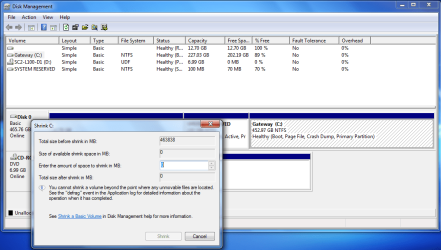
I recently restored my Win 7 OS to factory settings and was running win 7's disk management console. I tried to shrink my C: partition to half the size (the maximum it would allow me) but during the process my computer force-restarted somehow, and my C: partition is now half the size it was before (227 gb now), but it shows up as the full size on the disk management console (452 gb). I tried to reshrink it from the disk manager, but it just tells me that the shrinkable space is 0, yet my C: drive is only half the size it was before, and I can't extend it. Here's a screenshot of the disk:

diskpartition1.png

Does anyone know how to remedy this? Any help would be appreciated!
 

My Computer

OS
Windows 7 64bit

My Computer

Computer Manufacturer/Model Number
HP Pavilion Elite 495UK
OS
Windows 7 Ultimate SP1 64-Bit
CPU
Intel Core i7 870 @ 2.93GHz
Motherboard
MSI 2A9C (CPU1)
Memory
8Gb Dual-Channel DDR3 @ 664MHz
Graphics Card(s)
nVidia GeForce GTX 460 1024MB dedicated RAM
Sound Card
Realtek HD Audio
Monitor(s) Displays
HP2310i
Screen Resolution
1920 x 1080
Hard Drives
1x1954GB Hitachi HDS22020ALA 330 (RAID), 1x1954GB Hitachi External for backup and storage
PSU
460W
Case
HP Elite
Cooling
Air cooled
Keyboard
Logitech K750 solar-powered keyboard
Mouse
Logitech Wireless M180 mouse
Internet Speed
2Mb
Other Info
Pure Avanti Flow Internet Radio with iPod Dock, 64Gb iPod, HP USB Speakers, Sony MDR-V500 Headphones, Sony Vaio F-Series Laptop
Thanks for the program! I also found out it was Norton that was causing my computer to force restart while partitioning
 

My Computer

OS
Windows 7 64bit
Hello iridia, welcome to Seven Forums!


As good and reliable a program as Partition Wizard is, I would not trust the installed version for the operation you need, use the boot CD as suggested and be sure to post back with any further questions you may have and to keep us informed.

First download the Partition Wizard Bootable Disk (PWBD) ISO file to the desktop, be sure to get the PWBD and not the installed version; scroll down to see the download link for the Bootable CD ISO file at this link below.
Then use ImgBurn to burn the ISO to a CD, at no greater than 4x speed with a verify; it was designed for use and works best from a CD rather than a DVD; then boot the created CD to make the changes, it doesn't take any input from the user to setup, just relax and let it load.

 

My Computer

Computer Manufacturer/Model Number
* BFK Customs *
OS
W 7 64-bit Ultimate
CPU
Intel Q9550 Yorkfield
Motherboard
ASUS P5Q Pro
Memory
8GB Dominator 8500C5D
Graphics Card(s)
ATI : XFX 5870
Sound Card
Realtek HD Audio 7-1
Monitor(s) Displays
1x 47" LCD HDMI & 3x 26" LCD HDMI
Screen Resolution
1920x1080P & 1920x1200
Hard Drives
1x 80GB Intel X25-M G2 SSD : 1x 500GB & 1x 640GB WD Caviar Black(s)
PSU
Corsair 620HX
Case
Cooler Master RC-690
Cooling
Tuniq Tower 120, 2x 140mm and 3x 120mm case fans
Keyboard
Microsoft 500
Mouse
Razer Diamondback 3G
Internet Speed
14 Mb/s
Other Info
1x Koutech 3Gb/s SATA HDD Hot Swap Rack
Back
Top