Solved Partitioning question

RWB

New member
Local time
5:17 PM
Messages
22
Also another question for you experts, I created an extended logical partition on my HD using Paragon Partition Manager 10-64 bit (I'm running 64bit Win7 Home).

In the creation process I left 121.x GB on the C: Primary partition (also left untouched the 2 unlabeled partitions for the system).

And created an extended logical partition at at 326 GB size (the remaining space of HD). It's file system if formatted to NFTS. Everything works without issues "except" I get a strange readout when I right click to choose properties on the new logical drive in the windows explorer file handler.

Now keep in mind the drive is newly created and I have moved "nothing" to it yet. But the readout says,
used space 41.4 MB (What's this?)
free space 326 GB (and even so free space is still showing max size?)

Should I have made the new partition an inactive Primary instead of Extended logical ?
 

My Computer

OS
Win7 Home Premium 64bit
well, you can make up to 4 primary partitions which, one of them can be turned to extended with lots of logicals. from what i've read somewhere, an extended partition hold numerous logical partitions, the used 41.4mb may just be the partition table which maps the structure of all logical partitions but in itself independent (doesn't use any space of the logicals) so the logical is still empty with max space.
if you haven't made many primary partitions, i guess it's better to make the new partition inactive primary, extended is necessary when you've run out of partition slots.
 

My Computer

Computer type
PC/Desktop
OS
Windows 7 Ultimate x86
Thanks for the reply guys. My new computer doesn't have any of my screenshot grabbers installed yet. I could do a down and dirty one with msPaint (if that's still even part of Win7 ? ).

But for the time being this is what I have now.

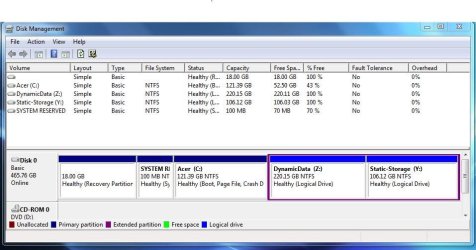
Win7 Partitions existing on new laptop and created.

I assume that the 1st 2 (non-drive letter) segments are treated by most partition apps as actual partitions ? And for that matter they may very well be but have modified attributes by Win7 ? (i.e. no drv letter etc)

I assume this because when I had the 2 above said segments, plus the active primary C drv and 1 extended partition Z drv, I then attempted to create another partition and my partition App baulked saying there were no more partitions available for the HD.

So it appeared it read the 2 win7 system non drive letter segments as actual partitions, thereby fulfilling the max of 4 partitions.

I was able however to dynamic resize the extended partition into another logical drv, which I did.

My disk as it is now (the 4th partition is an extended one with 2 logical drives Z and Y).

18gb Recovery Partition | 100mb System Reserve Partition | C: Primary Active | Z: DynamicData | Y: StaticStorage
 

My Computer

OS
Win7 Home Premium 64bit
The snipping tool is part of Windows. Just type snip in the lower search bar and select snipping tool.
Expand the Disk management to full screen and do a full screen snip to capture all the information.
 

My Computer

Computer type
PC/Desktop
Computer Manufacturer/Model Number
Own build
OS
Windows 7x64 Home Premium SP1
CPU
Intel i7 2600k
Motherboard
ASUS P8Z68 Deluxe
Memory
G.Skill Ripjaws (DDR3-1600) 2x4GB
Graphics Card(s)
Nvidia GeForce GTS 450; Intel HD Graphics 3000(GT2+)
Monitor(s) Displays
Dell Ultrasharp IPS panel U2311H, Samsung SyncMaster P2350
Screen Resolution
1920x1080
Hard Drives
Samsung 850 Pro SSD 256GB, Samsung SSD 840 120GB, Seagates 1TB Barracuda ST31000528AS x2
PSU
Seasonic M12II 520W
Case
Lian Li Lancool PC-K60
Cooling
Case: 1x120mm, 3x140mm CPU: Hyper 212+
Keyboard
Logitech MK520 (wireless)
Mouse
Logitech MK520
Internet Speed
6-7 Mbps
Antivirus
Norton Security Premium, Malwarebytes on 2 (MSE on 3rd PC)
Browser
FireFox
Other Info
Audio: Logitech Z523 2.1
Did you read the tutorial in the blue link? It explains how to do it.
 
Oh excuse my ignorance of the snipping tool, I now have a snip for your viewing.
 

Attachments

  • HDD_Layout.JPG
    HDD_Layout.JPG
    74.1 KB · Views: 8

My Computer

OS
Win7 Home Premium 64bit
The used space reading may be within the margin used by formatting. I would not worry about it since your configuration looks fine. If you are concerned you can run a Disk Check on each partition to check its file system, and a Surface Scan to check the HD's physical condition using the Paragon software or Partition Wizard Partition surface test.

If anything serious comes up then run the HD maker's HD Diagnostic extended CD scan to get its definitive condition.

If you're still running the Acer preinstalled Win7 be aware that is a corrupt install larded with smothering bloatware and useless duplicate utilities which have better versions built into Win7. That's why most tech enthusiasts choose to Clean Reinstall - Factory OEM Windows 7 to enjoy Win7's native performance.
 
Back
Top