Partitioning question..

markst

New member
Member
Local time
10:38 PM
Messages
42
Location
Texas
Cant remember how to this but here goes. Have Windows 7 RC installed with no problem. Went into msconfig and got rid of the dual boot with Vista. Again no problem, boots right into Windows 7. Problem is I still have the Vista partition ( Drive D: ). How do I get rid of that partition and move that space to Windows 7 ( Drive C:). When I go into computer management all I can see to do is Shrink Volume... Any Ideas.
 

My Computer

Computer Manufacturer/Model Number
HOME BUILT
OS
Windows 7 RTM 64-bit
CPU
AMD 6000 DUAL CORE
Motherboard
MSI K9A2 CF
Memory
4 MB
Graphics Card(s)
BFG 9800 GTX 512
Monitor(s) Displays
ACER 24 INCH
Screen Resolution
1920X1280
Hard Drives
2-WD CAVIER BLACK 500gb 32 Bit Buffer
SEAGATE EXTERNAL 250gb
SEAGATE PORTABLE 250gb
PSU
ANTEC 650
Case
ANTEC GAMER 900
Keyboard
Microsoft Wireless Keyboard 3000 ver. 2
Mouse
Microsoft Wireless Laser 8000 Bluetooth
Internet Speed
12 mbs
Hi,

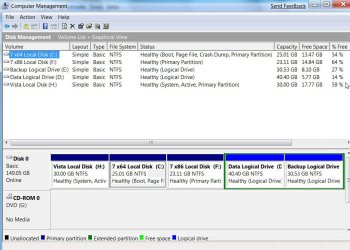
In Disk Management, is your Vista partition shown as "System" ?

Please post a screenshot of Disk Management, like this:

DISKMANAGEMENT2009-02-04_031947.jpg
 

My Computers

System One System Two

  • Computer type
    PC/Desktop
    OS
    7 X64
    CPU
    i5 8400
    Motherboard
    gigabyte b365m ds3h
    Memory
    2x8gb 3200mhz
    Hard Drives
    various
    PSU
    pure power 11 400w cm
    Case
    Coolermaster
    Cooling
    cryorig m9i
  • Computer type
    PC/Desktop
    OS
    7x64
    CPU
    g5400
    Motherboard
    ga b365m ds3h
    Memory
    8gb ddr4 2400
    PSU
    xfx pro 450w
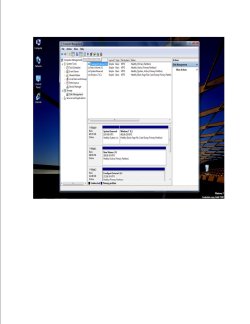
Here you go.
 

Attachments

  • Publication2.jpg
    Publication2.jpg
    92.2 KB · Views: 63

My Computer

Computer Manufacturer/Model Number
HOME BUILT
OS
Windows 7 RTM 64-bit
CPU
AMD 6000 DUAL CORE
Motherboard
MSI K9A2 CF
Memory
4 MB
Graphics Card(s)
BFG 9800 GTX 512
Monitor(s) Displays
ACER 24 INCH
Screen Resolution
1920X1280
Hard Drives
2-WD CAVIER BLACK 500gb 32 Bit Buffer
SEAGATE EXTERNAL 250gb
SEAGATE PORTABLE 250gb
PSU
ANTEC 650
Case
ANTEC GAMER 900
Keyboard
Microsoft Wireless Keyboard 3000 ver. 2
Mouse
Microsoft Wireless Laser 8000 Bluetooth
Internet Speed
12 mbs
Hi,

In Disk Management, is your Vista partition shown as "System" ?

Please post a screenshot of Disk Management, like this:

View attachment 9807

that poor harddrive never gets a breather does it? lol.... true workhorse there for sure... keep me posted on manufacturer and lifespan :p
 

My Computer

Computer Manufacturer/Model Number
CUSTOM
OS
XP/win7 x86 build 7127
CPU
Athlon64 X2 DUAL 4200+ 2.21ghz
Motherboard
ASUS K8 PRO SLI
Memory
2GB Dual Chan DDR2 Corsair
Graphics Card(s)
Nvidia 6800GT
Sound Card
nvidia
Monitor(s) Displays
19' LCD
Screen Resolution
1280x1024
Hard Drives
WD 250, 2x500, 2x1TB IDE/USB
WD 250 SATA (system)
SEAGATE 120 Sata
PSU
coolermaster 450
Case
SUPERFLOWER
Cooling
1 HDD bay fan, 5x80mm Case Fans, AEROGATE II Fan/Temp
Keyboard
MS wireless
Mouse
MS Wireless
Internet Speed
fassssssssst
True :

Western Digital Black
SATA II
640 MB
32 Buffer
 

My Computer

Computer Manufacturer/Model Number
HOME BUILT
OS
Windows 7 RTM 64-bit
CPU
AMD 6000 DUAL CORE
Motherboard
MSI K9A2 CF
Memory
4 MB
Graphics Card(s)
BFG 9800 GTX 512
Monitor(s) Displays
ACER 24 INCH
Screen Resolution
1920X1280
Hard Drives
2-WD CAVIER BLACK 500gb 32 Bit Buffer
SEAGATE EXTERNAL 250gb
SEAGATE PORTABLE 250gb
PSU
ANTEC 650
Case
ANTEC GAMER 900
Keyboard
Microsoft Wireless Keyboard 3000 ver. 2
Mouse
Microsoft Wireless Laser 8000 Bluetooth
Internet Speed
12 mbs
It is my understanding that the "System" drive cannot be deleted or you will loose your mounting point to Windows 7. I may be wrong on this and someone will let us know soon enough. Look at it like this, getting to Windows 7 the way you did it requires a "stepping stone" and it you delete that stepping stone, you will sink into a dark hole...

Since your Windows 7 install is fresh and you obviously want to do away with Windows Vista, why not use the Setup program to delete the 1st primary partition (and possibly the second primary on disk 0), reformat it and install Windows 7 onto the first partition and then if you didn't already do so, use that install to delete the second partition and reformat it for whatever...

I don't think you can "extend" the volume backwards and the fact that it is the "System" drive is why you can only "shrink" that 100mb volume (probably not by much either).

Try to keep in my that Windows 7 begins to die off in March 2010 and goes to sleep in June 2010 (RIP). You will have to be doing this all over again when the retail hits the markets.
 

My Computer

Computer Manufacturer/Model Number
Dell B-110
OS
Dual boot WindowsXP/Windows 7
CPU
Intel Pentium 4 3.2GHz HT
Memory
1 GB
Graphics Card(s)
nVidia GeForce FX 5500
Sound Card
Creative Soundblaster Audigy 2 ZS
Screen Resolution
1024 X 768 32bit
Hard Drives
2 WD - 80/160 GB
Other Info
Highly upgraded from Dell stock unit
Eagle - look at his partitions again....

mark - your 'vista drive looks to be already formatted (the one showing up as a new volume).

Windows 7 has 2 partitions, a *small* boot partition and the main system partition - which is all your main drive is currently showing.

It sounds like you're good to go - just reboot and see what happens.

*also*, read How to use the Snipping Tool in Vista - Vista Forums for tips on how to use the snipping tool effectively.
 

My Computers

System One System Two

  • Computer type
    PC/Desktop
    Computer Manufacturer/Model Number
    The Beast Model A (homebrew)
    OS
    Windows 11 21H2 Current build
    CPU
    AMD Ryzen 9 3950X
    Motherboard
    MSI MEG X570 GODLIKE
    Memory
    4 * 32 GB - Corsair Vengeance 3600 MHz
    Graphics Card(s)
    EVGA GeForce RTX 3080 Ti XC3 ULTRA GAMING (12G-P5-3955-KR)
    Sound Card
    Realtek® ALC1220 Codec
    Monitor(s) Displays
    2x Eve Spectrum ES07D03 4K Gaming Monitor (Matte) | Eve Spec
    Screen Resolution
    3x 3840 x 2160
    Hard Drives
    3x Samsung 980 Pro NVMe PCIe 4 M.2 2 TB SSD (MZ-V8P2T0B/AM) } 3x Sabrent Rocket NVMe 4.0 1 TB SSD
    PSU
    PC Power & Cooling’s Silencer Series 1050 Watt, 80 Plus Plat
    Case
    Fractal Design Define 7 XL Dark ATX Full Tower Case
    Cooling
    SteelSeries Apex Pro Wired Gaming Keyboard
    Keyboard
    SteelSeries Apex Pro
    Mouse
    Logitech MX Master 3S | MX Master 3 for business
    Internet Speed
    AT&T LightSpeed Gigabit Duplex Ftth
    Antivirus
    Windows Defender + MB 3
    Browser
    Nightly (default) + Firefox (stable),Chrome, Edge
  • Computer type
    PC/Desktop
    System Manufacturer/Model Number
    Dell Latitude E5470
    OS
    ChromeOS Flex Dev Channel (current)
    CPU
    Intel(R) Core(TM) i5-6300U CPU @ 2.40GHz, 2501 Mhz, 2 Core(s), 4 Logical Processor(s)
    Motherboard
    Dell
    Memory
    16 GB
    Graphics Card(s)
    Intel(R) HD Graphics 520
    Sound Card
    Intel(R) HD Graphics 520 + RealTek Audio
    Monitor(s) Displays
    Dell laptop display 15"
    Screen Resolution
    1920 * 1080
    Hard Drives
    Toshiba 128GB M.2 22300 drive
    INTEL Cherryville 520 Series SSDSC2CW180A 180 GB SATA III SSD
    PSU
    Dell
    Case
    Dell
    Cooling
    Dell
    Keyboard
    Dell
    Mouse
    Logitech MX Master 3S (shared w. Sys 1) | Dell TouchPad
    Internet Speed
    AT&T LightSpeed Gigabit Duplex Ftth

My Computer

Computer Manufacturer/Model Number
Colonel Travis 5000
OS
Black Label 7 x64
CPU
AMD Phenom II X6 1055t
Motherboard
GA-890FXA-UD5
Memory
8GB Corsair XMS3
Graphics Card(s)
Radeon HD 6790
Sound Card
X-FI Titanium Fatal1ty Pro
Monitor(s) Displays
Acer AJ15
Screen Resolution
1600x900
Hard Drives
OCZ Agility 3 SSD 120GB |
Corsair Force GT SSD 120 GB |
Barracuda 7200 SATA 300GB |
WD Caviar Green SATA 500GB
PSU
OCZ ModXStream 700W
Cooling
50 billion case fans
Internet Speed
35Mbps/35Mbps
John is bang on as usual. Should be fine after a reboot.

Just to add to the confusion, the small boot partition contains the 7 boot files - M$ call this the "System" partition, because it is the partition thru which the operating system is booted.

The partition marked "Boot" contains the o/s files of the operating system you are booted into.
 

My Computers

System One System Two

  • Computer type
    PC/Desktop
    OS
    7 X64
    CPU
    i5 8400
    Motherboard
    gigabyte b365m ds3h
    Memory
    2x8gb 3200mhz
    Hard Drives
    various
    PSU
    pure power 11 400w cm
    Case
    Coolermaster
    Cooling
    cryorig m9i
  • Computer type
    PC/Desktop
    OS
    7x64
    CPU
    g5400
    Motherboard
    ga b365m ds3h
    Memory
    8gb ddr4 2400
    PSU
    xfx pro 450w
Err...

In all my time using Win7 I have always been referring to them backwards....I always call the one labeled System as "boot" and the one labeled Boot, et al. as "System"....

No wonder ppl get confrused (sp on purpose) when I tell them that the small Boot partition is normal
 

My Computers

System One System Two

  • Computer type
    PC/Desktop
    Computer Manufacturer/Model Number
    The Beast Model A (homebrew)
    OS
    Windows 11 21H2 Current build
    CPU
    AMD Ryzen 9 3950X
    Motherboard
    MSI MEG X570 GODLIKE
    Memory
    4 * 32 GB - Corsair Vengeance 3600 MHz
    Graphics Card(s)
    EVGA GeForce RTX 3080 Ti XC3 ULTRA GAMING (12G-P5-3955-KR)
    Sound Card
    Realtek® ALC1220 Codec
    Monitor(s) Displays
    2x Eve Spectrum ES07D03 4K Gaming Monitor (Matte) | Eve Spec
    Screen Resolution
    3x 3840 x 2160
    Hard Drives
    3x Samsung 980 Pro NVMe PCIe 4 M.2 2 TB SSD (MZ-V8P2T0B/AM) } 3x Sabrent Rocket NVMe 4.0 1 TB SSD
    PSU
    PC Power & Cooling’s Silencer Series 1050 Watt, 80 Plus Plat
    Case
    Fractal Design Define 7 XL Dark ATX Full Tower Case
    Cooling
    SteelSeries Apex Pro Wired Gaming Keyboard
    Keyboard
    SteelSeries Apex Pro
    Mouse
    Logitech MX Master 3S | MX Master 3 for business
    Internet Speed
    AT&T LightSpeed Gigabit Duplex Ftth
    Antivirus
    Windows Defender + MB 3
    Browser
    Nightly (default) + Firefox (stable),Chrome, Edge
  • Computer type
    PC/Desktop
    System Manufacturer/Model Number
    Dell Latitude E5470
    OS
    ChromeOS Flex Dev Channel (current)
    CPU
    Intel(R) Core(TM) i5-6300U CPU @ 2.40GHz, 2501 Mhz, 2 Core(s), 4 Logical Processor(s)
    Motherboard
    Dell
    Memory
    16 GB
    Graphics Card(s)
    Intel(R) HD Graphics 520
    Sound Card
    Intel(R) HD Graphics 520 + RealTek Audio
    Monitor(s) Displays
    Dell laptop display 15"
    Screen Resolution
    1920 * 1080
    Hard Drives
    Toshiba 128GB M.2 22300 drive
    INTEL Cherryville 520 Series SSDSC2CW180A 180 GB SATA III SSD
    PSU
    Dell
    Case
    Dell
    Cooling
    Dell
    Keyboard
    Dell
    Mouse
    Logitech MX Master 3S (shared w. Sys 1) | Dell TouchPad
    Internet Speed
    AT&T LightSpeed Gigabit Duplex Ftth
Windows 7 has 2 partitions, a *small* boot partition and the main system partition

I was basing all my jibberish on the likelihood that he had the Windows Vista previously installed on the "System Reserved" *small* boot partition or more appropriately "multi(0)disk(0)rdisk(0)partition(1)". Whenever a dual boot is set up the old "C" drive where the Vista resided is renamed "D" and the Windows 7 assumes the "C" title. Not the way it looks in the MBT though, the first primary is going to be the system/boot and cannot be deleted or reformatted using Disk Manager. He can extend it forward from the beginning of partition(1) but he will should not be able to extend it backwards from partition(2).

He will have to start over during Setup and gobble up that partition by deleting all partitions on disk(0) and reformatting the drive in order to use that space effectively. Till then he is probably stuck with it the way it is. Having said that I seem to remember a neat Linux utility that might be able to accomplish what he wants...
 

My Computer

Computer Manufacturer/Model Number
Dell B-110
OS
Dual boot WindowsXP/Windows 7
CPU
Intel Pentium 4 3.2GHz HT
Memory
1 GB
Graphics Card(s)
nVidia GeForce FX 5500
Sound Card
Creative Soundblaster Audigy 2 ZS
Screen Resolution
1024 X 768 32bit
Hard Drives
2 WD - 80/160 GB
Other Info
Highly upgraded from Dell stock unit
LOL John - everybody calls it the boot partition - except M$.
 

My Computers

System One System Two

  • Computer type
    PC/Desktop
    OS
    7 X64
    CPU
    i5 8400
    Motherboard
    gigabyte b365m ds3h
    Memory
    2x8gb 3200mhz
    Hard Drives
    various
    PSU
    pure power 11 400w cm
    Case
    Coolermaster
    Cooling
    cryorig m9i
  • Computer type
    PC/Desktop
    OS
    7x64
    CPU
    g5400
    Motherboard
    ga b365m ds3h
    Memory
    8gb ddr4 2400
    PSU
    xfx pro 450w
I was basing all my jibberish on the likelihood that he had the Windows Vista previously installed on the "System Reserved" *small* boot partition or more appropriately "multi(0)disk(0)rdisk(0)partition(1)". Whenever a dual boot is set up the old "C" drive where the Vista resided is renamed "D" and the Windows 7 assumes the "C" title. Not the way it looks in the MBT though, the first primary is going to be the system/boot and cannot be deleted or reformatted using Disk Manager. He can extend it forward from the beginning of partition(1) but he will should not be able to extend it backwards from partition(2).

He will have to start over during Setup and gobble up that partition by deleting all partitions on disk(0) and reformatting the drive in order to use that space effectively. Till then he is probably stuck with it the way it is. Having said that I seem to remember a neat Linux utility that might be able to accomplish what he wants...

You're still missing my point- it seems *more* likely that there is another HD involved, the one *now* marked New Volume, that was *previously* the Windows Vista drive. Notice the size of the current Windows 7 partition - it's 400+ GB, and the New Volume is just a shade under 300 GB....

There is no need to start fresh - reboot and all should be well.

LOL John - everybody calls it the boot partition - except M$.

I know, right?
 

My Computers

System One System Two

  • Computer type
    PC/Desktop
    Computer Manufacturer/Model Number
    The Beast Model A (homebrew)
    OS
    Windows 11 21H2 Current build
    CPU
    AMD Ryzen 9 3950X
    Motherboard
    MSI MEG X570 GODLIKE
    Memory
    4 * 32 GB - Corsair Vengeance 3600 MHz
    Graphics Card(s)
    EVGA GeForce RTX 3080 Ti XC3 ULTRA GAMING (12G-P5-3955-KR)
    Sound Card
    Realtek® ALC1220 Codec
    Monitor(s) Displays
    2x Eve Spectrum ES07D03 4K Gaming Monitor (Matte) | Eve Spec
    Screen Resolution
    3x 3840 x 2160
    Hard Drives
    3x Samsung 980 Pro NVMe PCIe 4 M.2 2 TB SSD (MZ-V8P2T0B/AM) } 3x Sabrent Rocket NVMe 4.0 1 TB SSD
    PSU
    PC Power & Cooling’s Silencer Series 1050 Watt, 80 Plus Plat
    Case
    Fractal Design Define 7 XL Dark ATX Full Tower Case
    Cooling
    SteelSeries Apex Pro Wired Gaming Keyboard
    Keyboard
    SteelSeries Apex Pro
    Mouse
    Logitech MX Master 3S | MX Master 3 for business
    Internet Speed
    AT&T LightSpeed Gigabit Duplex Ftth
    Antivirus
    Windows Defender + MB 3
    Browser
    Nightly (default) + Firefox (stable),Chrome, Edge
  • Computer type
    PC/Desktop
    System Manufacturer/Model Number
    Dell Latitude E5470
    OS
    ChromeOS Flex Dev Channel (current)
    CPU
    Intel(R) Core(TM) i5-6300U CPU @ 2.40GHz, 2501 Mhz, 2 Core(s), 4 Logical Processor(s)
    Motherboard
    Dell
    Memory
    16 GB
    Graphics Card(s)
    Intel(R) HD Graphics 520
    Sound Card
    Intel(R) HD Graphics 520 + RealTek Audio
    Monitor(s) Displays
    Dell laptop display 15"
    Screen Resolution
    1920 * 1080
    Hard Drives
    Toshiba 128GB M.2 22300 drive
    INTEL Cherryville 520 Series SSDSC2CW180A 180 GB SATA III SSD
    PSU
    Dell
    Case
    Dell
    Cooling
    Dell
    Keyboard
    Dell
    Mouse
    Logitech MX Master 3S (shared w. Sys 1) | Dell TouchPad
    Internet Speed
    AT&T LightSpeed Gigabit Duplex Ftth
markst...i just try help ok? My english is not so good. I'm have this problem once, and i use Gparted iso (burn on CD-RW or DVD-RW and get first boot with Bios on DVD/CD first). Gparted is security and save tool, and you can change or deleted only partition that you selected. And after you deleted you partition you can reboot in Windows and you can see drive. Or, if you choice more than one primary device (bootable partition) you can choose just "extended" partition and still install seven or only use the partition for your back-up files...Resume: Gparted is a excellent tool to your partition administration...save and FREEWARE...Best regards!!! see this: Modify Your Partitions With GParted Without Losing Data | HowtoForge - Linux Howtos and Tutorials and this for download product: GParted -- Welcome Bye!!!
 

My Computer

Computer Manufacturer/Model Number
PHOENIX BIOS
OS
Seven 7100 - Mac Osx for iPC - Xp too - of course!!
CPU
INTEL CORE2DUO
Motherboard
FOXCONN
Memory
2GB
Graphics Card(s)
NVIDIA 8500 GT 1MB
Sound Card
CREATIVE SOUND BLASTER AUDIGY 24-BITS
Monitor(s) Displays
SAMSUMG SyncMaster 2263uw 3.0 mpxl
Screen Resolution
1680x1050 (recomended!)
Hard Drives
160 GB IDE MAXTOR
160 GB SATA WERSTERN DIGITAL
Mouse
MICROSOFT REAL GOOD
Internet Speed
3 MB SPEED - 300KB DOWNL
Other Info
I Love Jesus, my Lord, with all my heart, my soul and my mind!!
Problem is I still have the Vista partition ( Drive D: ). How do I get rid of that partition and move that space to Windows 7 ( Drive C:). When I go into computer management all I can see to do is Shrink Volume... Any Ideas.

You're still missing my point- it seems *more* likely that there is another HD involved, the one *now* marked New Volume, that was *previously* the Windows Vista drive. Notice the size of the current Windows 7 partition - it's 400+ GB, and the New Volume is just a shade under 300 GB....

Not missing the point at all, he said the Vista install was on Drive D: (the *small* 100 MB partition at the beginning of Disk 0). If I understand him correctly, he wants to "blend" that partition into the now installed Drive C Windows 7 install. He cannot do that with Disk Manager at this point.

Sure, he will be able to reboot as long as he doesn't disturb the *small* partition. The only way to get it all back together is to start over and delete all partitions on Disk 0 during setup.
 

My Computer

Computer Manufacturer/Model Number
Dell B-110
OS
Dual boot WindowsXP/Windows 7
CPU
Intel Pentium 4 3.2GHz HT
Memory
1 GB
Graphics Card(s)
nVidia GeForce FX 5500
Sound Card
Creative Soundblaster Audigy 2 ZS
Screen Resolution
1024 X 768 32bit
Hard Drives
2 WD - 80/160 GB
Other Info
Highly upgraded from Dell stock unit
Can you explain how to install Vista on a 100 MB partition? Not GB, MB?

That 100 MB System partition is created by the *Windows 7* installer - and it has been doing that since before the original Beta release. I know, b/c until I clean installed build 6801 I could not get that partition to show up - on every upgrade from Vista it would not show.
 

My Computers

System One System Two

  • Computer type
    PC/Desktop
    Computer Manufacturer/Model Number
    The Beast Model A (homebrew)
    OS
    Windows 11 21H2 Current build
    CPU
    AMD Ryzen 9 3950X
    Motherboard
    MSI MEG X570 GODLIKE
    Memory
    4 * 32 GB - Corsair Vengeance 3600 MHz
    Graphics Card(s)
    EVGA GeForce RTX 3080 Ti XC3 ULTRA GAMING (12G-P5-3955-KR)
    Sound Card
    Realtek® ALC1220 Codec
    Monitor(s) Displays
    2x Eve Spectrum ES07D03 4K Gaming Monitor (Matte) | Eve Spec
    Screen Resolution
    3x 3840 x 2160
    Hard Drives
    3x Samsung 980 Pro NVMe PCIe 4 M.2 2 TB SSD (MZ-V8P2T0B/AM) } 3x Sabrent Rocket NVMe 4.0 1 TB SSD
    PSU
    PC Power & Cooling’s Silencer Series 1050 Watt, 80 Plus Plat
    Case
    Fractal Design Define 7 XL Dark ATX Full Tower Case
    Cooling
    SteelSeries Apex Pro Wired Gaming Keyboard
    Keyboard
    SteelSeries Apex Pro
    Mouse
    Logitech MX Master 3S | MX Master 3 for business
    Internet Speed
    AT&T LightSpeed Gigabit Duplex Ftth
    Antivirus
    Windows Defender + MB 3
    Browser
    Nightly (default) + Firefox (stable),Chrome, Edge
  • Computer type
    PC/Desktop
    System Manufacturer/Model Number
    Dell Latitude E5470
    OS
    ChromeOS Flex Dev Channel (current)
    CPU
    Intel(R) Core(TM) i5-6300U CPU @ 2.40GHz, 2501 Mhz, 2 Core(s), 4 Logical Processor(s)
    Motherboard
    Dell
    Memory
    16 GB
    Graphics Card(s)
    Intel(R) HD Graphics 520
    Sound Card
    Intel(R) HD Graphics 520 + RealTek Audio
    Monitor(s) Displays
    Dell laptop display 15"
    Screen Resolution
    1920 * 1080
    Hard Drives
    Toshiba 128GB M.2 22300 drive
    INTEL Cherryville 520 Series SSDSC2CW180A 180 GB SATA III SSD
    PSU
    Dell
    Case
    Dell
    Cooling
    Dell
    Keyboard
    Dell
    Mouse
    Logitech MX Master 3S (shared w. Sys 1) | Dell TouchPad
    Internet Speed
    AT&T LightSpeed Gigabit Duplex Ftth
Can you explain how to install Vista on a 100 MB partition? Not GB, MB?

Don't ask me, that's where HE said he had Vista installed, I merely commented on what information HE gave to us.

p.s. I know Vista requires anywhere from 20-40 GB of hard disk space but that wasn't the question.
 

My Computer

Computer Manufacturer/Model Number
Dell B-110
OS
Dual boot WindowsXP/Windows 7
CPU
Intel Pentium 4 3.2GHz HT
Memory
1 GB
Graphics Card(s)
nVidia GeForce FX 5500
Sound Card
Creative Soundblaster Audigy 2 ZS
Screen Resolution
1024 X 768 32bit
Hard Drives
2 WD - 80/160 GB
Other Info
Highly upgraded from Dell stock unit
Cant remember how to this but here goes. Have Windows 7 RC installed with no problem. Went into msconfig and got rid of the dual boot with Vista. Again no problem, boots right into Windows 7. Problem is I still have the Vista partition ( Drive D: ). How do I get rid of that partition and move that space to Windows 7 ( Drive C:). When I go into computer management all I can see to do is Shrink Volume... Any Ideas.

Please tell me where it says 100 MB partition, - it doesn't

Or else, tell me where that 100 MB partition shows up as the drive letter D: in his screen capture - again, it does not.

you are the one assuming he is referring to the 100 MB partition.

If you know that Vista requires GB of space, then you would have realized that he could not have been talking about the 100 MB partition b/c neither does it say Vista on it, nether does it have a driver letter D assigned to it, and if you had read what I wrote not once but 3 times you'd realize that he had formatted the drive - but most likely Explorer has not updated itself and is still showing a D: drive which 8was* the former Vista installation, an a reboot would solve the issue.

The screen capture that he provided goes a long way to dispelling what it seems he was saying and what is actually going on....
 

My Computers

System One System Two

  • Computer type
    PC/Desktop
    Computer Manufacturer/Model Number
    The Beast Model A (homebrew)
    OS
    Windows 11 21H2 Current build
    CPU
    AMD Ryzen 9 3950X
    Motherboard
    MSI MEG X570 GODLIKE
    Memory
    4 * 32 GB - Corsair Vengeance 3600 MHz
    Graphics Card(s)
    EVGA GeForce RTX 3080 Ti XC3 ULTRA GAMING (12G-P5-3955-KR)
    Sound Card
    Realtek® ALC1220 Codec
    Monitor(s) Displays
    2x Eve Spectrum ES07D03 4K Gaming Monitor (Matte) | Eve Spec
    Screen Resolution
    3x 3840 x 2160
    Hard Drives
    3x Samsung 980 Pro NVMe PCIe 4 M.2 2 TB SSD (MZ-V8P2T0B/AM) } 3x Sabrent Rocket NVMe 4.0 1 TB SSD
    PSU
    PC Power & Cooling’s Silencer Series 1050 Watt, 80 Plus Plat
    Case
    Fractal Design Define 7 XL Dark ATX Full Tower Case
    Cooling
    SteelSeries Apex Pro Wired Gaming Keyboard
    Keyboard
    SteelSeries Apex Pro
    Mouse
    Logitech MX Master 3S | MX Master 3 for business
    Internet Speed
    AT&T LightSpeed Gigabit Duplex Ftth
    Antivirus
    Windows Defender + MB 3
    Browser
    Nightly (default) + Firefox (stable),Chrome, Edge
  • Computer type
    PC/Desktop
    System Manufacturer/Model Number
    Dell Latitude E5470
    OS
    ChromeOS Flex Dev Channel (current)
    CPU
    Intel(R) Core(TM) i5-6300U CPU @ 2.40GHz, 2501 Mhz, 2 Core(s), 4 Logical Processor(s)
    Motherboard
    Dell
    Memory
    16 GB
    Graphics Card(s)
    Intel(R) HD Graphics 520
    Sound Card
    Intel(R) HD Graphics 520 + RealTek Audio
    Monitor(s) Displays
    Dell laptop display 15"
    Screen Resolution
    1920 * 1080
    Hard Drives
    Toshiba 128GB M.2 22300 drive
    INTEL Cherryville 520 Series SSDSC2CW180A 180 GB SATA III SSD
    PSU
    Dell
    Case
    Dell
    Cooling
    Dell
    Keyboard
    Dell
    Mouse
    Logitech MX Master 3S (shared w. Sys 1) | Dell TouchPad
    Internet Speed
    AT&T LightSpeed Gigabit Duplex Ftth
you are the one assuming he is referring to the 100 MB partition.

My apologies, you are quite correct and I did miss the point. I did assume he was talking about the *small* partition and I was wrong in my advice, sorry.:o

Robert
 

My Computer

Computer Manufacturer/Model Number
Dell B-110
OS
Dual boot WindowsXP/Windows 7
CPU
Intel Pentium 4 3.2GHz HT
Memory
1 GB
Graphics Card(s)
nVidia GeForce FX 5500
Sound Card
Creative Soundblaster Audigy 2 ZS
Screen Resolution
1024 X 768 32bit
Hard Drives
2 WD - 80/160 GB
Other Info
Highly upgraded from Dell stock unit
Ok now that you guys got that sorted out i want to know how the OP is going to combine his vista with win 7 when they are on separate hard disks.:p
 

My Computer

OS
Win 7
Back
Top