partitioning trouble

august north

New member
Local time
8:01 PM
Messages
2
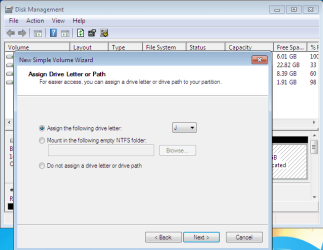
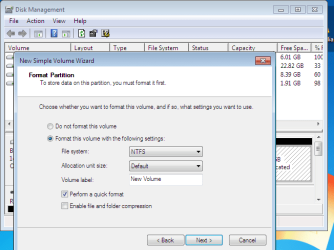
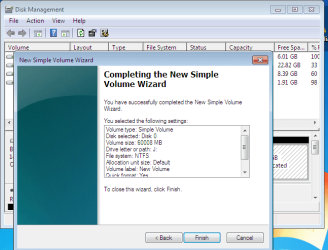
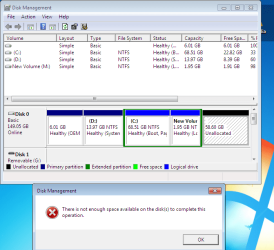
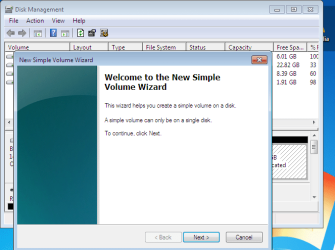
i'm having some trouble with partitions. I've got over 50 gbs of unallocated space, and when i try to make it into a usable drive, it won't let me. I'm using the partition tool that came with Windows 7.

partition 1.PNG

partition 2.PNG

partition 3.PNG

partition 4.PNG

partition 5.PNG

partition 6.PNG

partition 7.PNG


These are some snippets of my dorian. I guess what I'm wondering is, should I try another partition tool? or am I doing something wrong? or, God forbid, should i reinstall windows? I appreciate any help, even if your dumb. Thanks.

I'm using Windows 7 Ultimate, and I installed it a few weeks ago onto my sony vaio. The model number is pcv-rs530g. I have an intel pentium 4 processor.

-august
 

My Computer

OS
windows 7
That's a mess of partitions.

It can be fixed, but not with the Windows tool.

You have C out in the middle of the partitions and you also have some logical partitions, which complicates things.

You need guys like Gregrocker or SIW2 to straighten you out with tools like Partition Wizard or Paragon.

They are on these forums pretty much every day, so don't do anything in the meantime other than try to find Partition Wizard Home Edition 4.2.2. It is free and online. Google it, download it, and wait for those guys or maybe others. I personally haven't operated the software.
 

My Computer

Computer type
PC/Desktop
Computer Manufacturer/Model Number
Ignatz Special; 4 speed manual gearbox; factory air conditioning; one of one
OS
Windows 7 Home Premium SP1, 64-bit
CPU
Intel Skylake i5-6600K, not overclocked
Motherboard
AsRock Z170M Extreme 4, micro ATX
Memory
8 GB HyperX DDR4-2666 (2 x 4 GB)
Graphics Card(s)
none; graphics are integrated on CPU
Sound Card
onboard: Realtek ALC1150; external: USB Behringer UF0-202
Monitor(s) Displays
Dell S2340M 23 inch IPS
Screen Resolution
1600 x 900
Hard Drives
System: Crucial MX100 series SSD, 128 GB;
Data: Samsung Spinpoint 103SJ, 1 TB;
Backup: WD Caviar Green WD30EZRX-00D8PB0, 3 TB
PSU
Rosewill SilentNight 500 watt fanless, semi-modular
Case
Antec Solo II
Cooling
Noctua NH-U12S; Noctua F12 intake, Noctua S12A exhaust
Keyboard
Microsoft 200 6JH-00001 USB
Mouse
Dell or Microsoft optical wired; USB
Antivirus
Microsoft Security Essentials and Malwarebytes Premium
Browser
Pale Moon
Other Info
All fans PWM; speeds at idle: CPU circa 500 rpm; intake circa 600 rpm; exhaust circa 600 rpm; CPU temps 27 idle and 47 C load in a warm room (27 C/81 F) when running Intel Extreme Tuning Utility stress test.
Hi August,

Would you like to add that space to an existing partition, or do you want to have another volume?

You need a 3rd party tool.

Paragon PM2010 free is good for this Paragon Partition Manager Free Edition
 

My Computers

System One System Two

  • Computer type
    PC/Desktop
    OS
    7 X64
    CPU
    i5 8400
    Motherboard
    gigabyte b365m ds3h
    Memory
    2x8gb 3200mhz
    Hard Drives
    various
    PSU
    pure power 11 400w cm
    Case
    Coolermaster
    Cooling
    cryorig m9i
  • Computer type
    PC/Desktop
    OS
    7x64
    CPU
    g5400
    Motherboard
    ga b365m ds3h
    Memory
    8gb ddr4 2400
    PSU
    xfx pro 450w
Select Full Scale Launcher, then select the Partition Tab.

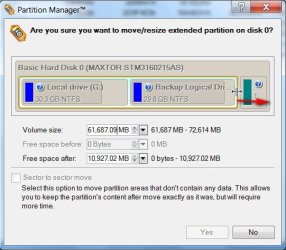
Rt click the Extended partition and select Move/Resize:

PM-2-2010-01-16_135025.jpg

Drag the edge of the partition all the way right to include the Unallocated space. click Yes , click Apply:

PM-3-2010-01-16_135128.jpg


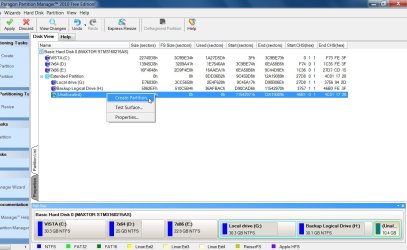
Rt click the Unallocated space and select create partition - choose the size ( presumably all of it , and NTFS, and a letter ) OK , Apply

PM-5-2010-01-16_135438.jpg
 

My Computers

System One System Two

  • Computer type
    PC/Desktop
    OS
    7 X64
    CPU
    i5 8400
    Motherboard
    gigabyte b365m ds3h
    Memory
    2x8gb 3200mhz
    Hard Drives
    various
    PSU
    pure power 11 400w cm
    Case
    Coolermaster
    Cooling
    cryorig m9i
  • Computer type
    PC/Desktop
    OS
    7x64
    CPU
    g5400
    Motherboard
    ga b365m ds3h
    Memory
    8gb ddr4 2400
    PSU
    xfx pro 450w
There's a limit on how many partitions you can have in one harddisk with MBR type partition. You should backup all data, repartition using GPT if you want to have more than 4 partition in a disk (I suggest you don't create more than 2 partition per-disk).

zzz2496
 

My Computer

Computer Manufacturer/Model Number
Self Built
OS
Windows7 Ultimate 64bit
CPU
Intel Core 2 Quad Q6600
Motherboard
Abit IN9-32X-MMAX
Memory
DDR2 Adata 4GB
Graphics Card(s)
Nvidia GeForce GTX 285 1024 and Nvidia GeForce 8800GT 512
Sound Card
Asus Xonar HDAV 1.3
Monitor(s) Displays
Dell 2407WFP and BenQ 2400v and Philips 150v3
Screen Resolution
3840x1200 and 1024x768
Hard Drives
2 WDC 1TB
1 WDC 1.5TB
1 WDC 640GB
1 WDC 320GB
1 Seagate 200GB
PSU
Corsair TX 850W
Case
Cooler Master HAF932
Cooling
Arctic Cooling Freezer Extreme and plenty of fans...
Keyboard
MicrosoftNaturalKeyboard 4000/Apple Alu keyboard/Dinovo mini
Mouse
Logitech G5/MarbleMouseTrackball/PerformanceMX/SpacePilotPRO
Internet Speed
1.5Mbps down/384Kbps up
Other Info
APC SURT 1000XL
Logitech Z-560
Wiimote
Mikrotik Router
Linksys (now Cisco) SD2008 8 port Gigabit switch
Linksys WRT54G (acting as AP)
Apple wireless Aluminium keyboard
Apple Magic Mouse
Xbox360 wired controller
siw 2, i couldn't be happier if id just done grass with the dahli lama. thanks a million. thanks ignatfsdafklj, i get the feeling that if some day we meet in a coffee shop, i'll probably like you rather than dislike you. and zzz2496, thanks for taking me up on that "even if you're dumb" thing. you guys rock.
 

My Computer

OS
windows 7
Back
Top