Partitioning Trouble

rsvr85

Yeah but no but
Guru
VIP
Local time
11:40 PM
Messages
1,065
Location
C:\Users\Home
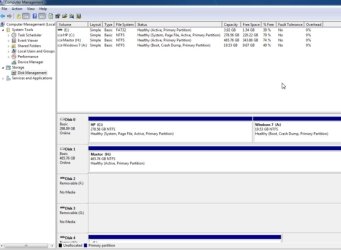
I want to delete my HP C:\ partition which has Vista installed on it, i have Windows 7 build 7100 installed on the Windows 7 A:\ partition.
I want to delete the C:\ partition and extend A:\ over it.
The system will not allow me to delete the C:\ partition, how do i do it?
Thanks in advance :)

http://i330.photobucket.com/albums/l406/rsvr85/Untitled-1.png
 

My Computer

Computer Manufacturer/Model Number
HP Touchsmart IQ771.uk
OS
Windows 7 Ultimate x64
CPU
AMD Turion(tm) 64 X2 Mobile Technology TL-56
Motherboard
ASUS Pheonix
Memory
3GB Nanya PC2-6400 DDR2-SDRAM SO-DIM (400MHz)
Graphics Card(s)
NVIDIA GeForce Go 7600 256MB GDDR3 SDRAM
Sound Card
High Definition Intergrated NVIDIA MCP51
Monitor(s) Displays
46" Sony Bravia HDTV
Screen Resolution
1600x1200
Hard Drives
1.5TB Samsug
320GB Seagate ST3320820AS - SATA 3Gb/s 8MB
500GB Maxtor Basics STM305003EHD301-RK
Internet Speed
↓6.32 Mb/s ↑0.35 Mb/s ↔26ms
Other Info
BIOS - American Megatrends Inc. 5.07
Ethernet Port - NVIDIA nForce 10/100/1000 Mbps
DVD Drive - TSSTcorp DVDR/RW TS-T632L
Move your page file off of C: to H:.

Reboot. Then you should be able to format C:, then combine the two into one partition.
 

My Computer

Computer Manufacturer/Model Number
self built
OS
7600.20510 x86
CPU
P4 550 3.4 GHz HT running at 3.5 GHz
Motherboard
MSI PM8M3-V (MS-7211 v1.x) Micro-ATX mainboard
Memory
OCZ 2 GB(2x1GB) DDR400mHz running @ 414 mHz
Graphics Card(s)
HIS Radeon HD 3850 IceQ 3 Turbo HDMI Dual DL-DVI AGP
Sound Card
MOTU Traveler firewire studio interface 192 kHz 24 bit
Monitor(s) Displays
22" widescreen Acer X223W LCD, 17" Compaq P75 CRT
Screen Resolution
1680x1050 and 1280x1024
Hard Drives
SATA I x2 WD, 400 GB and 120 GB, SATA 2 WD Caviar Black 1 TB
PSU
350W generic
Case
Cybertronpc, it glows blue
Cooling
stock cpu fan, Ice-Q 3 gpu and system, many case fans
Keyboard
Logitch Classical Keyboard 200
Mouse
Logitech Mediaplay cordless
Internet Speed
1792/448 kbits/sec
Other Info
SATA II PCI fake RAID adapter, 1 GB Readyboost, original ATI Remote Wonder (even works with WMC perfectly), Logitech Rumblepad 2 game controller x2
You will need to do a startup repair after combining partitions.
 

My Computer

OS
Win 7
Hi rsv,


From your screenshot, C: is the System partition - it contains the 7 bootfiles.

PARR2009-05-02_014143.jpg

1. First, make 7 (A) the System partition :

Go to Folder options, dot "Show Hidden Files,folders and drives" and untick "Hide protected operating system files".

You will see bootmgr and a yellow Boot folder on the C drive.

Copy them both to the A drive. ( It won't let you copy bcd - skip it).

Open an elevated command prompt and type:

bcdedit /export C:\Boot\bcd A:\Boot bcd

Go into Disk Management and rt click A and mark as active.

I assume 7 is the default boot option in the boot menu - open msconfig, click the boot tab, highlight the Vista entry and delete.

Reboot into 7.

You no longer need C.

2. You need a 3rd party partition manager to get the 7 partition into the lower address spaces on the left. It cannot be done with Disk Management.

You can use the "Move " function on Gparted boot cd - and do a startup repair to correct the bcd entry.

Or you can delete C and use the "Copy partition"function on the Paragon boot disc to copy A to what is now the unallocated space where C was - it will update bcd for you.

You will be able to boot into both the new copy, and the existing A partition.

To keep only the new copy, Mark it active, reboot and delete A. Then you can extend the new partition into the unallocated space on it's right.
 

My Computers

System One System Two

  • Computer type
    PC/Desktop
    OS
    7 X64
    CPU
    i5 8400
    Motherboard
    gigabyte b365m ds3h
    Memory
    2x8gb 3200mhz
    Hard Drives
    various
    PSU
    pure power 11 400w cm
    Case
    Coolermaster
    Cooling
    cryorig m9i
  • Computer type
    PC/Desktop
    OS
    7x64
    CPU
    g5400
    Motherboard
    ga b365m ds3h
    Memory
    8gb ddr4 2400
    PSU
    xfx pro 450w
@SIW2

What do you mean by "You need a 3rd party partition manager to get the 7 partition into the lower address spaces on the left. It cannot be done with Disk Management"?
 

My Computer

Computer Manufacturer/Model Number
HP Touchsmart IQ771.uk
OS
Windows 7 Ultimate x64
CPU
AMD Turion(tm) 64 X2 Mobile Technology TL-56
Motherboard
ASUS Pheonix
Memory
3GB Nanya PC2-6400 DDR2-SDRAM SO-DIM (400MHz)
Graphics Card(s)
NVIDIA GeForce Go 7600 256MB GDDR3 SDRAM
Sound Card
High Definition Intergrated NVIDIA MCP51
Monitor(s) Displays
46" Sony Bravia HDTV
Screen Resolution
1600x1200
Hard Drives
1.5TB Samsug
320GB Seagate ST3320820AS - SATA 3Gb/s 8MB
500GB Maxtor Basics STM305003EHD301-RK
Internet Speed
↓6.32 Mb/s ↑0.35 Mb/s ↔26ms
Other Info
BIOS - American Megatrends Inc. 5.07
Ethernet Port - NVIDIA nForce 10/100/1000 Mbps
DVD Drive - TSSTcorp DVDR/RW TS-T632L
No, Disk management can not move anything to the left.

Unless you want to leave your 7 partition where it and the size it is - you need a 3rd party app.

Gparted is free:

http://sourceforge.net/project/down...&filename=gparted-live-0.4.4-1.zip&a=94605667

http://gparted.sourceforge.net/download.php

Full instructions here - it says Vista - instructions for 7 are the same - you need a dvd of 7 to do the startup repair afterwards:

http://www.howtogeek.com/howto/windows-vista/using-gparted-to-resize-your-windows-vista-partition/

Make A the System partition before you move it.
 

My Computers

System One System Two

  • Computer type
    PC/Desktop
    OS
    7 X64
    CPU
    i5 8400
    Motherboard
    gigabyte b365m ds3h
    Memory
    2x8gb 3200mhz
    Hard Drives
    various
    PSU
    pure power 11 400w cm
    Case
    Coolermaster
    Cooling
    cryorig m9i
  • Computer type
    PC/Desktop
    OS
    7x64
    CPU
    g5400
    Motherboard
    ga b365m ds3h
    Memory
    8gb ddr4 2400
    PSU
    xfx pro 450w
Back
Top