Partitioning Your Drive – How do you feel?

Do you multi partition your drives?

  • Never

    Votes: 10 17.5%
  • Always

    Votes: 28 49.1%
  • Sometimes

    Votes: 19 33.3%

  • Total voters
    57

DirtRider

Just Looking
Guru
VIP
Local time
3:41 PM
Messages
603
Multi Partitioning Your Drive – How do you feel?

I was just wondering how you all feel about [FONT=&quot][/FONT]multi partitioning your drives. I normally don’t do it but prefer to have another drive installed for data and backups
 

My Computer My Computer

At a glance

Windows 7 Pro 64 bitIntel(R) Core(TM) i7 CPU 870 @ 2.93GHz4GBNVIDIA GeForce GTX 470
Computer Manufacturer/Model Number
Proline
OS
Windows 7 Pro 64 bit
CPU
Intel(R) Core(TM) i7 CPU 870 @ 2.93GHz
Motherboard
H55-G43(MS-7638)
Memory
4GB
Graphics Card(s)
NVIDIA GeForce GTX 470
Sound Card
Onboard
Monitor(s) Displays
Proline LCD 19 inch
Screen Resolution
1280 x 1024
Hard Drives
2 x SATA 250 Gig 1 x External 2TB
PSU
RX 730 SS
Case
Proline
Cooling
Standard
Keyboard
PS2
Mouse
PS2
Internet Speed
To embarrassed to tell lol
Too much real estate on my 1tb drive, I've got a dual boot and a data and media partition. I have an external for backups.
 

My Computer My Computer

At a glance

Win 10 Pro x64Intel I5-2500K @3.3GHz16GB G.Skill Ripjaws X (4x4GB)EVGA GeForce 750 Ti SC 2GB
Computer type
PC/Desktop
Computer Manufacturer/Model Number
Self Built
OS
Win 10 Pro x64
CPU
Intel I5-2500K @3.3GHz
Motherboard
Asrock P67 Extreme4
Memory
16GB G.Skill Ripjaws X (4x4GB)
Graphics Card(s)
EVGA GeForce 750 Ti SC 2GB
Sound Card
ASUS Xonar DG 5.1 Channels 24-bit 96KHz PCI Interface Sound
Monitor(s) Displays
auria eq2367
Screen Resolution
1920 x 1080
Hard Drives
250GB Samsung 850 EVO SSD
1TB WD Blue
1TB Hitachi
PSU
SeaSonic X 650W 80 Plus Gold
Case
Corsair Obsidian 750D
Cooling
Corsair H60, Three 140mm case fans
Keyboard
Logitech Wireless Keyboard K520
Mouse
Logitech Wireless Mouse M310
Internet Speed
Wave Broadband ~ 100 dn 5 up
Antivirus
Windows Defender, Malwarebytes Premium
Browser
Edge, IE11, Chrome
Other Info
Laptop specs: HP g7-1365dx /
CPU: AMD A6-3420M APU with Radeon(tm) HD Graphics /
RAM: Crucial 8Gb (2x4Gb) /
SSD: Crucial M4-CT128M4SSD2 ATA Device/ FW 000F /
GFX: AMD Radeon HD 6520G /
OS: Windows 10 Pro x64
I'm from the real OLD School.
I have never partitioned my drive as I never had a need for doing it.
 

My Computer My Computer

At a glance

Windows 7 Home Premium 64bitIntel(R)Core(TM)2 quad [email protected] 2.39GHz6GB DDR2 6400GeForce 8500/512MB
Computer Manufacturer/Model Number
HP M9077c
OS
Windows 7 Home Premium 64bit
CPU
Intel(R)Core(TM)2 quad [email protected] 2.39GHz
Motherboard
ASUSeK
Memory
6GB DDR2 6400
Graphics Card(s)
GeForce 8500/512MB
Sound Card
Realtek High Def Audio
Monitor(s) Displays
HP w2408 LCD 24" widescreen
Screen Resolution
1920x1200
Cooling
6 pack of Bud
Keyboard
MS wireless Inteli
Mouse
MS wireless Inteli
Always if it's a 1 drive computer. This way you can put your data and files on the second partition and reload or reimage the OS to the main partition. External drives work for this as well.....but to me, it's worth have the space right inside of the computer and not having to wait for the data to stop copying.
 

My Computer My Computer

At a glance

Windows 7 Ultimate x64Intel Q9550 2.83Ghz OC'd to 3.40Ghz8GB G.Skill PI DDR2-800, 4-4-4-12 timingsEVGA 1280MB Nvidia GeForce GTX570
Computer Manufacturer/Model Number
Self-Built in July 2009
OS
Windows 7 Ultimate x64
CPU
Intel Q9550 2.83Ghz OC'd to 3.40Ghz
Motherboard
Gigabyte GA-EP45-UD3R rev. 1.1, F12 BIOS
Memory
8GB G.Skill PI DDR2-800, 4-4-4-12 timings
Graphics Card(s)
EVGA 1280MB Nvidia GeForce GTX570
Sound Card
Realtek ALC899A 8 channel onboard audio
Monitor(s) Displays
23" Acer x233H
Screen Resolution
1920x1080
Hard Drives
Intel X25-M 80GB Gen 2 SSD
Western Digital 1TB Caviar Black, 32MB cache. WD1001FALS
PSU
Corsair 620HX modular
Case
Antec P182
Cooling
stock
Keyboard
ABS M1 Mechanical
Mouse
Logitech G9 Laser Mouse
Internet Speed
15/2 cable modem
Other Info
Windows and Linux enthusiast. Logitech G35 Headset.
Since I carry more than 200gig of personal data stored ..
I always partition my HD and put ALL my Data in a different partition than my System.
It makes maintaining and restoring the small System Partition a lot easier and faster.

I also have more than one HD installed ..
The second is a bootable twin to the working HD .. for an installed backup.
 

My Computer My Computer

At a glance

XP MCE .... XP Pro 64 .... W7 U x64E6750, 2.67GHz C2D4GB, PC2 6400GeForce 9400GT
Computer Manufacturer/Model Number
HP d4996t (upgraded)
OS
XP MCE .... XP Pro 64 .... W7 U x64
CPU
E6750, 2.67GHz C2D
Memory
4GB, PC2 6400
Graphics Card(s)
GeForce 9400GT
Monitor(s) Displays
Twin Samsung 2443BWT
Screen Resolution
1920x1200
Hard Drives
Many .. 3 Installed
PSU
460W
Internet Speed
Cable

My Computer My Computer

At a glance

Microsoft Windows 7 Home Premium 64-bit 7601 ...Intel(R) Core(TM) i7-3770 CPU @ 3.40GHz8.00 GBIntel(R) HD Graphics 4000
Computer type
PC/Desktop
OS
Microsoft Windows 7 Home Premium 64-bit 7601 Multiprocessor Free Service Pack 1
CPU
Intel(R) Core(TM) i7-3770 CPU @ 3.40GHz
Motherboard
ASUSTeK COMPUTER INC. P8H77-M
Memory
8.00 GB
Graphics Card(s)
Intel(R) HD Graphics 4000
Sound Card
On Board
Monitor(s) Displays
Dell 24"
Screen Resolution
1920 x 1080
Hard Drives
(1) INTEL SSDSC2CT180A3 ATA Device (2) ST500DM002-1BD142 ATA Device (3) WDC WD3200AAKS-75L9A0 ATA Device (4) Generic- Compact Flash USB Device (5) Generic- MS/MS-Pro USB Device (6) Generic- SD/MMC USB Device (7) Generic- SM/xD-Picture USB
PSU
500w Corsair
Case
Cooler Master
Cooling
3 Fans
Keyboard
Logitech MK300
Mouse
Logitech WOM
Internet Speed
75Mb
Antivirus
Norton 360
Browser
Firefox, Opera, IE
Always. I can find my stuff faster and it's safely out of the reach of Windows crashes.
 

My Computer My Computer

At a glance

Windows 7 x64
OS
Windows 7 x64
Well, the first thing I always do is to seperate my user data from the OS partition. Then I have a partition with which I experiment, a video partition, a backup partition, a couple of operating systems, etc. How would one do that without partitioning. On this system here I have 3 drives - but this is the maximum I can fit into this dumb Dell box - unless I want to employ more velcro.
 

My Computer My Computer

At a glance

Vista, Windows7, Mint Mate, Zorin, Windows 8from 1.6GHz Duo to i7
Computer Manufacturer/Model Number
HP, Dell, Gateway, Toshiba - 4 laptops and 2 desktops
OS
Vista, Windows7, Mint Mate, Zorin, Windows 8
CPU
from 1.6GHz Duo to i7
Monitor(s) Displays
2x HP w2207
Hard Drives
5x HDD, 7x SSD, 12x Externals
Keyboard
with trackball - no mices
Mouse
Trackball mice
Internet Speed
DSL 6000
I don't, but I'm debating doing it on my next clean install. I have all my stuff backed up to an external drive and another PC so it's not a big deal having to copy it back to this PC it windows craps out on me. My last couple of failures were hard drives so it wouldn't have mattered anyway.
 

My Computer My Computer

At a glance

Windows 10 Education 64 bitAMD Phenom II X4 980 Black Edition Deneb 3.7GHz8GB 4GBx2 Kingston PC10600 DDR3 1333 MemoryZotac NVIDIA Geforce GT640 2 Gig DDR3 PCIe
Computer type
PC/Desktop
Computer Manufacturer/Model Number
Home Built
OS
Windows 10 Education 64 bit
CPU
AMD Phenom II X4 980 Black Edition Deneb 3.7GHz
Motherboard
Asus M4N68T-M V2 µATX Motherboard
Memory
8GB 4GBx2 Kingston PC10600 DDR3 1333 Memory
Graphics Card(s)
Zotac NVIDIA Geforce GT640 2 Gig DDR3 PCIe
Sound Card
VIA VT1708s High Definition Audio 8-channel Onboard
Monitor(s) Displays
22" LG E2242 1080p and 2 19" I-INC AG191D
Screen Resolution
1280x1024 - 1920x1080 - 1280x1024
Hard Drives
Crucial M100 256 GB SSD and 500 GB WD Blue SATA
PSU
Thermaltake TR 620
Case
Power Up Black ATX Mid-Tower Case
Cooling
Stock heatsink and fan
Keyboard
Logitech Wireless K350 Wave
Mouse
Logitech Wireless M570 Trackman Wheel
Internet Speed
80 Mbps Down 30 Mbps Up
Antivirus
Windows Defender
Browser
Internet Explorer 11
Other Info
HP DVD1040e Lightscribe - External USB2
To partiton or not to partition

I prefer to use exteran hd or jump drive. If your system crashed or hd fail then you are out of luck. If you do partiton just keep an extra backup on anohter medium
 

My Computer My Computer

At a glance

XP
OS
XP
I've never partitioned and I've been working with PC's that have hard drives since DOS 2. I currently have a 1TB drive for Windows 7. I have a second internal 750GB drive that I do full hard drive backups with Acronis True Image software.

Old, slow computers, required a lot of time just to defrag a 10GB hard drive. That is not the case any longer, and the OS could care less where the data is - it just knows it's on the hard drive.

Like someone else mentioned, if the hard drive crashed everything is lost, if it's not backed up somewhere else.
 

My Computer My Computer

At a glance

Windows 10 64 bitIntel i7 6700K16GB Corsair DominatorIntel CPU Graphics
Computer type
PC/Desktop
Computer Manufacturer/Model Number
My Own Build
OS
Windows 10 64 bit
CPU
Intel i7 6700K
Motherboard
ASUS ROG Maximus VIII Hero
Memory
16GB Corsair Dominator
Graphics Card(s)
Intel CPU Graphics
Sound Card
RealTek
Monitor(s) Displays
27" Dell S2719dgf
Screen Resolution
2560X1440
Hard Drives
1 TB Samsung 850 EVO SSD for Win 10 Pro
500GB Samsung 850 EVO SSD for Win 10 Insider
2 TB drive for backup
PSU
EVGA Supernova 750G2
Case
BeQuiet Silent Base 600
Cooling
Deepcool Captain 120EX
Keyboard
Microsoft Wireless 2000
Mouse
Microsoft wireless
Internet Speed
100 MB/sec (Cable)
Antivirus
Microsoft Defender and Malwarebytes
Browser
Edge/Firefox
Other Info
Cakewalk (Sonar) by BandLab and Studio One 4.1 Pro recording studio software. MOTU 896Mk3 Hybrid recording interface, Frontier Tranzport wireless control unit, Behringer X-Touch Control Surface.
Five USB connected optical drives for CD Audio production using Nero BurningROM
These questions always make me laugh a little when I see the never option. You have to partition a drive, or else it won't be usable.

Anyway, it depends for me. if it is a single drive system, like my laptop, I alway cut off a D drive for storage. I don't ever both with redirection...I just store things on the D drive. On a tower that has two drives, which is preferable...I don't. I use the smallest for the OS and the largest for data. For example, in my current home system, i have identical WD drives, except one is 320 GB and one is 640 GB. The 320 GB is C and the other is D.
 

My Computer My Computer

At a glance

Windows 7 Ultimate x64 SP1Intel Core i7-260012 GB Patriot Extreme DDR3-1333Nvidia GTX 470
OS
Windows 7 Ultimate x64 SP1
CPU
Intel Core i7-2600
Motherboard
Gigabyte GA-P67A-UD3P-B3
Memory
12 GB Patriot Extreme DDR3-1333
Graphics Card(s)
Nvidia GTX 470
Monitor(s) Displays
Dell UltraSharp 2209WA
Hard Drives
OCZ Agility3 240 GB, WD5001AALS, WD7501AALS
PSU
OCZ ModStream 700W
Case
CoolerMaster HAF 912 Advanced
Cooling
CoolerMaster Hyper 212 Plus
I don't bother with it. If you have to transfer something from one "Drive" to another, it's just fragmenting it up a bit and it's quite slow... Currently I have:

(C: ) 2x OCZ Vertex Series SATA II 60Gb, RAID0 for OS,
(I: ) 2x WD Raptor SATA II 150GB RAID0 For Programs,
(B: ) & (D: ) 2x Western Digital WD10EACS 1Tb For Storage,
(K: ) 1x Seagate 500Gb SATA II for Computer Utilities and Photos,
(H: ) 2x Western Digital Caviar 20Gb RAID0 for FTP & Audio Console Backup,
(J: ) 1x Seagate 200Gb SATA II for Virtual Machine, (OSX 10.6 Snow Leopard)
(F: ) 1x Seagate 320Gb SATA II for .ISO Files and Remote Image Backup of my Laptop,
And
(G: ) 1x WD Caviar Black 500Gb in an eSATA External Caddy for System Image Backup.

Partitions..? We don't need to Stinkin Partitions!
 
Last edited:

My Computer My Computer

At a glance

Windows 7 Ultimate x64 & OSX 10.6Intel Core 2 Quad Q9550 12MB 2.86 @ 5.09GHz, ...8Gb (4x2Gb) *Serial Sequential* Corsair XMS2 ...EVGA GTX 470 @865MHz Core, 1730MHz Shader, 18...
Computer Manufacturer/Model Number
Custom Built, RsPC!{Ltd.}
OS
Windows 7 Ultimate x64 & OSX 10.6
CPU
Intel Core 2 Quad Q9550 12MB 2.86 @ 5.09GHz, 1.3Vcore@87
Motherboard
ASUS P5E3 Deluxe w/ Intel X58 Chipset BIOS 0304
Memory
8Gb (4x2Gb) *Serial Sequential* Corsair XMS2 DDR-800 1.8v
Graphics Card(s)
EVGA GTX 470 @865MHz Core, 1730MHz Shader, 1855MHz Mem, >43C
Sound Card
MOTU 192HD+424+3x2408Mk3, D8B, ASUS X-Fi 24, only 96kHz :(
Monitor(s) Displays
Asus VK278Q 27" 2ms HD LED Backlit LCD Monitors
Screen Resolution
2x 1920x1080
Hard Drives
2x OCZ 60GB SSDs RAID0 - OS, (100+ GB Part-Page file)
5x Samsung SATAII 1TB RAID5 - Music,
6x WD RE2 SATAII 1Tb RAID1+0 - Storage,
4x WD Dual 64MB 2TB RAID5 - Backup
3x WD Velociraptor 600GB RAID5 - Audio Production
PSU
2x Corsair 850w, Compaq R3000 UPS Backup
Case
Built Steel/Dynamat/Neopreme Shock Mount 6U Silent Rack Case
Cooling
iXrema+2x12cm Magmas 3x20cm Case Fans 4x14cm Exhaust Fans
Keyboard
Cherry 6316 Mechanical, IBM Model M, Das Keyboard, 10key USB
Mouse
2x Logitec G500... Yes 2 :)
Internet Speed
Fiber, Dual 85Mb/s up 105 Mb/s Down
Other Info
Audio system =
Dynaudio BM6A Near Fields + BM10 Sub for Reference & monitoring
Klipschorns & Servodrive Sub for Music Playback...
Mackie D8B converted into 24ch Automated DAW controller/MIDI interface, MOTU Rig for AD/DA I/O & Professional Recording, ASUS Sound Card for Music Playback (needs upgrade!)

Boot up Time = ~30sec from Dead off Init RAID, then ~9.877-12.454sec for windows, as per B
Apologies to all for the way this question was presented, I have now changed it to reflect "Do you multi partition your drives?" :D
 

My Computer My Computer

At a glance

Windows 7 Pro 64 bitIntel(R) Core(TM) i7 CPU 870 @ 2.93GHz4GBNVIDIA GeForce GTX 470
Computer Manufacturer/Model Number
Proline
OS
Windows 7 Pro 64 bit
CPU
Intel(R) Core(TM) i7 CPU 870 @ 2.93GHz
Motherboard
H55-G43(MS-7638)
Memory
4GB
Graphics Card(s)
NVIDIA GeForce GTX 470
Sound Card
Onboard
Monitor(s) Displays
Proline LCD 19 inch
Screen Resolution
1280 x 1024
Hard Drives
2 x SATA 250 Gig 1 x External 2TB
PSU
RX 730 SS
Case
Proline
Cooling
Standard
Keyboard
PS2
Mouse
PS2
Internet Speed
To embarrassed to tell lol
I follow the general rule that others appear to here - on a single drive, I separate the OS and data. If there are multiple drives I tend to use complete drives though I will for example partition a 500 GB drive that is just for the OS - Unused space is wasted space.

Also for a system with two Identical 500 GB drives I would partition out the OS drive to free some space and create a small partition on the non OS drive for a scratch area to locate the swapfiles.

All this is of course backed up partition by partition to an external (except the scratch drive)

I have also in the past created cloned copies of the OS drive on either a second drive or partition to allow fast OS failure recovery.

Oh and I sometimes create a boot partition for multi-OS systems (like MS does with win7 - but I did it first :p)
 

My Computers My Computers

  • At a glance

    Windows 11 Pro x64 [Latest Release and Releas...Ryzen 9 5950X, 3.8 - 5.2 MHz64GB [2 x 32GB] DDR4 3200MHz4GB NVIDIA GEFORCE GTX 1650 Ti
    Computer type
    PC/Desktop
    Computer Manufacturer/Model Number
    ChillBlast - Custom to my design
    OS
    Windows 11 Pro x64 [Latest Release and Release Preview]
    CPU
    Ryzen 9 5950X, 3.8 - 5.2 MHz
    Motherboard
    Asus Prime X570-Pro
    Memory
    64GB [2 x 32GB] DDR4 3200MHz
    Graphics Card(s)
    4GB NVIDIA GEFORCE GTX 1650 Ti
    Sound Card
    On-board SPDIF to 5.1 System + HDMI [5.1 system]
    Monitor(s) Displays
    32" UHD 32 Bit HDR Monitor + 43" UHD 4K 32Bit HDR TV
    Screen Resolution
    2 x 3840 x 2160 @60Hz
    Hard Drives
    1TB M2 SSD OS, 500GB Fast Access SSD, 2 x 8TB Data + Various Externals from 1TB to 4TB, 10TB NAS
    PSU
    NZXT C750 80 PLUS Gold 750W Modular PSU
    Case
    Workstation Case [Matt Black]
    Cooling
    NZXT Kraken X63 280mm CPU Cooler +2x Quiet Case fans
    Keyboard
    Logitech Wireless MX Keys & K400 + others
    Mouse
    Logitech Wireless MX Master 3S
    Internet Speed
    920 MB Down 50 MB Up
    Antivirus
    BitDefender Total Security Pro
    Browser
    Chrome (always run latest Non-Beta)
    Other Info
    Also run ...
    Laptop - Quad 8GB - Windows 10 Pro x64
    Nexus 7 Android tablet x2
    Samsung 10.2" tablet
    Blackview TAB 8 4G Android Tablet c/w Keyboard
    Wacom Intuos Pro Medium Pen Pad
    Wacom Intuos Pro Small Pen Pad
    Wacom Expresskeys Remote
    Loopdeck+ Graphics Controller
    Shuttle Pro v2 Control
  • At a glance

    Windows 11 Pro x64 Latest RPIntel I7 10750H 5.0GHz32GB [2x16GB] DDR4 2933 MHznVidia GTX1650Ti 4 GB GDDR6
    Computer type
    Laptop
    System Manufacturer/Model Number
    Dell XPS 17 10750H
    OS
    Windows 11 Pro x64 Latest RP
    CPU
    Intel I7 10750H 5.0GHz
    Motherboard
    Dell XPS
    Memory
    32GB [2x16GB] DDR4 2933 MHz
    Graphics Card(s)
    nVidia GTX1650Ti 4 GB GDDR6
    Sound Card
    Stock [Realtek] 4 Speaker
    Monitor(s) Displays
    17" IPS UHD+ Infinity Edge Touchscreen
    Screen Resolution
    3840 x 2400
    Hard Drives
    2TB M2 NVMe, 4TB External + various 500GB & 1TB External NVMe (also have access to spinner HDD from
    PSU
    Stock
    Case
    Stock XPS Aluminium & Carbon Fibre
    Cooling
    Stock - Active Fan Control
    Keyboard
    Backlit + Various Logitech
    Mouse
    Stock Track Pad + Logitech MX Trackball
    Internet Speed
    72 MB Down 18MB Up
    Browser
    Chrome
    Other Info
    Also run ...
    Laptop - Quad 8GB - Windows 10 Pro x64
    Nexus 7 Android tablet x2
    10.2" tablet
    Sony Z3 Android Smartphone
    Wacom Intuos Pro Medium Pen Pad
    Wacom Intuos Pro Small Pen Pad
    Wacom Expresskeys Remote
    Loopdeck+ Graphics Controller
    Shuttle Pro v2 Control Pad
    10TB NAS
Safety first

I have found that having 2 hard drives of approximately same size with each divided into two partitions is the best way to go because....

Drive 1 will have the OS in a 32gb partition that is more than enough for almost all programs that one may use even with 64bit OS (this does not apply if you install large games), including Microsoft Office.

The rest of the drive holds data partition that should have an user section and folder for all masters of programs that you install. The drive should be large enough to hold even the OS image and any other images of CD/DVD masters, just in case you loose them. Also images of the running OS should be stored here for quick OS restore.

Drive 2 will be a duplicate of drive 1. This is is important for situation where drive 1 goes bad. Even the OS should be here and in running condition in the partition 1.

Sync program should be used to sync the two drives very frequently to keep it updated just in case.


Even with 2 drives, a additional offline backup should be made of both the OS and the data partitions of drive 1.
 

My Computer My Computer

At a glance

Windows 7
OS
Windows 7
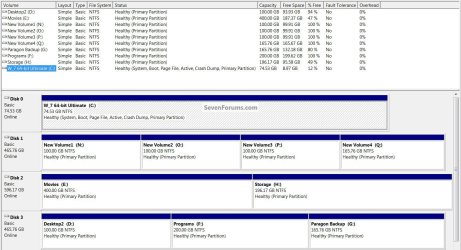
I have created a partition or two. ;)


Disk25.jpg
 

My Computer My Computer

At a glance

W 7 64-bit UltimateIntel Q9550 Yorkfield8GB Dominator 8500C5DATI : XFX 5870
Computer Manufacturer/Model Number
* BFK Customs *
OS
W 7 64-bit Ultimate
CPU
Intel Q9550 Yorkfield
Motherboard
ASUS P5Q Pro
Memory
8GB Dominator 8500C5D
Graphics Card(s)
ATI : XFX 5870
Sound Card
Realtek HD Audio 7-1
Monitor(s) Displays
1x 47" LCD HDMI & 3x 26" LCD HDMI
Screen Resolution
1920x1080P & 1920x1200
Hard Drives
1x 80GB Intel X25-M G2 SSD : 1x 500GB & 1x 640GB WD Caviar Black(s)
PSU
Corsair 620HX
Case
Cooler Master RC-690
Cooling
Tuniq Tower 120, 2x 140mm and 3x 120mm case fans
Keyboard
Microsoft 500
Mouse
Razer Diamondback 3G
Internet Speed
14 Mb/s
Other Info
1x Koutech 3Gb/s SATA HDD Hot Swap Rack
I voted sometimes as it's not something that I did to begin with as I've never had a large drive in any of the machines I've had,

When I had my WinME machine that had an 80GB drive and I did partition that so I could dual boot WinME with my retail copy of XP.

The machine I have now came with Vista on a 250GB drive and I partitioned it so I could install Windows 7 and dual boot.

I don't go into Vista now and when I've plucked up enough courage I will be getting rid of Vista and giving Windows 7 the whole 250GB's, I do have a 500GB external drive that I do system images on every Friday evening with Acronis TI ;)
 

My Computer My Computer

At a glance

Windows 10 64bit/Windows 10 64bit/Windows 10 ...Intel Pentium J3710 @ 60GHz/Intel B820,1.7GHz...8.00GB DDR3 @ 1599MHz/8GB 2 x 4GB DDR3/8.00GB...Intel HD Graphics/Intel/512MB ATI AMD Radeon ...
Computer type
PC/Desktop
Computer Manufacturer/Model Number
Acer Aspire XC-704 x64 bit/ Asus K55A Notebook PC/HP Envy x360 Convertible 15-bq0xx
OS
Windows 10 64bit/Windows 10 64bit/Windows 10 64bit
CPU
Intel Pentium J3710 @ 60GHz/Intel B820,1.7GHz/AMD A9 Radeon
Motherboard
Acer Aspire XC-704 (SOCKET 0)/Asus/HP 8312 (Socket FP4)
Memory
8.00GB DDR3 @ 1599MHz/8GB 2 x 4GB DDR3/8.00GB Dual-Channel
Graphics Card(s)
Intel HD Graphics/Intel/512MB ATI AMD Radeon R5 Graphics (HP
Sound Card
Realtek High Definition Audio/Onboard/AMD High Definition Au
Monitor(s) Displays
Acer LCD K222HQL /Asus 15.6/Generic PnP Monitor (1920x1080@6
Screen Resolution
1920x1080@59Hz/1366 x 768/1920x1080@60Hz
Hard Drives
1863GBWesternn Digital WDC/Asus/119GB SanDisk SD8SN8U-128G-1006 (SSD)
931GB Hitachi HGST HTS721010A9E630 (SATA)
Keyboard
Microsoft Natural Ergonomic Keyboard 4000 (UK)/Inbuilt/Inbui
Mouse
Microsoft Optical Wheel Mouse/Same plus Touchpad/Same + Pad
Internet Speed
Infinity 2 up to 76 Mbps
Antivirus
MSE/MSE/MSE and all 3 have MalwareBytes Premium
Browser
Edge, Firefox/Edge, Firefox/Edge, Firefox, Chrome
Other Info
Seagate Expansion 500GB External Desktop Drive
Seagate Expansion Portable Drives 500GB and 1TB
Epson XP-332 Wireless Printer
Drive 2 will be a duplicate of drive 1. This is is important for situation where drive 1 goes bad. Even the OS should be here and in running condition in the partition 1.

Sync program should be used to sync the two drives very frequently to keep it updated just in case.
Except that doesn't work, because the boot sector isn't copied across, and you are at the mercy of the sync program. There are also several flaws with that system as well, such as a malware infection could grab both drives and infect them. The key to remember is that a backup is never kept "live" with the system. It seems common around here, unfortunately, but you're over thining and over-complicating your recovery.

If you really want to keep that Drive 1 safe, use an external drive of a size large enough to hold a drive image of Drive 1, and set it to backup on a schedule. I have two physical drives in my system. The primary is for the OS and apps, while the second is for my user data. I keep an image, done weekly of the primary, and keep everything on my D drive also copied over to my server. I have options for restoration, and neither backup option is kept on my computer. That's the key.
 

My Computer My Computer

At a glance

Windows 7 Ultimate x64 SP1Intel Core i7-260012 GB Patriot Extreme DDR3-1333Nvidia GTX 470
OS
Windows 7 Ultimate x64 SP1
CPU
Intel Core i7-2600
Motherboard
Gigabyte GA-P67A-UD3P-B3
Memory
12 GB Patriot Extreme DDR3-1333
Graphics Card(s)
Nvidia GTX 470
Monitor(s) Displays
Dell UltraSharp 2209WA
Hard Drives
OCZ Agility3 240 GB, WD5001AALS, WD7501AALS
PSU
OCZ ModStream 700W
Case
CoolerMaster HAF 912 Advanced
Cooling
CoolerMaster Hyper 212 Plus
DeaconFrost,

I do understand that the boot sector is not copied using a simple sync program and besides, that would not realy work anyway. A imaging program is needed and most of imaging programs have some capabilities of copying the boot MBR. True Image is one that I use and it works just fine for the MBR.
 

My Computer My Computer

At a glance

Windows 7
OS
Windows 7
Back
Top