Partitions and recovery - (wot not space & Dell software)

Digory

New member
Local time
10:43 AM
Messages
16
Dear all,

Great forum - would very much appreciate some advice.
Have just bought Dell Inspiron with Win7 Home Premium installed.
Have set up two accounts - 1 admin and 1 std user.
Next plan was to partition HDD so that data was in own volume.
Never used Win7 before [XP Pro desktop] but thanks to your forum have figured out how to manage partions.
I was a bit surprised to find my 320GB HDD was already partioned three ways.

100MB OEM - no volume letter.
14.65GB Recovery - no volume letter.
283GB OS - C assigned.

I tested the "C" drive for shrink space and returned a 144GB available.
This leaves me circa 140GB for OS and Office 2007 - seems exessive.

Guessing the 100MB and 14.65GB Recovery are there to stay [whether or not I like the way created].
Interestingly, I was going to create the sys restore disc as per the Dell manual but could not find "DellDataSafe" [anyone used this].
Is this a Win7 recovery partition ?

As regards the available shrink space - does this seem correct or should I be looking at a defrag first.
Seems a bit sad to end up with less than half of the 320GB before I even start.

Thanks D;-)
 

My Computer My Computer

At a glance

Win 7 Home Premium 64bit
OS
Win 7 Home Premium 64bit
1) The 100 mb partition is the system reserved which contains files needed to boot win7. The 14.65gb is the recovery partition needed to restore your computer to factory default state (the way you found it on unboxing). Leave both of these alone.

2) Fore dell datasafe, click on Start orb->All programs->Dell datasafe local backup folder->dell datasafe local backup, then follow on screen prompts. You'll need more than one dvd otherwise use a dual layer dvd. I personally prefer using a single dual layer. Do this ASAP, its an insurance.

http://support.dell.com/support/topics/global.aspx/support/dsn/document?c=us&l=en&s=gen&docid=62A668E1C399857AE040AE0AB8E12942

3) For shrinking C: drive, use Partition Wizard.

http://www.sevenforums.com/tutorials/93322-partition-wizard-use-bootable-cd.html?ltr=P
 
Last edited by a moderator:

My Computer My Computer

At a glance

Windows 7 x64 pro/ Windows 7 x86 Pro/ XP SP3 x86
Computer Manufacturer/Model Number
Too many to describe...
OS
Windows 7 x64 pro/ Windows 7 x86 Pro/ XP SP3 x86
Thanks for pointer.
Have looked for Del software - no DellDataSafe folder.
Seems odd but maybe I need to install.

Thanks for partition overview.
Any thoughts on defrag and the 140GB.

D:-)
 

My Computer My Computer

At a glance

Win 7 Home Premium 64bit
OS
Win 7 Home Premium 64bit
The 140 GBs of shrink space are the Windows limit because it cannot move the MFT which sits in the middle of the partition. If you use the Partition Wizard that Bill2 posted, you can overcome that limit.

For the creation of a data partition and moving the user folders, You may want to have a look at one of my Video tutorials: http://www.sevenforums.com/tutorials/72427-data-partition.html
 

My Computer My Computer

At a glance

Vista, Windows7, Mint Mate, Zorin, Windows 8from 1.6GHz Duo to i7
Computer Manufacturer/Model Number
HP, Dell, Gateway, Toshiba - 4 laptops and 2 desktops
OS
Vista, Windows7, Mint Mate, Zorin, Windows 8
CPU
from 1.6GHz Duo to i7
Monitor(s) Displays
2x HP w2207
Hard Drives
5x HDD, 7x SSD, 12x Externals
Keyboard
with trackball - no mices
Mouse
Trackball mice
Internet Speed
DSL 6000
Ahh thanks (tried a defrag but made no improvement - this explains why).
Always a bit cautious with downloading programmes for this kind of task.
In the past [xp] have used acronis with success.
I assume if you guys are recommending partition wizzard you are pretty happy with it.

Assuming I can move the MFT file - would 100GB be sensible size for WIN7 and OFFICE.

Cheers D)
 

My Computer My Computer

At a glance

Win 7 Home Premium 64bit
OS
Win 7 Home Premium 64bit
Ahh thanks (tried a defrag but made no improvement - this explains why).
Always a bit cautious with downloading programmes for this kind of task.
In the past [xp] have used acronis with success.
I assume if you guys are recommending partition wizzard you are pretty happy with it.

Assuming I can move the MFT file - would 100GB be sensible size for WIN7 and OFFICE.

Cheers D)

100GB is more than enough. I use about 50GB and that is overkill
 

My Computer My Computer

At a glance

Win 7 Professional 32-bitIntel Core 2 Duo CPU T5750 @ 2.00 GHz3GB
Computer Manufacturer/Model Number
Gateway M6827
OS
Win 7 Professional 32-bit
CPU
Intel Core 2 Duo CPU T5750 @ 2.00 GHz
Memory
3GB
Monitor(s) Displays
ViewSonic Vx900
Screen Resolution
1280x1024
Hard Drives
150GB Hard Drive
1. Partition Wizard is very reliable. However, it never hurts to backup a partition that one is going to manipulate.
2. For the OS alone, 100GBs is more than enough. On my 3 Win7 systems, the OS never used more than 18GBs and I have a lot of programs installed (no games though). All my user files are in different partitions. I also delete the hiberfile with powercfg.exe -h off as cmd command.
 

My Computer My Computer

At a glance

Vista, Windows7, Mint Mate, Zorin, Windows 8from 1.6GHz Duo to i7
Computer Manufacturer/Model Number
HP, Dell, Gateway, Toshiba - 4 laptops and 2 desktops
OS
Vista, Windows7, Mint Mate, Zorin, Windows 8
CPU
from 1.6GHz Duo to i7
Monitor(s) Displays
2x HP w2207
Hard Drives
5x HDD, 7x SSD, 12x Externals
Keyboard
with trackball - no mices
Mouse
Trackball mice
Internet Speed
DSL 6000
1) The 100 mb partition is the system reserved which contains files needed to boot win7. The 14.65gb is the recovery partition needed to restore your computer to factory default state (the way you found it on unboxing). Leave both of these alone.

2) Fore dell datasafe, click on Start orb->All programs->Dell datasafe local backup folder->dell datasafe local backup, then follow on screen prompts. You'll need more than one dvd otherwise use a dual layer dvd. I personally prefer using a single dual layer. Do this ASAP, its an insurance.

http://support.dell.com/support/topics/global.aspx/support/dsn/document?c=us&l=en&s=gen&docid=62A668E1C399857AE040AE0AB8E12942

3) For shrinking C: drive, use Partition Wizard.


Hello Digory, welcome to Seven Forums!


We here at Seven Forums have an excellent source for all the Partition Wizard info you may need, have a look at Option One of this tutorial at the link below to do exactly what you need to do and if you need to install the Partition Wizard to the Windows partition see the second link below.

Do remember to post back with any questions and to keep us informed.

Partition Wizard : Use the Bootable CD

Partition Wizard Home Edition
 

My Computer My Computer

At a glance

W 7 64-bit UltimateIntel Q9550 Yorkfield8GB Dominator 8500C5DATI : XFX 5870
Computer Manufacturer/Model Number
* BFK Customs *
OS
W 7 64-bit Ultimate
CPU
Intel Q9550 Yorkfield
Motherboard
ASUS P5Q Pro
Memory
8GB Dominator 8500C5D
Graphics Card(s)
ATI : XFX 5870
Sound Card
Realtek HD Audio 7-1
Monitor(s) Displays
1x 47" LCD HDMI & 3x 26" LCD HDMI
Screen Resolution
1920x1080P & 1920x1200
Hard Drives
1x 80GB Intel X25-M G2 SSD : 1x 500GB & 1x 640GB WD Caviar Black(s)
PSU
Corsair 620HX
Case
Cooler Master RC-690
Cooling
Tuniq Tower 120, 2x 140mm and 3x 120mm case fans
Keyboard
Microsoft 500
Mouse
Razer Diamondback 3G
Internet Speed
14 Mb/s
Other Info
1x Koutech 3Gb/s SATA HDD Hot Swap Rack
All - big thanks (and thanx the welcome post).

Will check out the links - you clearly have confidence in partiton wizard which is good to know.
This may be a dumb question, when I think about my "C" OS partition, I am thinking about OS, OFFICE and all other programmes [or apps].
Are you guys keeping just OS in smaller partition ?

D:-)
 

My Computer My Computer

At a glance

Win 7 Home Premium 64bit
OS
Win 7 Home Premium 64bit
All - big thanks (and thanx the welcome post).

Will check out the links - you clearly have confidence in partiton wizard which is good to know.
This may be a dumb question, when I think about my "C" OS partition, I am thinking about OS, OFFICE and all other programmes [or apps].
Are you guys keeping just OS in smaller partition ?

D:-)


Yes but don't go much less than 80GB or it may come back to bite you; remember all the 'other' program/apps that get installed to the OS partition. ;)
 

My Computer My Computer

At a glance

W 7 64-bit UltimateIntel Q9550 Yorkfield8GB Dominator 8500C5DATI : XFX 5870
Computer Manufacturer/Model Number
* BFK Customs *
OS
W 7 64-bit Ultimate
CPU
Intel Q9550 Yorkfield
Motherboard
ASUS P5Q Pro
Memory
8GB Dominator 8500C5D
Graphics Card(s)
ATI : XFX 5870
Sound Card
Realtek HD Audio 7-1
Monitor(s) Displays
1x 47" LCD HDMI & 3x 26" LCD HDMI
Screen Resolution
1920x1080P & 1920x1200
Hard Drives
1x 80GB Intel X25-M G2 SSD : 1x 500GB & 1x 640GB WD Caviar Black(s)
PSU
Corsair 620HX
Case
Cooler Master RC-690
Cooling
Tuniq Tower 120, 2x 140mm and 3x 120mm case fans
Keyboard
Microsoft 500
Mouse
Razer Diamondback 3G
Internet Speed
14 Mb/s
Other Info
1x Koutech 3Gb/s SATA HDD Hot Swap Rack
If PW CD can't safely shrink C as much as you want, the tool I use is Perfect Disk 10 Trial Verision.

After defragging for compactness (from drop-down menu), rightclick on C drive to choose Offline Defrag>System and it will move System Files safely.
 
Bare Foot Kid,

Have checked out the links and will give this a whirl.
The Partition Wizard website has plenty of useful info - good link.

Looking at the link screenshots, one option is to boot the PWBD in "Safe Mode".
I am not sure I understand Safe Mode in this context.
Is this what you would recommended.

D:-)
 

My Computer My Computer

At a glance

Win 7 Home Premium 64bit
OS
Win 7 Home Premium 64bit
Hello again Digory.


No, I would only use safe mode if I had no other option. ;)
 

My Computer My Computer

At a glance

W 7 64-bit UltimateIntel Q9550 Yorkfield8GB Dominator 8500C5DATI : XFX 5870
Computer Manufacturer/Model Number
* BFK Customs *
OS
W 7 64-bit Ultimate
CPU
Intel Q9550 Yorkfield
Motherboard
ASUS P5Q Pro
Memory
8GB Dominator 8500C5D
Graphics Card(s)
ATI : XFX 5870
Sound Card
Realtek HD Audio 7-1
Monitor(s) Displays
1x 47" LCD HDMI & 3x 26" LCD HDMI
Screen Resolution
1920x1080P & 1920x1200
Hard Drives
1x 80GB Intel X25-M G2 SSD : 1x 500GB & 1x 640GB WD Caviar Black(s)
PSU
Corsair 620HX
Case
Cooler Master RC-690
Cooling
Tuniq Tower 120, 2x 140mm and 3x 120mm case fans
Keyboard
Microsoft 500
Mouse
Razer Diamondback 3G
Internet Speed
14 Mb/s
Other Info
1x Koutech 3Gb/s SATA HDD Hot Swap Rack
Bare Foot Kid,

Wow - that was quick.
Okay; so thats for when it all goes south.
Lets hope I will not be needing that option.
D:-)
 

My Computer My Computer

At a glance

Win 7 Home Premium 64bit
OS
Win 7 Home Premium 64bit
Got my fingers crossed mate.
 

My Computer My Computer

At a glance

W 7 64-bit UltimateIntel Q9550 Yorkfield8GB Dominator 8500C5DATI : XFX 5870
Computer Manufacturer/Model Number
* BFK Customs *
OS
W 7 64-bit Ultimate
CPU
Intel Q9550 Yorkfield
Motherboard
ASUS P5Q Pro
Memory
8GB Dominator 8500C5D
Graphics Card(s)
ATI : XFX 5870
Sound Card
Realtek HD Audio 7-1
Monitor(s) Displays
1x 47" LCD HDMI & 3x 26" LCD HDMI
Screen Resolution
1920x1080P & 1920x1200
Hard Drives
1x 80GB Intel X25-M G2 SSD : 1x 500GB & 1x 640GB WD Caviar Black(s)
PSU
Corsair 620HX
Case
Cooler Master RC-690
Cooling
Tuniq Tower 120, 2x 140mm and 3x 120mm case fans
Keyboard
Microsoft 500
Mouse
Razer Diamondback 3G
Internet Speed
14 Mb/s
Other Info
1x Koutech 3Gb/s SATA HDD Hot Swap Rack
Last edited by a moderator:

My Computer My Computer

At a glance

Win 7 Home Premium 64bit
OS
Win 7 Home Premium 64bit

My Computer My Computer

At a glance

W 7 64-bit UltimateIntel Q9550 Yorkfield8GB Dominator 8500C5DATI : XFX 5870
Computer Manufacturer/Model Number
* BFK Customs *
OS
W 7 64-bit Ultimate
CPU
Intel Q9550 Yorkfield
Motherboard
ASUS P5Q Pro
Memory
8GB Dominator 8500C5D
Graphics Card(s)
ATI : XFX 5870
Sound Card
Realtek HD Audio 7-1
Monitor(s) Displays
1x 47" LCD HDMI & 3x 26" LCD HDMI
Screen Resolution
1920x1080P & 1920x1200
Hard Drives
1x 80GB Intel X25-M G2 SSD : 1x 500GB & 1x 640GB WD Caviar Black(s)
PSU
Corsair 620HX
Case
Cooler Master RC-690
Cooling
Tuniq Tower 120, 2x 140mm and 3x 120mm case fans
Keyboard
Microsoft 500
Mouse
Razer Diamondback 3G
Internet Speed
14 Mb/s
Other Info
1x Koutech 3Gb/s SATA HDD Hot Swap Rack
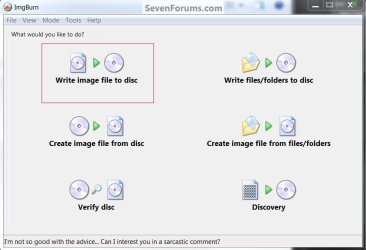
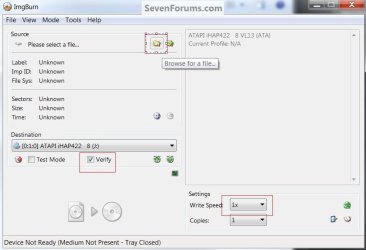
Oooops - guess i didnt read PW website instructions carefully enough.
Just saw any burner software and used Roxio.

Burn ISO file onto a CD using any CD/DVD Burner software

Will use an ISO burner and try again.

Thanks all. D:-)
 

My Computer My Computer

At a glance

Win 7 Home Premium 64bit
OS
Win 7 Home Premium 64bit
Remember to post back with an update.
 

My Computer My Computer

At a glance

W 7 64-bit UltimateIntel Q9550 Yorkfield8GB Dominator 8500C5DATI : XFX 5870
Computer Manufacturer/Model Number
* BFK Customs *
OS
W 7 64-bit Ultimate
CPU
Intel Q9550 Yorkfield
Motherboard
ASUS P5Q Pro
Memory
8GB Dominator 8500C5D
Graphics Card(s)
ATI : XFX 5870
Sound Card
Realtek HD Audio 7-1
Monitor(s) Displays
1x 47" LCD HDMI & 3x 26" LCD HDMI
Screen Resolution
1920x1080P & 1920x1200
Hard Drives
1x 80GB Intel X25-M G2 SSD : 1x 500GB & 1x 640GB WD Caviar Black(s)
PSU
Corsair 620HX
Case
Cooler Master RC-690
Cooling
Tuniq Tower 120, 2x 140mm and 3x 120mm case fans
Keyboard
Microsoft 500
Mouse
Razer Diamondback 3G
Internet Speed
14 Mb/s
Other Info
1x Koutech 3Gb/s SATA HDD Hot Swap Rack
Back
Top