partitions

chhuning

New member
Local time
12:33 AM
Messages
4
hello -

I have an Acer laptop with 320gb hard drive, but for some reason, the os and everything else is in a partition of 50-something gb, which is rapidly filling up. Can I expand that partition without effecting the software that's already on it?

Thanks

Chris
 

My Computer

Computer Manufacturer/Model Number
Acer
OS
windows home premium
Yes. Use "disk management".

Or you may be able to control the growth on the existing 50 gig partition and may not have to expand it.

How much space do you have devoted to System Restore?
 

My Computer

Computer type
PC/Desktop
Computer Manufacturer/Model Number
Ignatz Special; 4 speed manual gearbox; factory air conditioning; one of one
OS
Windows 7 Home Premium SP1, 64-bit
CPU
Intel Skylake i5-6600K, not overclocked
Motherboard
AsRock Z170M Extreme 4, micro ATX
Memory
8 GB HyperX DDR4-2666 (2 x 4 GB)
Graphics Card(s)
none; graphics are integrated on CPU
Sound Card
onboard: Realtek ALC1150; external: USB Behringer UF0-202
Monitor(s) Displays
Dell S2340M 23 inch IPS
Screen Resolution
1600 x 900
Hard Drives
System: Crucial MX100 series SSD, 128 GB;
Data: Samsung Spinpoint 103SJ, 1 TB;
Backup: WD Caviar Green WD30EZRX-00D8PB0, 3 TB
PSU
Rosewill SilentNight 500 watt fanless, semi-modular
Case
Antec Solo II
Cooling
Noctua NH-U12S; Noctua F12 intake, Noctua S12A exhaust
Keyboard
Microsoft 200 6JH-00001 USB
Mouse
Dell or Microsoft optical wired; USB
Antivirus
Microsoft Security Essentials and Malwarebytes Premium
Browser
Pale Moon
Other Info
All fans PWM; speeds at idle: CPU circa 500 rpm; intake circa 600 rpm; exhaust circa 600 rpm; CPU temps 27 idle and 47 C load in a warm room (27 C/81 F) when running Intel Extreme Tuning Utility stress test.
Thanks for the reply.

The recovery partition is 13gb
 

My Computer

Computer Manufacturer/Model Number
Acer
OS
windows home premium
hello -

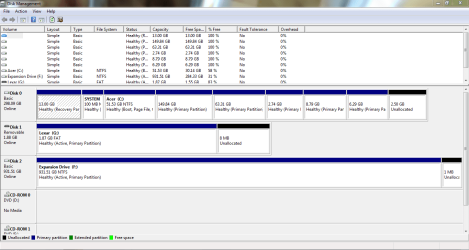
attached is that screenshot

yes, i did make the recovery disks

chris
 

Attachments

  • Capture.PNG
    Capture.PNG
    31.3 KB · Views: 36

My Computer

Computer Manufacturer/Model Number
Acer
OS
windows home premium
Hi again Chris -

I am not sure how you have eight Primary Partitions. We're limited to 4 on an MBR disk, normally on the fourth it offers to create only an Extended wherein you can make as many Logical Sub-Partitions as you wish. But I've never seen eight. It may be an anomaly but it is not correct and may be risky.

Since all of the partitions to the right of C are empty according to Disk mgmt, I would delete each one, then extend C into the space by as much as you want. Partition or Volume - Extend - Windows 7 Forums

If you then want a fourth partition, accept an Extended Logical partition which can safely have more partitions added. If Disk Mgmt errs again then use free Partition Wizard to choose a fourth partition to be Logical. Partition Wizard Use the Bootable CD - Windows 7 Forums

Is there a reason why F is marked Active? I would use Diskpart or Partition Wizard to mark it Inactive as it should not be marked Active unless it has an OS or it risks derailing the MBR should you Repair or reinstall Win7. Partition - Mark as Active

When you are finished, run Disk Check on both HD's to check your file system.
 
Thanks very much!

All working perfectly now
 

My Computer

Computer Manufacturer/Model Number
Acer
OS
windows home premium
Back
Top