Partitions

Copyright

New member
Member
VIP
Local time
2:07 AM
Messages
102
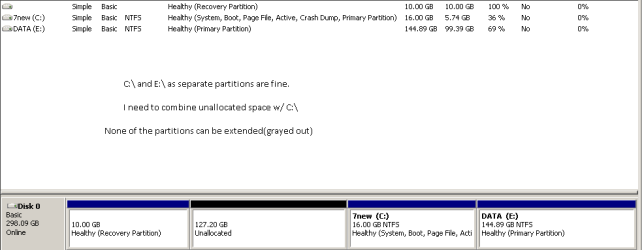
I did a quick install of Windows 7 using install.wim, onto a 16 GB partition. When I made sure everything worked, I deleted the original partition. Now when I go to extend the 16 GB partition, the option is greyed, yet there is like 150 GB of unallocated HDD space. What can I do?

(To fix this I think I need to make the 16 GB partition into a primary partition)
 
Last edited:

My Computer

Computer Manufacturer/Model Number
Dell Laptop Studio 1537
OS
Windows 7 x64 7229
CPU
Intel Core 2 Duo CPU T6400
Memory
4 GB
Graphics Card(s)
Mobile Intel 45 Chipset
Can you post a screen shot of your disk management.
 

My Computer

OS
Win 7
Here it is.
 

Attachments

  • Untitled.png
    Untitled.png
    4.8 KB · Views: 428

My Computer

Computer Manufacturer/Model Number
Dell Laptop Studio 1537
OS
Windows 7 x64 7229
CPU
Intel Core 2 Duo CPU T6400
Memory
4 GB
Graphics Card(s)
Mobile Intel 45 Chipset

My Computer

Computer type
PC/Desktop
Computer Manufacturer/Model Number
Self built custom
OS
64-bit Windows 11 Pro for Workstations
CPU
Intel i7-8700K OC'd to 5 GHz
Motherboard
ASUS ROG Maximus XI Formula Z390
Memory
64 GB (4x16GB) G.SKILL TridentZ RGB DDR4 3600 MHz
Graphics Card(s)
ASUS ROG-STRIX-GTX1080TI-O11G-GAMING
Sound Card
Integrated
Monitor(s) Displays
2 x Samsung Odyssey G7 27"
Screen Resolution
2560x1440
Hard Drives
1TB Samsung 990 PRO M.2,
4TB Samsung 990 PRO PRO M.2,
TerraMaster F8 SSD Plus NAS
PSU
Seasonic Prime Titanium 850W
Case
Thermaltake Core P3
Cooling
Corsair Hydro H115i
Keyboard
Logitech wireless K800
Mouse
Logitech MX Master 4
Internet Speed
2 Gb/s Download and 100 Mb/s Upload
Antivirus
Malwarebyte Anti-Malware Premium
Browser
Google Chrome
Other Info
Logitech Z625 speaker system,
Logitech BRIO 4K Pro webcam,
HP Color LaserJet Pro MFP M477fdn,
APC SMART-UPS RT 1000 XL - SURT1000XLI,
Galaxy S23 Plus phone
Code:
Microsoft Windows [Version 6.1.7100]
Copyright (c) 2009 Microsoft Corporation.  All rights reserv

C:\windows\system32>diskpart

Microsoft DiskPart version 6.1.7100
Copyright (C) 1999-2008 Microsoft Corporation.
On computer: LONGCAT

DISKPART> list disk

  Disk ###  Status         Size     Free     Dyn  Gpt
  --------  -------------  -------  -------  ---  ---
  Disk 0    Online          298 GB   127 GB

DISKPART> list volume

  Volume ###  Ltr  Label        Fs     Type        Size
  ----------  ---  -----------  -----  ----------  -------
  Volume 0     F                       DVD-ROM         0 B
  Volume 1     C   7new         NTFS   Partition     15 GB
  Volume 2     E   DATA         NTFS   Partition    144 GB
  Volume 3         PQSERVICE    NTFS   Partition     10 GB

DISKPART> select volume 1

Volume 1 is the selected volume.

DISKPART> extend

Virtual Disk Service error:
The size of the extent is less than the minimum.
What now? :S. If I have to reformat to fix this, I guess I will.
 

My Computer

Computer Manufacturer/Model Number
Dell Laptop Studio 1537
OS
Windows 7 x64 7229
CPU
Intel Core 2 Duo CPU T6400
Memory
4 GB
Graphics Card(s)
Mobile Intel 45 Chipset
Hello Copyright.


You could always use a third party manager like Paragon Partition Manager, I believe they even have a free trial, it'd be worth checking out.


Later ;) Ted
 

My Computer

Computer Manufacturer/Model Number
* BFK Customs *
OS
W 7 64-bit Ultimate
CPU
Intel Q9550 Yorkfield
Motherboard
ASUS P5Q Pro
Memory
8GB Dominator 8500C5D
Graphics Card(s)
ATI : XFX 5870
Sound Card
Realtek HD Audio 7-1
Monitor(s) Displays
1x 47" LCD HDMI & 3x 26" LCD HDMI
Screen Resolution
1920x1080P & 1920x1200
Hard Drives
1x 80GB Intel X25-M G2 SSD : 1x 500GB & 1x 640GB WD Caviar Black(s)
PSU
Corsair 620HX
Case
Cooler Master RC-690
Cooling
Tuniq Tower 120, 2x 140mm and 3x 120mm case fans
Keyboard
Microsoft 500
Mouse
Razer Diamondback 3G
Internet Speed
14 Mb/s
Other Info
1x Koutech 3Gb/s SATA HDD Hot Swap Rack
You may be able to do so with a 3rd party partitioning program like the one Ted mentioned.

If you decide to do a clean install, then you can just delete the 7new partition to combine the unallocated space to reinstall Windows 7 on without having to wipe out your Data partition as well in Custom (advances) and Drive options (advanced).
 

My Computer

Computer type
PC/Desktop
Computer Manufacturer/Model Number
Self built custom
OS
64-bit Windows 11 Pro for Workstations
CPU
Intel i7-8700K OC'd to 5 GHz
Motherboard
ASUS ROG Maximus XI Formula Z390
Memory
64 GB (4x16GB) G.SKILL TridentZ RGB DDR4 3600 MHz
Graphics Card(s)
ASUS ROG-STRIX-GTX1080TI-O11G-GAMING
Sound Card
Integrated
Monitor(s) Displays
2 x Samsung Odyssey G7 27"
Screen Resolution
2560x1440
Hard Drives
1TB Samsung 990 PRO M.2,
4TB Samsung 990 PRO PRO M.2,
TerraMaster F8 SSD Plus NAS
PSU
Seasonic Prime Titanium 850W
Case
Thermaltake Core P3
Cooling
Corsair Hydro H115i
Keyboard
Logitech wireless K800
Mouse
Logitech MX Master 4
Internet Speed
2 Gb/s Download and 100 Mb/s Upload
Antivirus
Malwarebyte Anti-Malware Premium
Browser
Google Chrome
Other Info
Logitech Z625 speaker system,
Logitech BRIO 4K Pro webcam,
HP Color LaserJet Pro MFP M477fdn,
APC SMART-UPS RT 1000 XL - SURT1000XLI,
Galaxy S23 Plus phone
Hi there

There's a free one you can download directly

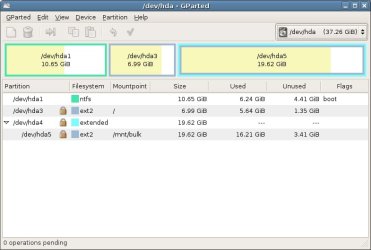
GPARTED.

GParted -- Live CD/USB/PXE/HD

This can extend and manipulate partitions "on the fly" as it's a BOOTABLE "Live CD".

Works just like the old Partitionmagic software from Powerquest (before Symantec bought them out and bollixed it wholesale).

Don't worry about the Linux OS -- It's a GUI which even the most dedicated Windows user would have NO trouble in using

You get images of your partitions -- just use the mouse to resize them. The menu system is pretty foolproof as well. (Delete, Create etc etc).

Enc screenshot.

You can also create a USB bootable version as well.

(If you've ever used the Acronis Backup software from the bootable media you might not have also realised that it actually boots up a small Linux kernel before presenting the user with the GUI so don't be put off by the fact that GPARTED also boots up a small Linux kernel before going into the graphical mode).

Cheers
jimbo
 

Attachments

  • gparted.jpg
    gparted.jpg
    38.3 KB · Views: 182

My Computer

Computer type
PC/Desktop
Computer Manufacturer/Model Number
Custom built, several laptops HP/ASUS
OS
Linux CENTOS 7 / various Windows OS'es and servers
CPU
Intel i7 Intel i5
Memory
8GB, 16GB
Graphics Card(s)
On Motherboard
Sound Card
Realtek HD audio
Monitor(s) Displays
Apple Cinema display, Samsung LCD
Screen Resolution
1920 X 1080
Hard Drives
4 X 1TB SATA
Mouse
Toshiba wireless laser
Internet Speed
> 20MB up

My Computers

System One System Two

  • Computer type
    PC/Desktop
    OS
    7 X64
    CPU
    i5 8400
    Motherboard
    gigabyte b365m ds3h
    Memory
    2x8gb 3200mhz
    Hard Drives
    various
    PSU
    pure power 11 400w cm
    Case
    Coolermaster
    Cooling
    cryorig m9i
  • Computer type
    PC/Desktop
    OS
    7x64
    CPU
    g5400
    Motherboard
    ga b365m ds3h
    Memory
    8gb ddr4 2400
    PSU
    xfx pro 450w
Thanks guys, it worked.
 

My Computer

Computer Manufacturer/Model Number
Dell Laptop Studio 1537
OS
Windows 7 x64 7229
CPU
Intel Core 2 Duo CPU T6400
Memory
4 GB
Graphics Card(s)
Mobile Intel 45 Chipset
Thanks for the update Copyright.

Glad it worked for you.:D
 

My Computers

System One System Two

  • Computer type
    PC/Desktop
    OS
    7 X64
    CPU
    i5 8400
    Motherboard
    gigabyte b365m ds3h
    Memory
    2x8gb 3200mhz
    Hard Drives
    various
    PSU
    pure power 11 400w cm
    Case
    Coolermaster
    Cooling
    cryorig m9i
  • Computer type
    PC/Desktop
    OS
    7x64
    CPU
    g5400
    Motherboard
    ga b365m ds3h
    Memory
    8gb ddr4 2400
    PSU
    xfx pro 450w
Back
Top