Passcode of device when connecting via Bluetooth,

Jamal NUMAN

New member
Member
VIP
Local time
8:30 AM
Messages
144
Passcode of device when connecting via Bluetooth,

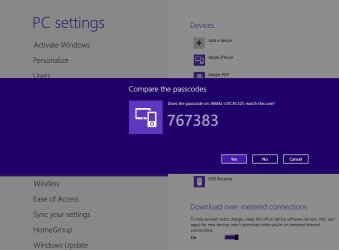
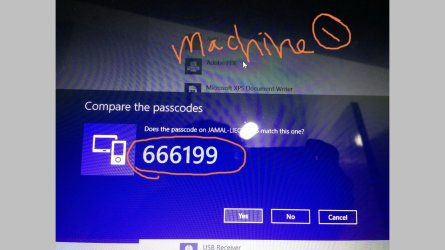
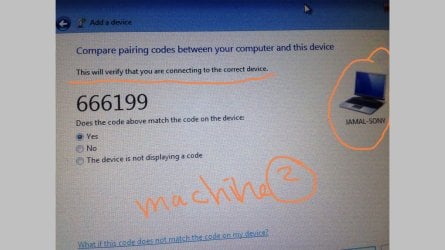
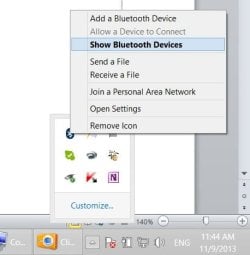
I wanted to connect my laptop (sony with windows 8) with tablet GPS (lieca CS25with windows7) but the system requires the passcode (attached).


I couldn’t figure out how to find out the Passcode of the GPS (lieca CS25with windows7)? Can this be found by windows 7?

Thank you

Best

Jamal
 

Attachments
  • Clip_181.jpg
    Clip_181.jpg
    22.3 KB · Views: 6
  • Clip_178.jpg
    Clip_178.jpg
    50.6 KB · Views: 1
  • Clip_179.jpg
    Clip_179.jpg
    43.4 KB · Views: 0

My Computer

OS
Windows 7 Ultimate x64
If you read the link it mentions:Double click the device you want to connect to and wait while a connection is established. You will be presented with a passcode that you must either verify as being the same on the other device (most likely if you are connecting to another computer), or enter the code on the device you are connecting to (most likely in case you are connecting to a phone).

The directions look easy enough but I personally haven't had a chance to work with Bluetooth so I can't test this out myself.

Forget Bluetooth Driver For Windows 8, Connect & Manage Devices Easily
 

My Computer

Computer type
PC/Desktop
Computer Manufacturer/Model Number
Home built
OS
Windows 7 Ult, Windows 8.1 Pro,
CPU
Q9650-4.275GHz, E8600 4.5GHz, E6750-3.8GHz
Motherboard
Evga 780i FTW
Memory
G.Skill PC2 9600 1200Mhz 5 5 5 15 2T
Graphics Card(s)
GTX480
Sound Card
Asus Xonar D2
Monitor(s) Displays
HannsG
Screen Resolution
1680X1050
Hard Drives
GSkill Phoenix Pro 120GB SSD
PSU
ThermalTake Toughpower 1000Watt modular
Case
ThermalTake XaserV
Cooling
Xigmatek S1283
Keyboard
Logitech G15
Mouse
Logitech G9
Internet Speed
T1
If you read the link it mentions:Double click the device you want to connect to and wait while a connection is established. You will be presented with a passcode that you must either verify as being the same on the other device (most likely if you are connecting to another computer), or enter the code on the device you are connecting to (most likely in case you are connecting to a phone).

The directions look easy enough but I personally haven't had a chance to work with Bluetooth so I can't test this out myself.

Forget Bluetooth Driver For Windows 8, Connect & Manage Devices Easily

Many thanks chev65 for the help,

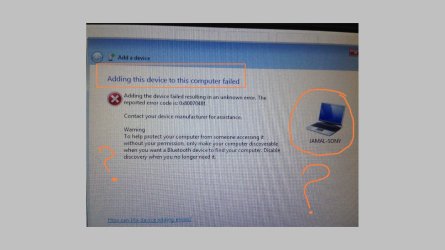
I followed the valuable steps you have already provided but the connection fails. Pleas,e have a look on the attached screenshots.


What might be the issue here?
 

Attachments

  • Clip_235.jpg
    Clip_235.jpg
    127.6 KB · Views: 0
  • Clip_234.jpg
    Clip_234.jpg
    223.5 KB · Views: 0
  • Clip_233.jpg
    Clip_233.jpg
    161.3 KB · Views: 0

My Computer

OS
Windows 7 Ultimate x64
Back
Top