Password problem

philippo

New member
Member
Local time
4:06 PM
Messages
25
Location
Puget Sound, AKA Paradise
I just hatched my first virtual machine in my 64 bit Win7 Ultimate. (It seemed a bit strange, I could not install a 64 bit OS because the error message came up stating something along the lines of: "This system does not support 64 bit...?" )

Haven't a clue why THAT happened, but I went and installed my old copy of 32 bit Vista and it seemed to work fine...until I installed the "integration features".

That too seemed as it should EXCEPT -- The next time I attempted to open that machine it wanted my Windows 7 login password...which never existed -- I NEVER had one, never set one up, never use them, actually.

So what gives? What do I do next?
 

My Computer

Computer Manufacturer/Model Number
Dell Inspiron 530
OS
Windows 7 Ultimate 64 bit
CPU
Intel Quad Core Q6600 @ 2.40 GHz
Memory
3.00 GB RAM
Graphics Card(s)
NVIDIA GeForce 8300 GS DirectX 10
Screen Resolution
1920x1080
Hard Drives
Total size of hard disk(s) 932 GB
Disk partition (C:) 353 GB Free (466 GB Total)
Disk partition (D:) 243 GB Free (466 GB Total)
Internet Speed
f***in' dialup!!
Virtual PC does not support 64-bit guest operating systems. All OS's installed on a Virtual PC virtual machine must be 32-bit, even when Virtual PC is running on a 64-bit host computer.

All VPC virtual machines use emulated 32-bit hardware, not the hardware of your host.

If integration features are enabled, you can not login to any Virtual PC virtual machine without a password. Using password in all user accounts is obligatory if integration features are enabled.

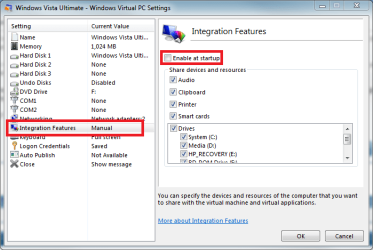
You have to turn integration off, login to virtual machine using account without a password, create a password, re-enable integration and reboot the virtual machine.

You can turn integration off in your virtual machines settings:

VPC_IntFeat_AutoEnable.png

Kari
 

My Computer

Computer type
Laptop
Computer Manufacturer/Model Number
HP ENVY 17-1150eg
OS
Windows 10 Pro x64 EN-GB
CPU
1.6 GHz Intel Core i7-720QM Processor
Memory
6 GB
Graphics Card(s)
ATI Mobility Radeon HD 5850 Graphics
Sound Card
Beats sound system with integrated subwoofer
Monitor(s) Displays
17" laptop display, 22" LED and 32" Full HD TV through HDMI
Screen Resolution
1600*900 (1), 1920*1080 (2&3)
Hard Drives
Internal: 2 x 500 GB SATA Hard Disk Drive 7200 rpm
External: 2TB for backups, 3TB USB3 network drive for media
Cooling
As Envy runs a bit warm, I have it on a Cooler Master pad
Keyboard
Logitech diNovo Media Desktop Laser (bluetooth)
Mouse
Logitech Performance Mouse MX
Internet Speed
50/10 Mbps VDSL
Antivirus
Windows Defender 4.3.9431.0
Browser
Maxthon 3.5.2., IE11
Thanks...of course I also saw your identical answer to an earlier poster with the same question -- sorry for the impatient duplication of the question
 

My Computer

Computer Manufacturer/Model Number
Dell Inspiron 530
OS
Windows 7 Ultimate 64 bit
CPU
Intel Quad Core Q6600 @ 2.40 GHz
Memory
3.00 GB RAM
Graphics Card(s)
NVIDIA GeForce 8300 GS DirectX 10
Screen Resolution
1920x1080
Hard Drives
Total size of hard disk(s) 932 GB
Disk partition (C:) 353 GB Free (466 GB Total)
Disk partition (D:) 243 GB Free (466 GB Total)
Internet Speed
f***in' dialup!!
Never mind. Main thing is you get answers to your questions, issues solved.

Kari
 

My Computer

Computer type
Laptop
Computer Manufacturer/Model Number
HP ENVY 17-1150eg
OS
Windows 10 Pro x64 EN-GB
CPU
1.6 GHz Intel Core i7-720QM Processor
Memory
6 GB
Graphics Card(s)
ATI Mobility Radeon HD 5850 Graphics
Sound Card
Beats sound system with integrated subwoofer
Monitor(s) Displays
17" laptop display, 22" LED and 32" Full HD TV through HDMI
Screen Resolution
1600*900 (1), 1920*1080 (2&3)
Hard Drives
Internal: 2 x 500 GB SATA Hard Disk Drive 7200 rpm
External: 2TB for backups, 3TB USB3 network drive for media
Cooling
As Envy runs a bit warm, I have it on a Cooler Master pad
Keyboard
Logitech diNovo Media Desktop Laser (bluetooth)
Mouse
Logitech Performance Mouse MX
Internet Speed
50/10 Mbps VDSL
Antivirus
Windows Defender 4.3.9431.0
Browser
Maxthon 3.5.2., IE11
Back
Top