Password request from Win7

gingem

New member
Local time
4:30 PM
Messages
11
Location
Howell New Jersey
I have just purchased my first win7 system and I am trying to connect it to a hardwired network with 8 other XP Pro SP3 systems. My problem is that the win7 machine sees all of the XP machines and I can go to each one and transfer files. The XP machines see the Win7 machine but I cannot connect to it, it keeps asking for a password. All systems are using Administrator rights. Any idea where this password comes from? I have tried everything.

Bill Meyer
 

My Computer

Computer Manufacturer/Model Number
Custom
OS
Win7 & XP Pro
CPU
INTEL I7 2.86
Motherboard
Asus P7P55D
Memory
8GB
Graphics Card(s)
Asus GTX480
Monitor(s) Displays
Asus 27.5, Gateway HD 24"
Screen Resolution
1920x1200
Hard Drives
WTD 1.0TB
You need to disable simple file sharing on the XP machines. Also check under the Advanced Sharing options in Win 7 and make sure that password protected sharing is turned off on both the Work/Home page and the public file sharing page. Don't forget to add "Everyone" to the sharing permissions on the Windows 7 machine.

After going through all of that if you are still having file access problems try doing this registry adjustment on the Win 7 machine with the problem.

Solution is really easy just modify one key in registry:
HKEY_LOCAL_MACHINE\SOFTWARE\Microsoft\Windows\CurrentVersion\Policies\System
create or modify 32-bit DWORD: LocalAccountTokenFilterPolicy
set the value to: 1

You can also try the following procedure on the XP machine.
Goto... Control Panel > Administrative Tools > Local Security Policy > Local Policies > Security Options

Scroll down to... Network Access: Sharing and security model for local accounts

Select... Guest only and not Classic. I checked on XP machine and Guest seems to be the default.

Suddenly those silly promps for user name and password go away when accessing Win 7 share from XP machine and it behaves more like XP file sharing without asking for Usernames and Passwords.

It will not cause security risk (except all users on same network can access shared files).
 
Last edited:

My Computer

Computer type
PC/Desktop
Computer Manufacturer/Model Number
Home built
OS
Windows 7 Ult, Windows 8.1 Pro,
CPU
Q9650-4.275GHz, E8600 4.5GHz, E6750-3.8GHz
Motherboard
Evga 780i FTW
Memory
G.Skill PC2 9600 1200Mhz 5 5 5 15 2T
Graphics Card(s)
GTX480
Sound Card
Asus Xonar D2
Monitor(s) Displays
HannsG
Screen Resolution
1680X1050
Hard Drives
GSkill Phoenix Pro 120GB SSD
PSU
ThermalTake Toughpower 1000Watt modular
Case
ThermalTake XaserV
Cooling
Xigmatek S1283
Keyboard
Logitech G15
Mouse
Logitech G9
Internet Speed
T1
Hi Chev

Thank you for the replay and I check the settings I have and except for the guest setting on the XP systems everything was fine. I am not having problems accessing the XP systems from the Win7 system. My problem is that I might be having a mental problem between the new Win7 format and the XP format.

I was trying to share the C drive on the Win7 machine like I have always done on the XP machines. I do this because I have a folder that I keep all of my data in and I usually copy this to any new computer so that all of my systems appear to have the same data in the same place. At night these systems sync to each other and I have all systems as backups. It works great and I have been doing this for years.

Is there some kind of new command to copy a directory from the XP machine to the Win7 machine?
 

My Computer

Computer Manufacturer/Model Number
Custom
OS
Win7 & XP Pro
CPU
INTEL I7 2.86
Motherboard
Asus P7P55D
Memory
8GB
Graphics Card(s)
Asus GTX480
Monitor(s) Displays
Asus 27.5, Gateway HD 24"
Screen Resolution
1920x1200
Hard Drives
WTD 1.0TB
Well that is a completely different problem altogether. :confused:

If you really need to share the C drive you can but it's not a good idea from a security standpoint because an attacker would have full control if they got into your system. I'm not sure about copying the directory but you can share the entire drive if thats what you mean.

You would be better served by sharing the entire User folder instead but if you insist on sharing the entire C drive you can do that also.

Assuming that all your networked machines are part of the same workgroup with sharing enabled and working between them.

To share the entire drive:
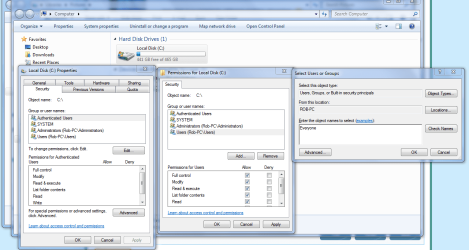
Open My Computer -> right click Local Disk C or which ever drive letter your drive is using. Right click on the drive you need to share-> select Properties -> select Security tab -> click Edit button -> click Add button -> enter the name of the User you want to set Security permissions (it is the same user name you've set the sharing permissions for, ex. Everyone will set the read permissions to every user. Put check marks in the boxes for full access and control -> click OK hit apply-> select the desired permissions -> click OK -> wait while permissions are set -> and your Done.

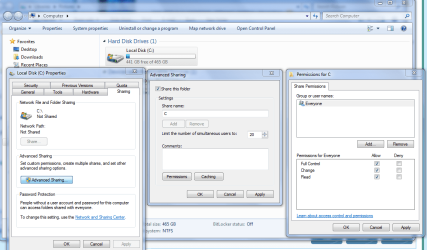
You will also need to use to access the sharing tab Sharing>Advanced put a check in the box to share the drive, then click on the permissions tab and "add Everyone" then use the check boxes to allow Everyone full access. Hit the apply button on both windows.
 

Attachments

  • Sharing C drive EVERYONE.PNG
    Sharing C drive EVERYONE.PNG
    67.1 KB · Views: 49
  • Sharing permissions EVERYONE.PNG
    Sharing permissions EVERYONE.PNG
    66.1 KB · Views: 31
Last edited:

My Computer

Computer type
PC/Desktop
Computer Manufacturer/Model Number
Home built
OS
Windows 7 Ult, Windows 8.1 Pro,
CPU
Q9650-4.275GHz, E8600 4.5GHz, E6750-3.8GHz
Motherboard
Evga 780i FTW
Memory
G.Skill PC2 9600 1200Mhz 5 5 5 15 2T
Graphics Card(s)
GTX480
Sound Card
Asus Xonar D2
Monitor(s) Displays
HannsG
Screen Resolution
1680X1050
Hard Drives
GSkill Phoenix Pro 120GB SSD
PSU
ThermalTake Toughpower 1000Watt modular
Case
ThermalTake XaserV
Cooling
Xigmatek S1283
Keyboard
Logitech G15
Mouse
Logitech G9
Internet Speed
T1
Tried those and still no luck. I think I might have to set up a virtual XP drive and do it that way.
 

My Computer

Computer Manufacturer/Model Number
Custom
OS
Win7 & XP Pro
CPU
INTEL I7 2.86
Motherboard
Asus P7P55D
Memory
8GB
Graphics Card(s)
Asus GTX480
Monitor(s) Displays
Asus 27.5, Gateway HD 24"
Screen Resolution
1920x1200
Hard Drives
WTD 1.0TB
Back
Top