
Password - Require on Wakeup

How to Enable or Disable Require Password on Wakeup in Windows 7


   Information
Seems a needless extra step to have to log on every time your computer resumes from standby, suspend, or hibernate. This will show you how to resume from suspend directly to the desktop without requiring a password on wakeup.


OPTION ONE

Through Power Options


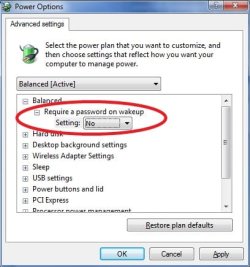
1. Open the Power Options Advanced Plan Settings.

2. Click on the Change settings that are currently unavailable link.

3. If prompted by UAC, then click on Yes.

4. To Disable Require Password on Wakeup
A) Change the Require a password on wakeup setting to NO , and click on OK.
4.jpg
5. To Enable Require Password on Wakeup
A) Change the Require a password on wakeup setting to YES , and click on OK.
6. Close the rest of the windows you have opened.


OPTION TWO

Through System Settings


NOTE: This option will change the password protection on wakeup setting in all power plans in your user account.
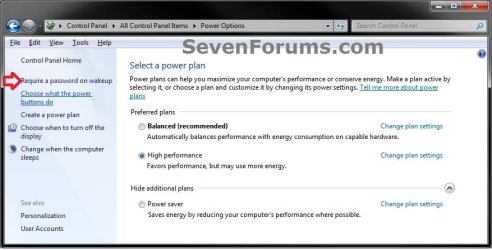
1. Open the Control Panel (Icons View), and click on the Power Options icon.

2. In the left pane, click on the Require a password on wakeup link. (see screenshot below)
System_Settings-1.jpg
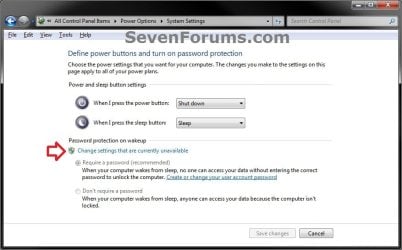
3. Click on the Change settings that are currently unavailable link. (see screenshot below)
System_Settings-2_UAC.jpg
4. If prompted by UAC, then click on Yes (if administrator) or enter administrator's password (if standard user).

5. To Disable Require Password on Wakeup
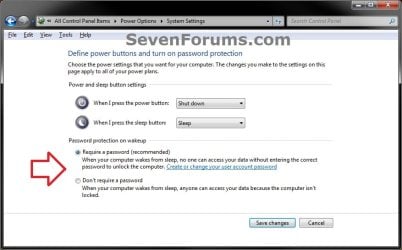
A) Select (dot) Don't Require a password. (see screenshot below step 7)

B) Go to step 7.
6. To Enable Require Password on Wakeup
A) Select (dot) Require a password. (see screenshot below step 7)
7. Click on the Save changes button. (see screenshot below)
NOTE: The Save changes button will remain grayed out until you make a change in the settings.
System_Settings-3.jpg
8. You can close the Power Options window when done. (see screenshot below step 2)


OPTION THREE

Through an Elevated Command Prompt


1. Open an elevated command prompt.

2. To Disable Require Password on Wakeup
WARNING: If you've created custom power profiles you'll have to get the GUID for the one you want to change from powercfg -l first and substitute it for the <profile> parameter in these commands below.
A) In the elevated command prompt type these commands below and press enter following each one.
Code:
powercfg -SETACVALUEINDEX [B][COLOR=red]<profile>[/COLOR][/B] SUB_NONE CONSOLELOCK 0
powercfg -SETDCVALUEINDEX [B][COLOR=red]<profile>[/COLOR][/B] SUB_NONE CONSOLELOCK 0
NOTE: where <profile> is SCHEME_BALANCED, SCHEME_MAX, SCHEME_MIN or a custom profile GUID from powercfg -l


Last edited by a moderator:
I've never looked into Bitlocker since it's only available in enterprise-level and pirated windows installs. None of the computers I've encountered in my life had a TPM chip, so I fail to see any advantages (other than maybe performance?) to using one or the other. And how does a pre-boot auth bitlocker setup help avoid entering the windows password when resuming from hibernation? I don't get the relevance of your post.
 

My Computer

OS
Windows 7
I've never looked into Bitlocker since it's only available in enterprise-level and pirated windows installs. None of the computers I've encountered in my life had a TPM chip, so I fail to see any advantages (other than maybe performance?) to using one or the other. And how does a pre-boot auth bitlocker setup help avoid entering the windows password when resuming from hibernation? I don't get the relevance of your post.

TPM not required. You won't have to enter passwords twice.
 

My Computer

Computer type
Laptop
Computer Manufacturer/Model Number
Apple
OS
El Capitan / Windows 10
CPU
i7-4980HQ
Memory
16GB
Graphics Card(s)
Iris 5200
Something like this:
Code:
@echo off
for /f "tokens=4 delims= " %%i in ('powercfg -getactivescheme') do set my_var=%%i
echo Current GUID: %my_var%
 powercfg -setacvalueindex %my_var% sub_none CONSOLELOCK 0
 powercfg -setdcvalueindex %my_var% sub_none CONSOLELOCK 0
 

My Computer

OS
windows7 ultimate x32
CPU
DualCore Intel Core 2 Duo E8400, 3000 MHz (9 x 333)
Motherboard
ASRock 4Core1333-GLAN (3 PCI,1 PCI-E x16,4 DDR2 DIMM...)
Memory
4Gb (1x4 DDR2-800 DDR2 SDRAM)
Graphics Card(s)
NVIDIA GeForce 9600 GT (512 mb)
Sound Card
onboard
Monitor(s) Displays
lg flatron w2242t
Screen Resolution
1680 x 1050
Hard Drives
WDC WD5000AAJS-00YFA0 ATA Device
PSU
-
Case
-
Cooling
-
Other Info
d-link dir100
Is there a way to only disable the password require at startup and leaving it enabled on wakeup ??

Basically, I don't want to click on my profile picture and then enter my password everytime I reboot or start my computer, I just want to hit "Restart" and nothing else. As far as the wakeup mode, I want it to have just the way it is by default: click in profile picture and enter password.

Anyone knows the secret ??
 
Last edited:

My Computer

OS
windows 7 home premium 64bit
Hello conhaqu,

You could use the tutorial below to set Windows to automatically log on to a user account at startup, then use the tutorial on the first page to enable password on wakeup.

http://www.sevenforums.com/tutorials/377-log-automatically-startup.html

Of course the only problem with doing this is that someone would only need to restart the computer to be logged in to your user account to bypass having to enter a password at wakeup.

Hope this helps, :)
Shawn
 

My Computer

Computer type
PC/Desktop
Computer Manufacturer/Model Number
Self built custom
OS
64-bit Windows 11 Pro for Workstations
CPU
Intel i7-8700K OC'd to 5 GHz
Motherboard
ASUS ROG Maximus XI Formula Z390
Memory
64 GB (4x16GB) G.SKILL TridentZ RGB DDR4 3600 MHz
Graphics Card(s)
ASUS ROG-STRIX-GTX1080TI-O11G-GAMING
Sound Card
Integrated
Monitor(s) Displays
2 x Samsung Odyssey G7 27"
Screen Resolution
2560x1440
Hard Drives
1TB Samsung 990 PRO M.2,
4TB Samsung 990 PRO PRO M.2,
TerraMaster F8 SSD Plus NAS
PSU
Seasonic Prime Titanium 850W
Case
Thermaltake Core P3
Cooling
Corsair Hydro H115i
Keyboard
Logitech wireless K800
Mouse
Logitech MX Master 4
Internet Speed
2 Gb/s Download and 100 Mb/s Upload
Antivirus
Malwarebyte Anti-Malware Premium
Browser
Google Chrome
Other Info
Logitech Z625 speaker system,
Logitech BRIO 4K Pro webcam,
HP Color LaserJet Pro MFP M477fdn,
APC SMART-UPS RT 1000 XL - SURT1000XLI,
Galaxy S23 Plus phone
Thank you so much Brink, that's exactly what I was looking for :). You're the best!

Btw, do you have any tutorial as to help explaining why my taskbar icons (ie, windows explorer....) sometimes turn blank while windows is finishing logging into the desktop?

Much appreciated for your help and time :)
 

My Computer

OS
windows 7 home premium 64bit
You're most welcome conhaqu.

Could just be a glitch while drivers and such are being started. If the icon doesn't return to normal, then rebuilding the icon cache may help.
 

My Computer

Computer type
PC/Desktop
Computer Manufacturer/Model Number
Self built custom
OS
64-bit Windows 11 Pro for Workstations
CPU
Intel i7-8700K OC'd to 5 GHz
Motherboard
ASUS ROG Maximus XI Formula Z390
Memory
64 GB (4x16GB) G.SKILL TridentZ RGB DDR4 3600 MHz
Graphics Card(s)
ASUS ROG-STRIX-GTX1080TI-O11G-GAMING
Sound Card
Integrated
Monitor(s) Displays
2 x Samsung Odyssey G7 27"
Screen Resolution
2560x1440
Hard Drives
1TB Samsung 990 PRO M.2,
4TB Samsung 990 PRO PRO M.2,
TerraMaster F8 SSD Plus NAS
PSU
Seasonic Prime Titanium 850W
Case
Thermaltake Core P3
Cooling
Corsair Hydro H115i
Keyboard
Logitech wireless K800
Mouse
Logitech MX Master 4
Internet Speed
2 Gb/s Download and 100 Mb/s Upload
Antivirus
Malwarebyte Anti-Malware Premium
Browser
Google Chrome
Other Info
Logitech Z625 speaker system,
Logitech BRIO 4K Pro webcam,
HP Color LaserJet Pro MFP M477fdn,
APC SMART-UPS RT 1000 XL - SURT1000XLI,
Galaxy S23 Plus phone
Password - Require on Wakeup

Hi everyone,

I already enabled require password on wake up but my pc is still not password locked when it wakes up from sleep or resumes from hibernation. it only does on start up.

Please help.
 

My Computer

Computer type
Laptop
Computer Manufacturer/Model Number
HP
OS
Windows 7 Home Premium x64
CPU
Intel Pentium B940 @ 2.00GHz 2.00GHz
Motherboard
DMI/Hewlett-Packard HP Pavilion g4 Notebook
Memory
4.00 gb
Graphics Card(s)
Intel(R) HD Graphics Family
Hard Drives
WDC WD3200BEVT-60A23T0
Antivirus
Microsoft Security Essentials
Browser
Internet Explorer/Mozilla Firefox

My Computer

Computer type
PC/Desktop
Computer Manufacturer/Model Number
Self built custom
OS
64-bit Windows 11 Pro for Workstations
CPU
Intel i7-8700K OC'd to 5 GHz
Motherboard
ASUS ROG Maximus XI Formula Z390
Memory
64 GB (4x16GB) G.SKILL TridentZ RGB DDR4 3600 MHz
Graphics Card(s)
ASUS ROG-STRIX-GTX1080TI-O11G-GAMING
Sound Card
Integrated
Monitor(s) Displays
2 x Samsung Odyssey G7 27"
Screen Resolution
2560x1440
Hard Drives
1TB Samsung 990 PRO M.2,
4TB Samsung 990 PRO PRO M.2,
TerraMaster F8 SSD Plus NAS
PSU
Seasonic Prime Titanium 850W
Case
Thermaltake Core P3
Cooling
Corsair Hydro H115i
Keyboard
Logitech wireless K800
Mouse
Logitech MX Master 4
Internet Speed
2 Gb/s Download and 100 Mb/s Upload
Antivirus
Malwarebyte Anti-Malware Premium
Browser
Google Chrome
Other Info
Logitech Z625 speaker system,
Logitech BRIO 4K Pro webcam,
HP Color LaserJet Pro MFP M477fdn,
APC SMART-UPS RT 1000 XL - SURT1000XLI,
Galaxy S23 Plus phone
Thanks Shawn.
I have password enabled for my administrator account.
The funny thing is dt d whole thing was wking perfectly and then suddenly stopped. I have also repeatedly enabled 'require a password on wake up' from the power options settings and it still doesnt wk.
I will appreciate further assistance.

...Kolbeval
 

My Computer

Computer type
Laptop
Computer Manufacturer/Model Number
HP
OS
Windows 7 Home Premium x64
CPU
Intel Pentium B940 @ 2.00GHz 2.00GHz
Motherboard
DMI/Hewlett-Packard HP Pavilion g4 Notebook
Memory
4.00 gb
Graphics Card(s)
Intel(R) HD Graphics Family
Hard Drives
WDC WD3200BEVT-60A23T0
Antivirus
Microsoft Security Essentials
Browser
Internet Explorer/Mozilla Firefox
Thanks Shawn.
I have password enabled for my administrator account.
The funny thing is dt d whole thing was wking perfectly and then suddenly stopped. I have also repeatedly enabled 'require a password on wake up' from the power options settings and it still doesnt wk.
I will appreciate further assistance.

...Kolbeval

Odd. You might also check to see if this may be the resume from screen saver not set to require a password if screen saver is turned on.

http://www.sevenforums.com/tutorials/15322-screen-saver-password-protection-enable-disable.html
 
Last edited:

My Computer

Computer type
PC/Desktop
Computer Manufacturer/Model Number
Self built custom
OS
64-bit Windows 11 Pro for Workstations
CPU
Intel i7-8700K OC'd to 5 GHz
Motherboard
ASUS ROG Maximus XI Formula Z390
Memory
64 GB (4x16GB) G.SKILL TridentZ RGB DDR4 3600 MHz
Graphics Card(s)
ASUS ROG-STRIX-GTX1080TI-O11G-GAMING
Sound Card
Integrated
Monitor(s) Displays
2 x Samsung Odyssey G7 27"
Screen Resolution
2560x1440
Hard Drives
1TB Samsung 990 PRO M.2,
4TB Samsung 990 PRO PRO M.2,
TerraMaster F8 SSD Plus NAS
PSU
Seasonic Prime Titanium 850W
Case
Thermaltake Core P3
Cooling
Corsair Hydro H115i
Keyboard
Logitech wireless K800
Mouse
Logitech MX Master 4
Internet Speed
2 Gb/s Download and 100 Mb/s Upload
Antivirus
Malwarebyte Anti-Malware Premium
Browser
Google Chrome
Other Info
Logitech Z625 speaker system,
Logitech BRIO 4K Pro webcam,
HP Color LaserJet Pro MFP M477fdn,
APC SMART-UPS RT 1000 XL - SURT1000XLI,
Galaxy S23 Plus phone
Thanks Brink.
I have done what you suggested but still haven't resolved this issue. I feel however that a system cleaner/uninstaller I installed and ran on my system around the time this problem started might have deleted a registry entry leading to this problem.
I will sincerely appreciate further assistance.
Many thanks.
 

My Computer

Computer type
Laptop
Computer Manufacturer/Model Number
HP
OS
Windows 7 Home Premium x64
CPU
Intel Pentium B940 @ 2.00GHz 2.00GHz
Motherboard
DMI/Hewlett-Packard HP Pavilion g4 Notebook
Memory
4.00 gb
Graphics Card(s)
Intel(R) HD Graphics Family
Hard Drives
WDC WD3200BEVT-60A23T0
Antivirus
Microsoft Security Essentials
Browser
Internet Explorer/Mozilla Firefox

My Computer

Computer type
PC/Desktop
Computer Manufacturer/Model Number
Self built custom
OS
64-bit Windows 11 Pro for Workstations
CPU
Intel i7-8700K OC'd to 5 GHz
Motherboard
ASUS ROG Maximus XI Formula Z390
Memory
64 GB (4x16GB) G.SKILL TridentZ RGB DDR4 3600 MHz
Graphics Card(s)
ASUS ROG-STRIX-GTX1080TI-O11G-GAMING
Sound Card
Integrated
Monitor(s) Displays
2 x Samsung Odyssey G7 27"
Screen Resolution
2560x1440
Hard Drives
1TB Samsung 990 PRO M.2,
4TB Samsung 990 PRO PRO M.2,
TerraMaster F8 SSD Plus NAS
PSU
Seasonic Prime Titanium 850W
Case
Thermaltake Core P3
Cooling
Corsair Hydro H115i
Keyboard
Logitech wireless K800
Mouse
Logitech MX Master 4
Internet Speed
2 Gb/s Download and 100 Mb/s Upload
Antivirus
Malwarebyte Anti-Malware Premium
Browser
Google Chrome
Other Info
Logitech Z625 speaker system,
Logitech BRIO 4K Pro webcam,
HP Color LaserJet Pro MFP M477fdn,
APC SMART-UPS RT 1000 XL - SURT1000XLI,
Galaxy S23 Plus phone
Have checked this Brink yet the problem persists. Thanks any way!
 

My Computer

Computer type
Laptop
Computer Manufacturer/Model Number
HP
OS
Windows 7 Home Premium x64
CPU
Intel Pentium B940 @ 2.00GHz 2.00GHz
Motherboard
DMI/Hewlett-Packard HP Pavilion g4 Notebook
Memory
4.00 gb
Graphics Card(s)
Intel(R) HD Graphics Family
Hard Drives
WDC WD3200BEVT-60A23T0
Antivirus
Microsoft Security Essentials
Browser
Internet Explorer/Mozilla Firefox
Back
Top