Password Reset Disk : Windows 7 / Vista

How to Create and Use a Windows 7 Password Reset Disk

If you forget your Windows password, you can use this password reset disk to create a new password. It is recommend that you create a password reset disk when you create your password, so you don't lose access to your files and information.

   Note
A password reset disk can only be created for local user accounts. If your computer is on a domain, a system administrator can reset your domain password.

You must have either a USB flash drive or a Floppy drive; it will not be created on a CD or DVD.
   Information
The disk can only be created from within Windows.

The disk will only work for the OS that it was created in.

This tutorial will also work for Windows Vista.


This will only create a password reset disk for the local user account that is currently logged on when it is created.

When you create a password reset disk on a USB flash drive, it will create and add a userkey.psw file on the USB flash drive for the specific local user account. You can move the userkey.psw file to another USB flash drive if you like, but you can only have one userkey.psw file on a USB flash drive.

The password reset disk can be used to reset your user account's password no matter how many times you reset it.

   Warning
Care must be taken where the disk is stored; anyone that can gain access to the disk can reset the password.


Let's get started!


OPTION ONE

Create the Password Reset Disk


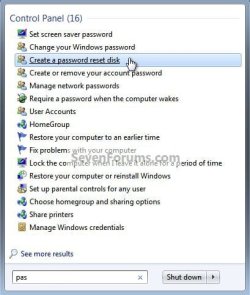
1) In the Windows start menu search box type "pas" (without the quotes) select the "Create a password ..." link, there will be no UAC prompt but it will ask you for the "Current User Account Password" enter it and click next.
Pass.jpg
Password.jpg
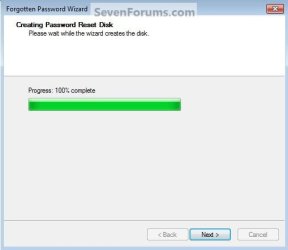
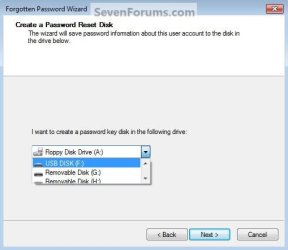
2) Insert the desired media you intend to use, then select the drive the disk is in, then in the wizard click next, then next again when it completes.
Select.jpg
Progress.jpg
3) Then click Finish to close the wizard.
Finish.jpg


OPTION TWO

How to Use the Password Reset Disk


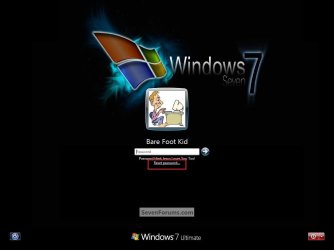
1) At the Windows logon screen, you'll get the "Reset Password" option when you enter an incorrect password, or if you just want to change the password, do as I did and type 1 in the password box and hit enter, then select "Reset Password".
Password R.jpg
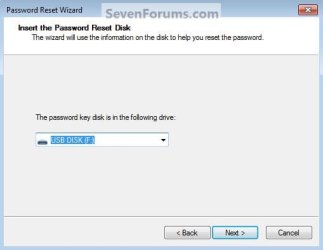
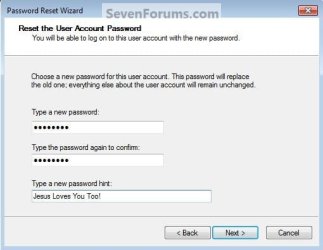
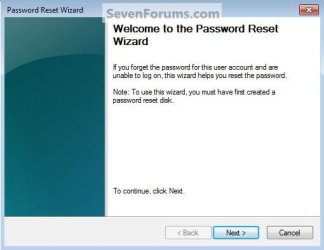
2) In the wizard that opens click next, you'll then be prompted to create a new password then a conformation, then click next.
Reset.jpg
Disk.jpg
New.jpg
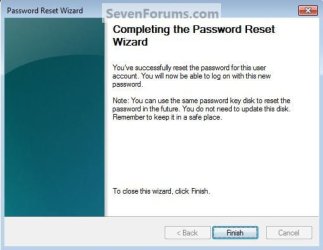
3) When it's done click finish to close the wizard.
You have now reset the password.
Finish2.jpg
Enjoy! :)


Last edited by a moderator:
I just re-did some of the snips in the tutorial and they look a lot better.
 

My Computer

Computer Manufacturer/Model Number
* BFK Customs *
OS
W 7 64-bit Ultimate
CPU
Intel Q9550 Yorkfield
Motherboard
ASUS P5Q Pro
Memory
8GB Dominator 8500C5D
Graphics Card(s)
ATI : XFX 5870
Sound Card
Realtek HD Audio 7-1
Monitor(s) Displays
1x 47" LCD HDMI & 3x 26" LCD HDMI
Screen Resolution
1920x1080P & 1920x1200
Hard Drives
1x 80GB Intel X25-M G2 SSD : 1x 500GB & 1x 640GB WD Caviar Black(s)
PSU
Corsair 620HX
Case
Cooler Master RC-690
Cooling
Tuniq Tower 120, 2x 140mm and 3x 120mm case fans
Keyboard
Microsoft 500
Mouse
Razer Diamondback 3G
Internet Speed
14 Mb/s
Other Info
1x Koutech 3Gb/s SATA HDD Hot Swap Rack
It looks really good.
 

My Computer

Computer Manufacturer/Model Number
Home built
OS
Windows 7 Ultimate 32 bit
CPU
Intel(R) Pentium(R) 4 CPU 3.00GHz
Motherboard
ASUS P4P800-VM Motherboard Chipset: Intel 865G + ICH5
Memory
2.50 GB RAM
Graphics Card(s)
NVIDIA GeForce 7600 GS
Sound Card
SoundMax Integrated Digital Audio (Chip)
Monitor(s) Displays
ViewSonic VX 1962 wm
Screen Resolution
1680 X 1050
Hard Drives
Seagate Barracuda 7200.10 80 GB
ST380215A ATA Device 18.6 GB
Western Digital "My Book" external hard drive 750 GB
Cooling
Fan based
Keyboard
Microsoft Comfort Curve Keyboard 2000 v10 USB
Mouse
Logitec optic USB
Internet Speed
3.01 Mb/s download 0.64 Mb/s upload
Thanks Carl!
 

My Computer

Computer Manufacturer/Model Number
* BFK Customs *
OS
W 7 64-bit Ultimate
CPU
Intel Q9550 Yorkfield
Motherboard
ASUS P5Q Pro
Memory
8GB Dominator 8500C5D
Graphics Card(s)
ATI : XFX 5870
Sound Card
Realtek HD Audio 7-1
Monitor(s) Displays
1x 47" LCD HDMI & 3x 26" LCD HDMI
Screen Resolution
1920x1080P & 1920x1200
Hard Drives
1x 80GB Intel X25-M G2 SSD : 1x 500GB & 1x 640GB WD Caviar Black(s)
PSU
Corsair 620HX
Case
Cooler Master RC-690
Cooling
Tuniq Tower 120, 2x 140mm and 3x 120mm case fans
Keyboard
Microsoft 500
Mouse
Razer Diamondback 3G
Internet Speed
14 Mb/s
Other Info
1x Koutech 3Gb/s SATA HDD Hot Swap Rack
“An error occurred while the wizard was attempting to set the password

Hi All – hope someone can help with this puzzling issue….

I have a brand new laptop, fully patched and I thought… before I transfer over my data etc. I will create and test the Password Reset USB.

It creates fine using the above guidelines when I on purpose type a wrong password at the login screen for my Administrator account ( the same as I created in ) and I just get:

“An error occurred while the wizard was attempting to set the password for this user account"


I have never ever seen this before nor is a search in Google much help – I am surprised it is not more documented?!

Very puzzled and I would really like to know why this is happening…. and how I can resolve this? ( luckily I CAN get access to the account as I DO know my password however I really would like to resolve this before I change to a more secure password ).

Any help much appreciated – thanks and best wishes
Tina
 

My Computer

Computer type
PC/Desktop
Computer Manufacturer/Model Number
Lenovo ThinkPad
OS
Windows 7 Pro 64, SP1
CPU
Intel Core i5 CPU M520 2.40GHz
Motherboard
Intel PCH QS57
Memory
8GB
Graphics Card(s)
512MB nVIDIA Quadro NVS3100m 8.16.1.8955, 3-19-2010
Sound Card
Conexant 20585 SmartAudio HD
Monitor(s) Displays
ThinkPad Display 1440x900, 2nd: F159B (Generic PnP Monitor)
Screen Resolution
14.1in 1440x900, 2nd: 1024 x 768 (32-bit) (60 Hz)
Hard Drives
Toshiba: 256 SSD + 128GB SSD as 2nd drive, both bought from Lenovo
Cooling
Laptop cooler
Antivirus
Norton Internet Security 2013 + MalwareBytes FREE
Browser
IE10
Other Info
Qualcomm Gobi 2000 HS-USB Mobile Broadband Device 9205
Intel(R) 82577LM Gigabit Network Connection
Intel(R) Centrino(R) Ultimate-N 6300 AGN
Hello Tina, welcome to Seven Forums!


I'm afraid I don't have much info for you either; have you tried to create the file to USB again, after you have deleted the old file as it will be detected if you try to create a second file to the same USB stick?
 

My Computer

Computer Manufacturer/Model Number
* BFK Customs *
OS
W 7 64-bit Ultimate
CPU
Intel Q9550 Yorkfield
Motherboard
ASUS P5Q Pro
Memory
8GB Dominator 8500C5D
Graphics Card(s)
ATI : XFX 5870
Sound Card
Realtek HD Audio 7-1
Monitor(s) Displays
1x 47" LCD HDMI & 3x 26" LCD HDMI
Screen Resolution
1920x1080P & 1920x1200
Hard Drives
1x 80GB Intel X25-M G2 SSD : 1x 500GB & 1x 640GB WD Caviar Black(s)
PSU
Corsair 620HX
Case
Cooler Master RC-690
Cooling
Tuniq Tower 120, 2x 140mm and 3x 120mm case fans
Keyboard
Microsoft 500
Mouse
Razer Diamondback 3G
Internet Speed
14 Mb/s
Other Info
1x Koutech 3Gb/s SATA HDD Hot Swap Rack
yes I have tried different USB sticks - strange isn't it just?

Thanks

Tina
 

My Computer

Computer type
PC/Desktop
Computer Manufacturer/Model Number
Lenovo ThinkPad
OS
Windows 7 Pro 64, SP1
CPU
Intel Core i5 CPU M520 2.40GHz
Motherboard
Intel PCH QS57
Memory
8GB
Graphics Card(s)
512MB nVIDIA Quadro NVS3100m 8.16.1.8955, 3-19-2010
Sound Card
Conexant 20585 SmartAudio HD
Monitor(s) Displays
ThinkPad Display 1440x900, 2nd: F159B (Generic PnP Monitor)
Screen Resolution
14.1in 1440x900, 2nd: 1024 x 768 (32-bit) (60 Hz)
Hard Drives
Toshiba: 256 SSD + 128GB SSD as 2nd drive, both bought from Lenovo
Cooling
Laptop cooler
Antivirus
Norton Internet Security 2013 + MalwareBytes FREE
Browser
IE10
Other Info
Qualcomm Gobi 2000 HS-USB Mobile Broadband Device 9205
Intel(R) 82577LM Gigabit Network Connection
Intel(R) Centrino(R) Ultimate-N 6300 AGN
yes I have tried different USB sticks - strange isn't it just?

Thanks

Tina


You get the same error with every reset 'disk' you create, that is strange?
 

My Computer

Computer Manufacturer/Model Number
* BFK Customs *
OS
W 7 64-bit Ultimate
CPU
Intel Q9550 Yorkfield
Motherboard
ASUS P5Q Pro
Memory
8GB Dominator 8500C5D
Graphics Card(s)
ATI : XFX 5870
Sound Card
Realtek HD Audio 7-1
Monitor(s) Displays
1x 47" LCD HDMI & 3x 26" LCD HDMI
Screen Resolution
1920x1080P & 1920x1200
Hard Drives
1x 80GB Intel X25-M G2 SSD : 1x 500GB & 1x 640GB WD Caviar Black(s)
PSU
Corsair 620HX
Case
Cooler Master RC-690
Cooling
Tuniq Tower 120, 2x 140mm and 3x 120mm case fans
Keyboard
Microsoft 500
Mouse
Razer Diamondback 3G
Internet Speed
14 Mb/s
Other Info
1x Koutech 3Gb/s SATA HDD Hot Swap Rack
Umm... did the first option.
Its finished and it's on my Flash Drive.
Now what?
Say I forgot my password... What should I do?
 

My Computer

Computer type
PC/Desktop
OS
Windows 8.1 Pro 64-Bit
CPU
Intel Core i5-4460 @ 3.20GHz
Motherboard
Gigabyte Technology Co., Ltd. H97-D3H-CF (SOCKET 0)
Memory
8.00GB Dual-Channel DDR3 @ 799MHz (11-11-11-28)
Graphics Card(s)
1023MB NVIDIA GeForce GTX 560 Ti (Gigabyte)
Monitor(s) Displays
SyncMaster (1920x1080@59Hz)
Screen Resolution
1980 X 1080
Hard Drives
488GB Western Digital WDC WD5000AAKS-00M9A0 ATA Device (IDE)
Hello BDani.


Use Option Two to create a new password.
 

My Computer

Computer Manufacturer/Model Number
* BFK Customs *
OS
W 7 64-bit Ultimate
CPU
Intel Q9550 Yorkfield
Motherboard
ASUS P5Q Pro
Memory
8GB Dominator 8500C5D
Graphics Card(s)
ATI : XFX 5870
Sound Card
Realtek HD Audio 7-1
Monitor(s) Displays
1x 47" LCD HDMI & 3x 26" LCD HDMI
Screen Resolution
1920x1080P & 1920x1200
Hard Drives
1x 80GB Intel X25-M G2 SSD : 1x 500GB & 1x 640GB WD Caviar Black(s)
PSU
Corsair 620HX
Case
Cooler Master RC-690
Cooling
Tuniq Tower 120, 2x 140mm and 3x 120mm case fans
Keyboard
Microsoft 500
Mouse
Razer Diamondback 3G
Internet Speed
14 Mb/s
Other Info
1x Koutech 3Gb/s SATA HDD Hot Swap Rack
Great tut Ted,

...its just a bummer that MS at the very least doesn't allow all user accounts while logged into a admin acnt., can't be done on the same thumb drive. Guess its for security reasons/privacy, ...like that exists anymore. lol

Who has a floppy for use on 7, ...not me, it does the raid on it's own unlike xp where when setting up a raid sys. you need a floppy.

Just a suggestion, create one for a 7 admin acnt.. so worst case if you don't have thumb drives for every other account on the PC Admin or not, they can be reset under an admin account:

control panel/user accounts and family/user accounts/manage another account/select account user/remove password .........

......But when I've done this in the past, it does state something along the lines of all encrypted files will no longer be encrypted. You might want to investigate that a little if you do encrypt files and possibly save passwords for email and forums.

Looks like I'll be using an older 512mb thumb for the lappy, the 7 desktop I'll connect a floppy drive to it, and the older xp already has one in it.

As far as the 7 desktop, I'm hopeful that I can connect an older floppy drive I have, create the disk, remove/disconnect the floppy drive, then if need be shut her down, connect and reset the password with the floppy disk.

Hope this helps others that might be thinking with desktops running 7 w/o an installed floppy, that if they have one, just temporally connect it to create password reset disk (new blank floppy) when needed and not have to use another thumb drive. ;)

I can't test this now, but it should work fine.
 

My Computer

Computer Manufacturer/Model Number
POS
OS
OS3.5
CPU
celery
Motherboard
Good Question ...Unknown
Memory
memory never forgets
Graphics Card(s)
OB
Sound Card
OB
Monitor(s) Displays
HUGE
Screen Resolution
168000000x105000000
Hard Drives
full
PSU
OEM 65watt
Case
N/A
Cooling
OB
Keyboard
OB
Mouse
mouse
Internet Speed
1 Trillion MBps
Other Info
Still An Awesome Forum!
Thank you mate.
 

My Computer

Computer Manufacturer/Model Number
* BFK Customs *
OS
W 7 64-bit Ultimate
CPU
Intel Q9550 Yorkfield
Motherboard
ASUS P5Q Pro
Memory
8GB Dominator 8500C5D
Graphics Card(s)
ATI : XFX 5870
Sound Card
Realtek HD Audio 7-1
Monitor(s) Displays
1x 47" LCD HDMI & 3x 26" LCD HDMI
Screen Resolution
1920x1080P & 1920x1200
Hard Drives
1x 80GB Intel X25-M G2 SSD : 1x 500GB & 1x 640GB WD Caviar Black(s)
PSU
Corsair 620HX
Case
Cooler Master RC-690
Cooling
Tuniq Tower 120, 2x 140mm and 3x 120mm case fans
Keyboard
Microsoft 500
Mouse
Razer Diamondback 3G
Internet Speed
14 Mb/s
Other Info
1x Koutech 3Gb/s SATA HDD Hot Swap Rack
Thanks for Sharing :D what a very nice tutorial :D
 

My Computer

Computer Manufacturer/Model Number
SAMSUNG ELECTRONICS CO., LTD./RC418
OS
Windows 7 Ultimate 32 bit
CPU
Intel(R) Core(TM) i5-2410M CPU @ 2.30GHz
Motherboard
FAB1
Memory
SODIMM
Graphics Card(s)
NVIDIA GeFORCE GT 520M
Sound Card
NVIDIA GeFORCE GT 520M
Monitor(s) Displays
Generic PnP Monitor
Hard Drives
C:, D:, E:, F:
PSU
NONE
Case
SAMSUNG
Cooling
NONE
Other Info
I'M USING A LAPTOP not a DESKTOP!!!!
Disable/undo password reset disk

I created a password reset disk on a flash drive in Windows 7. I'd like to disable/undo this. How do I do so?
 

My Computer

OS
Windows 7 Home 64 bit
Confusion with the USB drive that will be used ...

What happens to the USB drive that I will USE to make a password reset disk ..??

Can I use it again for my own stuffs ..??

Or will it be just be solely be used as PRD ??
 

My Computer

OS
Windows 7 Enterprise x32
The reset dsk is really a misnoma, it's just a very small file. I add one to each USB I have, in the top level directory and one on the hard drive in the same place,TLD that is.
 

My Computer

Computer Manufacturer/Model Number
DIY
OS
Windows 7 home premium x64
CPU
AMD FX-4100 AM3+ 3.6GHz 12MB Black Edition
Motherboard
Asus M5A97 Pro
Memory
Crsair vengeance 12Gb DDR3 1600MHz CL9
Graphics Card(s)
Asus GTX 560 1GB
Sound Card
Realtek onboard
Monitor(s) Displays
Hanns G 1680x1050 native
Hard Drives
OCZ 128Gb Petrol ssd
2x500 Gb Samsung
PSU
OCZ StealthXstream II 500W
Internet Speed
8Mb or better
So to "disable" it (make my flash drive no longer a password reset disk), I just need to delete userkey.psw off of it?
 

My Computer

OS
Windows 7 Home 64 bit
There is some flexibility in managing Password reset disks

1 As stated in the earlier post, the so-called Password reset disk is actually just a file called userkey.psw
2 Using the Create a password reset disk procedure just adds this file to the root of an external drive. Other files & folders on the external drive are unaffected. The drive can continue to be used for other files.
3 If you make a new Password reset disk, it invalidates all previous ones. I don't mean you risk overwriting the previous one - I mean that Windows 7 will only accept the latest one that was made [it must store a marker in the Registry or somewhere].
4 If you attempt to make a Password user disk on an external drive that already has userkey.psw in its root then Windows 7 will warn you but will allow you you to proceed.
5 After it's been made, you can store userkey.psw anywhere you want and with whatever name you want as long as you can tell which account, which PC & which OS it applies to and as long as you have a second PC [or user account] to be able to move the file back into the root of an external drive when the thing is needed. Within those constraints, you can hide it, rename it, zip it - anything, as long as you don't tamper with its contents.
6 When you need to use it, it has to be on the root of any external drive [it does not need to be the same one that it was made on]. It must have the name userkey.psw again. It can still be hidden. It has to be the latest one made for this account on this PC for this OS.
7 I hope this is useful info for you.
 
Last edited:

My Computer

Computer Manufacturer/Model Number
Dell Inspiron 1545
OS
Windows 7 Home Premium 64bit
Memory
3GB
Sound Card
IDT
I have several questions about password reset disk.
1. Will I being prompted to format the USB flash drive before creating password reset disk?
2. Can I access data on my USB flash drive after creating password reset disk?
3. Can I use password reset disk on my USB flash drive as many times as I like? Or the password reset disk will not usable (requires recreating password reset disk) after used?
 

My Computer

Computer Manufacturer/Model Number
Acer Aspire One 722 (AO722)
OS
Windows 7 Home Premium Service Pack 1 32-bit Build 7601
CPU
AMD C-50 Processor 1.0 Ghz
Memory
2 GB DDR3 RAM (1.73 usable in System Properties)
Graphics Card(s)
AMD Radeon HD 6200 series Graphics
Sound Card
High Definition Audio Device
Monitor(s) Displays
Generic PnP Monitor
Screen Resolution
1366 x 768 (recommended)
Hard Drives
320 GB HDD storage
298.09 GB in Disk Management (REAL)
Keyboard
Built-in on my laptop
Mouse
External mouse
Other Info
Installed Windows 7 Service Pack 1 by 9/9/2012
I have several questions about password reset disk.
1. Will I being prompted to format the USB flash drive before creating password reset disk?
2. Can I access data on my USB flash drive after creating password reset disk?
3. Can I use password reset disk on my USB flash drive as many times as I like? Or the password reset disk will not usable (requires recreating password reset disk) after used?


Hello JonathanV.


  • No, no format.
  • Yes the data will be available.
  • You should be able to as long as the "password" is not molested in any way.
 

My Computer

Computer Manufacturer/Model Number
* BFK Customs *
OS
W 7 64-bit Ultimate
CPU
Intel Q9550 Yorkfield
Motherboard
ASUS P5Q Pro
Memory
8GB Dominator 8500C5D
Graphics Card(s)
ATI : XFX 5870
Sound Card
Realtek HD Audio 7-1
Monitor(s) Displays
1x 47" LCD HDMI & 3x 26" LCD HDMI
Screen Resolution
1920x1080P & 1920x1200
Hard Drives
1x 80GB Intel X25-M G2 SSD : 1x 500GB & 1x 640GB WD Caviar Black(s)
PSU
Corsair 620HX
Case
Cooler Master RC-690
Cooling
Tuniq Tower 120, 2x 140mm and 3x 120mm case fans
Keyboard
Microsoft 500
Mouse
Razer Diamondback 3G
Internet Speed
14 Mb/s
Other Info
1x Koutech 3Gb/s SATA HDD Hot Swap Rack
This is very good info. Just that, I didn't do it before, and now, I'm sitting in front of a "Stuck-on-Stupid" Toshiba L455D-S5976 that won't allow me to login AFTER the "Welocome" screen. This thing is being threatened by a total, I mean completely TOTAL rebuild!

Is there a solution to resetting a pwd AFTER the system starts screwing up? This one lost my pic, username, and pwd, somehow.
 

My Computer

Computer Manufacturer/Model Number
BIOSTAR Group A55MH
OS
Windows 7 Ultimate 64-bit
CPU
2.90 gigahertz AMD A8-3850 APU with Radeon HD Graphics
Motherboard
BIOSTAR Group A55MH Bus Clock: 100 megahertz BIOS: American
Memory
8170 Megabytes Usable Installed Memory
Graphics Card(s)
ATI Radeon HD 5450 [Display adapter]
Sound Card
AMD High Definition Audio Device
Monitor(s) Displays
Samsung SyncMaster [Monitor] (19.1"vis, s/n HA19HVDP427004,
Screen Resolution
1440x900
Hard Drives
1500.20 Gigabytes Usable Hard Drive Capacity
1104.84 Gigabytes Hard Drive Free Space
Case
DELL Dimension 3000
Keyboard
HP KB 0228
Mouse
GH optical-wired
Internet Speed
50+MB
Back
Top