Pastel print

chadaway

New member
Local time
7:11 PM
Messages
2
How do you make the print on the screen darker everywhere in Windows 7? I can hardly read the writing.
Is there a setting that I missed out on? XP used bold black on the screen for writing, but I can hardly see the print in Windows 7.
 
Last edited:

My Computer

Computer Manufacturer/Model Number
hewlett packard/pavilion dv6
OS
windows 7 home premium 64
CPU
AMD Turion(tm) II P540 Dual-Core Processor,2400 Mhz, 2 Core
Memory
4 GB
Sound Card
Fraunhofer IIS MPEG Layer-3 Codec & Microsoft Codec
Monitor(s) Displays
AMD M880G with ATI Mobility Radeon HD 4250
Screen Resolution
1366 x 768 x 59 hertz
Hard Drives
(Standard disk drives)
WDC WD5000BEVT-60AORTO ATA Device
chadaway

I find the same - writing is pale

Have you tried - Control Panel\Display - Adjust ClearType Text?

It made a marginal difference for me
 

My Computer

Computer type
PC/Desktop
Computer Manufacturer/Model Number
PC SPECIALIST
OS
Windows 7 - Home Premium - 64 bit
CPU
Intel® Core™i7 Quad Core
Motherboard
ASUS® P6X58D-E: DDR3, USB 3.0, SATA 6.0GB/s, 3-Way SLI
Memory
12GB SAMSUNG DDR3 TRI-DDR3 1333MHz (3 x 4GB)
Graphics Card(s)
1GB NVIDIA GEFORCE GT 430 - DVI,HDMI,VGA
Sound Card
Sound Blaster® Audigy™ SE (£19)
Monitor(s) Displays
Samsung SyncMaster 913 TM
Screen Resolution
1281 x 1024
Hard Drives
C: 500GB SERIAL ATA 3-Gb/s

D: 500GB SERIAL ATA 3-Gb/s
PSU
450W Quiet 80 PLUS Dual Rail PSU
Case
PIANO BLACK ENIGMA CASE + 2 FRONT USB
Cooling
?SUPER QUIET 22dBA TRIPLE COPPER HEATPIPE CPU COOLER
Keyboard
Standard PS/2 Keyboard
Mouse
Microsoft USB IntelliMouse Optical (IntelliPoint)
Internet Speed
6.6 Mbps
Antivirus
Norton
Browser
IE 11
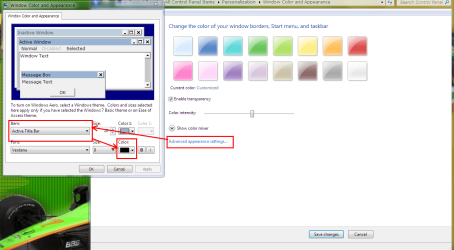
Howdy y'all! Right click an empty place on your Desktop, Personalization, Window Color, and finally Advanced appearance settings. In the drop-down menu (see snip) you will find settings for font color on most but not all items. By default it is black but maybe has been changed somehow.

Capture.PNG
 

My Computer

Computer type
PC/Desktop
Computer Manufacturer/Model Number
Home Built Desktop By DataTech
OS
Windows 7 Ultimate X64 SP1
CPU
Intel i5-2550K, Differing ~4.4-4.8GHz No built in GPU
Motherboard
ASUS P8Z68-V PRO/GEN3
Memory
16GB G.Skill Sniper 1866MHz @ 2133MHz 2x8GB
Graphics Card(s)
ASUS GTX650TIB-DC2OC-2GD5, (650TI Boost)
Sound Card
Onboard Realtek 5-1
Monitor(s) Displays
Samsung P2570HD
Screen Resolution
1920x1080
Hard Drives
Samsung 840 Pro 256GB SSD for OS, 500GB Seagate Constellation (Enterprise drive) for Data
PSU
Corsair HX650W
Case
Inwin Dragon Rider
Cooling
Hyper 212 EVO w/two Noctua fans, push-pull, @1300 RPM
Keyboard
E-Z Eyes, bright yellow keys with large characters
Mouse
steelseries SENSEI Laser Pro Gaming
Internet Speed
48-51Mbs Mbs down, 11 Mbs up Xfinity Cable
Antivirus
Norton Internet Security 2013
Browser
IE 10, Opera, Pale Moon if needed
Other Info
4 case fans, LG BluRay-RE, ASUS DVD-RW, Mr. Fusion power supply, 1.21 gigawatts.
Britton 30,

I'm a newbie on this site and on Windows 7 so pleez be patient. I tried to do what you suggested. I went to Desktop -> Personalize -> Window Color (A popup for Window Color and Appearance came up with Item Desktop with Color 1 already selected. This was black. The option was only to click OK so I did but that was what it was set to before I did anything. The font color is not an option.) Now what?
I have Windows 7 Home Premium.
.
 

My Computer

Computer Manufacturer/Model Number
hewlett packard/pavilion dv6
OS
windows 7 home premium 64
CPU
AMD Turion(tm) II P540 Dual-Core Processor,2400 Mhz, 2 Core
Memory
4 GB
Sound Card
Fraunhofer IIS MPEG Layer-3 Codec & Microsoft Codec
Monitor(s) Displays
AMD M880G with ATI Mobility Radeon HD 4250
Screen Resolution
1366 x 768 x 59 hertz
Hard Drives
(Standard disk drives)
WDC WD5000BEVT-60AORTO ATA Device
Welcome to the Seven Forums
You could try Windows Classic theme and see if it helps.
Right click on desktop go to Personalize scroll down to it.
Personalization.png
Jerry
 

My Computer

Computer type
Laptop
Computer Manufacturer/Model Number
Sager NP9170
OS
Win 7 Pro x64 / Win 10 Pro
CPU
Intel(R) Core(TM) i7-3630QM CPU @ 2.40GHz
Motherboard
CLEVO P170EM
Memory
12 GB
Graphics Card(s)
(1) Intel(R) HD Graphics 4000 (2) NVIDIA GeForce GTX 675M
Sound Card
(1) Realtek High Definition Audio (2) Intel(R) Display Aud
Monitor(s) Displays
17.3
Screen Resolution
1920x1080
Hard Drives
(1) Samsung 860 EVO 500GB(OS) (1) Samsung 860 EVO 500GB(Data)
Keyboard
Backlite
Antivirus
MSE, Malwarebytes Pro
Browser
Firefox
Other Info
DESKTOP: Custom-built.
OS: Win 10 Pro x64.
CASE: Rosewill R5.
CPU: Intel I5 4670K CPU @ 3.40GHz.
CPU COOLER: Cool Master Hyper 212 EVO.
MOTHERBOARD: Asus Z87-A.
MEMORY: Kingston HyperX 2x4 GB.
GPU: Nvidia Geforce 650 TI.
PSU: Corsair TX750.
DRIVES: (1) Samsung 840 120 GB SSD (2) Western Digital blue 500 GB 7200 RPM.
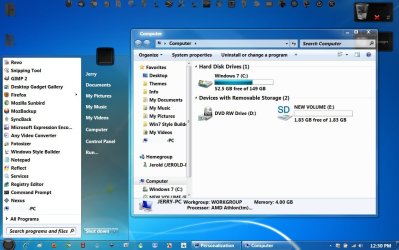
If you are using the default aero theme I changed it to 99% Black Bold 11pt text & named it AeroBold in a zip at the bottom.
Untitled.jpg
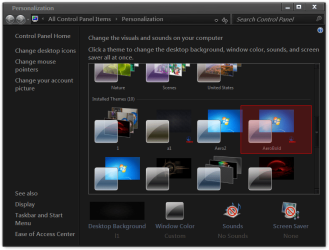
& will show up in Personalization
Personalization.png
&
You will need to do 1 of these 2 ways of Enabling custom themes for it to work.
http://www.sevenforums.com/tutorials/34579-enabling-custom-themes-windows-7-a.html
Or
http://www.sevenforums.com/tutorials/28377-theme-how-apply-custom-themes.html?filter
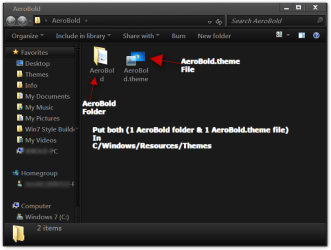
Put both (1AeroBoldFolder & 1 AeroBold.theme file)
AeroBold.png
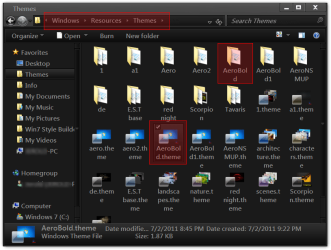
In
C/Windows/Resources/Themes
Themes.png
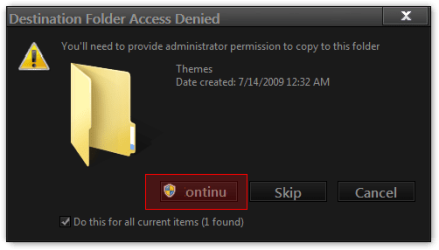
Click Continue
Destination Folder Access Denied.png
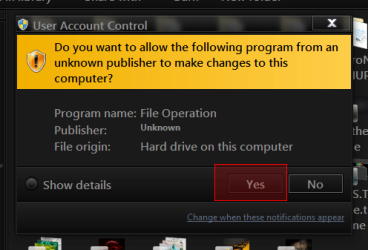
Click Yes
User Account Control.png
Jerry
 

Attachments

Last edited:

My Computer

Computer type
Laptop
Computer Manufacturer/Model Number
Sager NP9170
OS
Win 7 Pro x64 / Win 10 Pro
CPU
Intel(R) Core(TM) i7-3630QM CPU @ 2.40GHz
Motherboard
CLEVO P170EM
Memory
12 GB
Graphics Card(s)
(1) Intel(R) HD Graphics 4000 (2) NVIDIA GeForce GTX 675M
Sound Card
(1) Realtek High Definition Audio (2) Intel(R) Display Aud
Monitor(s) Displays
17.3
Screen Resolution
1920x1080
Hard Drives
(1) Samsung 860 EVO 500GB(OS) (1) Samsung 860 EVO 500GB(Data)
Keyboard
Backlite
Antivirus
MSE, Malwarebytes Pro
Browser
Firefox
Other Info
DESKTOP: Custom-built.
OS: Win 10 Pro x64.
CASE: Rosewill R5.
CPU: Intel I5 4670K CPU @ 3.40GHz.
CPU COOLER: Cool Master Hyper 212 EVO.
MOTHERBOARD: Asus Z87-A.
MEMORY: Kingston HyperX 2x4 GB.
GPU: Nvidia Geforce 650 TI.
PSU: Corsair TX750.
DRIVES: (1) Samsung 840 120 GB SSD (2) Western Digital blue 500 GB 7200 RPM.
Maybe this is clearer....

Untitled.png
 

My Computer

Computer type
PC/Desktop
Computer Manufacturer/Model Number
Home Built Desktop By DataTech
OS
Windows 7 Ultimate X64 SP1
CPU
Intel i5-2550K, Differing ~4.4-4.8GHz No built in GPU
Motherboard
ASUS P8Z68-V PRO/GEN3
Memory
16GB G.Skill Sniper 1866MHz @ 2133MHz 2x8GB
Graphics Card(s)
ASUS GTX650TIB-DC2OC-2GD5, (650TI Boost)
Sound Card
Onboard Realtek 5-1
Monitor(s) Displays
Samsung P2570HD
Screen Resolution
1920x1080
Hard Drives
Samsung 840 Pro 256GB SSD for OS, 500GB Seagate Constellation (Enterprise drive) for Data
PSU
Corsair HX650W
Case
Inwin Dragon Rider
Cooling
Hyper 212 EVO w/two Noctua fans, push-pull, @1300 RPM
Keyboard
E-Z Eyes, bright yellow keys with large characters
Mouse
steelseries SENSEI Laser Pro Gaming
Internet Speed
48-51Mbs Mbs down, 11 Mbs up Xfinity Cable
Antivirus
Norton Internet Security 2013
Browser
IE 10, Opera, Pale Moon if needed
Other Info
4 case fans, LG BluRay-RE, ASUS DVD-RW, Mr. Fusion power supply, 1.21 gigawatts.
Back
Top